Client feedback becomes manageable when you compare it with a clear baseline, clarify the requested change and record the decision before altering the work. Some comments identify an error, some choose among agreed options and some introduce a new deliverable. Treat those situations differently while keeping the conversation practical. This is part of manage freelance projects.
Keep the agreed version easy to find
Before classifying a request, locate the brief, acceptance conditions, approved inputs and version under review. Use write project brief acceptance criteria if those are not clear. “That was included” and “that is extra” are difficult claims to assess when each person is remembering a different conversation.
Record a baseline in ordinary language: two event-announcement formats, supplied approved text, one consolidated review stage and the final export requirements. The precise terms should reflect the actual agreement. Do not copy another freelancer’s revision allowance and assume it governs your project. A review stage describes a process; it does not excuse delivery that fails the agreed requirements.
Keep comments attached to a version or identifiable item. “Change the second heading in event-square-v2” is more reliable than “change the bit we discussed.” Preserve the original before a substantial revision so you can compare decisions and recover if necessary. Version history is useful evidence of what changed, not a substitute for deciding what should change.
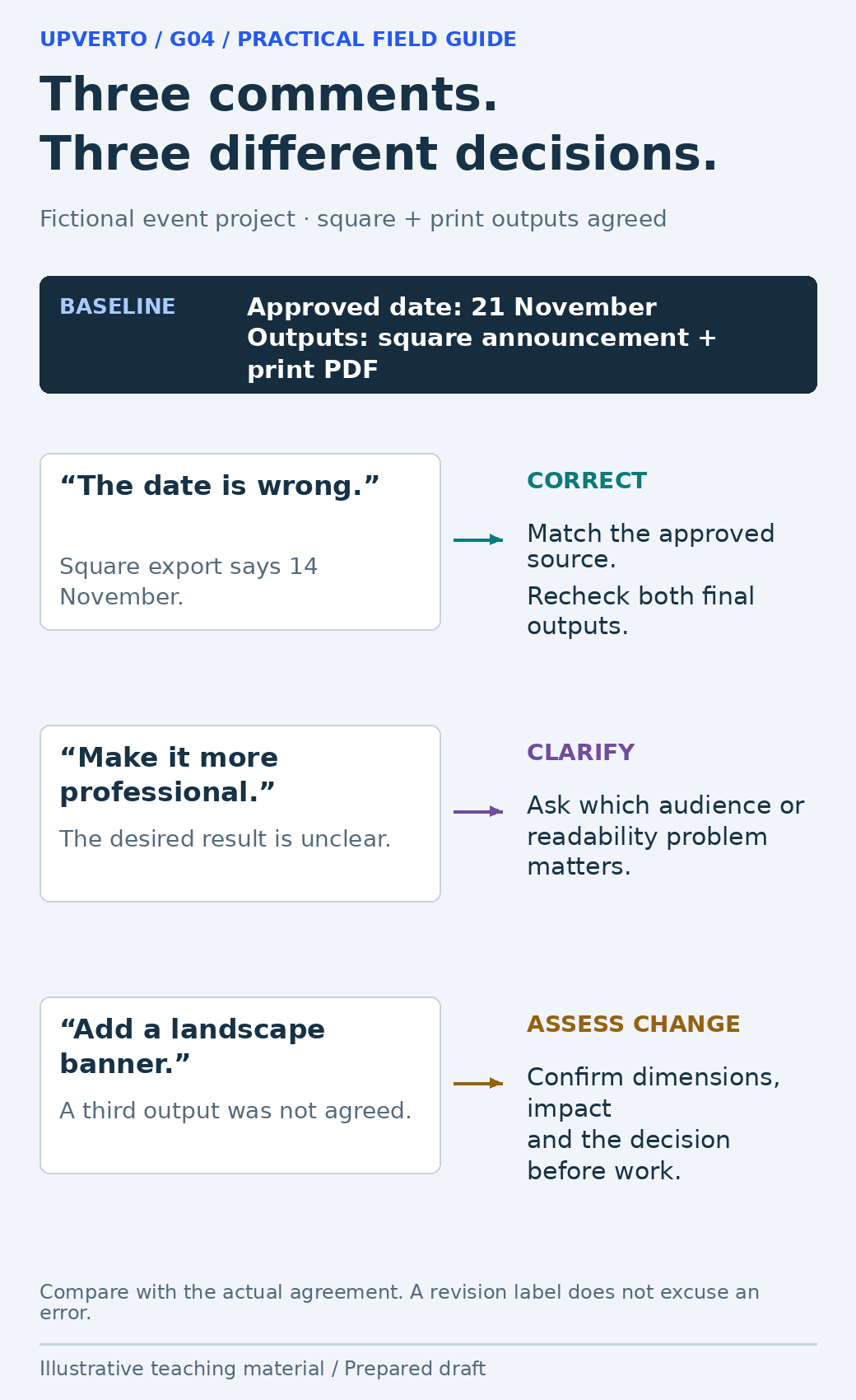
Read the text version: Classify feedback against the agreed baseline
The fictional baseline has a square announcement and print PDF with an approved date of 21 November. An export showing 14 November needs correction. “Make it more professional” needs clarification of the desired result. A new landscape banner needs a scope and impact decision before work. Classify by the actual agreement rather than treating every comment as the same kind of revision.
Classify the request before discussing the response
| Request type | Example | Useful response |
|---|---|---|
| Correction against the brief | Export contains the wrong approved date | Acknowledge and correct the mismatch; check affected outputs |
| Clarification needed | “Make it more professional” | Ask which audience, hierarchy or usability issue the client means |
| Choice within agreed work | Use the second of two proposed headline treatments | Confirm the chosen version and apply the agreed decision |
| Potential new scope | Add a third format with a different layout | Assess deliverable, effort, timing and commercial impact before starting |
Classification is a reasoned comparison, not a label you apply to win an argument. If the brief is ambiguous, show the relevant wording and explain the uncertainty. It may be sensible to agree a narrow resolution and improve the brief for future work. Do not retrospectively invent a boundary that the client could not have known.
The GOV.UK guidance on deciding priorities recommends decisions informed by evidence and stakeholder input. For a small project, the useful adaptation is to compare the proposed change with the purpose and constraints. A visually exciting extra may be less important than correcting the essential event date.
Turn vague or conflicting comments into a decision
When a comment is vague, ask for the problem behind it. “Make the logo bigger” might mean that the organisation is hard to identify at the intended viewing size. The right response could be a clearer header or more space around the logo, not a proportional enlargement that pushes the venue off the page. Restate the problem and propose a reviewable adjustment.
When comments conflict, identify the exact conflict and ask the agreed decision-maker to choose. Do not silently combine incompatible instructions or ask every stakeholder separately until someone gives the answer you prefer. Consolidated feedback reduces duplication, but it still needs a clear owner who can resolve competing priorities.
Summarise the decision with the affected version and intended check. For example: “Use the shorter venue line approved by the organiser; retain the full address in the footer; check both exports at intended size.” This makes the next review about whether the decision was implemented, rather than repeating the whole discussion.
Worked example: a third event format
Fictional scenario: The agreed package contains a square announcement and a printable version. The first review identifies an incorrect date in the square export and asks for a new landscape banner. The designer separates the correction from the new output; no real project or client result is claimed.
The date must match the approved source across both original deliverables. The landscape banner introduces another layout and export to produce and check. The designer estimates an illustrative two hours for adaptation and half an hour for checking, subject to receiving the final dimensions. Those numbers explain an impact calculation, not a recommended rate or a universal time allowance.
| Record | Correction C01 | Change request CR02 |
|---|---|---|
| Requested work | Replace incorrect date | Add a landscape banner |
| Baseline comparison | Required content already agreed | Third format not in current outputs |
| Impact | Recheck both original exports | Illustrative 2 + 0.5 = 2.5 hours; timing and price to agree |
| Decision | Apply correction | Await dimensions and explicit decision |
| Status | Planned in fictional example | Not started |
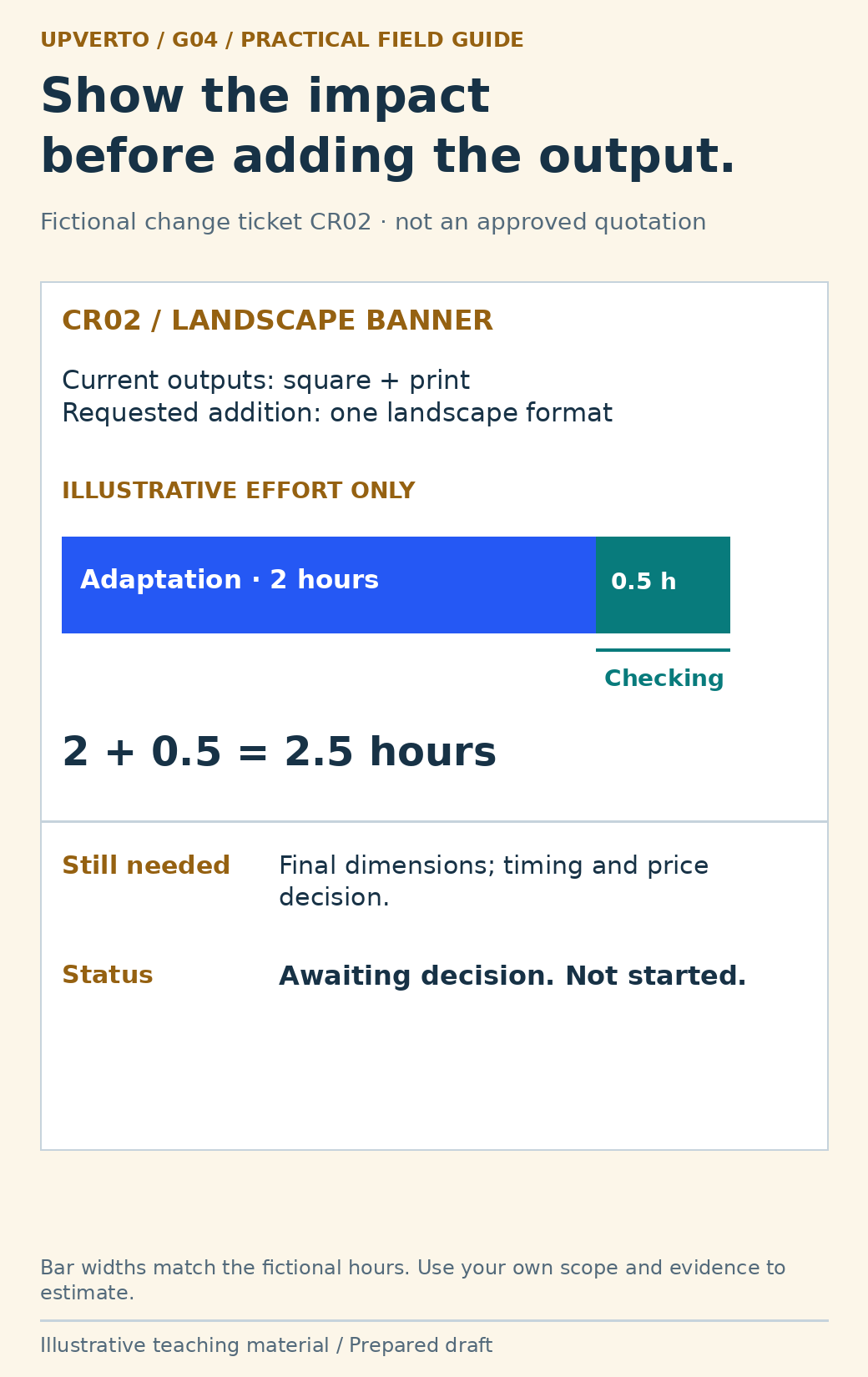
Read the text version: Inspect a change request and its illustrative effort
Fictional change request CR02 adds a landscape banner to the agreed square and print outputs. Illustrative effort is 2 hours adaptation plus 0.5 hours checking, totalling 2.5 hours. The bar segments are proportional to those values. Final dimensions, timing and price still need agreement; the request is not started or approved. These are sample planning numbers, not a recommended rate or duration.
The client can approve the addition, replace another deliverable where appropriate, defer it or decline it. Record the chosen option before starting the extra. If the designer elects to include it without an additional charge, still record its scope and timing so that a one-off choice does not silently redefine future work.
Copy the feedback and change log
| Field | What to record |
|---|---|
| Reference | A short comment or change identifier |
| Source and version | Who requested it and which file or page they reviewed |
| Requested result | The actual desired change, without interpretation hidden as fact |
| Classification | Correction, clarification, agreed choice or potential new scope |
| Baseline reference | The relevant deliverable or acceptance condition |
| Impact | Affected outputs, dependencies, checks, timing and commercial questions |
| Decision and owner | Who can decide, what was agreed and when |
| Implementation evidence | Version changed, check performed and unresolved limits |
The log can be a simple table; its value is a traceable decision. Do not mark a change approved because you sent an estimate. Do not mark it complete because a task card moved if the exported result has not been checked. Keep requested, agreed, implemented and verified states distinct.
For the initial boundaries and estimation method, return to estimate freelance project scope. This guide concerns decisions during delivery. If a change alters a legal, security or specialist obligation, obtain the appropriate review rather than treating the log as authority to proceed.
Explain the impact without blame or hidden pressure
Use a short response: “The square and print versions remain in the current scope. The new landscape format adds a separate layout and check. I can prepare it once we confirm dimensions and the revised arrangement. Would you like that option, or should we complete the original two outputs first?” The message identifies the choice and preserves the original work.
If your own mistake caused rework or delay, acknowledge it directly. Explain the correction and the effect on delivery. If a client dependency changes the schedule, describe that dependency without turning the update into an accusation. The aim is a shared decision about the next step.
Use client project update examples to keep the latest decision visible in the next progress update. A concise record makes a changed project easier to deliver; it does not make every disagreement disappear.
Frequently asked questions
Does every client comment count as a paid revision?
No. Compare it with the actual agreement and acceptance conditions. An error against approved requirements differs from a new deliverable. Do not use a revision label to avoid correcting your own mismatch.
What should I do with “make it more professional”?
Ask what is difficult for the intended audience or which quality the client wants to improve. Offer a specific interpretation and a reviewable change instead of repeatedly guessing at an undefined preference.
Can I refuse a new format?
You can explain whether it fits your ability, availability and agreed scope, then discuss suitable options. Do not imply it is already included or already approved. Follow the actual engagement terms when declining or changing work.
What if two people give opposite instructions?
Show the conflict to the agreed final approver and ask for one direction. Record it against the relevant version. Do not silently choose one person’s instruction while telling the other that all feedback was followed.
Should I document a small extra I include for free?
Yes. State what you are including, whether it changes timing and that it is a specific choice for this project. Clear documentation prevents the extra from becoming an accidental promise of unlimited future changes.
When can I mark a change complete?
After implementing the agreed decision and checking the affected delivery output. Record the relevant version and actual check. If validation is still pending, say so rather than using “complete” as a synonym for “edited.”
Sources and scope
The worked examples, worksheets and diagrams are original fictional teaching materials. They are not reports of client results. Primary references were checked during preparation; verify current rules and account-specific features before acting.