
You have an idea for a useful tool. Perhaps a campus society needs to sort event messages, or a small workshop needs to find unfinished jobs. Because you are learning AI, adding a model feels like the natural next step.
Before you do, describe the task without the word AI. What information arrives? What decision is needed? What should happen if the answer is uncertain? Those questions help you choose a method you can understand, test and maintain.
This guide shows how to compare a manual process, simple programmed rules and an AI-assisted version. You do not need to train a model to begin. Your first result will be a decision sheet and a small set of test cases, not a promise that a product is ready for customers.
Understand the three options
A manual process means a person makes the decision. For example, a society organiser reads a message and chooses its category. This can teach you which categories people actually need before you write software.
A rule is an explicit instruction. “If the user selects Equipment, place the request in the equipment list” is a rule. The same valid input, under the same rule and conditions, should give the same result. Rules still need careful design: an incorrect rule can consistently produce an incorrect answer.
An AI model can be useful when inputs vary in ways that are awkward to describe with a short set of rules. A possible experiment is suggesting a category from a free-text message. You still need examples, a definition of a good answer and a process for checking mistakes. Buying access to a model does not supply those decisions.
Google’s engineering guidance explicitly advises considering a product without machine learning first and establishing measurements before adding it. That is a useful starting principle, not proof that rules will win for every task. Google’s Rules of Machine Learning
A fictional example with a real decision to make
Hamza, a fictional student in Lahore, wants to build a request organiser for university clubs. The first job is narrow: route an incoming event request to Equipment, Room or Other. There is no automatic booking, message sending or spending.
He writes three invented messages:
- “We need two microphones for Friday.”
- “Can we use the seminar room after lunch?”
- “The room is confirmed, but the projector is missing.”
The third message exposes the weakness of a quick keyword rule. A rule that checks “room” first could send it to the wrong list. Adding more keywords may help some cases and create new mistakes elsewhere.
Hamza could also ask users to choose a category from a short form. That changes the input instead of making the software more complicated. He should test whether users understand those choices. A clearer form may solve the problem without text classification at all.
His first useful comparison therefore includes a fourth possibility: redesign the workflow. You do not have to accept messy input as a permanent condition.
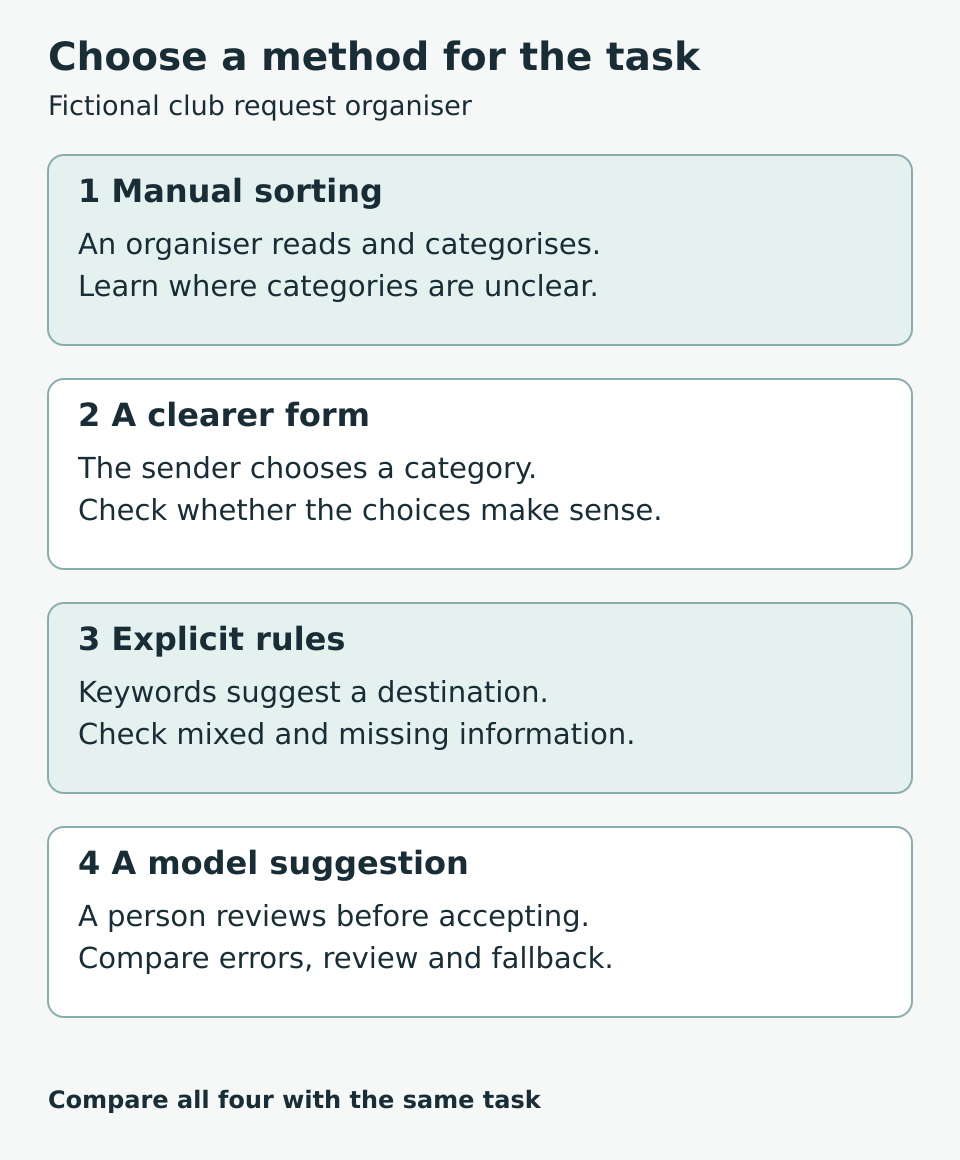
Figure 1. Compare ways to complete the task, including changing how information enters the tool.
Keep exact decisions outside the experiment
Some parts of the organiser have clear answers. A missing event date should trigger a request to supply the date. A request marked Closed should leave the open list. A person should not see another club’s private records merely because a model suggests they are relevant.
For this practice product, keep those decisions in ordinary application logic and access controls. Limit the AI experiment to suggesting a category. It cannot approve access, reserve a room or create missing facts.
This separation makes diagnosis easier. If the category is wrong, investigate the suggestion step. If the date disappears after saving, investigate the data-saving step. Calling the whole application an “AI system” can hide these different responsibilities.
Also distinguish a category suggestion from a factual answer. “Equipment” is one of a few labels. “The hall is available on Friday” needs reliable availability information. Do not quietly expand the first task into the second.
Build a baseline you can inspect
A baseline is a simple starting method against which you compare changes. Hamza uses the category form as his baseline. He also writes a small keyword sorter for learning purposes.
Create a practice table with these columns: invented request, expected category, why that category fits, baseline result, alternative result and review note. Decide the expected category before viewing the model’s suggestion. If two people reasonably disagree, improve the category definitions or allow a review outcome.
Include ordinary requests and awkward ones: missing information, spelling mistakes, mixed topics and a request outside the product’s scope. For a Pakistani audience, consider examples in the language and script your intended users actually use. English results do not establish performance on Urdu or Roman Urdu. Avoid assuming every student has the same language preferences.
Use invented or suitably permitted material. Do not paste a club’s private messages into an external service just to make the test realistic. You can learn a great deal from carefully constructed examples before involving real information.
Compare the whole task rather than a polished answer
Imagine Hamza tries each method on 20 invented requests. These are hypothetical results for explaining a comparison, not measured product evidence:
- The keyword sorter matches the expected category on 14 requests.
- A model suggestion matches on 17 requests.
- The model also takes longer to review on several unclear requests.
“17 out of 20” is a result on those examples, not a general accuracy claim. If Hamza repeatedly changes his instructions after seeing every example, he is learning those cases. He should keep separate, previously unseen examples for a later check and report their results separately.
He records completion time, corrections, unhandled inputs and whether users understand the result. He also notes what happens if the model service is unavailable. A small improvement in category matching may not justify an extra dependency if the category form already lets users complete the task reliably.
The mistake type matters. An Equipment request sent to Other may be easy to recover. A system that silently discards a request causes a different problem. Do not combine both into one neat score and ignore the difference.
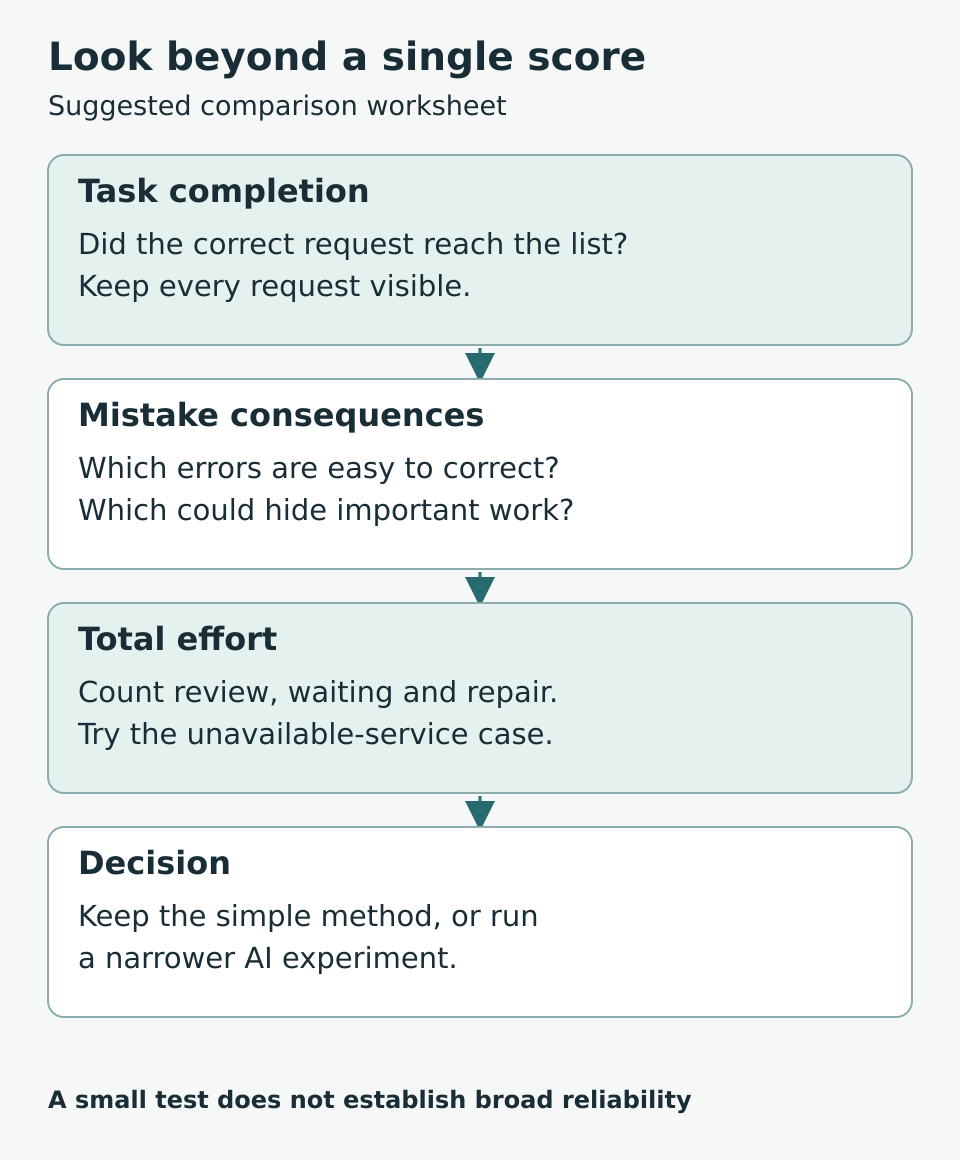
Figure 2. A useful comparison includes the work needed to detect and repair mistakes.
Design a safe uncertain result
For this example, an uncertain request stays visible in a Needs review list. The organiser can choose or change its category. The tool retains the original request so the suggestion does not replace the evidence.
Do not assume a model’s confident wording is a dependable confidence measurement. If you use a numerical threshold, investigate how it relates to correct and incorrect outcomes on your own task before relying on it. For a first practice tool, a clearly labelled suggestion with easy correction is simpler to reason about.
When the model is unavailable, the form and manual category choice should still work. Test that situation deliberately. A fallback written in your notes but never tried is still an assumption.
Fill in your decision worksheet
Copy these prompts into a notebook and answer them for one product idea:
- Task: What exact decision or output do I need?
- Inputs: Could a clearer form remove ambiguity?
- Simple version: Can a person, lookup or short rule complete it?
- Expected result: Who can judge whether the output is useful?
- Difficult cases: Which inputs expose the simple version’s limits?
- Consequences: What happens when each method is wrong?
- Extra work: What review, running cost and maintenance does AI add?
- Fallback: What will the user do when the AI step fails?
- Decision: Keep the simple version, test a limited AI step, or investigate the problem further?
Record uncertainties instead of filling every space with a confident answer. “I cannot yet define a correct category” is a reason to refine the task before choosing a model.
Frequently asked questions
Is a product less valuable if it does not use AI
A product can be useful because it helps someone complete a task reliably. A working stock checklist or event-request form does not become less useful because its logic is simple. Judge the result in the user’s workflow.
Can I use AI while building a rules based tool
Yes. You might ask an assistant to explain code or suggest test cases. Check its suggestions and make sure you can explain the implementation. Using AI during development does not mean the finished product must call an AI model.
Are rules always cheaper
No. A large, fragile rule system can require substantial maintenance. Compare the actual work and dependencies in your case. Start with a manageable baseline rather than assuming either method is automatically cheaper.
Do I need a large dataset to start
You can start understanding the task with a small practice set. That set is not enough to establish broad reliability. Data needs depend on the task and method; avoid treating an arbitrary example count as a release standard.
Should I train my own model first
Usually the first learning question is whether the task is clear and worth automating. You can compare simple approaches before deciding whether training, an existing model or no model is appropriate. Training is a separate technical commitment.
What should I do if neither method works
Inspect the task definition, inputs and categories. A smaller task or better input form may help. Keep the manual process available rather than hiding unresolved mistakes behind an impressive interface.
Your next step
Choose one decision in a product idea and write ten invented examples, including at least three awkward cases. Define the expected results. Try the simplest method you can explain and record where it fails. Your next learning task should come from those failures, not from a desire to add AI everywhere.