Linux administration and IT support both involve understanding a system well enough to investigate a problem without creating a larger one. They are related routes, but they are not identical. General support may involve user accounts, applications and devices across several operating systems. Linux work adds particular knowledge of files, permissions, processes, services and system configuration.

In this guide
Use which digital skill should I learn to compare the work with other skill directions. This guide starts with a local practice environment and a fictional support ticket. It does not authorise changes to a client machine or imply that a later cloud specialisation is already covered by basic Linux study.
Prepare a lab you control
Learn the foundations in computer basics for digital skills: files, folders, installations, updates and basic account security. Choose a spare device, virtual machine or other permitted local environment that you understand and can recover. Follow the official installation documentation for your chosen system; do not experiment on a production computer that other people depend on.
Write down the operating-system version, account used, lab purpose and recovery method. If you use a virtual-machine snapshot, understand what it restores and what it does not. Keep practice data separate from personal documents. Use invented filenames and records in anything you may later show publicly.
Ubuntu’s terminal tutorial explains navigation, commands and file information. Start by locating yourself, listing a practice folder and reading the command’s help. Do not paste an unfamiliar command merely because it appears in an answer online. Identify what it reads or changes and which path it targets.
Understand the three learning directions
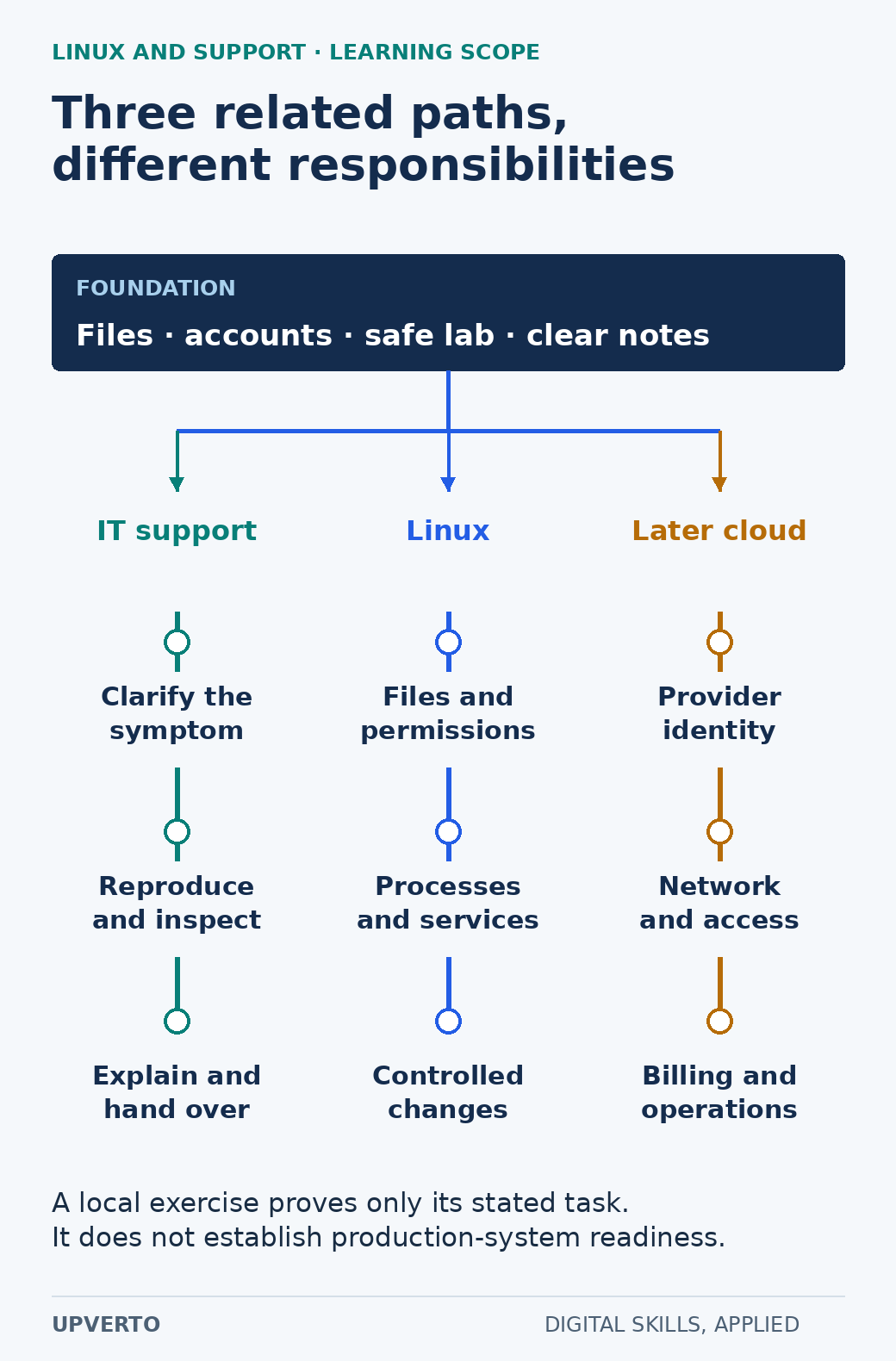
Read the text version: Compare support, Linux and later cloud learning
Shared foundation: files, accounts, safe local lab and clear notes. IT support adds symptom clarification, reproduction and handover. Linux adds file permissions, processes, services and controlled changes. Later cloud specialisation adds provider identity, network/access and billing/operations. A local exercise demonstrates only its stated scope.
For general IT support, practise clarifying symptoms, gathering relevant information, reproducing issues and explaining next steps to a user. For Linux administration, add users and groups, permission interpretation, package management, processes, logs and service behaviour. For later cloud work, you will also need the selected provider’s identity, networking, billing and operational concepts.
Do not collapse all three into “I can manage servers.” A local exercise can demonstrate a particular skill, such as interpreting a file permission, without proving readiness to operate an internet-facing service. Record the environment and limits of every sample.
Ubuntu’s user-management documentation is a primary reference for the account and privilege boundary. Understand why an administrative action needs the appropriate authority and why routine investigation should use only the access necessary. A request from a user does not automatically authorise a system-wide permission change.
Worked example: investigate a fictional access problem
The invented ticket says: “I can open the team notes, but I cannot save my changes.” The practice file is team-notes.txt, and the expected task is to edit that file in an authorised lab folder. The ticket does not yet identify the user account, exact path, error message or intended access policy.
Start by asking for the minimum useful details: which file, which application, what action was attempted, the exact error and when it began. Determine whether the problem affects one file or several. Avoid requesting passwords or unrelated personal data. Copy only the relevant, non-sensitive error text into the ticket.
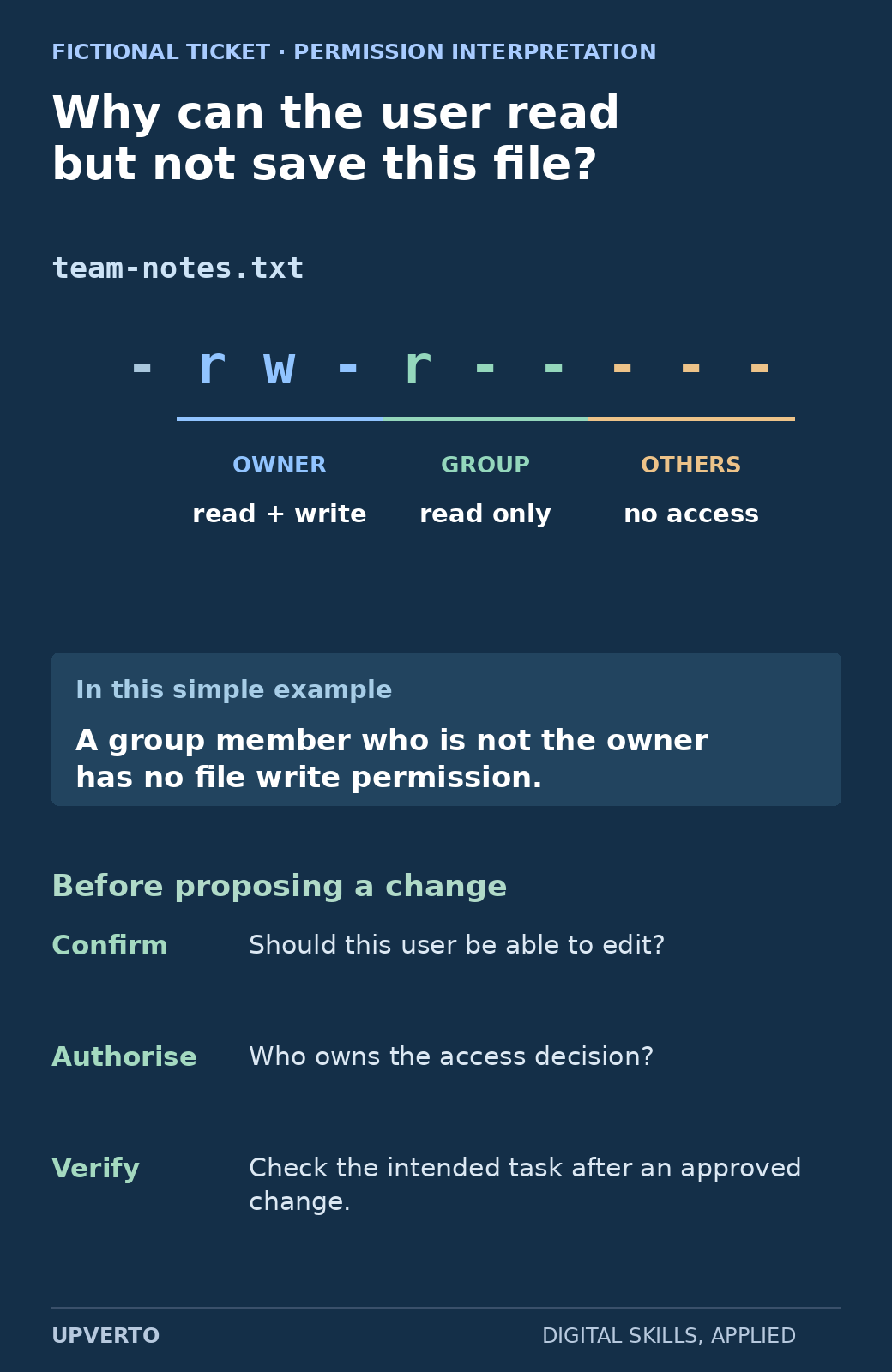
Read the text version: Decode the file permission in a support ticket
For the fictional file team-notes.txt, -rw-r----- gives the owner read and write permissions, the group read only, and others no access. A group member who is not the owner therefore lacks the file write permission in this simple example. Real diagnosis also considers account identity, parent-directory access and application behaviour. Confirm intended access, obtain the authorised decision and verify the task after any approved change.
In the fictional evidence sheet, the file is owned by trainer, its group is practice, and its permissions are -rw-r-----. That means the owner can read and write, the group can read, and others have no permissions on the file. A group member who is not the owner therefore lacks file write permission under this simple example. Other factors, such as parent-directory access or application behaviour, may also matter in a real case.
This is an interpretation exercise, not a recommendation to broaden access. Confirm whether that user should be able to edit, identify the authorised owner and propose the smallest appropriate correction. Do not solve the symptom by granting everyone write access. Record the approval and verify the intended task after any permitted change.
Use commands to answer a question
In your own lab, pwd shows the current working directory, and ls -l displays detailed information about visible entries. Use the specific practice filename when possible rather than dumping unrelated folders into a report. The official tutorial explains the owner, group and permission fields in that output.
Before a command, write the question it will answer. “Which file am I inspecting?” is a reason to verify the path. “Who may write this file?” is a reason to inspect its permissions. “Can the user complete the intended task now?” requires a functional check with the appropriate account, not merely a screenshot of a successful command.
Read-only investigation can still reveal sensitive information, so collect and share only what the ticket needs. Administrative commands, package changes, service restarts and network configuration belong behind an explicit change plan and authority. The beginner lab does not need remote access or production credentials.
Keep a support-ticket and lab record
| Field | Practice entry or prompt |
|---|---|
| Reported symptom | User can open but cannot save team-notes.txt |
| Expected behaviour | Confirm whether the user is intended to edit this file |
| Environment | Record OS version, account, application and exact practice path |
| Evidence | Error text and relevant owner/group/permission information |
| Hypothesis | Current file permissions may explain the write failure |
| Proposed action | Request the authorised access decision; change only after approval |
| Verification | Test the intended edit and check that unrelated access was not broadened |
| Handover | Record action, result, remaining uncertainty and responsible owner |
For another lab, practise creating and locating your own sample files, explaining their permissions, and recovering a deliberately changed practice document from your backup. Keep the commands and observations you actually used. If a step remains a plan, label it as planned rather than presenting a fabricated terminal transcript.
Build toward a bounded support service
A first support-related deliverable might be a documented setup guide, an inventory from authorised information or a supervised troubleshooting task. Operating client systems adds access approval, change windows, backups, recovery, incident handling and communication responsibilities. You need evidence that fits those responsibilities before accepting them.
Use write a portfolio case study to show the problem, observations, decisions and actual verification in a case study. Apply the ready for paid client work checklist to the exact brief, including your ability to recognise when to stop and escalate. Good support does not require pretending to know every answer; it requires gathering useful evidence and staying within the authorised boundary.
Frequently asked questions
Are Linux administration and general IT support the same skill?
They overlap in troubleshooting and communication, but their technical scope can differ. General support may cover applications and devices on several systems. Linux administration adds specific operating-system and service responsibilities. Read the actual role or service brief.
Do I need a cloud account to start learning Linux?
No. A suitable local lab can support foundational practice. Cloud work adds provider-specific identity, network, billing and operational responsibilities, so treat it as a later learning scope rather than a necessary first purchase.
Why does the example file allow reading but not editing?
Its illustrative permissions give the group read access without write access. For a group member who is not the owner, that can explain the symptom. A real diagnosis must also consider the actual account, path, directory permissions and application behaviour.
Should I use an administrator account whenever a command fails?
No. First understand the failure and whether the action is authorised. Elevating privileges can hide the cause or create a wider change. Use the least access needed and obtain the appropriate approval for administrative work.
Can I put real support logs in my portfolio?
Only with appropriate permission and careful removal of sensitive information. Synthetic lab records are safer for a public beginner sample. Never publish passwords, tokens, private user details or unrelated system information.
What proves that a support issue is resolved?
Verify the user’s intended task in the relevant environment and record the observed result. A command completing successfully does not by itself prove that the original problem is fixed or that no unintended access change occurred.