Choose a digital skill by comparing the work you would do, the foundations you need, the equipment available to you, and a small task you can actually try. A popular skill is only useful to your plan if you can learn to apply it to a real problem.
You do not need to identify your lifelong career in one afternoon. Make an informed choice about what to investigate and practise next. This guide compares 15 skill families, provides trial tasks, and gives you a worksheet for choosing a starting direction.

In this guide
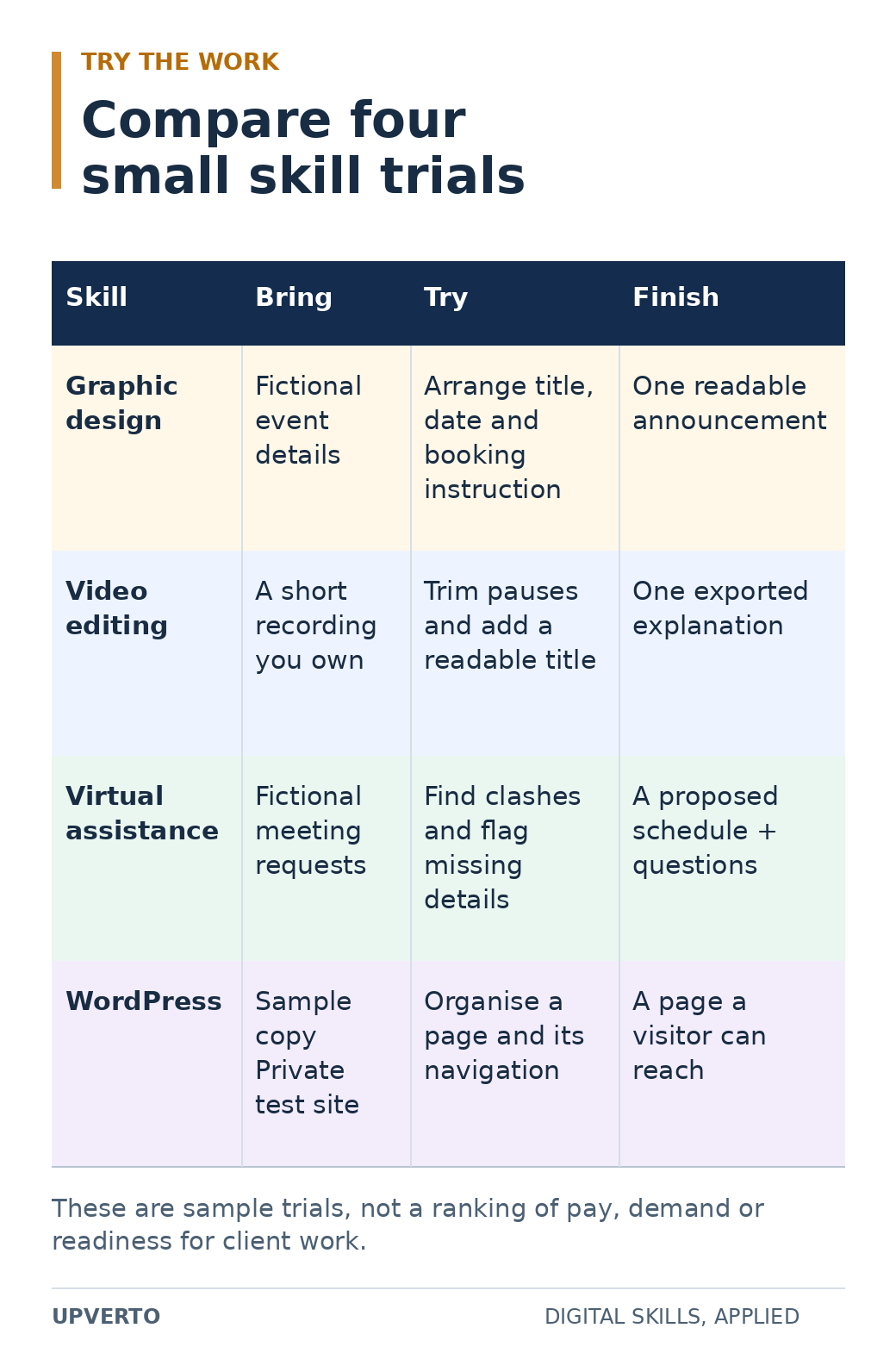
Read the text version: Compare the work through a small trial
| Skill | Inputs | Trial task | Finished output |
|---|---|---|---|
| Graphic design | Fictional event details | Arrange the title, date and booking instruction | One readable announcement |
| Video editing | A short recording you own | Trim pauses and add a readable title | One exported explanation |
| Virtual assistance | Fictional meeting requests | Identify clashes and flag missing details | A proposed schedule and questions |
| WordPress | Approved sample copy and a private test site | Organise a page and its navigation | A page a visitor can reach |
These four examples come from the article’s wider set of skill families. They compare tasks, not pay, demand or professional readiness.
Practical summary
- Work: Do I want to make, analyse, organise, or explain?
- Foundations: Which prerequisite skills do I need?
- Access: Can I complete the work with my equipment and time?
- Evidence: What small output could show that I am improving?
Start with tasks, not impressive job titles
A job title can hide several very different activities. “Digital marketing” might involve researching customers, writing advertisements, managing campaign settings, analysing results, or coordinating content. “AI work” can mean building software, connecting tools, evaluating outputs, or supporting an existing process.
Pick a concrete task to examine. Would you enjoy making a confusing page easier to read? Investigating why a website feature fails? Turning a long recording into a clear short video? Checking a set of records for inconsistencies? These questions get you closer to the day-to-day work.
If you are unsure how a skill connects to paid work, read the digital-skills earning roadmap. A skill can support different routes, including employment, freelance services, or a product. Your first learning choice does not force you to use only one route forever.
Compare 15 digital-skill families
The examples below describe possible practice outputs. They are not a list of services every beginner is ready to sell, and the order is not a ranking of pay or demand.
| Skill family | Work you would practise | Example starting output |
|---|---|---|
| WordPress | Organising and maintaining website content, layouts, and functionality. | A small information site with tested navigation and a handover guide. |
| Web development | Writing and debugging code for interfaces and applications. | A responsive page with a working interaction and documented checks. |
| Graphic design | Using layout, typography, colour, and imagery to communicate. | A clear event announcement adapted for two different placements. |
| Video editing | Selecting material, shaping a sequence, working with sound, and preparing exports. | A concise explanation video with checked captions. |
| UI and UX design | Understanding user needs and designing usable flows and interfaces. | A simple booking flow with explained decisions and a usability exercise. |
| SEO | Investigating how useful website content is discovered, understood, and measured in search. | A small-site audit with evidence and prioritised recommendations. |
| Social media management | Planning, preparing, scheduling, and reviewing content for a defined audience. | A short content plan with clear objectives and approval steps. |
| Writing and copywriting | Researching, structuring, and editing information for a reader and purpose. | A useful article or service page supported by checked facts. |
| Paid advertising | Planning campaigns, configuring tracking, managing budgets, and interpreting results. | A campaign plan using fictional data, without spending a client’s money. |
| Email marketing and CRM | Organising permitted contact data and preparing appropriate communication sequences. | A sample customer journey and email sequence using fictional contacts. |
| Spreadsheets and analytics | Cleaning information, building calculations, and explaining patterns. | A checked reporting sheet using non-sensitive sample data. |
| No-code and AI automation | Connecting steps, defining rules, testing exceptions, and monitoring a workflow. | A demonstration workflow with a documented failure case and recovery. |
| AI engineering | Building and evaluating software that uses models and data. | A narrow application with tests, limitations, and safe handling of inputs. |
| Virtual assistance | Organising information, coordinating tasks, researching, and communicating. | A fictional operations task pack with a repeatable written procedure. |
| Linux and IT support | Managing systems, investigating problems, and documenting reliable operations. | A private practice environment with a tested setup or recovery procedure. |
The five detailed roadmaps in this starting collection cover WordPress, graphic design, video editing, SEO, and virtual assistance. Use them to understand what learning and delivery involve before choosing a service.
Compare the foundations you need
Some prerequisites are shared: managing files, naming versions, reading a brief, searching for help, and explaining a decision. Others depend on the work. A coding task may require programming fundamentals. An analytics project may require understanding the meaning of the data and checking calculations. A design task requires judgement about communication as well as tool operation.
Write down the gap between what you can do today and the smallest meaningful task in that family. A gap is not a reason to give up. It tells you what belongs at the beginning of your learning plan.
Also distinguish a task’s visible simplicity from its responsibility. Editing text on a test website is different from changing a live checkout. Drafting a sample advertisement is different from managing a client’s budget. Organising fictional records is different from handling confidential customer information.
Check equipment and time before committing
Try the actual workflow on the device you have. Can you open the files, use the necessary application, inspect the result properly, export the required format, and keep a backup? A tool opening successfully is only the first check.
Video projects can involve large files and demanding playback. Development may require running several tools together. Administrative and writing tasks still benefit from a reliable way to organise documents and compare information. Check current requirements with the software provider before purchasing hardware or subscriptions.
Choose a learning schedule that fits your existing responsibilities. You might reserve three short sessions for focused practice and one longer session for a project. That is an example arrangement, not a required timetable. The useful question is whether you can return to the work regularly enough to build and review an output.
Try a small task before buying a large course
Choose two or three families that seem plausible. Give each a small, comparable trial. The time boxes below are suggested exploration limits; finishing within them does not prove professional competence.
| Trial | Task | What to notice |
|---|---|---|
| Graphic design | Spend 30–45 minutes arranging a fictional event’s title, date, location, and booking instruction on one page. | Can you explain what the reader should notice first? Are you willing to revise spacing and readability? |
| Video editing | Record a short explanation yourself, then trim pauses and add a readable title. | Do you enjoy choosing what to keep? Can you organise the files and review the export? |
| Virtual assistance | Turn a fictional list of meeting requests into a tidy schedule with unresolved questions flagged. | Do you enjoy checking details and making a repeatable process? |
| WordPress | Use a private practice environment to organise a page, navigation, and a short article. | Do you enjoy connecting content, layout, and navigation? Can you explain how a visitor finds information? |
| SEO | Review three public pages for the questions they answer and the usefulness of their headings and links. | Do you enjoy investigation and written reasoning? Can you separate observation from a guess? |
WordPress’s official beginner pathway links to a private demo environment and introduces its basic site-building tools. Blackmagic Design’s official editing training provides worked training materials. These are examples of places to investigate a workflow, not requirements to buy a particular tool.
After each trial, record what you produced, where you got stuck, what help you used, and whether you want to improve the result. Enjoying a polished finished video is different from enjoying the work of editing it.
Look for evidence that people need the work
Review a small sample of current, relevant opportunities. Search for the specific output as well as the broad skill name. A useful note might say, “Several requests ask for interview edits with captions and organised source files.” A less useful note says, “Video is booming.”
For each request, record the buyer, task, inputs, required experience, deliverables, and any uncertainties. Do not treat an advertised budget as proof of what a beginner will earn. A small sample of listings can help you understand the work; it cannot establish a reliable market average.
If you can speak to an appropriate potential buyer, ask how they currently handle the task and what makes it difficult. Do not begin by trying to sell an undefined service. The service-definition guide explains how to connect these observations to an offer.
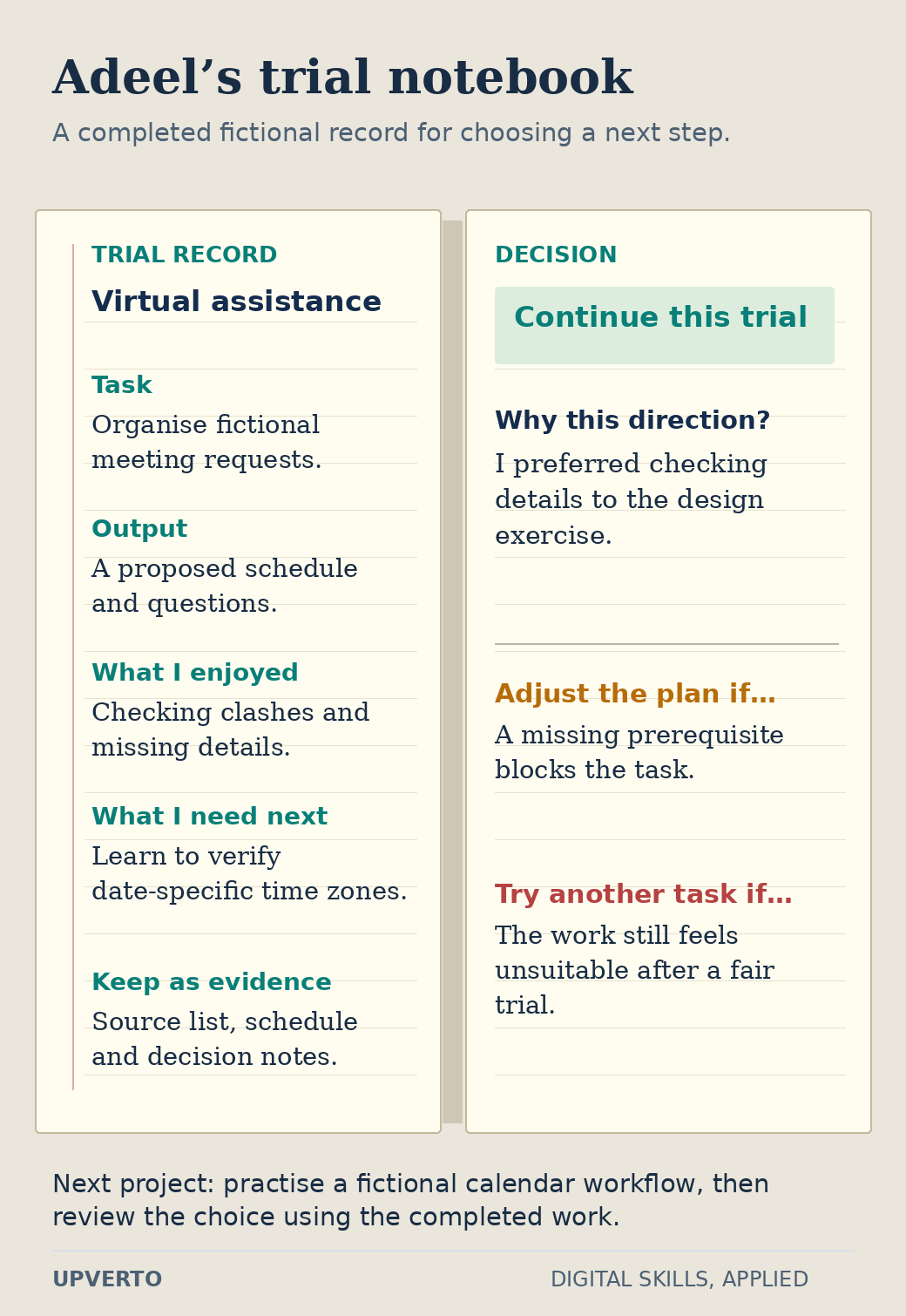
Read the text version: Use a trial notebook to choose a next step
This is a fictional extension of the article’s Adeel example.
- Trial
- Virtual assistance: organise invented meeting requests.
- Output
- A proposed schedule and questions.
- Observation
- Adeel enjoyed checking clashes and missing details, and preferred this work to the design exercise.
- Learning gap
- He needs to verify time zones for the particular meeting date.
- Evidence to keep
- The source list, schedule and decision notes.
- Decision
- Continue by practising a fictional calendar workflow, then review the choice using the completed project.
Adjust the learning plan when a missing prerequisite blocks the work. Try another direction when a fair trial shows that the task itself is unsuitable. The record is a starting decision, not an earnings prediction.
Use a decision worksheet
| Question | Evidence to write down |
|---|---|
| What did I try? | The actual task and the output I produced. |
| What felt engaging? | A specific activity, such as organising, writing, investigating, or revising. |
| What foundations are missing? | The prerequisite lessons or practice I need. |
| Can I access the workflow? | Device, software, connectivity, accessibility, and file-handling needs. |
| What does a buyer need? | A specific request or problem, with its source and date. |
| What will I build next? | One slightly harder project with clear acceptance checks. |
| When will I review the choice? | A project milestone at which I will compare progress with my expectations. |
Teaching example: Adeel enjoys organising information and has experience maintaining a study timetable. After trying a design exercise and an operations task, he prefers checking schedules and writing procedures. He chooses to investigate virtual assistance and practises a fictional calendar workflow. This is a reasoned starting choice; it does not predict his income or prevent him from learning another skill later.
Questions that can make choosing harder
Which skill is easiest?
That depends on the task and your starting knowledge. A simple introductory exercise may be accessible while professional delivery in the same field requires substantial judgement. Compare a defined task, its prerequisites, and its consequences instead of relying on one universal difficulty label.
Should I choose a skill because AI can do part of it?
Investigate what remains your responsibility: understanding the request, checking correctness, choosing an appropriate result, protecting information, and delivering useful work. A tool can assist a task without making every output suitable for a client.
What if I choose and then change my mind?
Review the choice after completing a small project. Identify whether the problem is missing foundations, an unsuitable learning resource, an equipment constraint, or genuine dislike of the work. Change direction for a clear reason and keep transferable skills such as research and communication.
Should I choose a skill only because it appears popular?
Popularity is a starting point for investigation. Examine the tasks people actually request, the required experience and the evidence you would need to provide. Then compare those requirements with your interests and constraints. An attractive job title is not enough to choose a learning path.
How can I test a skill before committing to it?
Choose a small task that resembles real work, use an introductory resource and finish a reviewable output. Record what you enjoyed, what was difficult and which prerequisites were missing. Compare a few finished trials rather than only watching introductory videos.
When should I add a complementary skill?
Add it when a project reveals a clear gap. For example, basic layout knowledge may improve a website project, while clearer writing may improve a report. Keep the first service or project manageable so that adding skills does not prevent you from finishing useful work.
Choose a project to learn through
Pick one family, complete a trial, and write down the evidence from your worksheet. Then build a practical learning plan. Once you can perform a meaningful task, choose a portfolio project and use the readiness checklist before accepting paid responsibility.