Onboarding turns an agreed project into a workable starting point. Collect the materials you actually need, confirm who can decide, and arrange appropriate access before production. A useful onboarding process reduces avoidable ambiguity without asking the client to hand over every account or complete an oversized form. It is the preparation stage of manage freelance projects.
Separate onboarding from discovery and production
Discovery determines what problem and scope are being considered; onboarding organises the agreed work. If the goal or deliverables remain unclear, return to freelance discovery call questions. Sending an intake form does not resolve a disagreement about what was purchased, and receiving credentials does not authorise every action the account allows.
Begin with the current brief or agreement, not a blank request for information. Identify the approved outputs, input dependencies, review arrangements and any conditions for starting. The client should be able to see why each requested item matters. A small event graphic may need approved text, logo files and export requirements; it does not normally need access to the organisation’s email account.
Use write project brief acceptance criteria to check the acceptance conditions. If the final output will be a PDF, record how it will be used. If the work changes a website, distinguish a draft or staging review from permission to publish. That distinction belongs in the onboarding record before anyone starts making changes.
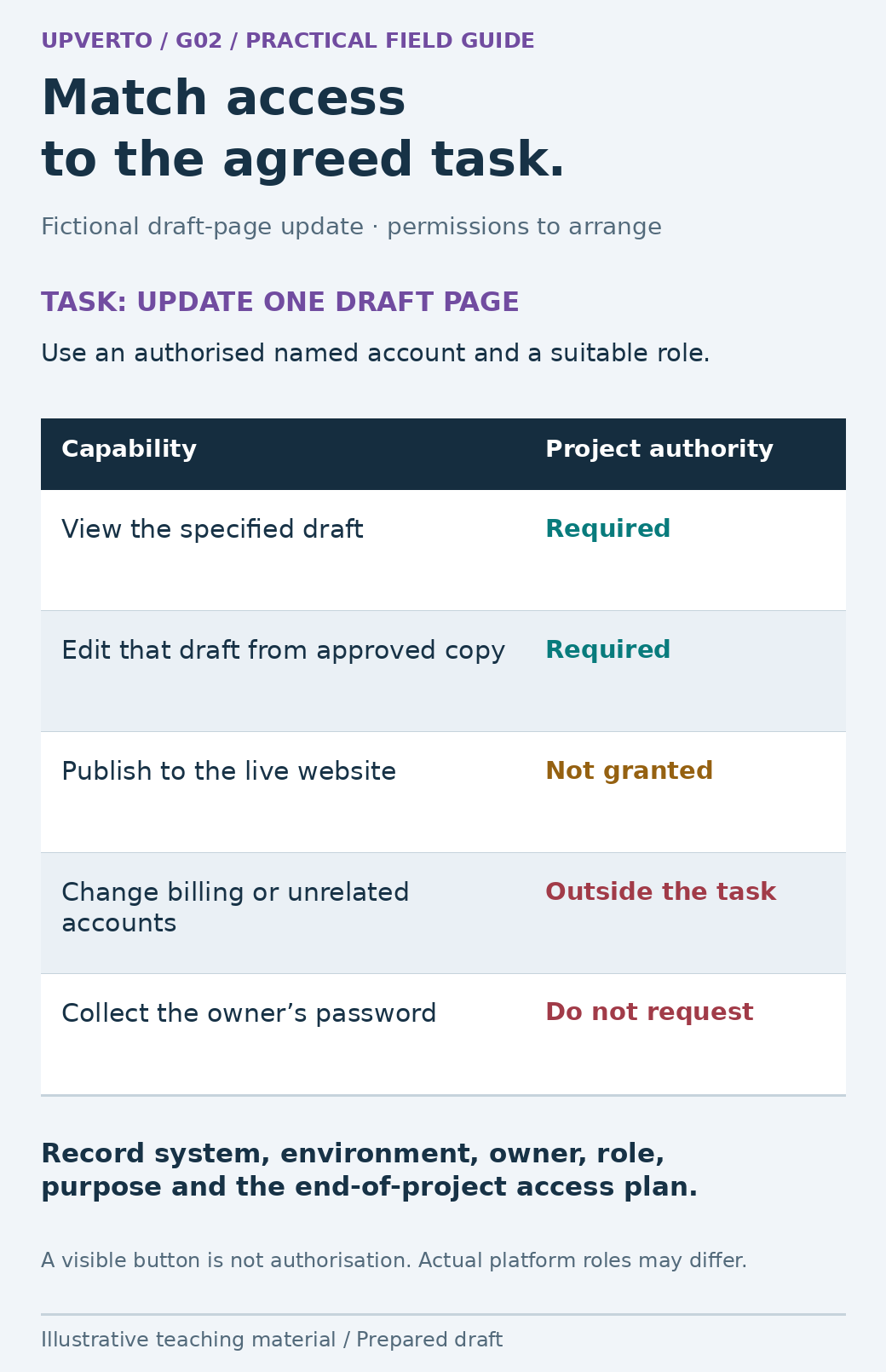
Read the text version: Specify only the access the project requires
For this fictional one-page draft update, the project needs authorised viewing and editing of the specified draft. It does not grant live publication or unrelated billing/account changes. Do not request the owner’s password. Record the system, environment, account owner, role, purpose and access review/removal plan. Platform roles vary, and a visible button does not confer project authority.
Collect approved materials with a clear owner
List the minimum inputs and name who supplies each one. Include the expected format and the evidence of approval where relevant. “Logo supplied” is incomplete if the file is a low-resolution screenshot and the intended output is a large printed poster. “Copy approved” is incomplete if two attached versions disagree.
| Input | Question that makes it usable |
|---|---|
| Text or records | Which version is current, who approves it and what should remain unknown? |
| Brand or media assets | Is this the correct source file and is its intended use authorised? |
| Output requirements | What dimensions, formats, devices or systems must the result support? |
| Existing project files | Which files are working copies and which must be preserved? |
| Reference examples | Which feature of the reference matters, and what should not be copied? |
| Review contacts | Who consolidates comments and who has final approval? |
Use an agreed shared location and meaningful file names. Record receipt separately from validation: a file can arrive and still be unsuitable. If something is missing, explain which step it blocks and ask the responsible person for the smallest necessary correction. Do not fill gaps with guessed customer data or unapproved wording.
Request task-specific access, not shared passwords
The OWASP Authorization Cheat Sheet describes least privilege: access should be limited to what the task requires. Apply that principle through the client’s authorised invitation or role-based process. A content-editing task should not casually become an administrator account with access to billing, unrelated projects and every customer record.
Record the system, environment, account owner, requested role, purpose and end-of-project access plan. Use a named account where the system supports it and follow the owner’s authentication requirements. Never ask a client to paste a password, recovery code or one-time authentication code into an intake document. If a platform lacks suitable delegation, agree a supported alternative with the owner instead of improvising a shared login.
Check access using the least consequential action that establishes the needed capability. Seeing a draft page does not prove that editing is possible, while having a publish button does not mean publishing is authorised. For changes requiring recovery, confirm the original copy, backup or rollback arrangement and who may use it. If the environment is uncertain, keep the affected work paused while that specific gap is resolved.
Worked example: onboarding a workshop-page update
Fictional scenario: A freelancer will update one draft workshop page for North Lane Studio. The booking service stays unchanged. The client has supplied two documents with different dates and has offered the main account password. The correct response is to resolve the inputs and access route, not to start editing whichever version is easiest.
| Onboarding item | Fictional record | Next action |
|---|---|---|
| Approved copy | Two conflicting dates; approval unknown | Owner confirms one source document |
| Website environment | Draft page only | Confirm page identifier and preview route |
| Access | Main password offered; not collected | Owner invites a suitable named editor account |
| Booking boundary | Link to existing service; no account changes | Check supplied destination within agreed scope |
| Review | Studio owner is final approver | Collect one consolidated review |
| Start condition | Copy and editor access unresolved | Begin production only when relevant inputs are ready |
The freelancer can prepare a checklist and organise the supplied assets while awaiting the two unresolved items. That useful preparation does not justify promising that the content update is already underway. When the owner resolves the date and grants suitable access, record what changed and use the confirmed baseline.
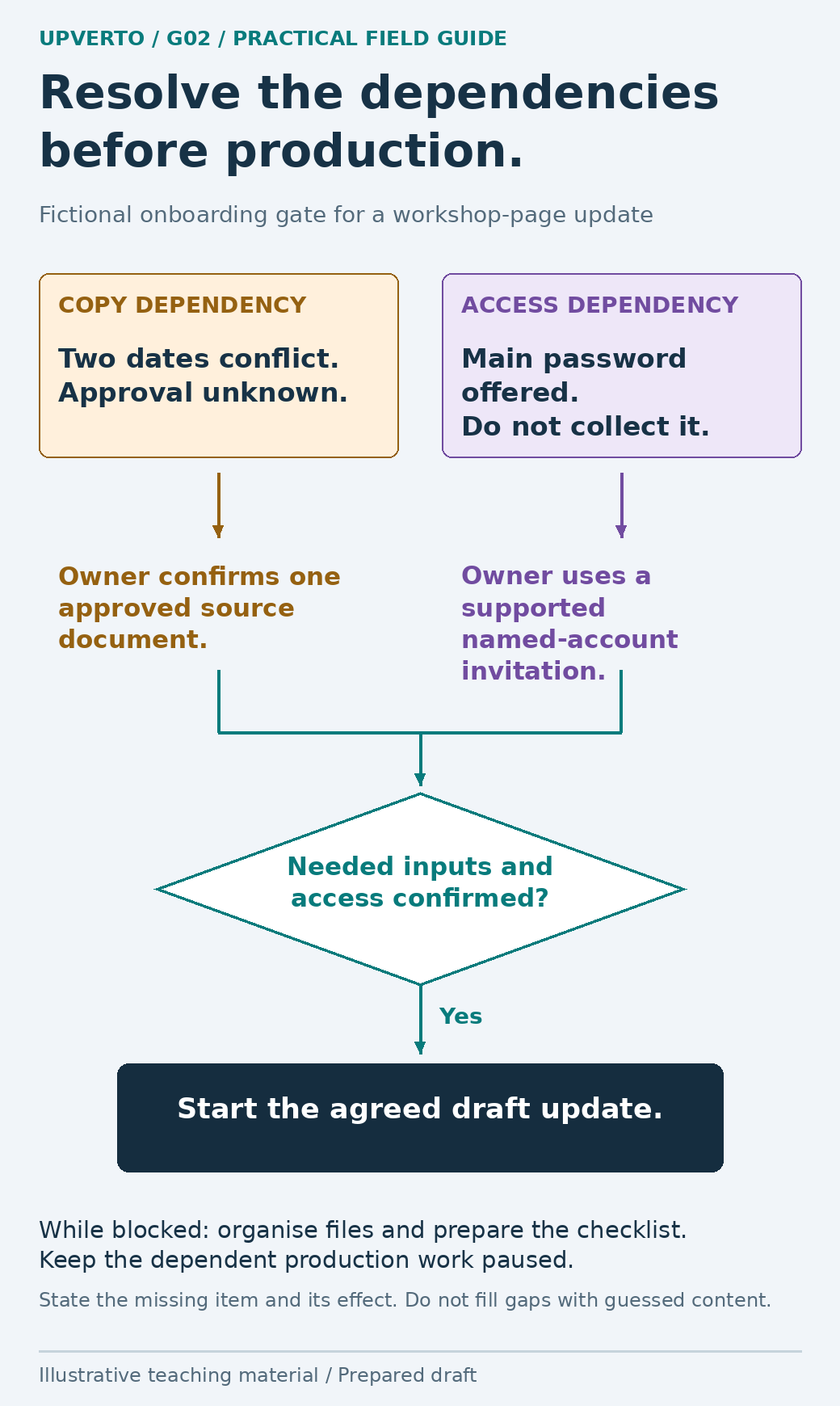
Read the text version: Use onboarding dependencies as a clear start gate
The fictional page update has two unresolved dependencies. The owner must confirm one approved copy source and arrange appropriate named-account access rather than sharing the main password. Confirm both before starting the dependent production task. While waiting, organise the supplied files and prepare the checking list. Missing inputs are not permission to guess content.
Copy this intake form and access register
Keep the form short enough to answer, but specific enough to use. Explain which fields are required and why. For a business contact, request the information needed to coordinate the project, not a private identity dossier. Handle any personal or confidential data according to the applicable requirements and agreed process.
| Form section | Fields to copy |
|---|---|
| Project | Project reference; goal; approved brief version; deliverables |
| People | Day-to-day contact; final approver; input owners; preferred channel |
| Materials | File or link; version; approval status; permission note; unresolved question |
| Access register | System; environment; account owner; role; purpose; grant date; removal/review plan |
| Working arrangements | Review method; update rhythm; decision deadlines; timezone where necessary |
| Start gate | Required inputs ready; access confirmed; recovery route; remaining limitations |
A start gate is a decision about dependencies, not a demand that every conceivable document be complete. If one deliverable can safely begin while another is blocked, record that boundary. For example, approved layout planning may proceed while a missing biography prevents final text placement. Avoid marking the whole project “ready” when the blocked dependency still controls delivery.
Before closing onboarding, give the client a brief summary of what was received, what is still needed and what happens next. This provides a chance to catch an incorrect assumption while the work is still easy to redirect.
Keep the setup current during the project
Onboarding records change when a new approver joins, an input is replaced or the scope changes. Update the relevant entry rather than leaving the original form as a misleading snapshot. Preserve the history of significant decisions so the team can tell which version governs the current work.
Once production begins, use client project update examples to report completed work, dependencies and decisions. At handover, revisit the access register and follow the agreed return, retention and removal process. An invitation should not remain indefinitely merely because nobody remembered why it was granted.
Frequently asked questions
Do I need a long onboarding questionnaire for every project?
No. Tailor the questions to the agreed work. A small project may need a short form, an input list and an access record. Remove fields that do not help someone make or deliver the agreed result.
What if the client sends their password without being asked?
Do not copy it into the project record or use it as the default access method. Ask the owner to follow their account-security process and arrange supported delegated access. The appropriate response may include the owner replacing an exposed password.
Can I start while some information is missing?
Only the parts whose dependencies are satisfied and whose boundaries are clear. Record what is blocked and its effect on timing. Do not substitute guessed content or represent an incomplete setup as fully ready.
Who should approve the work?
Name a final approver and a person who consolidates comments. They can be the same person on a small project. Confirm who resolves conflicts before several stakeholders provide incompatible directions.
Should I ask for administrator access to save time?
Request the minimum suitable role through the owner’s authorised process. Administrative access can include capabilities unrelated to the work. If a specific task needs more access, explain it and agree a limited, supported arrangement.
What should happen to access at the end?
Follow the agreed review or removal process with the account owner. Confirm which ongoing responsibilities, if any, require continued access. Do not delete client accounts or records unilaterally during cleanup.
Sources and scope
The worked examples, worksheets and diagrams are original fictional teaching materials. They are not reports of client results. Primary references were checked during preparation; verify current rules and account-specific features before acting.