
A tutorial can show you how a program was built. The harder question comes when you need to change it. Can you explain what the current code does, decide where a new requirement belongs and check that the older behaviour still works?
You can practise those decisions without starting a large application. This guide uses one small fictional example to show how to move from copying instructions to changing, debugging and testing code. The aim is a more independent learning process, not a promise that one exercise makes you ready to ship software.
Start with a program small enough to explain
Choose something that fits comfortably on one screen: a calculation, a list filter or a function that labels an input. Avoid beginning with a generated application containing files you have never opened.
Save a working copy before experimenting. Write down what the program is supposed to do, what input it accepts and what output it returns. If the requirement is unclear, a passing output cannot tell you much.
For example: “Given a non-negative whole number of items in stock, return Restock when the count is below five. Otherwise return Enough.” The wording makes two decisions explicit: the boundary is five, and this first exercise assumes a valid whole-number input.
Predict before you run
Before executing the program, write the result you expect for a chosen input. This makes a difference between “the computer displayed something” and “the computer displayed what the requirement says it should.”
Do not choose only the easiest case. With the stock rule, try zero, four, five and nine. Five is especially useful because it sits exactly at the point where the answer changes.
Keep your expected result separate from the observed result. If you change the expectation after seeing the output, you can accidentally accept a defect as correct. When they differ, check both the code and your understanding of the requirement.
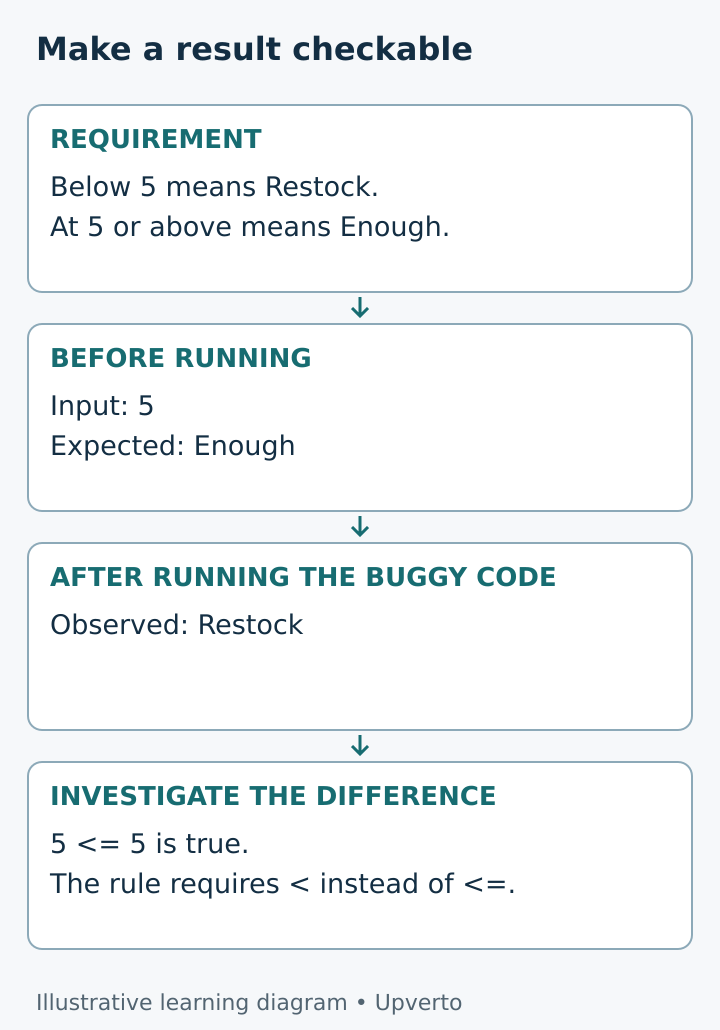
Figure 1. Write the expectation before running the program so that a surprising result becomes something you can investigate.
Worked example repair a boundary mistake
Nadia, a fictional learner, is experimenting with a stock reminder for a small stationery counter. She uses invented quantities and does not connect the exercise to a real business system.
Her first version is deliberately wrong:
def stock_message(quantity):
    if quantity <= 5:
        return "Restock"
    return "Enough"
For stock_message(4), her expected and observed results are both Restock. For stock_message(5), she expects Enough, but the function returns Restock.
She traces the condition with five substituted for quantity. The expression 5 <= 5 is true, so the first return statement runs. Her requirement said “below five,” not “five or below.” She changes <= to <.
def stock_message(quantity):
    if quantity < 5:
        return "Restock"
    return "Enough"
Conditions choose which branch of code runs; the Python tutorial explains this control-flow structure. The defect here is in Nadia’s chosen comparison, not a failure of Python. Python conditions and functions.
Now she reruns all four examples. Checking only five would leave her unsure whether the repair affected another case. Her written result is modest: “The function matches the stated rule for these four valid inputs.” She does not claim that every possible use is safe.
Change one requirement on purpose
Once the original rule works, choose a small extension. Nadia wants the threshold to be adjustable for different practice items. She adds a second input:
def stock_message(quantity, threshold):
    if quantity < threshold:
        return "Restock"
    return "Enough"
Before running it, she writes three cases: quantity two with threshold three should return Restock; quantity three with threshold three should return Enough; quantity five with threshold three should also return Enough.
This is useful practice because she made a design decision and updated the checks. It is more informative than changing only a heading or colour. The extension also creates a new question: what counts as a valid threshold?
For this exercise, she keeps the assumption of non-negative whole numbers and writes it beside the function. Accepting text from a user and validating it is a separate next exercise. Naming a limit is better than quietly pretending the limit does not exist.
Tell three kinds of failure apart
A program can fail before it runs because the syntax is invalid. It can also start running and raise an exception. Or it can finish normally while returning the wrong result. Python’s documentation distinguishes syntax errors from exceptions and explains the information in an exception message. Python errors and exceptions.
Nadia’s boundary mistake belongs to the third category: the code runs, but it does not follow the requirement. There is no error message to tell her which business rule she intended.
When there is an error message, read its final description and locate the referenced code. Then reduce the problem to the smallest example that still fails. Do not change five unrelated lines and hope that one change repairs it.
When the output is merely wrong, compare the expected and observed values. Follow one input through the condition or calculation. If necessary, temporarily print intermediate values. Remove temporary debugging output when it no longer helps, especially before sharing an exercise with someone else.
Use AI help without handing over the exercise
Ask for a hint or a diagnosis you can test. A useful request is: “My rule is below five. Input five gives Restock, but I expected Enough. Help me trace the comparison without rewriting the whole function.”
If an assistant proposes a change, predict its effect before applying it. Ask which previous cases should be rerun. Keep the original version so that you can compare the actual difference.
Do not paste passwords, private records or an entire unrelated project into a prompt. A small invented failing example is often enough to discuss the concept. Generated explanations and tests can be wrong, so judge them against the requirement and actual execution.
There is no benefit in pretending you received no help. Record what the assistant suggested and what you verified yourself. This makes the next learning step clearer.
Turn manual checks into a repeatable test
At first, a written input-output list is enough. Later, you can express the same checks as code:
cases = [(0, "Restock"), (4, "Restock"),
         (5, "Enough"), (9, "Enough")]

for quantity, expected in cases:
    actual = stock_message(quantity, 5)
    if actual != expected:
        raise AssertionError((quantity, expected, actual))

print("Four practice cases passed")
This checks the two-input version with a threshold of five. The message is intentionally specific. Four passing examples do not establish that input validation, persistence or a complete inventory workflow works.
When you add a requirement, add or update the relevant cases. Keep earlier cases unless the requirement intentionally changed. A check that catches a repaired bug helps you notice if a later edit brings it back.
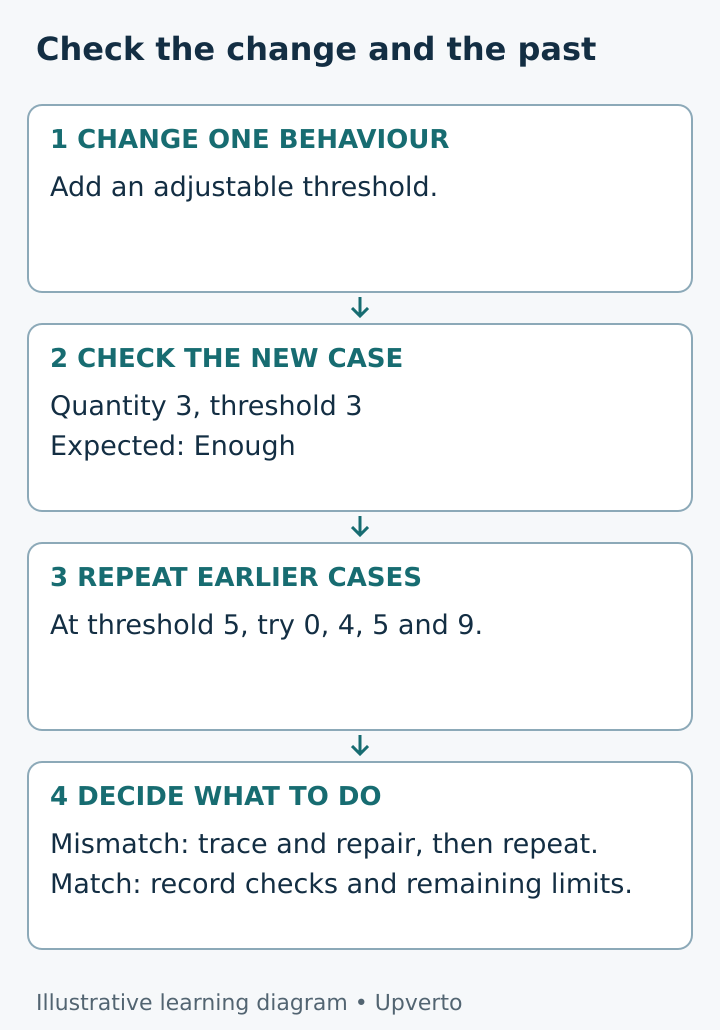
Figure 2. Check the new behaviour and the earlier behaviour after each meaningful change.
Use this practice worksheet
Copy this into your build notes:
- Requirement: what must happen, in plain language?
- Starting point: which saved version works under the current assumptions?
- Independent change: what single behaviour am I changing?
- Prediction: which input will reveal the difference?
- Boundary: what happens at the exact cutoff?
- Observed result: what actually happened?
- Diagnosis: which operation explains the result?
- Repair: what did I change, and why?
- Repeat checks: which earlier cases still pass?
- Remaining limit: what have I not tested or implemented?
If you cannot fill in the diagnosis, do not conceal that gap with a bigger rewrite. Reduce the example or revisit the relevant concept. Your notes should explain the reasoning, not just list successful commands.
Your next step
Choose a tiny program you already ran successfully. Make one behaviour change, include a boundary case and rerun the old examples. Then close the tutorial and explain the difference between your original version and your new version.
Save the requirement, code and checks together. That small packet is evidence of a learning decision you can inspect later. You can build larger projects when you can repeat this process across more connected parts.
Frequently asked questions
Should I stop watching tutorials completely?
No. Use a tutorial to meet an unfamiliar concept or see a worked example. Then pause and make a related change that the tutorial does not dictate. The independent decision is the missing practice, not necessarily more video time.
What if I cannot fix a bug without help?
Reduce it, write the expected and observed results, and ask for a focused hint. After receiving help, rerun the failing case and explain the repair. Needing help does not erase the learning you do while verifying it.
Is changing variable names enough practice?
It can help you read code, but it rarely tests whether you understand behaviour. Also change an input, a boundary or a requirement and predict the resulting output. Keep the exercise small enough to explain.
Why do old tests matter after a new feature?
A change can affect behaviour that previously worked. Repeating earlier checks helps reveal that. These checks only cover the cases you chose, so keep a separate note of important situations that remain untested.
Can I practise this without a paid AI tool?
Yes. The example uses ordinary Python and your own expectations. An assistant is optional support. Documentation, a teacher or a peer can also help you reason about a small failing case.
When should I start a bigger project?
Try one when you can explain a small program, make a change and check the result with reasonable support. Increase the scope gradually. A useful next project might combine two functions, rather than adding accounts, payments and deployment at once.