A handover is complete when the intended recipient can identify the agreed deliverables, access them and understand what happens next. Sending a folder link is only one part of that job. Explain files, dependencies, access arrangements and support boundaries, and preserve an accurate record of what was delivered. This closes the delivery process in manage freelance projects.
Build the pack around what the recipient needs
Begin with the digital project quality checklist so the pack contains checked final outputs. Compare the contents with the agreed brief. Source files, alternative formats and setup work should be included when the agreement calls for them, not assumed merely because you happen to possess them.
Use a short README or delivery note that names the project and final version, identifies the files, explains how to open or use them, and lists material limitations. Distinguish an editable source from an export intended for distribution. If the recipient needs a particular application, font or account, identify that dependency rather than letting the first failed opening attempt reveal it.
A useful folder structure mirrors use: final outputs, agreed editable sources, reference or licence notes, and checks or instructions. Avoid a pile of “final-final-new” files. You can preserve working history elsewhere according to the agreed retention process without making the client search through every draft.
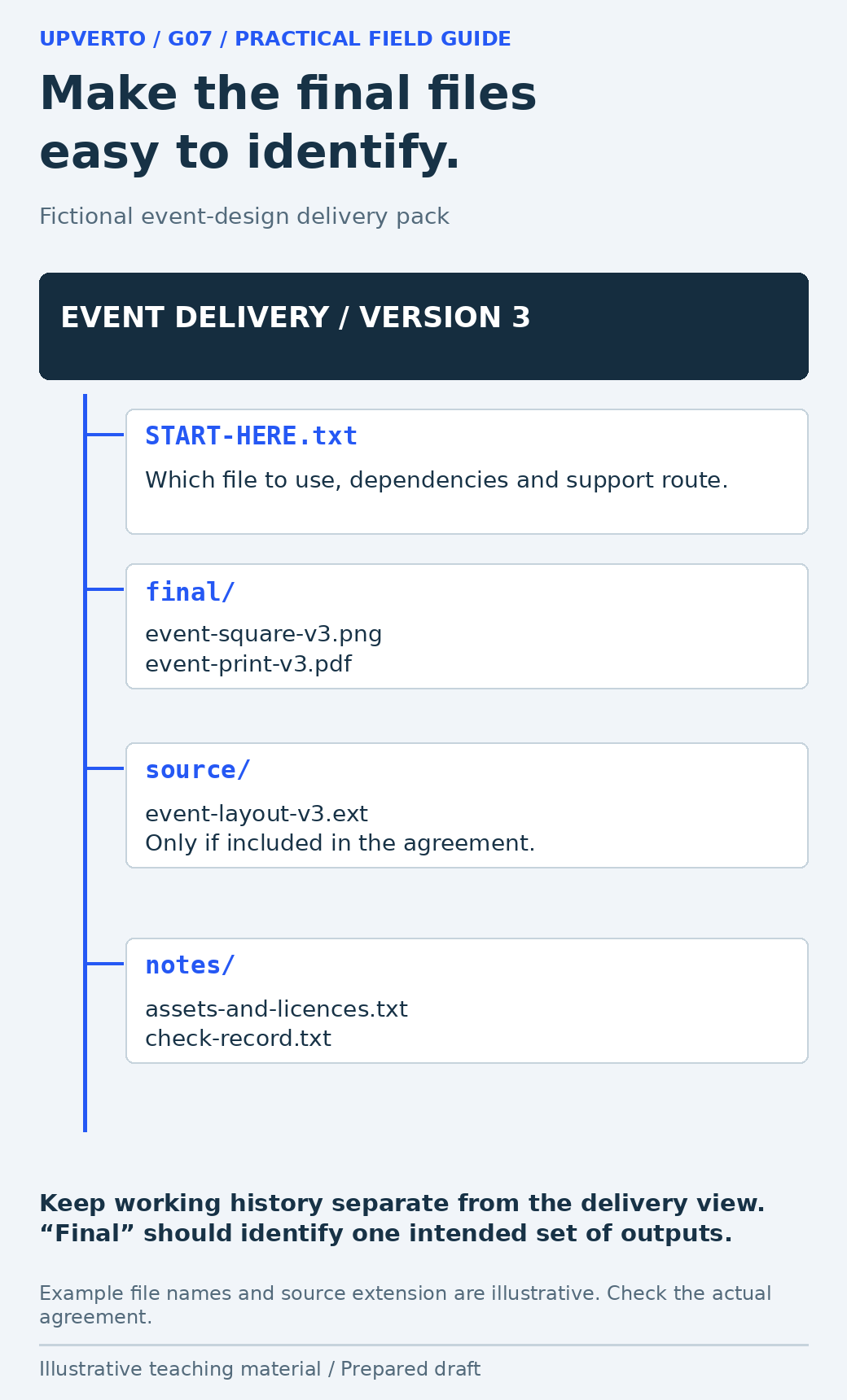
Read the text version: Organise a usable event-design handover pack
Fictional pack: START-HERE.txt explains the files, dependencies and support route. final/ contains event-square-v3.png and event-print-v3.pdf. source/ contains the agreed editable event-layout-v3.ext only where included. notes/ contains asset/licence notes and the real check record to prepare for your own work. Keep draft history separate from the clear delivery view.
Separate file delivery from rights and licences
WIPO’s copyright guidance describes rights that depend on the applicable legal framework. Do not assume that sending a file, paying an invoice or commissioning work automatically transfers every relevant right in every jurisdiction. Identify the arrangements in the actual agreement and obtain qualified advice when a specific legal conclusion is needed.
Third-party materials need separate attention. For example, the Creative Commons Attribution 4.0 licence deed includes attribution and other conditions and notes that other rights may still matter. A file being downloadable or included in a project folder does not erase its licence. Check the particular asset, source and permitted use rather than treating all “free” resources as interchangeable.
| Material | What the handover should clarify |
|---|---|
| Your agreed original work | Which files and use or ownership arrangements the agreement covers |
| Client-supplied material | Which original owner or permission record applies |
| Third-party asset | Source, licence, required credit and relevant restrictions |
| Software or subscription | Who holds the account and pays for continuing access |
| Confidential project data | Who may retain it, for what purpose and under what handling process |
This record can explain operational dependencies without making legal claims you cannot support. If a font or stock asset cannot be redistributed in the source pack under its terms, identify a permitted route for the client rather than copying it anyway.
Transfer responsibility through the owner’s process
Use the client’s supported account and sharing arrangements. The OWASP least-privilege guidance supports keeping access limited to the task. Confirm the intended owner and named users, and document which access should continue for an agreed support task and which should be reviewed or removed.
Do not hand over passwords in a public README or leave recovery codes in a shared folder. Do not unilaterally delete the client’s account, revoke the wrong collaborator or move a live service to an unverified owner. Use the authorised platform process, preserve an appropriate recovery route and confirm the resulting access with the recipient.
A delivery link should work for the intended recipient without exposing the pack publicly by accident. Check the sharing scope and ask the recipient to confirm access to the files they need. That is different from claiming they have tested every feature or formally accepted the project. Record the actual acknowledgement accurately.
Worked example: an event-design handover
Fictional scenario: A designer has agreed a square event announcement, a print PDF and the editable source. The event uses client-supplied text and logo, plus a third-party font. No attendance or sales result is claimed. The following is an illustrative pack, not a record of files delivered to a real client.
| Pack item | Purpose |
|---|---|
| START-HERE.txt | Final version, file meanings, dependencies and support route |
| final/event-square-v3.png | Checked square output for the agreed placement |
| final/event-print-v3.pdf | Checked printable output with agreed dimensions |
| source/event-layout-v3.ext | Editable source in the agreed application format |
| notes/assets-and-licences.txt | Client-supplied assets and the font source/terms to verify |
| notes/check-record.txt | Actual checks to record when producing your own pack |
The delivery note explains that the PNG is for the square placement and the PDF is for print. The source may require the agreed application and a correctly licensed font. The recipient should not have to guess whether opening the PDF in an editor will preserve the original layout.
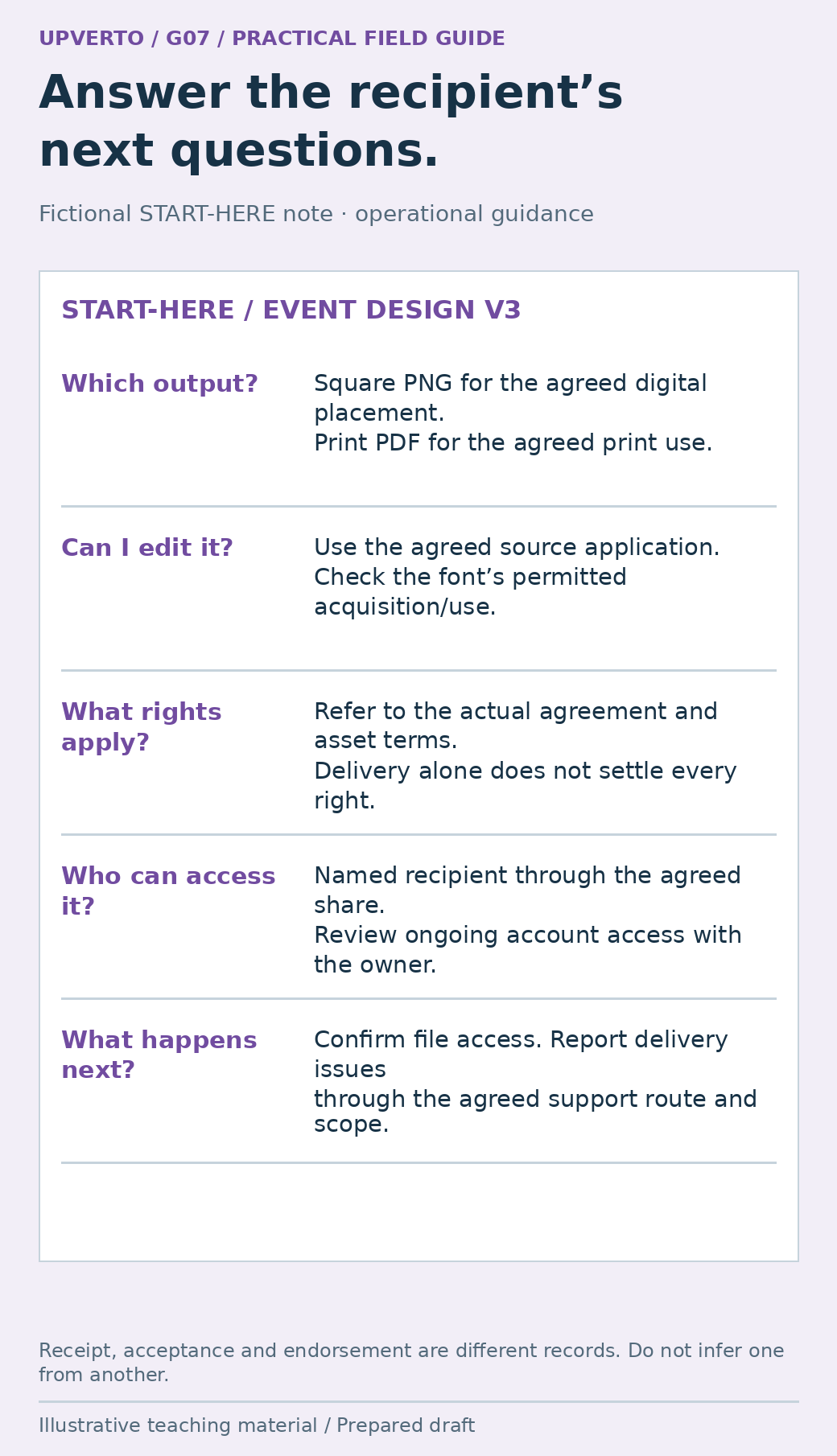
Read the text version: Write a handover note that clarifies files and responsibilities
The fictional delivery note identifies the square PNG and print PDF, the application and permitted font route for the editable source, the actual agreement and third-party terms governing rights, the named recipient’s access and the agreed support process. Ask for actual file-access confirmation. Receipt, acceptance and a testimonial are different statements.
Explain what happens after delivery
State the agreed support route, review window where applicable and what it covers. Distinguish a delivery issue from new content, a new format or an ongoing maintenance responsibility. A request to correct a file that differs from the approved text is different from a request for next month’s campaign. The actual agreement and circumstances govern how either is handled.
Do not promise unlimited assistance as a substitute for a clear arrangement. Name response expectations only when you can meet them and the scope is understood. If a live system needs continuing maintenance, identify the owner; silence after handover should not leave both sides assuming the other is monitoring it.
Use write project brief acceptance criteria to resolve any mismatch between the delivery note and the agreed acceptance conditions. If there is a genuine continuing need after handover, the guide to retain freelance clients ongoing services helps discuss an appropriate ongoing service separately.
Copy this handover checklist
| Check | Evidence or decision to retain |
|---|---|
| Deliverables | Each agreed output is present and clearly named |
| Final inspection | The actual supplied versions were checked |
| Instructions | The recipient can identify and use the files |
| Dependencies | Applications, fonts, accounts and licences are identified |
| Access | Correct recipient and sharing scope; authorised transfer/review process |
| Rights questions | Agreement and relevant asset terms are recorded; unresolved legal questions referred |
| Support | Contact route, scope and expected next steps are clear |
| Receipt and records | Actual acknowledgement, remaining issues and agreed retention/removal plan |
Before sending, open the pack from the delivery location rather than relying on your local folder. Check links, file names and the note’s references. A renamed file can break an instruction even when the file itself is correct. Remove unnecessary confidential information from the pack and retain the records needed under the applicable agreement and requirements.
Close with a specific request: confirm that the intended files can be accessed and identify any delivery issue through the agreed channel. Do not describe silence as satisfaction or invent a testimonial from a receipt acknowledgement. A usable handover gives both sides a clear basis for finishing the project.
Frequently asked questions
Must I include editable source files?
Follow the actual agreement. Identify whether sources, exports or both are included before delivery. If sources are included, explain the application and third-party dependencies needed to use them.
Does payment automatically transfer all ownership?
Do not assume a universal rule. Applicable law, the agreement and third-party rights can differ. Record the intended arrangement and seek qualified advice for a jurisdiction-specific ownership question.
Can I include fonts and stock assets in the source folder?
Only when their particular terms allow the intended redistribution and use. Otherwise explain the supported licensing or acquisition route. “Free to download” does not establish permission to redistribute every asset.
How do I know the client received the work?
Ask for confirmation that the intended recipient can access the agreed files and record what they actually acknowledge. Access confirmation, acceptance of the work and endorsement of its results are different statements.
Should I remove my access immediately?
Follow the agreed access plan with the account owner. Some support tasks may require limited continued access; other access should be reviewed or removed through the authorised process. Avoid unilateral changes that could lock out the client.
What if the client asks for another format after handover?
Compare it with the agreed deliverables and support scope. Explain whether it is a delivery correction or new work, then discuss the appropriate next step. Do not silently treat every future request as included.
Sources and scope
The worked examples, worksheets and diagrams are original fictional teaching materials. They are not reports of client results. Primary references were checked during preparation; verify current rules and account-specific features before acting.