
You can finish a lesson, follow the code and still feel unsure when you open a blank project. What should you build first? Which part do you understand well enough to change? How will you know whether your result works?
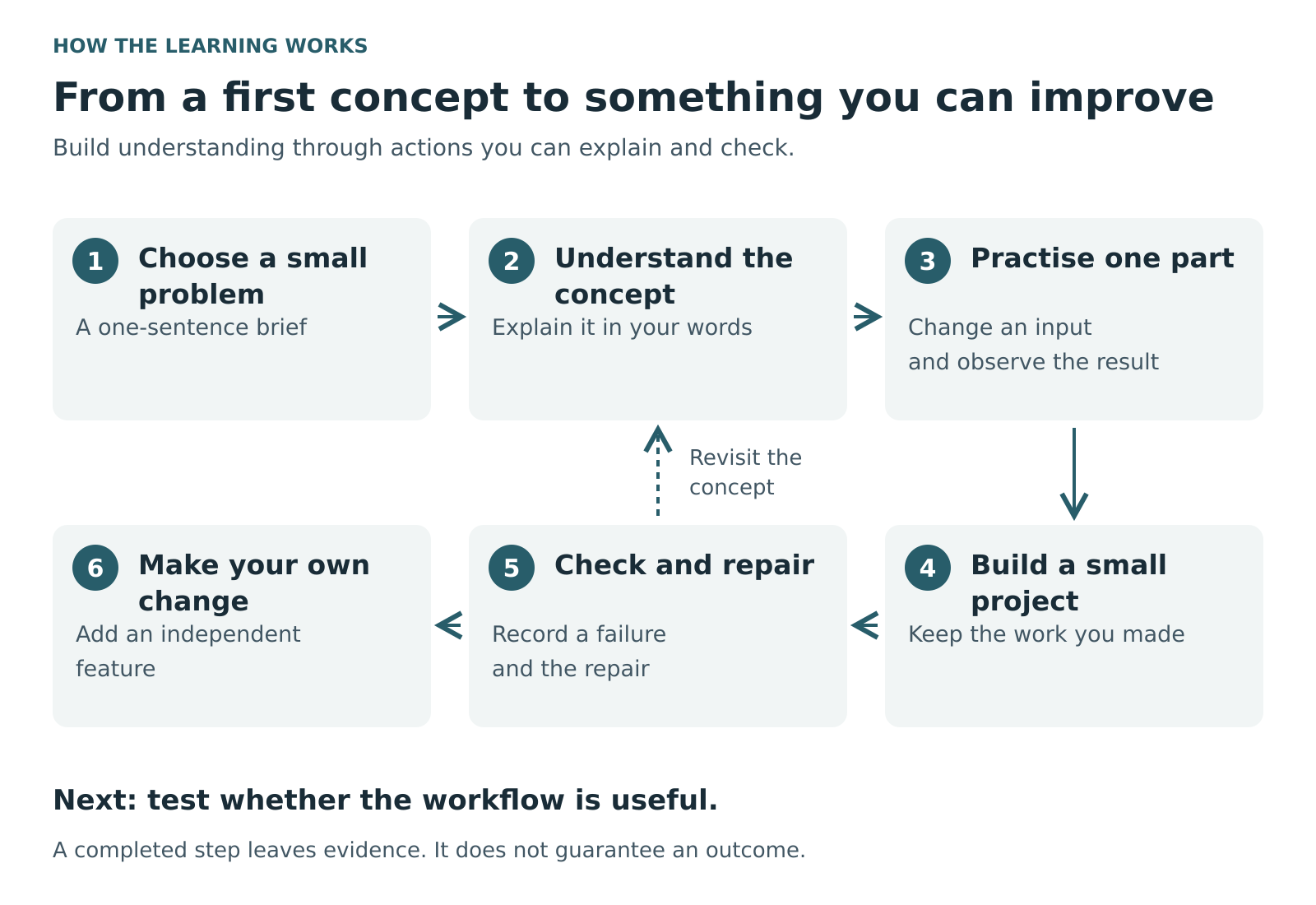
Upverto’s learning approach connects those questions. Start with a concept you can explain, practise it in a small task, use it in a project, then test and change what you built. The aim is to help you move towards useful software of your own, whether that becomes a personal tool, something for your business or a product you want to develop further.
Here is what that means in practice, including a small project you can use to think through your own learning.
A learning system you can see in the work
The authored course material combines plain explanations, technical detail, English and Urdu text, visual explanations, exercises and project guides. These give you several ways into an unfamiliar idea. A diagram can show where information goes; a worked example can show what changes; an exercise asks you to make a decision yourself.
The next step matters just as much. Project guides ask learners to run something, inspect it, make a change, investigate a failure and explain the result. Some extensions deliberately provide less guidance.
That makes progress more concrete. “I read about saving files” becomes “I saved a note, reopened the program and found the same text.” Later, it becomes “I added a feature without breaking the older notes.” Each step leaves something you can inspect.
Start with a problem small enough to understand
Imagine Amina runs a small shop and wants to remember customer follow-ups. This is a fictional learning example, not a customer success story.
Her first idea is an “AI business assistant.” That is too broad for a first build. She narrows it to one question: Which enquiries still need my attention?
For practice, she uses invented records: Customer A asked about an item; Customer B needs a reply tomorrow. She needs to add a note, find it again and mark its status. She does not need an automated sales agent or real customer information to investigate that workflow.
Before choosing tools, write four things:
- Who will use this: one shop owner, initially.
- What they need to do: record an enquiry and find unfinished follow-ups.
- What a useful result looks like: the right saved notes appear when needed.
- What the first version excludes: automatic messages, payments and multiple staff accounts.
You can replace this example with revision notes, a stock checklist or a personal task list. Choose something familiar enough that you can recognise a wrong result.
Learn the concept at the moment you need it
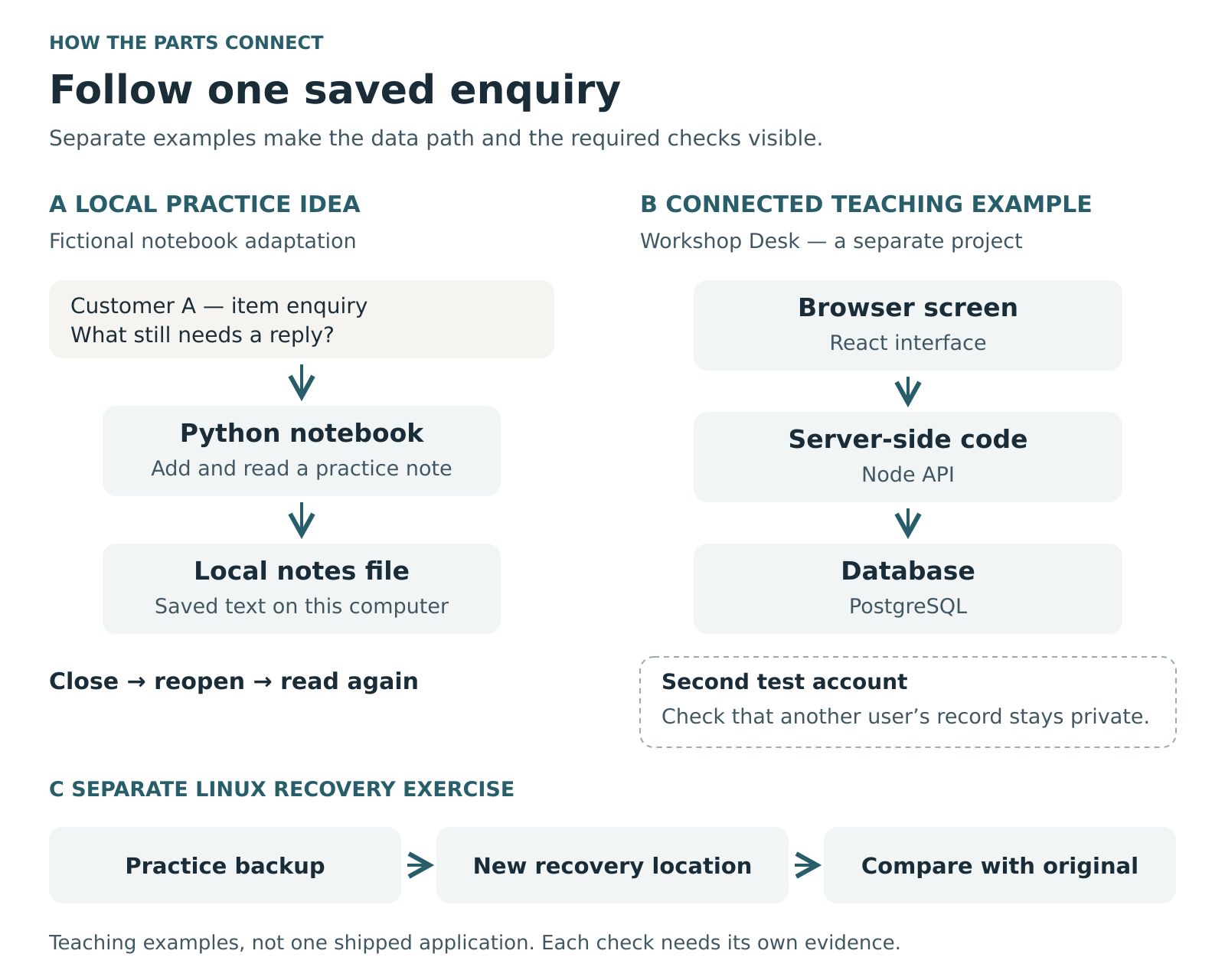
Upverto’s authored learning-notebook project provides a useful starting point. Its supplied Python program adds notes, saves them in a JSON file and loads them again. JSON is a plain-text format for storing data in a structured form. The guide asks learners to close and reopen the program, inspect the saved file and explain why the note remains.
For Amina’s practice tool, this creates a reason to learn about functions, files and input validation. Each concept answers a question she already has. Where is the note stored? What happens if its topic is empty? What should the program do if a practice file is damaged?
English and Urdu explanations can help a learner revisit the same idea in a more familiar language while keeping technical terms connected to the code. Diagrams and before-and-after examples provide another way to follow the relationship.
Use those supports actively. Predict what will happen, run the exercise, then explain any difference. If you cannot explain a line yet, make that your next small learning task.
Move from following instructions to making decisions
The notebook project does not stop at running the supplied program. It asks learners to add search, test matching and missing topics, and handle Urdu text. A later extension asks learners to add a learning-status field and decide what should happen to older notes that have no status.
Those are useful decisions to practise. Adding a field affects existing work. A search that succeeds once still needs a sensible result when nothing matches.
Amina could adapt this pattern into her own enquiry statuses, such as “New,” “Waiting” and “Closed.” That is an extension idea, not a ready-made shop feature supplied by the notebook project.
She could keep a short build record:
- Expected: searching an item name returns the related practice enquiries.
- Observed: one matching record appears, but a second is missing.
- Changed: she adjusts her search rule and explains why.
- Checked: both matches appear; an unknown item returns a clear empty result.
This record is useful when she returns to the project later. It also shows where she relied on the example and where she made her own decision.
Understand AI through experiments you can explain
As you progress into AI, the same approach gives technical ideas something concrete to attach to.
The neural-network project uses a tiny XOR exercise: the output is on when one input is on, but not both. Learners inspect a forward calculation, loss, gradients and weight updates in ordinary Python. They are asked to change the learning rate and add a numerical check. The project explicitly treats fitting those four examples as a teaching experiment, not evidence that a model will perform well on unfamiliar data.
A separate classifier project asks learners to compare against a baseline, keep training, validation and test roles distinct, and save and reload their model. The learning question includes whether the reloaded model reproduces its predictions, rather than stopping when training finishes.
For Amina, a possible later experiment might suggest a category for an enquiry. She would first need examples, a clear definition of a correct category and a way to review mistakes. If a simple search or rule already solves the problem, she can keep that simpler version. Choosing whether AI is useful is part of building responsibly.
Connect the parts of a useful product
A local notebook has a deliberately limited scope. A shared application introduces further questions: who can see each record, what happens after a restart, and how a mistake can be recovered.
Upverto’s authored web-development material includes Workshop Desk, a teaching project designed to connect a browser screen, server-side code and a database, using React, Node and PostgreSQL respectively. Its guide follows a browser action into stored data, asks learners to check ownership with two accounts and includes changed-requirement work. Email in that project is simulated locally; it should not be mistaken for a configured messaging service.
Linux projects introduce another part of the picture. The exercises ask learners to create and inspect files, deliberately change a practice copy, detect the difference and repair it. Later recovery work asks them to restore sample content into a fresh location and compare it with the original.
These examples show why building a product involves more than a screen or a model response. You need to understand how the parts connect and what evidence supports each claim you make about them.
Find out whether someone actually needs it
Once a small version works, the next question is whether its workflow helps its intended user. A completed exercise cannot answer that by itself.
For the shop example, Amina could compare the prototype with her existing way of keeping notes. Using invented enquiries, can she find an unfinished follow-up without help? Does “Waiting” have a clear meaning? Can she correct a mistake? Does the tool create extra work?
If you are considering a product or business, ask someone who understands the problem to walk through a safe demonstration. Ask what they do now and where the proposed tool would fit. Watch for confusion rather than explaining every button for them. Record what needs changing before expanding the feature list.
The result might be a better internal tool, a narrowly focused product idea or a decision not to pursue the idea. Freelance work is one possible application of these skills, but building something for your own work or business is another.
Keep separate notes on technical checks and user feedback. “The search passed my examples” and “a shop owner found the workflow useful” answer different questions. Neither establishes sales, income or commercial readiness.
Make room for practice and revision
Plan study time for reading, exercises, setup, debugging and project changes. The authored study-time calculator uses provisional planning ranges that include lessons, practice, revision and project work. Those estimates are not measured student completion times or promises of mastery.
Choose a pace you can sustain and a small outcome for each session. Saving and reloading a note is a clearer target than “learn Python tonight.” Leave time to revisit what failed.
Upverto is an expanding self-learning platform, with affordable, beginner-accessible learning as a goal. AI engineering, web development, WordPress development and Linux are examples of its learning paths, rather than a limit on what practical self-learning can cover.
To start, choose one problem, write its first acceptance checks and build the smallest useful version. You can explore the AI Engineering learning path to see how its foundations and projects relate to that direction.
Frequently asked questions
Can I start if I have never written code?
Begin with the foundation material and small exercises. Check each project’s prerequisites before attempting it. If you cannot yet read its functions or use the required tools, return to those lessons rather than copying past the gap.
Do I need AI in my first project?
No. A notes tool, form or checklist can give you useful practice with inputs, saved data and testing. Add an AI experiment when you can explain the problem it addresses and how you will judge its output.
How do I know I am learning rather than copying?
Try a change that is not shown step by step. Predict its effect, implement it, test ordinary and failing cases, and explain your choices. A working copied example is a starting point; your independent change supplies more useful evidence.
Are the explanations available in Urdu?
The authored course material includes English and Urdu-script explanations, with technical terms and code retained where needed. Use the language that helps you understand the idea, then connect the explanation back to the actual exercise.
Will a course project be ready to sell?
Treat it as a learning foundation. Real use can require additional work on access, data handling, reliability, deployment and support. Check the project’s stated limits and validate the proposed workflow before presenting it as a commercial product.
Is this only useful for freelancing?
No. You can apply the same process to a personal tool, an internal business workflow or your own product idea. The immediate goal is something you can explain, change and check; the eventual use depends on the problem you choose.