A web-development service is a promise about behaviour: a visitor can find information, submit a request, or complete another agreed task on a working website. Learning the syntax is part of that promise. You also need to understand what happens when the input is missing, the screen is narrow, a request fails, or the owner needs a change. Build your learning path around these responsibilities before offering a complete application.

In this guide
If you are still comparing directions, start with which digital skill should I learn. This guide follows one fictional community-library catalogue from a simple page to a small application. Each stage produces evidence you can inspect; none sets a deadline for becoming a full-stack developer.
Start with a page you can explain
Be comfortable creating folders, recognising file extensions, installing tools from official sources and recovering an earlier file. The preparation guide on computer basics for digital skills covers that groundwork. Keep a practice folder with a short README, your source files and a record of checks. Separate it from client data and personal documents.
Learn HTML as the structure of the page. A heading identifies a section; a button performs an action; a link leads somewhere. CSS controls presentation, spacing and adaptation to different screens. JavaScript handles interaction and changing state. Starting with these distinctions helps you diagnose whether a problem belongs to content, layout or behaviour.
MDN’s HTML accessibility guidance explains why meaningful elements, associated labels and useful link text matter. Apply that guidance to your own page rather than treating accessibility as a final decoration. Try the page with only a keyboard, check that focus is visible, and read its headings in order. These are useful checks, although they do not constitute a complete accessibility audit.
Use a project ladder with separate completion tests
The fictional library has three sample books. A visitor should see the title, author and availability, then filter the list by a word in the title. The sample has no personal records, reservations, accounts or payments. Those exclusions keep the first project inspectable.
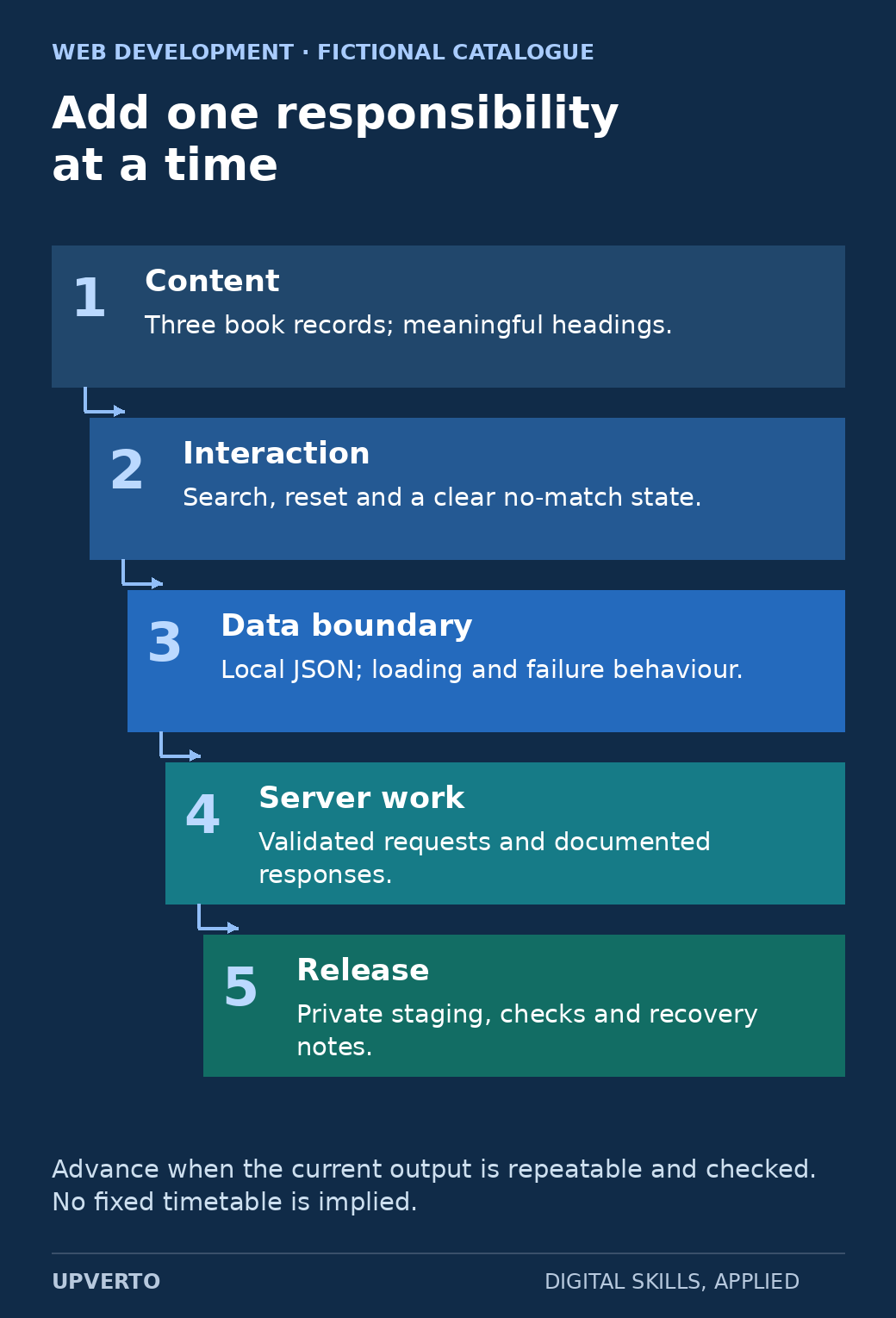
Read the text version: A catalogue project ladder
- Content: three book records with meaningful headings.
- Interaction: search, reset and a clear no-match state.
- Data boundary: a local JSON source with loading and failure behaviour.
- Server work: validated requests and documented responses.
- Release: private staging, actual checks and recovery notes.
Advance based on repeatable evidence, not a fixed completion timetable.
| Stage | Build | Evidence before advancing |
|---|---|---|
| 1. Static content | A catalogue page containing three fictional book records | Semantic headings, readable narrow-screen layout and working navigation |
| 2. Interaction | A labelled search field and a reset action | Known query, no match, empty query and keyboard checks |
| 3. Data boundary | Read the same records from a local JSON file | Loading, successful response and unavailable-file states |
| 4. Server work | A separate practice service with validated requests | Documented inputs, response shapes and rejected invalid requests |
| 5. Release | A private staging deployment and handover notes | Configuration, actual deployed checks and a tested recovery procedure |
Do not add a database merely to make the project sound advanced. First ask what information must persist, who may change it, and which relationships need to be represented. A database adds responsibilities for validation, access, backups and migrations. A login adds identity and session responsibilities. A payment adds a further boundary. Each deserves a separate learning and review step.
Worked example: inspect the search rule
The following invented data is enough to reason about a filter. Record B1 is Garden Notes, B2 is River Atlas, and B3 is Small Gardens. The rule trims surrounding spaces and compares titles without case sensitivity. An empty query returns all three records; a missing match returns an empty list. The interface must translate that empty list into an understandable message.
const books = [
  { id: "B1", title: "Garden Notes" },
  { id: "B2", title: "River Atlas" },
  { id: "B3", title: "Small Gardens" }
];
function searchBooks(query) {
  const term = query.trim().toLowerCase();
  return books.filter(book =>
    book.title.toLowerCase().includes(term));
}
A local check of the sample function verifies that GARDEN returns B1 and B3, river returns B2, ocean returns no records, and an empty string returns all three. This checks the function only. It does not prove that a browser interface announces updates, handles focus correctly, or works on a deployed server. Keep those claims separate.
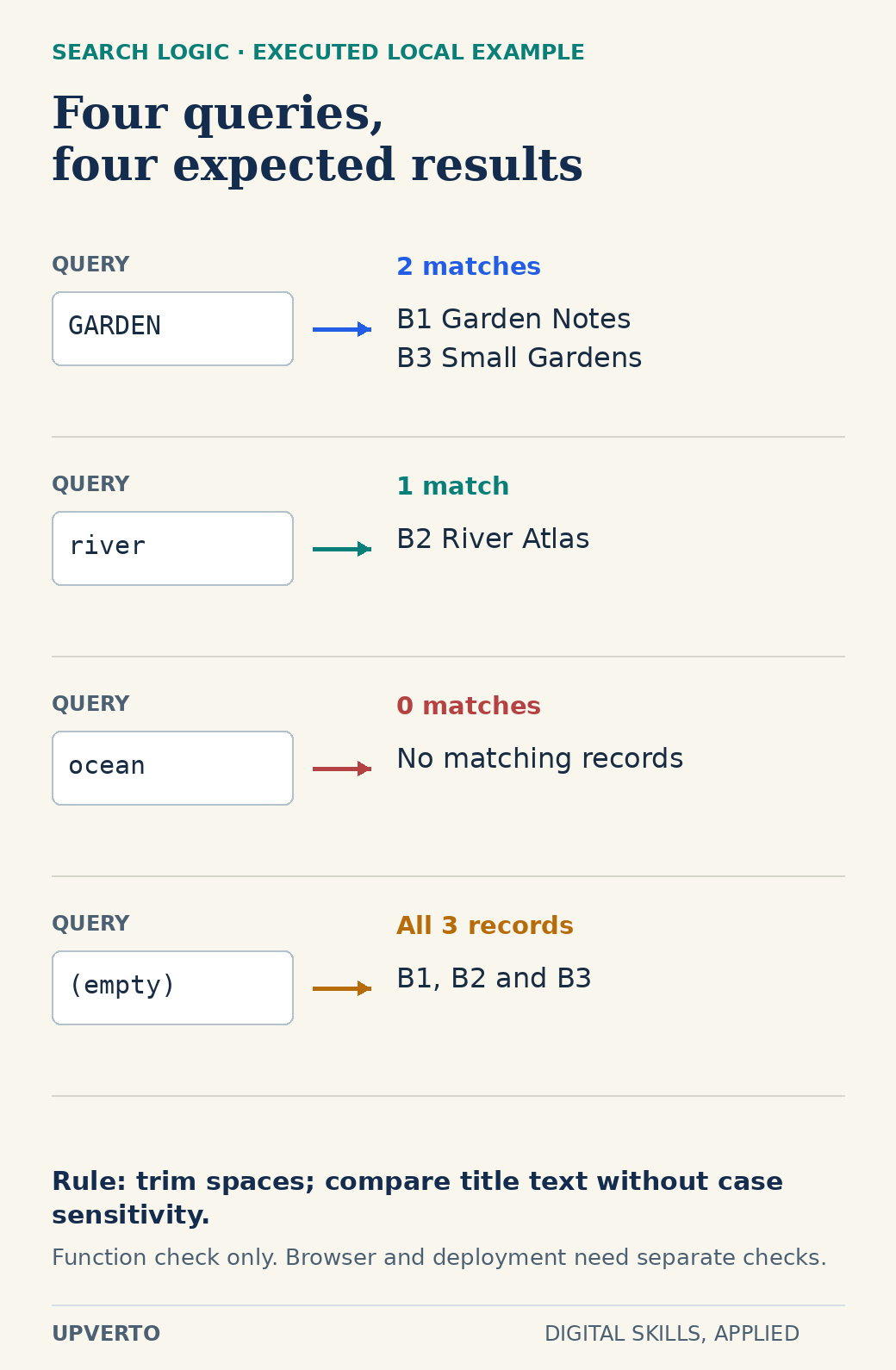
Read the text version: Inspect the catalogue search cases
The search rule trims surrounding spaces and compares lowercase title text.
| Query | Expected and locally checked result |
|---|---|
| GARDEN | B1 Garden Notes and B3 Small Gardens |
| river | B2 River Atlas |
| ocean | No records |
| Empty string | All three records |
The JavaScript function check does not verify keyboard feedback, layout or deployment.
For the user-facing version, show “2 books found” after the garden search and “No books match this title. Try another word” after the ocean search. Preserve the typed query so the visitor can edit it. Decide whether filtering occurs as they type or after submission; explain that decision in the README. A loading message becomes relevant only when the interface actually waits for data.
Copy this practical project brief
Purpose: help a visitor locate a title in a small fictional catalogue. Inputs: three invented book records and a written filtering rule. Deliverables: source files, a working practice page, a test log and setup instructions. Boundary: no real library integration, visitor accounts or reservation service.
- Write the expected results for four searches before implementing the filter.
- Check the label, submit or reset control, keyboard path and visible focus.
- Test long titles and a narrow viewport; record any wrapping or overflow problem.
- If you load JSON, simulate a missing file and display an appropriate failure message.
- Give another person the setup instructions and record where they need clarification.
- Save a version before changing the data format, then practise returning to it.
Use a log with columns for condition, expected behaviour, observed behaviour, environment, date and next action. A screenshot is useful evidence of appearance. It cannot demonstrate a filter result, an error path or a restore by itself. Link each claim in your project notes to the relevant evidence.
Translate capability into a limited service
A beginner who can reliably build and check static layouts might prepare a specified informational page from approved copy and design. A developer who can implement and test a bounded interaction might add a filter to an existing interface after reviewing its environment. Neither description automatically includes server administration, security review, payment processing or ongoing support.
For each possible service, name the required inputs, the exact output, the checks you perform, the changes included and the handover. Ask who controls hosting and deployment, who supplies content, and how a change will be approved. If a prospective client needs something outside your demonstrated ability, narrow the scope or involve an appropriately experienced person.
Use the ready for paid client work checklist against the actual proposed brief. Being able to follow a tutorial once is different from diagnosing a variation independently. Rebuild a feature without copying the solution, explain the tradeoffs and handle a deliberately introduced error. These exercises reveal a more useful next learning step than collecting another framework name.
Choose the next project deliberately
MDN’s accessibility learning module is a primary reference for the interface work. Pair reference reading with small changes you can inspect. Keep a question list rather than opening several unrelated courses at once. After the catalogue works, use choose portfolio projects for freelance services to choose a second project that adds one meaningful responsibility, such as an editable data model or a documented API boundary.
A course may help with sequence and feedback, but compare its current syllabus with your gap. This guide does not assume that a course covers every deployment, database or security responsibility. Your portfolio should describe what you actually built and checked, including remaining limitations.
Frequently asked questions
Do I need to learn a framework before offering any web service?
A framework is not the first acceptance criterion. Learn the underlying HTML, CSS and JavaScript needed for the work, then use a framework when the project or team requires it. A narrowly scoped static-page service can have different prerequisites from maintaining a complex application.
When should I add a backend to the catalogue project?
Add it when you have a concrete requirement that a static file cannot satisfy, such as authorised editing or shared persistent records. First document inputs, permissions and failure behaviour. Do not add real accounts or personal data just to make the sample appear more advanced.
Does passing the search-function check prove the website works?
No. It verifies four specified logic cases. The actual interface still needs checks for keyboard use, visible feedback, layout and integration. A deployed version also needs its own configuration and recovery checks.
Can I use AI-generated code in my practice project?
You can inspect it as a draft, but you remain responsible for understanding, testing and maintaining it. Do not submit secrets or client data without permission. Keep the parts you can explain and verify, and record any external code and its licence.
What should I show if the project has no real users?
Label it as a fictional practice project. Show the brief, source, normal and error-state checks, design decisions and limitations. Report observed test behaviour without inventing visitor satisfaction, conversions or commercial results.
How do I know which service is small enough to begin with?
Write its exact inputs and completion checks, then compare those with work you can repeat independently. If you cannot explain a failure or hand over the result, reduce the responsibility and practise that gap before promising delivery.