To offer WordPress services, learn to organise content, build usable pages, manage the tools involved, test the result, and hand over a site someone else can maintain. Installing a theme is one step. Client work also involves understanding requirements, protecting existing content, and checking what visitors can actually do.
WordPress is a content management system: software for creating and managing website content. This roadmap focuses on the abilities behind useful client work and the projects that can demonstrate them. If you are comparing it with other directions, use the digital-skill selection guide.

In this guide
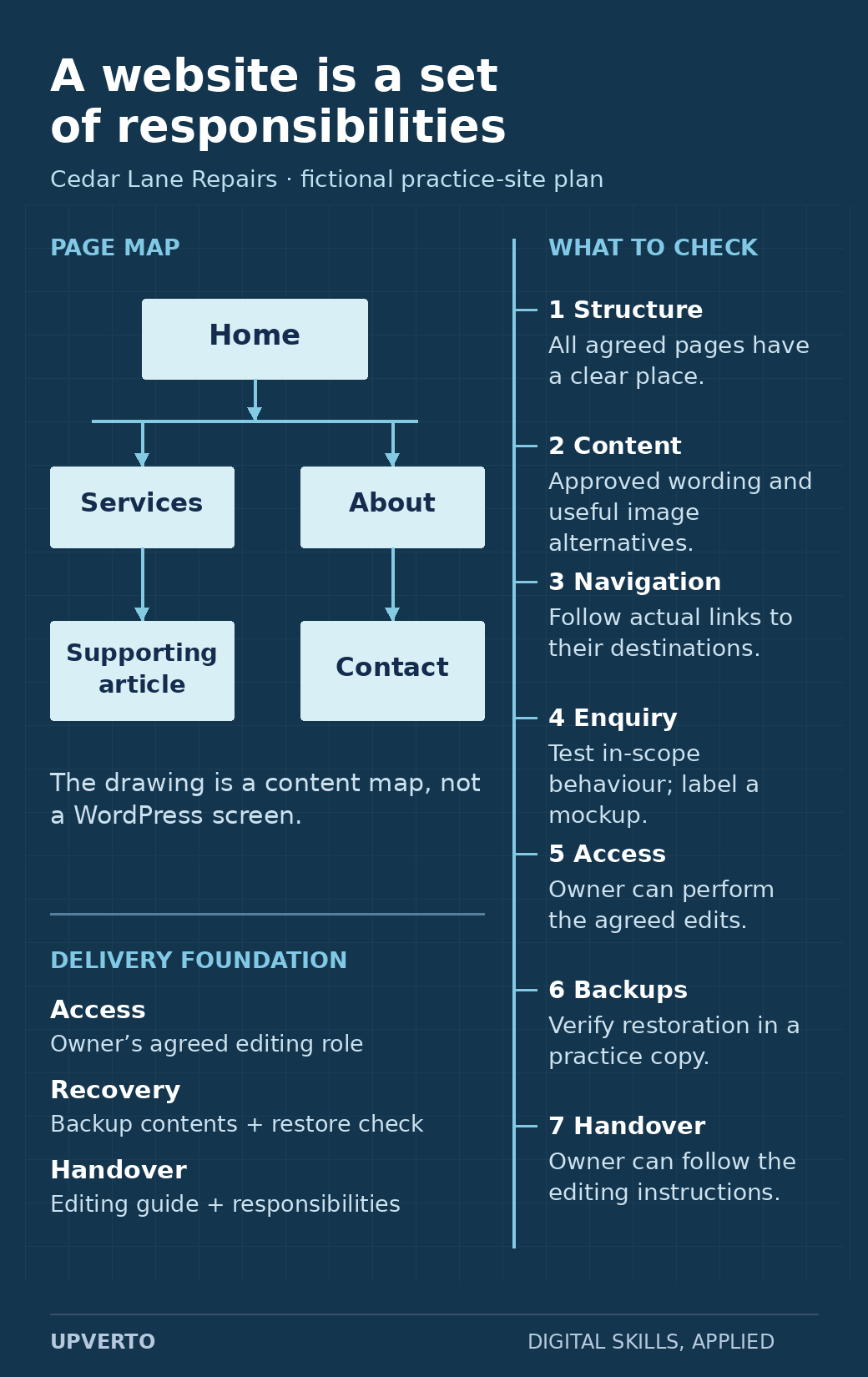
Read the text version: Connect website responsibilities to checks
This is a content and responsibility diagram for the fictional Cedar Lane Repairs practice site, not a WordPress screenshot.
- Page structure: place the agreed Home, Services, About, Contact and supporting article pages in a clear content map.
- Content: check complete approved wording and appropriate image alternatives.
- Navigation: follow the actual links and confirm their destinations.
- Enquiry: check the behaviour within the agreed scope; clearly identify a visual mockup if no working interaction exists.
- Access: check that the owner can perform the routine edits agreed for their role.
- Backups: identify the backup contents and verify restoration in a practice copy.
- Handover: provide instructions the owner can follow, along with maintenance and support responsibilities.
The illustrative map does not establish that any live website has passed these checks.
Understand the kinds of WordPress work
| Work type | Possible deliverable | Responsibility to understand |
|---|---|---|
| Content and layout updates | Approved changes to named pages or posts. | Preserving unrelated content, checking links and layout, and obtaining approval. |
| Small information websites | A defined set of pages, navigation, and agreed features. | Content structure, usability, accessibility, configuration, and handover. |
| Maintenance | An agreed set of checks, updates, backups, and reports. | Recovery, compatibility, access, responsibilities, and support boundaries. |
| Custom development | Specific theme, plugin, or integration functionality. | Programming, testing, security, compatibility, and ongoing ownership. |
These categories require different depths of ability. Do not describe basic page editing as evidence that you can safely manage every integration, migration, or security incident. Use the readiness rubric for the particular work you want to accept.
Learn the foundations in a practical order
Begin with files, browsers, accounts, domains, and hosting concepts. Learn the difference between an address, the server that hosts a site, and the software that manages its content. You need enough understanding to ask sensible questions when a site is unavailable or a change does not appear.
Next, practise pages, posts, media, navigation, themes, plugins, and the editing tools used by the site. WordPress’s official beginner pathway covers these introductory areas and includes lessons on settings, backups, and security. Use current documentation for the version and tools you actually use.
Then connect the parts into a useful visitor journey. Decide which information belongs on each page, how a visitor reaches it, and what the next action should be. A layout is successful only when it supports the intended content and task.
- Content: pages, posts, images, and clear navigation.
- Presentation: readable layouts and behaviour across screen sizes.
- Operation: access, backups, updates, and recovery.
- Delivery: requirements, checks, approval, and handover.
Understand the editor and theme before changing them
A site may use WordPress blocks, a page builder, theme-specific controls, or a combination. Inspect how the actual page is built before replacing its content or settings. A change in one editor may not control the output you expect.
Practise keeping content editable and preserving structure. Avoid placing all text inside a screenshot simply to reproduce a design. Use headings, paragraphs, lists, links, and appropriate image alternatives that people and assistive technology can interpret.
For images, use the text alternative that fits their purpose. An informative image and a purely decorative image need different treatment; the W3C images tutorial explains the distinction.
Practice brief: a small service-information site
Fictional project: Build an information site for Cedar Lane Repairs, an invented repair service. Use fictional details and permitted assets in a private practice environment. Do not configure real payments or collect actual customer information for this exercise.
| Requirement | Practice output |
|---|---|
| Audience | A visitor who wants to understand the services, service area, and enquiry process. |
| Pages | Home, services, about, and contact information, with a short supporting article. |
| Navigation | A clear route between pages, with meaningful link labels. |
| Content | Readable headings and text using supplied fictional copy. |
| Enquiry example | A clearly labelled test-only interaction if your environment supports it; no real submissions. |
| Checks | Page links, text, images, responsive layout, keyboard access, and any test interaction. |
| Handover | A short guide explaining how to edit a page and what needs maintenance. |
Keep the brief, a content plan, the site output, and a check log. Record what you actually tested. If the contact interaction is only a visual mockup, label it as such instead of presenting it as a working form.
Practise recovery and maintenance in a safe environment
Before offering maintenance, learn how backups are created, what they include, and how restoration is verified. A backup file existing is different from evidence that the intended site can be restored.
In a practice copy, record the current state, make a small authorised change, check it, and practise reverting it. Learn how to recognise whether a problem comes from content, a theme, a plugin, or another dependency. Do not disable broad protections just to make an error disappear.
For client work, agree on the access and recovery process before production. Live payments, personal data, and business-critical workflows require capabilities and permissions beyond a beginner’s visual site exercise.
Check a website as a visitor and an owner
- Content: approved wording is complete; headings describe the sections; contact details are correct for the intended environment.
- Navigation: important links lead to the intended destinations, including on smaller screens.
- Interaction: test each in-scope control and its error or empty state.
- Presentation: text remains readable; tables and images fit; keyboard focus is visible.
- Operation: the required backup, access, and maintenance arrangements are documented.
- Handover: the owner can identify how to make the agreed routine edits.
This is a starting checklist, not an exhaustive accessibility, security, or performance audit. Use more specialised checks when the scope requires them and state the actual limits of your review.
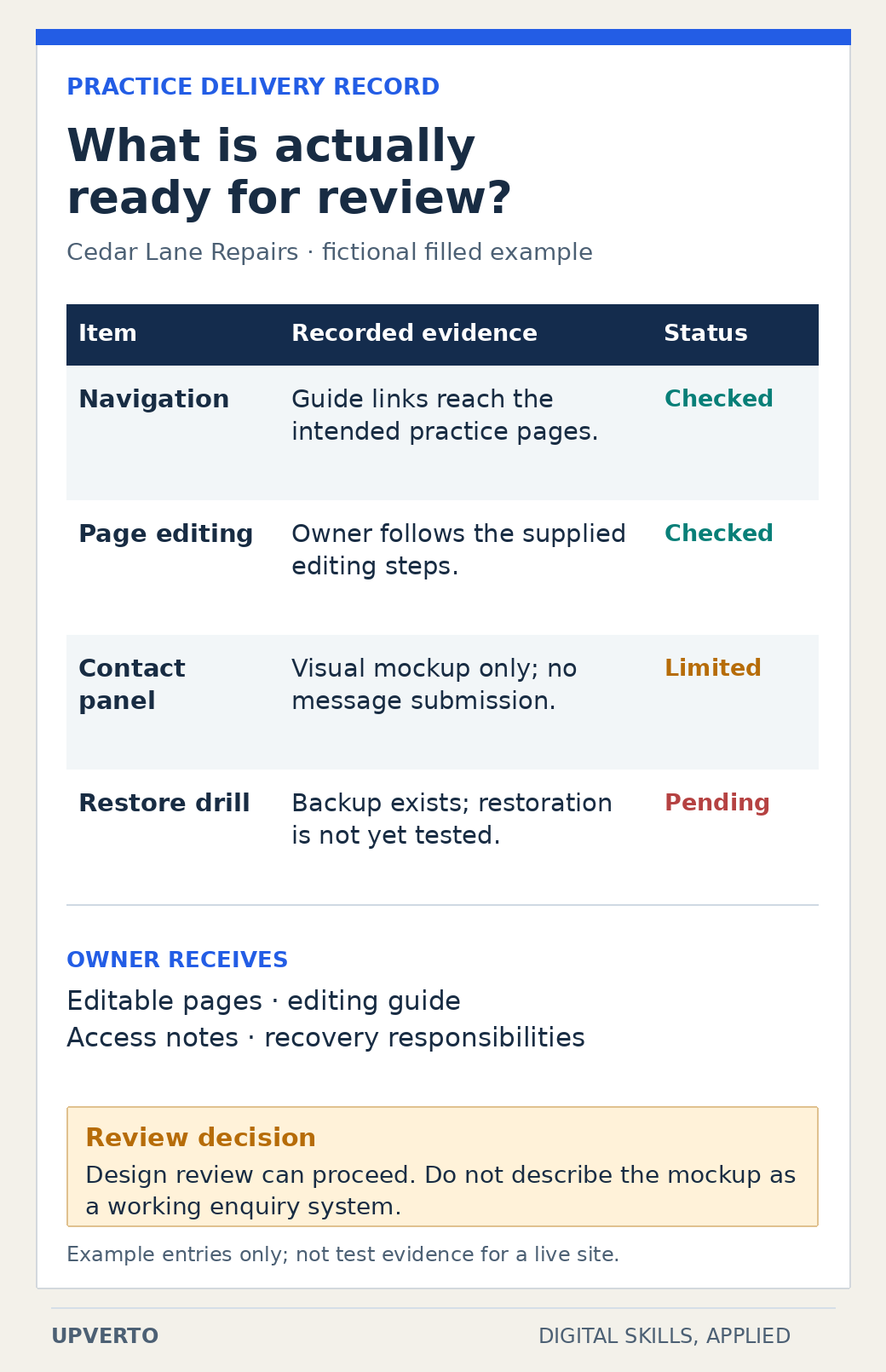
Read the text version: Read a release inspection record
This is a filled fictional planning record, not actual WordPress test evidence.
| Item | Example record | Status |
|---|---|---|
| Navigation | Guide links reach the intended practice pages. | Checked in the fictional example |
| Page editing | The owner follows the supplied editing steps. | Checked in the fictional example |
| Contact panel | It is a visual mockup only, with no message submission. | Limited |
| Restoration | A backup exists, but restoration has not yet been tested. | Pending |
The owner handover contains editable pages, an editing guide, access notes and recovery responsibilities. The example decision permits design review while keeping the unimplemented enquiry behaviour and pending restore check explicit. Actual delivery records must contain evidence from the real project.
Turn the project into evidence and a service
Write a case study showing how the page structure serves the visitor, what changed during review, and which checks passed. Include only results you performed. A visually attractive screenshot does not prove a working website.
Use the portfolio structure and project-selection guidance. Once the evidence supports a defined task, use the package worksheet to specify the pages, inputs, functionality, revisions, and handover involved.
For a potential client, ask what exists now, what needs to change, who owns the content, which systems are involved, and what approval is needed. These questions help you distinguish a content update from a broader redevelopment.
Frequently asked questions
Do I need programming before starting WordPress?
You can begin learning content management and page building before custom programming. More advanced themes, integrations, debugging, and bespoke functionality require deeper technical knowledge. Match the work you offer to the capabilities you have demonstrated.
Can I offer maintenance immediately after building one site?
Assess maintenance separately. You need to understand updates, backups, recovery, permissions, compatibility, and the agreed support responsibility. One successful build does not demonstrate every maintenance scenario.
What should my first WordPress portfolio project include?
Use a small brief with a clear audience, a few purposeful pages, working navigation and a defined contact or enquiry requirement. Check the completed experience and document your decisions. Explain that it is a practice project, and separate what you built from third-party themes or assets.
Do I need to learn every page builder?
Begin with one editor and theme combination so you can understand a complete workflow. Learn how content, layout and theme settings interact before collecting more tools. Investigate another builder when a project requires it, then test its behaviour before promising that service.
What should I check before handing over a website?
Check the agreed pages, important links, relevant forms, mobile layout and any functionality within scope. Confirm that the owner can access the site and understands the editing process. Record what was tested, what remains outside scope, and the agreed backup, recovery and support arrangements.
Can I make changes directly on a client’s live site?
Use the client’s authorised workflow. Preserve a recovery route, understand the impact of the change and use a staging or draft environment where appropriate. Agree on who approves publication. Completing a practice site does not automatically prepare you to change every live system safely.
Choose one task and practise the whole delivery
Begin with the fictional site brief and a learning plan. If WordPress is your chosen path, inspect Upverto’s WordPress course outline for its actual curriculum. Then use the readiness rubric and the project-delivery guide before offering paid work.