A portfolio is ready to share when its intended reader can inspect relevant evidence and understand what it proves. That requires more than attractive thumbnails. The sample must open, the project label must be clear and your contribution must be distinguishable from the work of others.
This is a presentation review. It does not establish that you can deliver every service mentioned in the portfolio. Use build freelance portfolio without clients to develop the underlying evidence, then use the checks below to make that evidence understandable.

In this guide
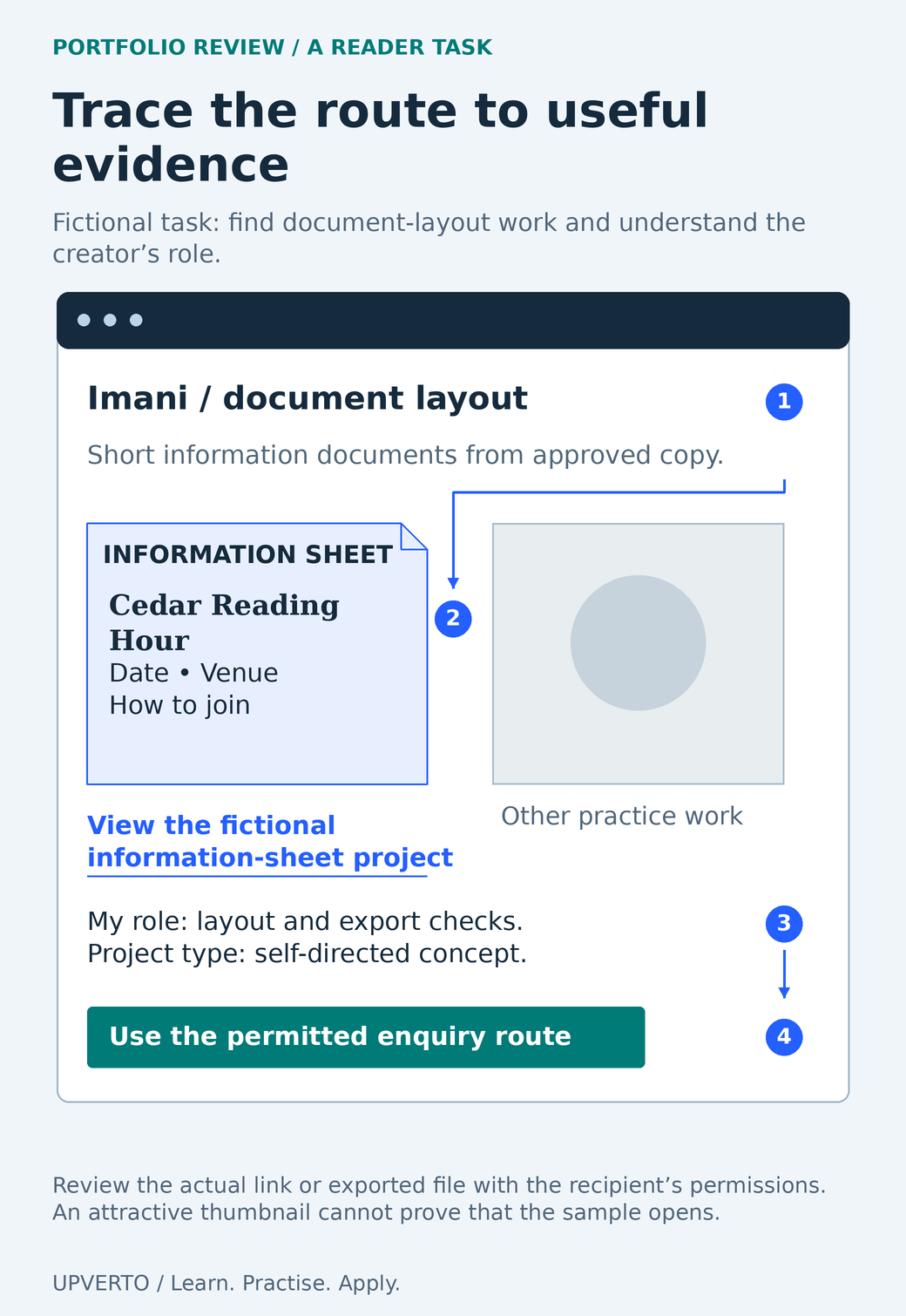
Read the text version: Inspect the route from service to sample and next action
- Identify the offered task: short document layout from approved copy.
- Open the relevant Cedar Reading Hour sample through a descriptive link.
- Read the contribution and context: layout and export checks, labelled as a self-directed concept.
- Find the appropriate permitted enquiry route.
Test the exact link or exported file with the recipient’s actual access permissions. The schematic demonstrates a review task, not a tested conversion result or a complete accessibility evaluation.
Review the portfolio as a reader with a job to do
Choose a fictional but specific reader task: “Find an example of a short information document, identify what the creator did and locate the permitted way to enquire.” Open the same link or attachment you plan to send. Do not begin inside the editor or an account that has extra permissions.
Notice the first explanation a reader receives. A list of tools does not tell them what you can produce. A row of images without labels does not tell them whether the work was a commission, collaboration or concept. Ask whether the service and the strongest relevant sample can be found without your spoken explanation.
When choosing the presentation itself, compare portfolio website vs PDF vs profile. Each format creates a different access test. A public site needs navigation; a PDF needs a clear current file; a platform entry needs the permitted media and next action.
Use a rubric with evidence, not an invented score
| Area | Observable check | Record |
|---|---|---|
| Relevance | A sample matches the task you want to offer. | Which sample and which requirement? |
| Context | The brief, audience and project type are stated. | Missing or ambiguous context |
| Contribution | Your role and supplied material are distinguishable. | Claim requiring clarification |
| Evidence | The actual output and checks can be inspected. | Supported claim or unsupported outcome |
| Permissions | Shared material and credits fit the permission held. | Asset or disclosure needing correction |
| Usability | The sample opens and relevant content is readable. | Device, link, navigation or format issue |
| Next action | The reader can use a suitable permitted contact route. | Broken or inappropriate destination |
Mark each row as ready, needs revision or not applicable, with a reason. Do not average a broken access link into a reassuring percentage. Some issues block the entire task even when the rest of the presentation is polished.
Separate blocking problems from improvements. A confidential screenshot should be removed before sharing. A broken sample link should be repaired before outreach. A minor spacing preference can wait until the evidence and access are sound.
Perform the access and accessibility checks
Open links from the actual exported document or published preview, and inspect the permission offered to the intended recipient. Check that the file or page contains the latest version. A signed-in owner can see material that a prospective client cannot. Use a suitable recipient-access test without exposing private content publicly.
Try the relevant small-screen view, enlarge text and move through the page with a keyboard. Check that headings describe the sections, links make sense and informative images have useful alternatives. The W3C Easy Checks resource provides an initial review method and explicitly says these checks are not a comprehensive accessibility evaluation.
For a PDF, inspect the actual file, including reading order and usable text. For a video, check the complete playback and captions where needed. Do not infer accessibility or quality from the fact that an upload succeeded.
Worked example: a strong sample with a blocked path
Fictional review: Imani wants to offer short document-layout work. The portfolio opens with a decorative collage and a button labelled “See more.” The relevant community-information sheet is in a private folder. Its description says “Client project,” although it was a self-directed concept.
The review finds three concrete problems. The route to the relevant task is unclear, the sample cannot be opened by the intended reader and the label misrepresents the context. Changing the colour scheme would not fix any of those problems.
Imani places the information-sheet sample first, changes the link text to “View the fictional information-sheet project” and provides an authorised readable export. The introduction now says what she created, which source material she used and what she checked. She verifies the link using the actual review permission.
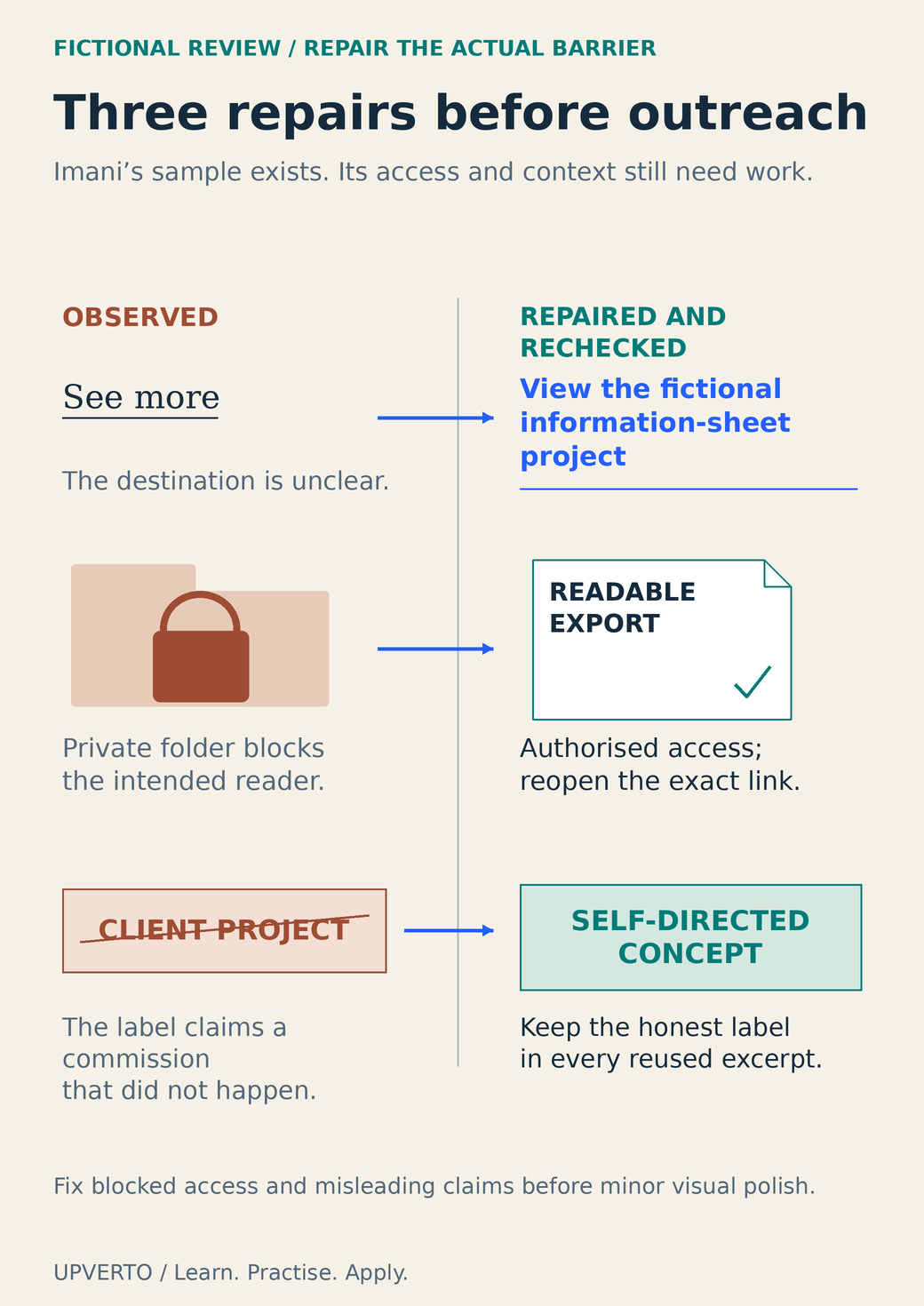
Read the text version: Repair three barriers in a portfolio sample
| Observed barrier | Repair and recheck |
|---|---|
| The link says “See more”. | Use “View the fictional information-sheet project” and check its destination. |
| A private folder blocks the intended reader. | Provide an authorised readable export and reopen the exact link with the correct permission. |
| A concept is labelled “Client project”. | Change it to “Self-directed concept” and retain that context in every reused excerpt. |
These are fictional observations and repairs. They demonstrate inspectability, not a measured change in enquiries or client acquisition.
The revised portfolio is more inspectable. The review does not claim that it will win work, improve rankings or increase a conversion rate. It records the specific barriers removed.
Ask for useful feedback and keep a repair log
Give a reviewer the same task a prospective client would have. Ask them to find the relevant sample and explain what they think you contributed. Avoid narrating the page as they use it. Record the point where they hesitate and the wording they interpret differently from your intention.
| Observation | Effect on the reader | Repair and recheck |
|---|---|---|
| Sample link requests access | The work cannot be inspected. | Provide authorised access; reopen the exact link. |
| Concept appears to be client work | The reader draws an unsupported conclusion. | Add visible project context wherever the sample appears. |
| Contribution is unclear | The reader cannot assess your capability. | Name your role and supplied assets; ask the reviewer to restate it. |
| Contact route is unsuitable | The next action fails or violates channel rules. | Use the appropriate current route and test it. |
Keep a version note after repairs. If you maintain a site, PDF and profile, update the shared facts in every copy. A correct case-study page does not fix an old attachment that still contains an unsupported claim.
Review delivery capability separately with the ready for paid client work checklist. A portfolio can be well presented while the underlying service remains too broad. Once both evidence and capability fit, use how to find freelance clients to choose a manageable next action rather than waiting for a visually perfect portfolio.
Frequently asked questions
How many projects should my portfolio contain?
Enough relevant work to support the service you are proposing, without padding it with unrelated pieces. There is no universal count. A small set with clear context, contribution and checks can be more useful than a large gallery that leaves the reader guessing.
Should I ask friends whether the portfolio looks professional?
Ask them to perform a specific task instead: locate a relevant sample, identify your role and find the next action. Their observations can reveal confusion. A general compliment does not establish that the access, evidence or service fit is clear.
Is a broken link more important than a design inconsistency?
A broken link can prevent the reader from inspecting the work at all, so it is a blocking issue. Fix access, confidentiality and misleading claims before polishing minor visual preferences. Then recheck the exact version you intend to share.
Does a polished portfolio prove I am ready for paid work?
No. Presentation review and delivery readiness are different. You also need to perform the task, estimate effort, handle feedback, check outputs and complete handover. Use the readiness checklist for those responsibilities.
Can I hide weak work instead of improving it?
You can select the evidence most relevant to the service, provided the selection does not create misleading claims. Keep learning experiments privately if they do not support the offer. Improve a sample when its gap affects the capability you need to demonstrate.
When should I review the portfolio again?
Review after changing the service, adding a sample, altering permissions or replacing a file. Recheck the link before a specific enquiry. Set a reasonable maintenance routine for public material so old claims, dependencies and contact details do not remain unnoticed.
Sources and review notes
Primary sources checked on 27 October 2026 (UTC). Check the current provider pages before relying on a changing feature, policy or price. Worked examples and worksheets are original teaching material; fictional examples are not evidence of client results.