To learn a digital skill, choose a clear task, learn its prerequisites, practise with feedback, and gradually remove the instructions you depend on. Progress becomes easier to assess when you can show what you built, explain your decisions, and correct a problem yourself.
This guide helps you turn a broad ambition such as “learn design” or “learn WordPress” into a practical learning sequence. It applies across creative, technical, marketing, and administrative work. If you have not chosen a direction yet, start with the skill-selection guide.

In this guide
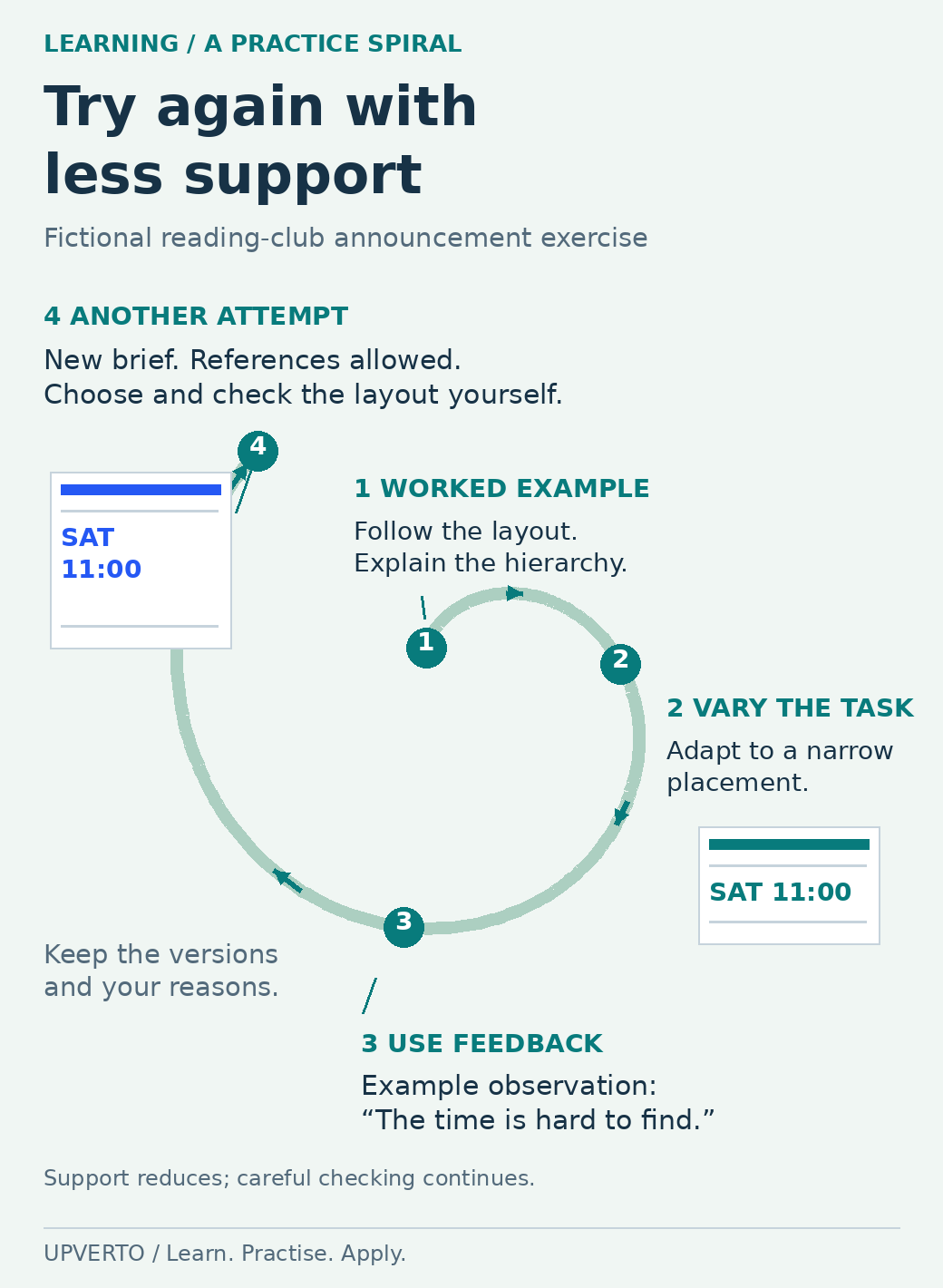
Read the text version: Repeat the task with less support
This illustrative practice spiral uses a fictional reading-club announcement.
- Worked example: follow an explained layout, then explain why its event name and related details are grouped.
- Independent variation: adapt the announcement for a narrower placement, choosing the changes yourself.
- Feedback: an illustrative reviewer observation says the time is hard to find. Record the actual observation in your own work.
- Another attempt: use a new brief and suitable references, with less dependence on a walkthrough. Check the exported result and keep your reasons.
The widening path represents increasing independence, not a score or a fixed timetable. Repeat the cycle when a new gap appears.
Practical summary
- Follow: complete one explained example.
- Explain: describe the purpose of the important steps.
- Change: adapt the example to a new requirement.
- Build: make a related output from a brief.
- Check and fix: identify a fault, correct it, and check again.
- Repeat independently: complete a new variation with suitable reference material.
Define a result you can inspect
Replace a topic name with an observable objective. “Study spreadsheets” might become “create a small expense sheet with consistent categories, a checked total, and clear instructions.” “Learn video” might become “edit a short explanation with intelligible speech and accurate captions.”
A useful objective names the output, the constraints, and the checks. For a simple website, the constraints could include a supplied set of pages and a mobile layout. Checks might include working navigation, readable text, and a tested contact route in a safe environment.
Keep the first objective small enough that you can finish and review it. A complete small output will reveal gaps that are difficult to notice while collecting introductory lessons.
Identify the prerequisites explicitly
Before the subject-specific work, check whether you can create and find folders, identify file types, keep versions, install or access the required tool safely, and understand the brief. If one of these steps is unfamiliar, include it in the learning plan.
Next, list the concepts the task depends on. For a design, this might include hierarchy and alignment. For an editing task, it might include timelines, source media, and export settings. For an administrative task, it might include time zones, sorting, and permission boundaries.
Prerequisites should be linked to the intended task. You do not need to finish every possible background topic before practising, but you do need enough understanding to recognise when the result is incorrect.
Choose one main learning resource and a reference source
Use a structured resource for the sequence and official documentation for exact behaviour or current software instructions. Check whether the resource matches your starting level, available tools, and intended task.
For example, Learn WordPress’s beginner pathway organises introductory site tasks into lessons. For video work, Blackmagic Design’s training collection offers editing and related practice material. Select the material that matches the task you are learning; completing every available lesson is not the immediate objective.
When comparing a free resource and a paid course, inspect the actual exercises, explanations, prerequisites, and support. A clear syllabus can help organise your study. A completion badge by itself cannot show whether you can deliver a particular client task.
Move from following an example to solving a brief
Begin with a worked example and save the result. Then close the instructions and explain the purpose of the main steps in your own words. If you can only remember where to click, return to the concept that makes the action useful.
Change one requirement. Use different text, a different input file, a different audience, or a different output format. Observe which parts of your previous solution still apply and which must change.
Next, attempt a related brief using reference documentation when needed. Independent work does not require memorising everything. It requires choosing a sensible approach, using references accurately, and checking the result without reproducing a tutorial line by line.
Finally, introduce a recoverable problem in a practice copy. Remove a media file, change a formula input, or make a layout too narrow. Diagnose and repair it. Do this in your own practice environment, with backups, rather than experimenting on a client’s live system.
Worked example: learning to produce a clear event graphic
Fictional brief: Create an announcement for a Saturday reading club. The audience must be able to find the event name, date, time, location, and booking instruction. Use invented details and assets you can lawfully reuse.
| Stage | Practice | Evidence to keep |
|---|---|---|
| Follow | Complete a basic layout exercise that explains alignment and hierarchy. | The first version and a note about each main decision. |
| Explain | Describe why the event name is prominent and why related details are grouped. | A short explanation in plain language. |
| Change | Adapt the announcement for a narrow placement. | The adapted version and what you changed. |
| Build | Create a second announcement from a fresh brief without copying the first layout. | The new brief and output. |
| Check | Inspect the exported file at its intended viewing size. | A list of missing details, readability issues, and corrections. |
| Repeat | Complete a variation with different text and constraints. | A final file and a record of where reference help was needed. |
This sequence is an Upverto practice method, not a certified assessment. Its purpose is to make learning observable and reveal the next gap.
Ask for feedback that can change the work
Give the reviewer the brief and ask focused questions. “Can you find the event time quickly?” is more useful than “Do you like it?” For a spreadsheet, ask whether the calculations match a manually checked sample. For a website, ask the reviewer to complete a named navigation task.
Keep observations separate from preferences. A missing date is a factual omission. A preference for a different colour may require discussion against the audience and brief. Record what you changed and why.
If you cannot get a suitable reviewer, perform a documented self-check and label it honestly. Do not describe self-review or an AI response as an independent professional evaluation.
Use AI to support your understanding
You can ask an AI tool to explain an unfamiliar concept, suggest questions to investigate, or create a fictional practice brief. Check important information against reliable sources, particularly when the advice concerns software behaviour, security, prices, or platform rules.
If the tool produces code, calculations, copy, or a design suggestion, inspect and test the output. Try explaining why it works and how you would recognise a failure. If you cannot check it, treat it as material to investigate rather than a finished client deliverable.
Use fictional or appropriately anonymised practice inputs. Follow the relevant owner’s permissions and tool policy before entering real client material into an external service.
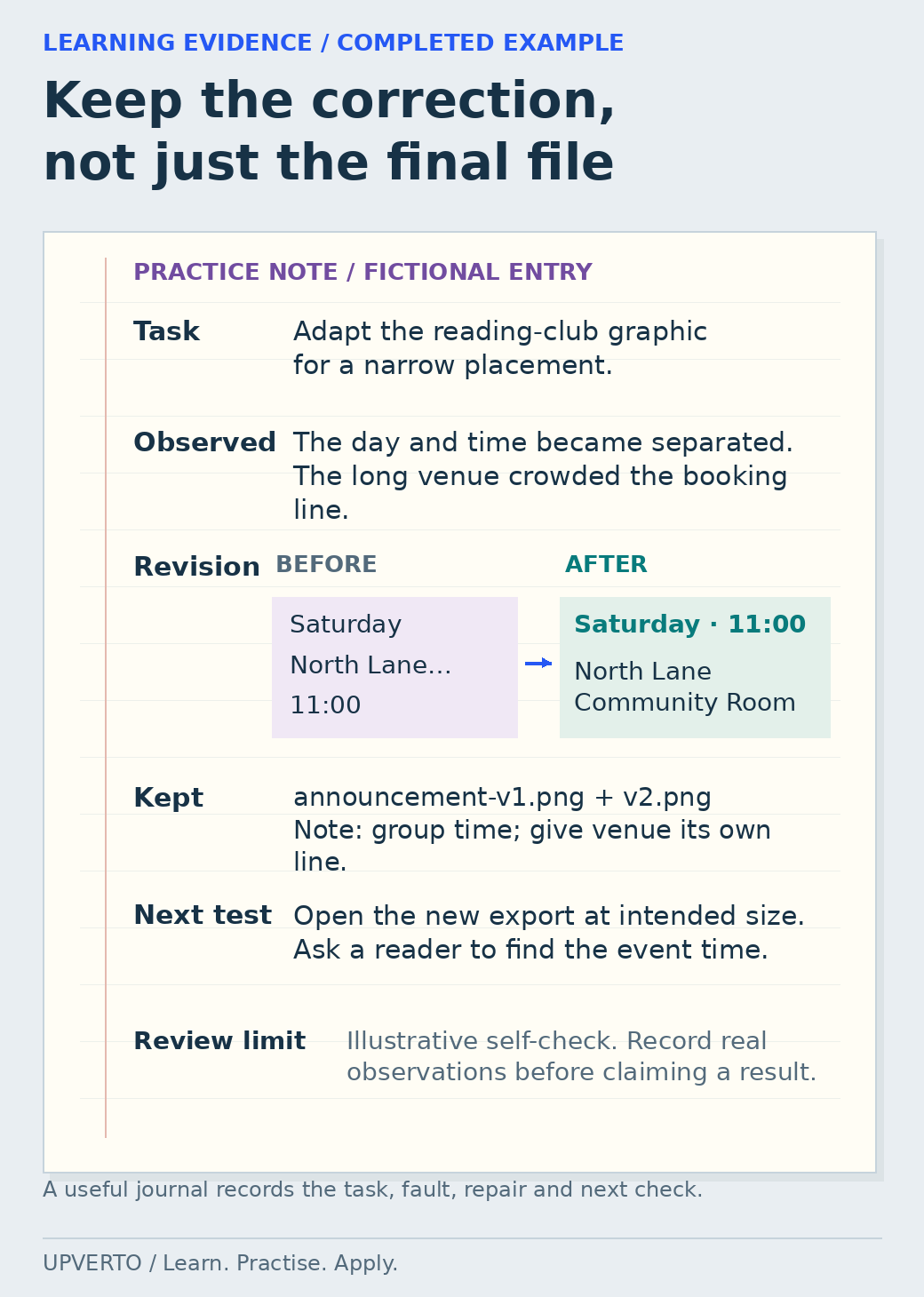
Read the text version: Record a correction and its next test
Fictional practice entry: adapt a reading-club announcement to a narrow placement.
- Observed problem
- The day and time became separated, and the long venue name crowded the booking instruction.
- Correction
- Group Saturday and 11:00 together. Give North Lane Community Room its own lines rather than squeezing every detail into one line.
- Evidence retained
- Keep announcement-v1.png, announcement-v2.png and a note explaining the grouping decision.
- Next test
- Open the actual new export at its intended viewing size and ask a reader to locate the event time.
- Review limit
- This is an illustrative self-check entry, not evidence that a real reader test occurred. Record your actual observations and label the kind of review accurately.
Build your own learning plan
| Field | Your plan |
|---|---|
| Objective | I will produce [output] for [purpose], meeting [checks]. |
| Prerequisites | List the concepts, file skills, and tool access you need first. |
| Main resource | Name one structured learning resource and relevant official references. |
| Practice sequence | Worked example → changed requirement → fresh brief → fault and repair. |
| Study sessions | Choose sessions you can realistically protect around other responsibilities. |
| Review | Who or what will check the result, and against which criteria? |
| Evidence | Keep the brief, versions, final output, checks, and explanation. |
| Next gap | After review, name the most useful thing to improve. |
When learning feels stuck
If every task requires replaying the same tutorial, reduce the scope and practise one decision at a time. If you keep switching tools, define the missing capability before changing. If your projects never finish, shorten the brief and agree on what “done” means before starting.
If you can repeat an example but cannot adapt it, focus on explanation and variation. If your outputs look finished but fail checks, make quality review a separate stage. A visible problem is useful learning information when you record and correct it.
Frequently asked questions
How long should learning take?
The time depends on your starting knowledge, the task, the quality of practice, and the standard you need to meet. Use project milestones and observable checks instead of treating a fixed number of days as proof of readiness.
Can I learn while studying or working?
Build a smaller plan around time you can actually use. Keep your files and notes organised so each session has a clear starting point. Review the scope if the schedule repeatedly becomes unrealistic.
How do I stop getting stuck watching tutorials?
Choose a small output before starting the lesson. Follow one example, then close the walkthrough and rebuild or change it using your own notes. Write down the point where you become stuck, use a relevant reference and test the result. Keep finishing small tasks rather than collecting more videos.
What should I do when I cannot understand a prerequisite?
Name the missing concept or action as precisely as you can. Learn it through a smaller example, explain it in your own words and use it again in the original task. Files, folders, terminology and basic tool controls may need explicit practice before the larger lesson makes sense.
How can I use AI without depending on it for every step?
Ask for explanations, examples or feedback, then check the answer against suitable references and the actual result. Make an independent variation and explain why it works. If you cannot identify an incorrect output or recover from a mistake, return to the missing foundation.
How do I know whether my learning plan is working?
Look for changes in what you can complete, explain, check and repair. Keep dated examples and notes about repeated errors. Adjust the next practice task to address a specific gap, and use the readiness guide before treating a finished course as evidence that you can deliver paid work.
Turn one practice output into evidence
Choose a relevant portfolio project once you can complete a small task. Before selling the work, use the client-work readiness rubric. The broader earning roadmap shows how learning connects to a portfolio, a service, and client delivery.