You can begin learning many digital skills with a phone. Whether you can complete a particular paid task on that phone is a separate question. The answer depends on the required application, the source material, the output, your access needs and the way you must check and hand over the work.
A phone that plays a lesson clearly might still be awkward for inspecting a dense spreadsheet. A computer that opens an editor might struggle with the actual footage. Start with a task you can describe, then test the complete workflow. The broader guide to make money online with digital skills explains how the work connects to a service; this guide helps you check the equipment behind it.
In this guide
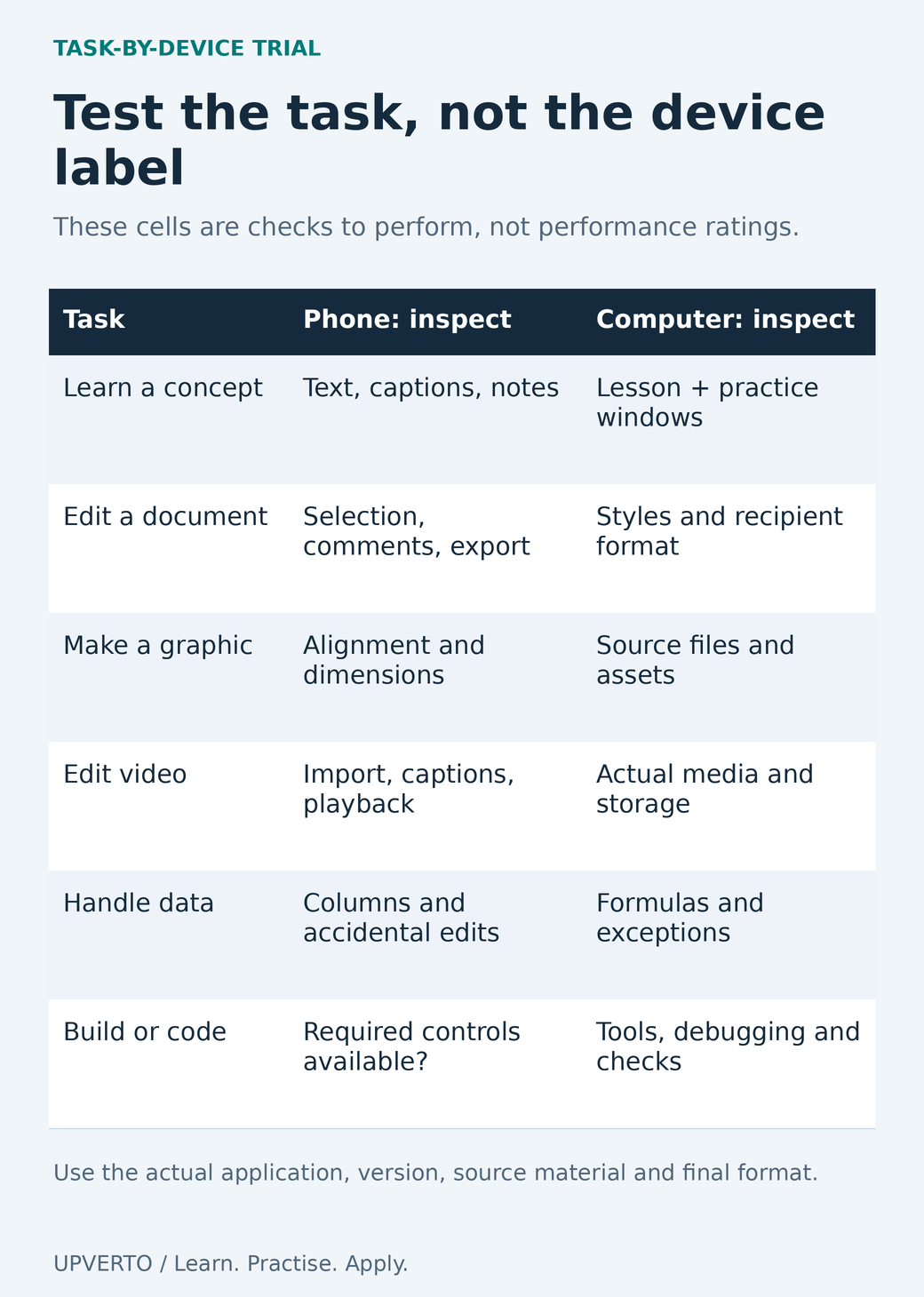
Read the text version: Match the task to the device trial
This is a task-by-device trial matrix, not a benchmark or rating. For learning, inspect text, captions and notes on a phone and lesson/practice windows on a computer. For documents, test selection, comments, export, styles and the recipient format. For graphics, inspect alignment, dimensions, source files and assets. For video, test import, captions, playback, actual media and storage. For data, inspect columns, accidental edits, formulas and exceptions. For technical work, establish whether the required tools, debugging and checks are available. Use the actual application and version, source material and final format.
Separate watching, practising and delivering
Watching teaches vocabulary and shows a process. Practice requires you to control the tool, save your own work, make a change and recover from a mistake. Delivery adds the recipient’s requirements: file type, dimensions, accuracy, permissions, review and reliable transfer. Treat these as three different tests rather than one statement that a skill “works on mobile.”
For example, you can read an HTML lesson on a phone. That does not establish that you can comfortably inspect a multi-file website, test its keyboard navigation and package it for another developer. Conversely, a short piece of approved copy may be drafted and revised effectively on a phone if the document tools and review process meet the actual brief.
If files, accounts or basic work habits are still unfamiliar, use start online work with no experience to define a manageable first task. Equipment decisions become clearer once you know the output you are trying to create.
Compare tasks rather than entire professions
| Task | Phone trial | Computer trial |
|---|---|---|
| Read a lesson and explain a concept | Check text size, captions, navigation and note-taking. | Check whether multiple windows help connect the lesson and practice. |
| Edit a short document | Test selection, comments, export and file naming. | Test styles, longer review and the recipient’s format. |
| Create an event graphic | Inspect precise alignment, text wrapping and exported dimensions. | Inspect editable files, asset dependencies and output settings. |
| Edit supplied video | Test import, full playback, caption corrections, sound and export. | Test the actual codec, timeline, storage and required handover. |
| Clean a spreadsheet | Check visible columns, formulas, validation and accidental edits. | Check full data structure, calculations and repeatable operations. |
| Develop a website or complex 3D scene | Check whether the required tools and debugging controls exist. | Verify software requirements and run a representative project. |
This matrix lists observations to make, not measured performance ratings. It does not claim that every phone, computer or mobile application has the same capabilities. Accessibility features, external input devices and your own comfortable working method can change which setup is practical.
Check the exact application and version
Read the provider’s requirements before installing or purchasing. For desktop editing, Adobe separates minimum and recommended Premiere specifications and lists operating system, processor, memory, graphics, storage and display conditions. Meeting the minimum is not a promise that your particular project will be pleasant to edit. Keep the application version and the page’s date in your notes.
Likewise, consult Blender’s current requirements when planning a 3D workflow. A browser viewer, a mobile companion and a desktop production application can have different functions. Avoid assuming that an application with a similar name opens every file or preserves every feature.
Also check export restrictions, offline access, project-file compatibility, font availability, watermark rules and asset permissions. These can block delivery even when editing itself feels smooth. Cloud processing may reduce local demands for some tasks, but it introduces account, connection, upload and confidentiality considerations.
Run a small end-to-end device trial
Fictional trial brief: make a square announcement for the imaginary Cedar Reading Hour. Use the supplied event name, Saturday 11:00, Cedar Community Room and [email protected]. Produce one PNG and keep the editable source. The square format is an exercise constraint, not a platform specification.
- Save the approved wording and one self-created simple illustration in a named project folder.
- Create the graphic in the application available on your device. Change the venue to a deliberately longer name and see whether you can fix the wrapping.
- Export the file, leave the editor and reopen the actual PNG. Check all wording, alignment, dimensions and legibility.
- Copy the project and export to your chosen backup location. Confirm which files are local and which require a connection.
- Share a view-only copy with an intended reviewer, check the permission and ask the reviewer to identify the date and booking instruction.
- Reopen the editable file and make one approved correction. Verify that the corrected export has an unambiguous new version name.
Record what you actually observed. “Exported PNG opens; editable source depends on an account I cannot share” is useful evidence. “Phone is good for design” is too broad. This guide does not report a cross-device benchmark; the trial is for your own equipment and required output.
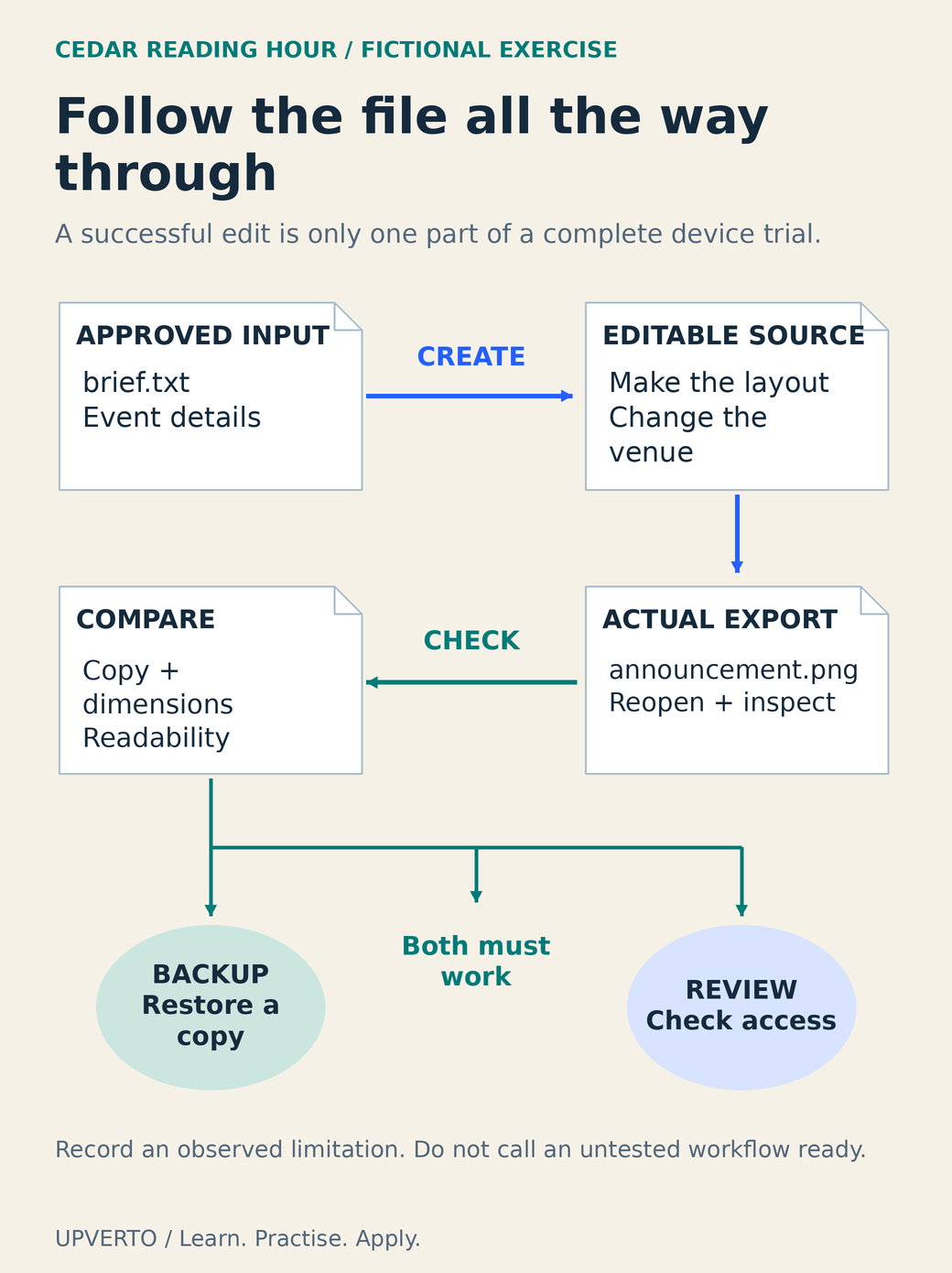
Read the text version: Trace a complete device trial
The fictional Cedar Reading Hour trial starts with approved event details in brief.txt. Create an editable source and test a venue-name change. Export announcement.png and reopen the actual file. Compare its copy, dimensions and readability with the approved brief. Then check both branches: restore a backup copy, and confirm the intended reviewer can access the shared result. A successful editing operation alone does not establish the full workflow. Record actual limitations rather than calling an untested route ready.
Use the result to decide what to change
| Check | Observed result | Decision |
|---|---|---|
| Source and export reopen | Record filenames, application and format. | Keep, change format or test another tool. |
| Required correction is possible | Describe the difficult operation. | Practise it or identify a real tool limit. |
| Files are recoverable | Record the backup and a successful restore. | Fix recovery before accepting delivery responsibility. |
| Review and handover work | Record recipient access and missing dependencies. | Adjust permissions or agree a supported handover. |
| Work is sustainable | Note discomfort, repeated errors or connection barriers. | Change setup, task scope or equipment. |
Try inexpensive changes that address a demonstrated problem: a supported keyboard, clearer folder structure, a smaller practice file or access to an existing computer. Borrowed, school or shared devices need permission, suitable software and a way to protect accounts and client material. Signing out does not necessarily remove downloaded copies.
Buy equipment when a real limitation justifies it and the full cost is manageable. The guide to cost to start digital services separates access costs from optional upgrades. Use the trial result when deciding which digital skill should I learn, and choose a first project your available setup can complete and check.
Frequently asked questions
Can I learn video editing entirely on a phone?
You can learn many editing concepts and practise supported mobile workflows. Test your actual source files, caption correction, audio checks, export and handover. A client who needs a particular desktop project file or a more complex workflow may require equipment and software beyond your current setup.
Does meeting minimum software requirements mean my computer is ready?
It means the provider lists that configuration as a minimum for the specified version and conditions. It does not measure your project. Try representative media or data, inspect the result and leave room for the files and dependencies your task needs.
Should I buy a laptop before choosing a skill?
First identify the work and test what you already have access to. Buying before defining the task can leave you with equipment that is expensive or unsuitable. Use a current requirements page and a small complete project to guide the decision.
Can I use a school or library computer for freelance work?
Only if its rules and your permission allow it. Check installation rights, session limits, file deletion, confidentiality and account security. Do not assume a shared machine is appropriate for private client data or that it will remain available near a deadline.
What if my internet connection is unreliable?
Check which tasks and files remain available offline, and test reconnecting and transferring the finished output. Plan around the real transfer conditions. A cloud-only source or unsynchronised file can be unavailable even when its name appears in a folder.
Is a larger screen always better for accessibility?
No single setup suits everyone. Text resizing, keyboard navigation, screen readers, captions, input devices and application support all matter. Test the work using the tools you rely on and avoid treating a particular device category as a guarantee of accessibility.
Sources and review notes
Primary sources checked on 27 October 2026 (UTC). Check the current provider pages before relying on a changing feature, policy or price. Worked examples and worksheets are original teaching material; fictional examples are not evidence of client results.