If you have no experience, your first job is to create a small piece of work you can understand and check. You do not need to choose every future tool, build a public brand or offer a service immediately. Start with your current equipment, a manageable task and a place to keep the evidence of what you tried.

In this guide
The broader guide to make money online with digital skills explains how learning connects to a service or job. This page focuses on the first practical steps. A completed first-week exercise is a starting point for learning, not proof that you are ready to take a client’s project.
Write down your actual starting point
List the device you can reliably use, available internet access, software you already have and the time you can protect. Be specific: “three evening sessions of thirty minutes” is more useful than “I will study whenever possible.” Add any practical constraint, such as sharing a computer or using a small screen.
Choose a task that fits those conditions. A phone can support reading, note-taking and some creation, but a particular project may require a desktop application, keyboard or larger display. Check the requirements for the task rather than assuming every digital skill is equally practical on every device. The guide on learn digital skills phone or computer develops that decision.
Do not buy a large tool collection before testing the work. Identify the one capability needed for the first exercise. Use official documentation or a suitable free resource where it answers the immediate question. Keep a list of possible purchases for later review instead of treating them as prerequisites for beginning.
Create a simple practice workspace
Make a folder called first-practice. Inside it, keep an inputs folder, a work folder and a review folder. Save the brief as a plain text document. The names are a suggested organisation, not a required software system. The purpose is to know which file is the original input and which is your current work.
Practise opening, renaming and saving a sample file, then find it again after closing the application. Understand where downloads go and how file extensions identify formats. Keep a backup appropriate to your device. If these tasks are unfamiliar, spend your first session on them rather than adding more tools.
Ubuntu’s terminal tutorial illustrates the importance of knowing the current folder and reading file information for Linux learners. Other operating systems have their own official help. You do not need terminal commands for every beginner task; you do need to understand where your work is stored and how to recover it.
Choose one small task with a visible finish
A suitable first trial could be arranging a fictional event announcement, editing a short recording you own, organising invented meeting requests or making a simple information page. Choose one. Define the input and what a finished output should allow someone to understand or do.
For a writing or layout trial, provide a fictional event title, date, location and request instruction. For a spreadsheet trial, use a few invented records. Avoid real client data, private messages or copied portfolio work. Synthetic inputs make it easier to practise freely and label the result honestly.
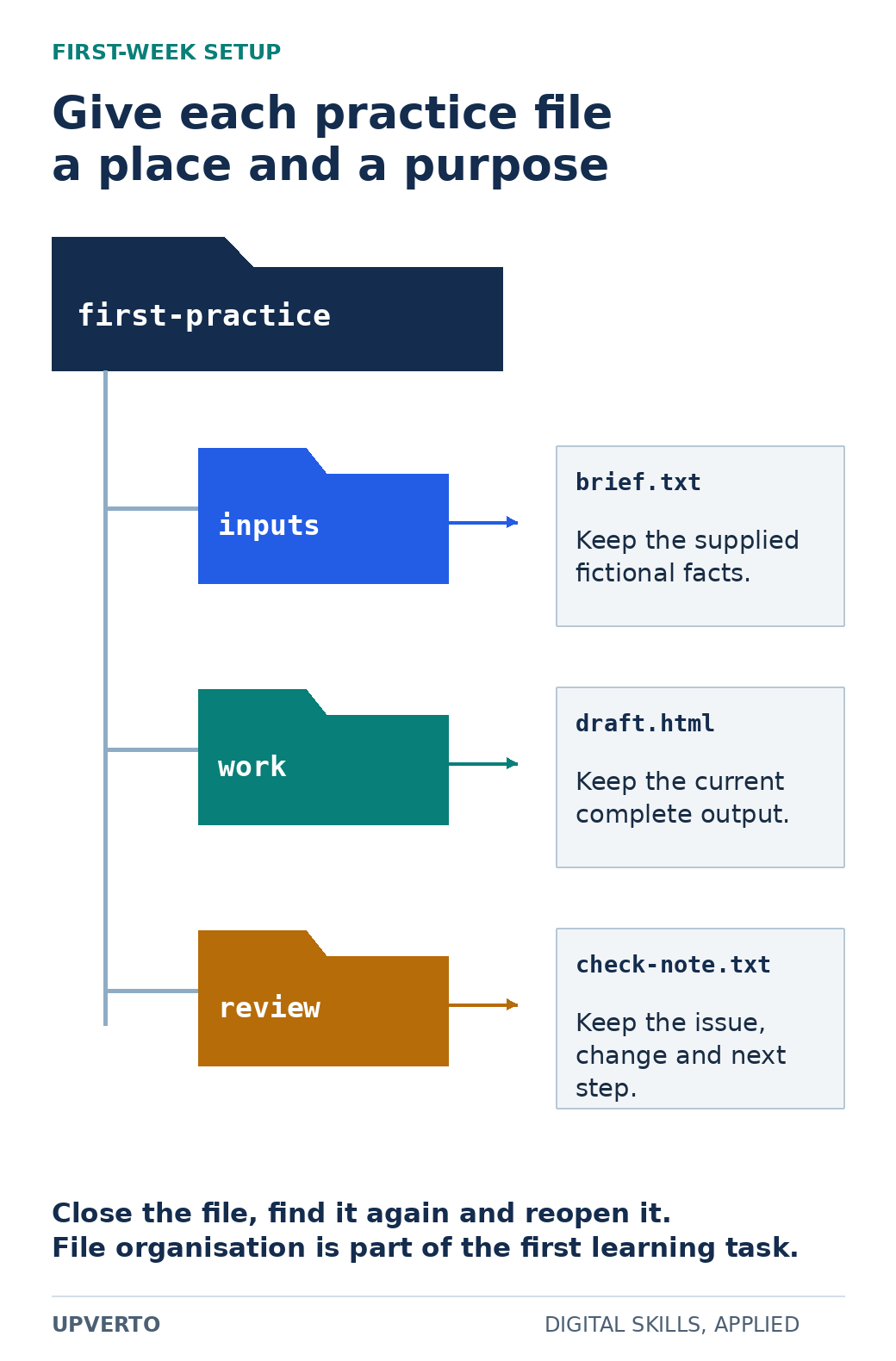
Read the text version: Organise a first practice folder
- first-practice/inputs/brief.txt: supplied fictional facts.
- first-practice/work/draft.html: current complete output.
- first-practice/review/check-note.txt: issue, change and next step.
Practise closing, locating and reopening the files. Use a backup appropriate to the device.
The fictional learner Sam chooses an event information page. The task is to make the title, date, location and request instruction easy to find. Sam will save one HTML file and a review note. There is no booking form, payment system or public launch. The narrow finish helps Sam recognise when the exercise is complete.
Use a first-week sequence with room to adjust
| Session | Action | Evidence to keep |
|---|---|---|
| 1. Set up | Create the folders and save the fictional brief | A file you can close, locate and reopen |
| 2. Learn one concept | Read a short lesson on headings and paragraphs | A note explaining the concept in your own words |
| 3. Make the output | Arrange the supplied event information | A first complete draft |
| 4. Check and repair | Compare the draft with the brief on the available screen | One identified issue and a revised version |
| 5. Review | Explain what worked, what remains difficult and what comes next | A short learning log and next task |
These are sessions, not a compulsory daily schedule. Spread them over the time you actually have. If setup takes longer, that is useful information about the prerequisite you need. Do not hide the difficulty by declaring a finished skill after watching a lesson.
Worked example: check Sam’s page
Sam’s first draft has the event title and a decorative image, but the request instruction is buried at the bottom. The fictional brief says that a visitor should be able to identify how to request a place. Sam moves that instruction beside the date and checks that the wording explains what will happen next.
For the HTML exercise, MDN’s guidance on semantic HTML is a primary source for using meaningful headings, labels and links. Sam uses a heading for the event title and a real link for a destination, rather than styling ordinary text to look interactive. If there is no real destination, the sample labels the request instruction as a prototype instead of pretending the link works.
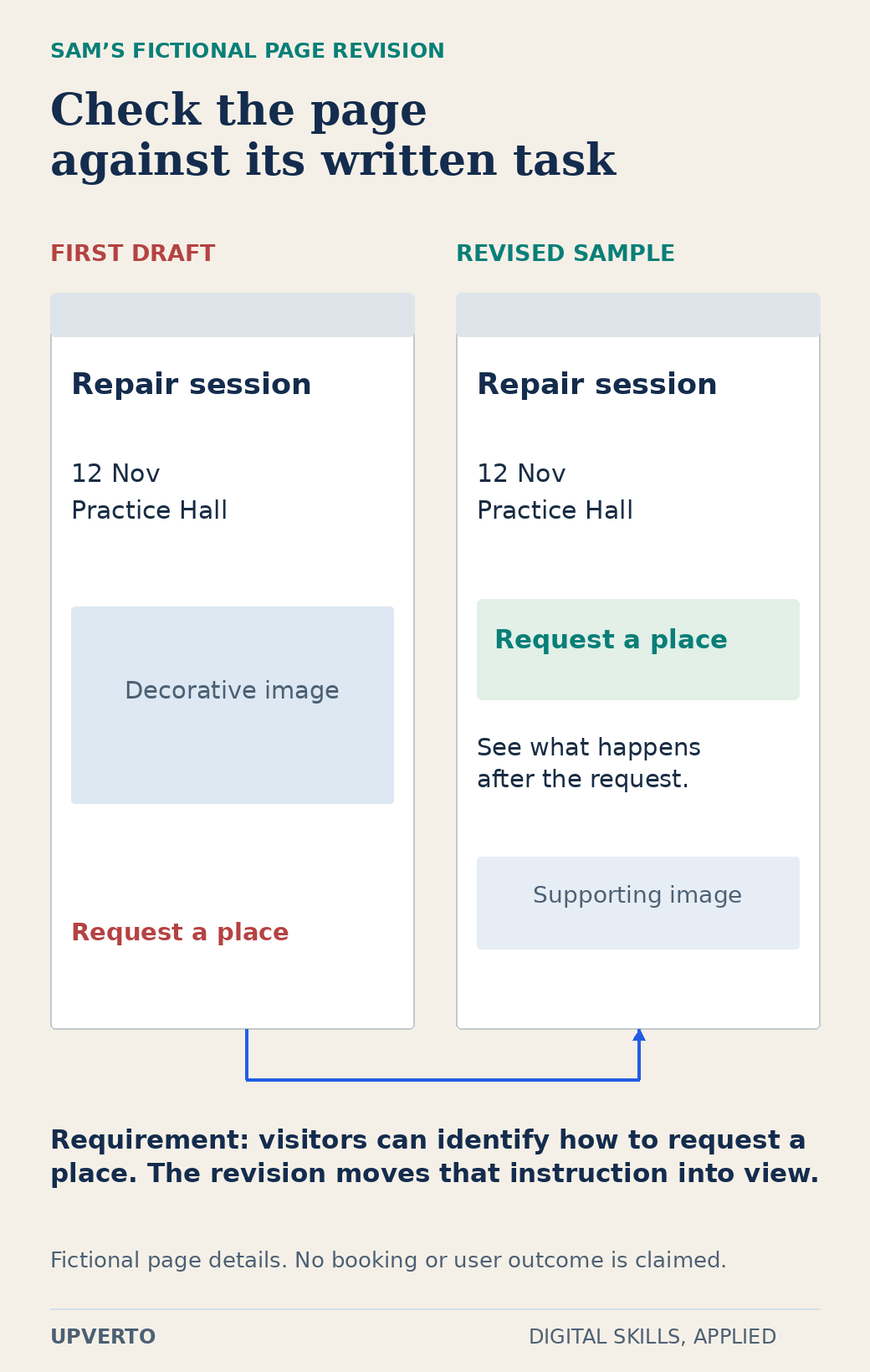
Read the text version: Compare an initial page with a task-led revision
The fictional requirement is that a visitor can identify how to request a place. In the first draft, the request instruction appears below a large decorative image. In the revised sample it sits near the date and location, with an explanation of what happens next. The event and details are invented. No real booking, user research or commercial outcome is claimed.
The review note records the supplied requirement, the observed issue and the change. It does not say that the revision increased bookings or that real users preferred it. The actual evidence is a revised sample and the reasoning behind it. That is enough for the first learning exercise.
Use the first-week setup and exploration checklist
- I can name the task and identify its required input.
- I can locate and reopen the files I create.
- I know which information is fictional and which source explains the technique.
- I have made one complete output, even if it is basic.
- I have compared that output with a written requirement.
- I have recorded a specific difficulty rather than calling the whole subject impossible.
- I have chosen one next exercise that addresses that difficulty.
Keep the checklist beside your work, not as a certificate. If an item is unfinished, use it to choose the next session. A folder with a brief, draft, revision and review note is more informative than a list of videos you watched without applying them.
Avoid commitments that do not help the first task
Be cautious of supposed jobs that demand payment before you can work or release your earnings. The FTC’s job-scam guidance describes these and other warning signs. Verify the organisation independently and do not send sensitive documents simply because an unsolicited message promises easy online work.
Keep the learning goal separate from an urgent income promise. A beginner exercise can show whether you enjoy a task and which prerequisite is missing; it cannot establish demand or replace a reliable financial plan. If you need immediate employment, evaluate actual opportunities and requirements alongside your longer learning path.
Your next step is the guide to computer basics for digital skills if files, browsers or basic software still cause friction. Otherwise, repeat the same type of task with slightly different inputs. The second attempt reveals whether you understood the method or depended on copying the first example.
Frequently asked questions
What should I learn first if I have no computer experience?
Begin with creating, saving, locating and reopening files, using the browser and understanding the software needed for one small exercise. These skills make later practice less frustrating. You do not need to install every possible tool.
Can I start with only a phone?
You can begin some research, note-taking and creation tasks, but the practical limits depend on the project and application. Check the actual requirements and choose a suitable first trial. Do not assume a phone replaces every desktop workflow.
Should I create a freelance profile during the first week?
It is usually more useful to produce and check a small sample first. A profile needs an honest description of what you can deliver. The first-week exercise does not establish readiness to promise a client outcome.
What if I cannot finish the five sessions in one week?
Treat them as a sequence and adapt it to your available time. Record the blocker and choose a smaller next step. The schedule is a planning example, not a deadline for becoming competent.
May I copy a tutorial project for my first attempt?
Following an exercise can help you learn, but acknowledge the source and then try a variation you can explain. Do not present copied work as original client experience. Keep your own inputs and decisions visible.
How do I know whether to continue with the skill?
Review the completed task, what you enjoyed, which difficulty was a missing prerequisite and what another attempt would teach you. A fair second trial can give better evidence than either instant enthusiasm or one frustrating session.