The cost of starting digital services depends on the task, the equipment you can already use and the commitments you choose. A useful budget separates money you must pay now from optional purchases, recurring bills and costs that appear only when you deliver work.
There is no honest universal startup figure. A learner who already has a suitable computer faces a different decision from someone who needs access, connectivity and assistive equipment. Build the budget around one defined output. The guide to make money online with digital skills explains the broader route; this worksheet helps you inspect its costs without assuming future earnings will cover them.

In this guide
Read the text version: Classify a cost before calculating it
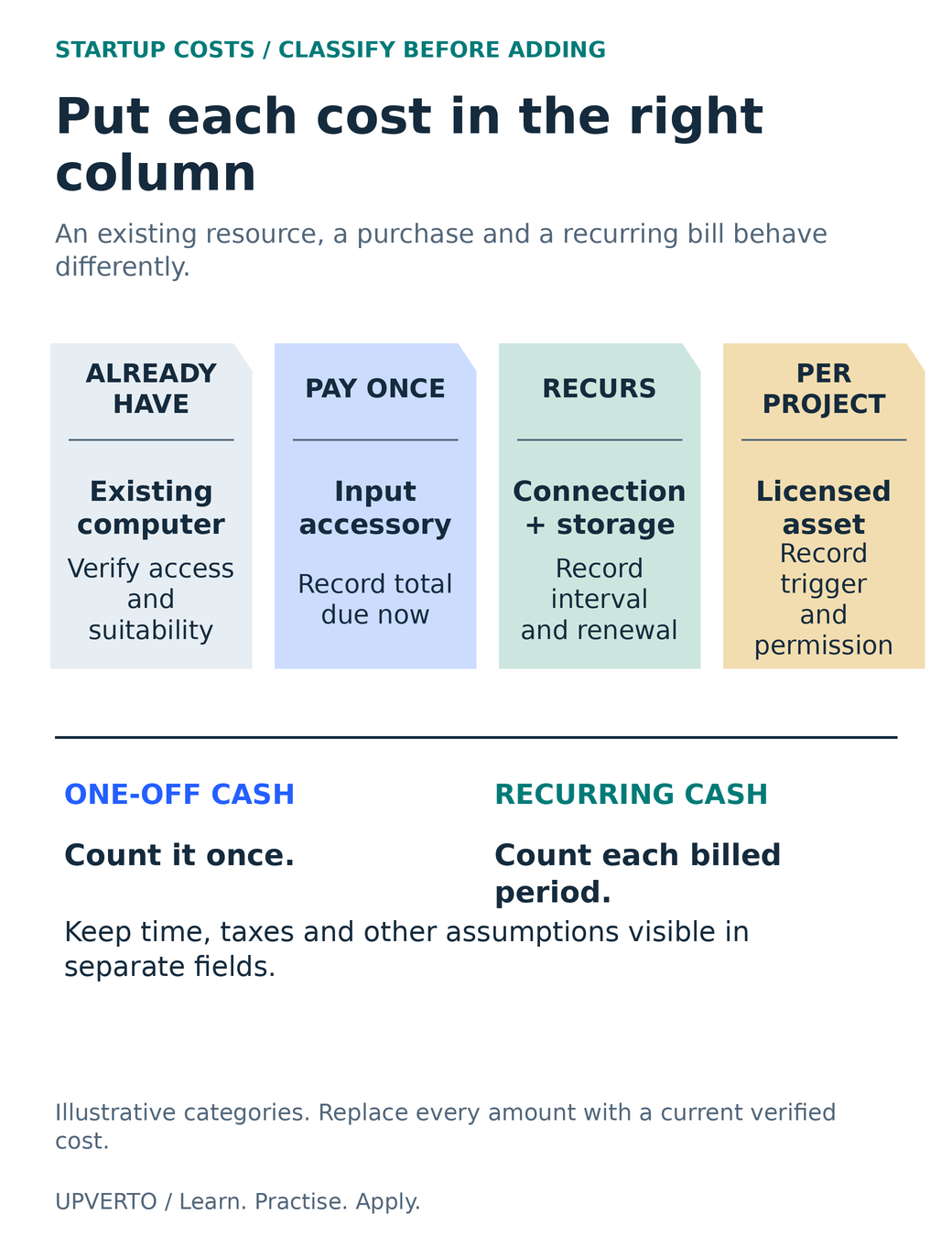
Classify costs before adding them. Existing access: verify that the computer or other resource is usable and permitted. Pay once: record the full amount due now for a necessary purchase. Recurring: record the billing interval and renewal for connection, storage or other commitments. Per project: record what triggers a charge, such as a licensed asset, and the needed permission. Count a one-off purchase once and recurring cash in every billed period. Keep time, taxes and other assumptions visible separately. The categories are illustrative and do not provide local prices.
Choose the route and output before the shopping list
A service, a remote job search and a digital product create different cost patterns. A small design service may need an editing tool and a reliable way to send files. A product may also need a storefront, ongoing hosting, customer support and updates. Compare freelancing vs remote jobs vs digital products before treating one person’s setup as your own budget.
Write a testable output statement: “Create one accessible two-page information document from approved copy, export a readable PDF and provide an agreed editable source.” This tells you what to check: device access, suitable document software, fonts, export, review and storage. It does not automatically justify a premium website, multiple design subscriptions or paid advertising.
If your intended output is still vague, use existing tools for a practice brief first. A failed export or unsupported source format gives you a concrete purchasing question. A subscription bought because professionals use it gives you a bill without establishing a requirement.
Separate four kinds of cost
| Category | Examples to investigate | Question |
|---|---|---|
| Existing access | Device, connection, workspace and permitted shared equipment | Can I reliably use it for this task? |
| One-off cash | Necessary equipment, repair, adapter or initial setup | What is due now, including delivery and applicable charges? |
| Recurring commitment | Software, hosting, storage, connectivity or support | When does it renew and how do I cancel? |
| Per-project or transaction cost | Licensed assets, specialist review, platform or payment charges | What event triggers the cost, and who agrees to it? |
Keep your time in a separate planning column. Unpaid practice, administration and client acquisition still consume capacity even when they do not appear as a cash charge. Do not label your cash total “profit” or assume every available hour can be billed.
For a device decision, first use learn digital skills phone or computer. Hardware should match the application and the actual project. Add backup and replacement planning where relevant; a zero purchase price for an existing device does not make failure impossible.
Check what free actually includes
On the official pages checked on 27 October 2026, LibreOffice can be downloaded and used in business without a licence fee, and Blender is free software. That establishes a zero software-licence charge for those stated uses; it does not make hardware, training, third-party assets, storage or support free.
A free plan, a free trial and open-source software are different arrangements. A trial can expire or begin billing. A hosted free plan may restrict export, collaboration, storage or commercial features. Open-source software has licence terms too, and assets distributed beside it can have separate permissions. Read the actual terms for the output you intend to deliver.
When comparing paid tools, write the current currency, billing interval, taxes shown, renewal rate, cancellation terms and features you need. A monthly price advertised for an annual commitment is not necessarily a month-to-month arrangement. Leave a line marked “unverified” instead of inventing a local price from a search snippet.
Worked example: a deliberately small practice budget
Fictional planning example, in USD: Mina wants to practise formatting a two-page information sheet. She already has permitted access to a suitable computer and an internet connection. The figures below are invented arithmetic inputs, not market quotes, recommendations or a prediction of earning. Local taxes, exchange charges and circumstances must be checked separately.
| Item | Due once | Per month | Assumption |
|---|---|---|---|
| Existing computer | $0 additional now | $0 additional now | No new purchase for this exercise |
| Necessary input accessory | $18 | $0 | Invented cost after a device trial |
| Additional connectivity allowance | $0 | $12 | Invented incremental amount |
| Backup/storage allowance | $0 | $4 | Invented planning amount, no provider named |
| LibreOffice licence | $0 | $0 | Official no-licence-fee option; suitability still tested |
| Optional premium subscription | $0 | $0 | Deferred; no demonstrated requirement |
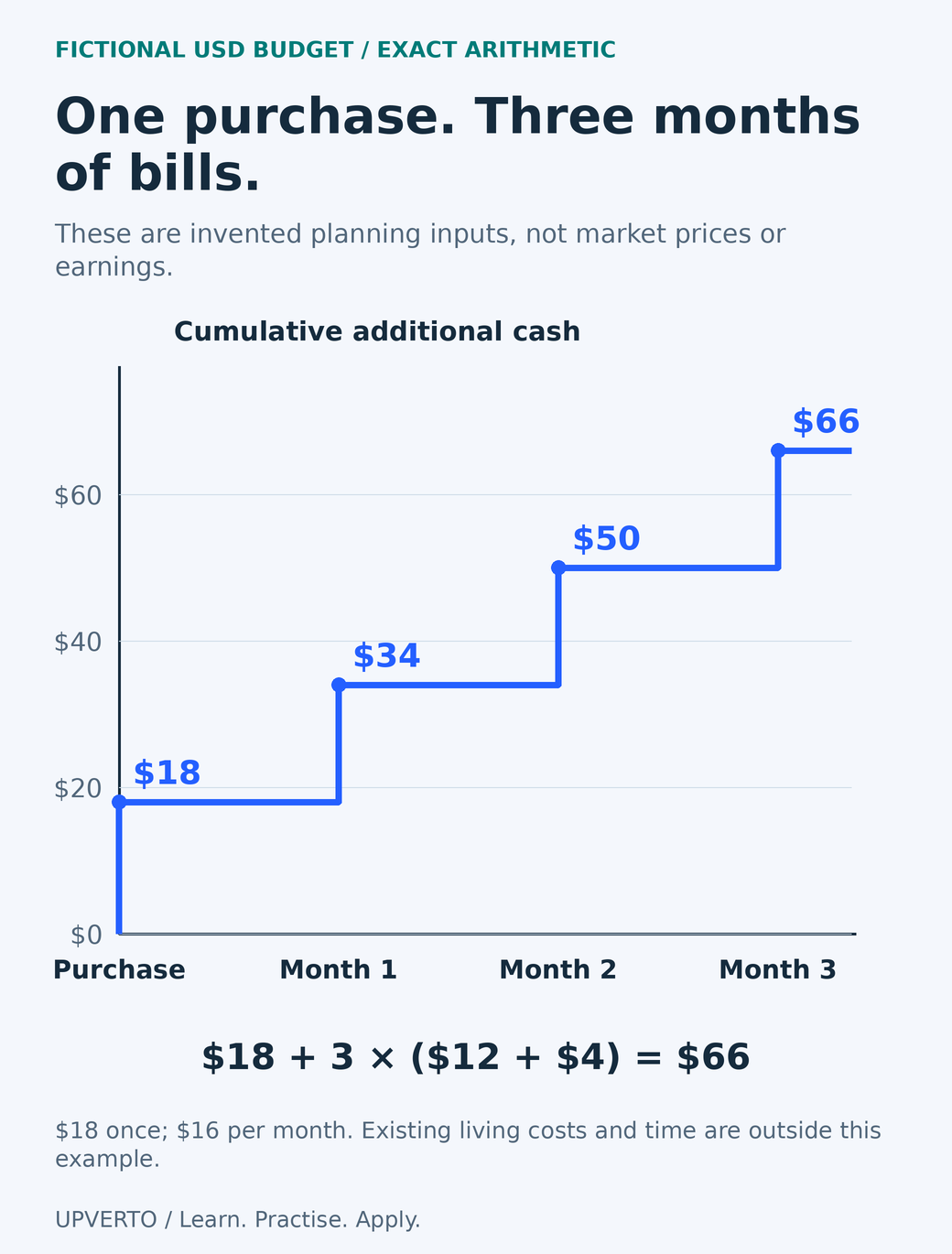
The first-month additional cash is 18 + 12 + 4 = $34. Recurring additional cash is 12 + 4 = $16 per month. With the same assumptions over three months, 18 + (3 × 16) = $66. The $18 item is counted once, not again every month. Existing living costs and the learner’s time are outside this narrow calculation, so $66 is not her complete cost of living or a business profitability estimate.
Read the text version: Check a three-month startup-cost calculation
All amounts are fictional USD arithmetic inputs, not quotes, recommendations or earnings. A necessary accessory costs $18 once. Additional connection and storage allowances are $12 plus $4, or $16 per month. Cumulative additional cash is $18 at purchase, $34 after month one, $50 after month two and $66 after month three. The three-month calculation is 18 + 3 × (12 + 4) = 66. Existing living costs and the learner’s time are outside this narrow example. Count the purchase once rather than adding it every month.
Mina’s next decision is to test the document export and backup. If the free tool produces the required files, a paid subscription remains optional. If the real recipient later needs a different format, she investigates that requirement before quoting a delivery commitment.
Copy this worksheet and make the assumptions visible
| Field | Your entry |
|---|---|
| One task and required output | Write quantity, format, recipient and checking method. |
| Existing access | List what you may use and any access restrictions. |
| Necessary one-off items | Record actual quote, currency, date and total due. |
| Recurring items | Record charge, billing interval, renewal date and cancellation route. |
| Per-project charges | Record trigger, estimate and whether the client must approve it. |
| Optional purchases | Write the observed problem that would justify each purchase. |
| Review point | Set a date to remove unused commitments and check assumptions. |
You can copy the table into a document or spreadsheet and add one row per item. Convert currencies only with a named rate and date, and keep any conversion or withdrawal charge separate. Where taxes, registrations or insurance may apply, obtain information for your jurisdiction rather than using a universal percentage.
Set a spending limit you can afford without relying on an unconfirmed client. Revisit costs after a complete practice project and before starting a recurring service. When choosing learning material, compare free resources vs paid courses against the specific help you need, including the quality of practice, feedback and access.
Frequently asked questions
Can I start learning without buying software?
Often you can use a free application or an existing permitted licence for a small practice task. Check whether it produces the needed format and whether its terms fit your use. Free software does not remove equipment, connection, asset or delivery responsibilities.
Should I include the full cost of my existing computer?
For a cash-startup worksheet, show what you must pay now and identify existing access separately. Replacement planning and business accounting are different calculations. If you need an accounting treatment or tax deduction, check local requirements with an appropriate professional.
How do I compare monthly and annual subscriptions?
Record the total commitment, billing schedule, renewal amount and cancellation terms. Divide an annual cost by twelve only to compare it; do not confuse that average with the cash due or assume you can cancel without further payment.
Is the fictional $34 first month enough for me?
It is only the total of the example inputs. It assumes existing device access and uses invented incremental costs. Replace every assumption with your own verified information. It is not a recommended budget or a statement about prices in your location.
Should I pay for a portfolio website immediately?
Only if it solves an access or presentation need you have identified. A suitable existing profile or document may let someone inspect your early work. Domain, hosting, maintenance and accessibility work should be considered together when deciding whether to build a site.
When is a paid tool worth adding?
When a verified requirement or repeated problem justifies the cost and you can sustain the commitment. Test the needed feature and export before subscribing. A tool purchase is not evidence that demand exists or that you are ready to promise the service.
Sources and review notes
Primary sources checked on 27 October 2026 (UTC). Check the current provider pages before relying on a changing feature, policy or price. Worked examples and worksheets are original teaching material; fictional examples are not evidence of client results.