Repeated work becomes easier to manage when the reliable parts are written down. A reusable template can hold the structure of a handover note. A process can explain when that note is ready to send, which checks come first and what to do when an input is missing.
The useful starting point is a task you already understand, not a promise to automate your whole business. Reuse should preserve quality and make decisions visible. It is one way to grow a sustainable freelance business while keeping each client’s information and rights in view.
Choose a stable, repeated task
Look for work with a recognisable trigger, similar inputs and an output you can check. Examples include preparing a delivery folder, checking event details across two export formats, or writing a short record of agreed revisions. Avoid starting with an activity where the goal changes completely each time.
Describe the repetition precisely: “create a delivery index after final exports are checked” is a better process candidate than “handle clients.” The first has a starting condition and a concrete output. The second hides many judgements and responsibilities.
Keep the current manual method visible while designing a reusable version. Record the step that prevents an old export being delivered, the exception that stops the task, and the person who decides what happens next. Removing these details to make the process look short can remove its value.
Separate your method from material you cannot reuse
A completed client file is not automatically a reusable public template. Review the agreement, permissions and source licences before copying content into a new project. Confidential information can remain sensitive even when a logo is removed.
WIPO’s copyright guidance distinguishes ideas and methods from their particular expression and explains that rights questions depend on the circumstances and applicable law. That distinction is not permission to copy a client’s wording, artwork, database or proprietary material. For a concrete licence example, CC BY 4.0 includes attribution and other conditions, and warns that other rights can still matter. Do not generalise those terms to every stock asset or font.
Begin with your own generic instructions where you have a sound basis to reuse them. Replace examples with newly written fictional data. Keep evidence of any third-party permission. If rights or confidentiality are unresolved, leave the material out while the issue is checked.
| Material found in a past project | Question before reuse | Safer preparation step |
|---|---|---|
| Your general checklist wording | Do agreements restrict this use? | Create a clean, generic version after checking |
| Client names, contact records or account links | Is reuse and disclosure authorised? | Remove from the reusable master |
| Client artwork or copy | Who controls the relevant use? | Exclude unless permission is established |
| Third-party font, photograph or component | Does its licence cover the new use? | Record the terms or replace it |
Worked example: a reusable handover index
This fictional example starts with a workshop-poster handover. The one-project record contains an organiser’s name, a private folder link, two approved export filenames and a licence note. Those details belong in that project’s delivery record. They do not belong in a general master.
The reusable version is written from scratch as a structure: project reference, approved deliverables, final-file location, editable-source availability, rights notes, instructions, support boundary and owner. Its sample project is labelled fictional. The private link is replaced with a field called “authorised delivery location,” not with an example link that might be mistaken for a real folder.
The process is grounded in freelance project handover. It says to inspect the final export filenames and the actual folder before filling the index. It never assumes that a file exists because a template contains its name.
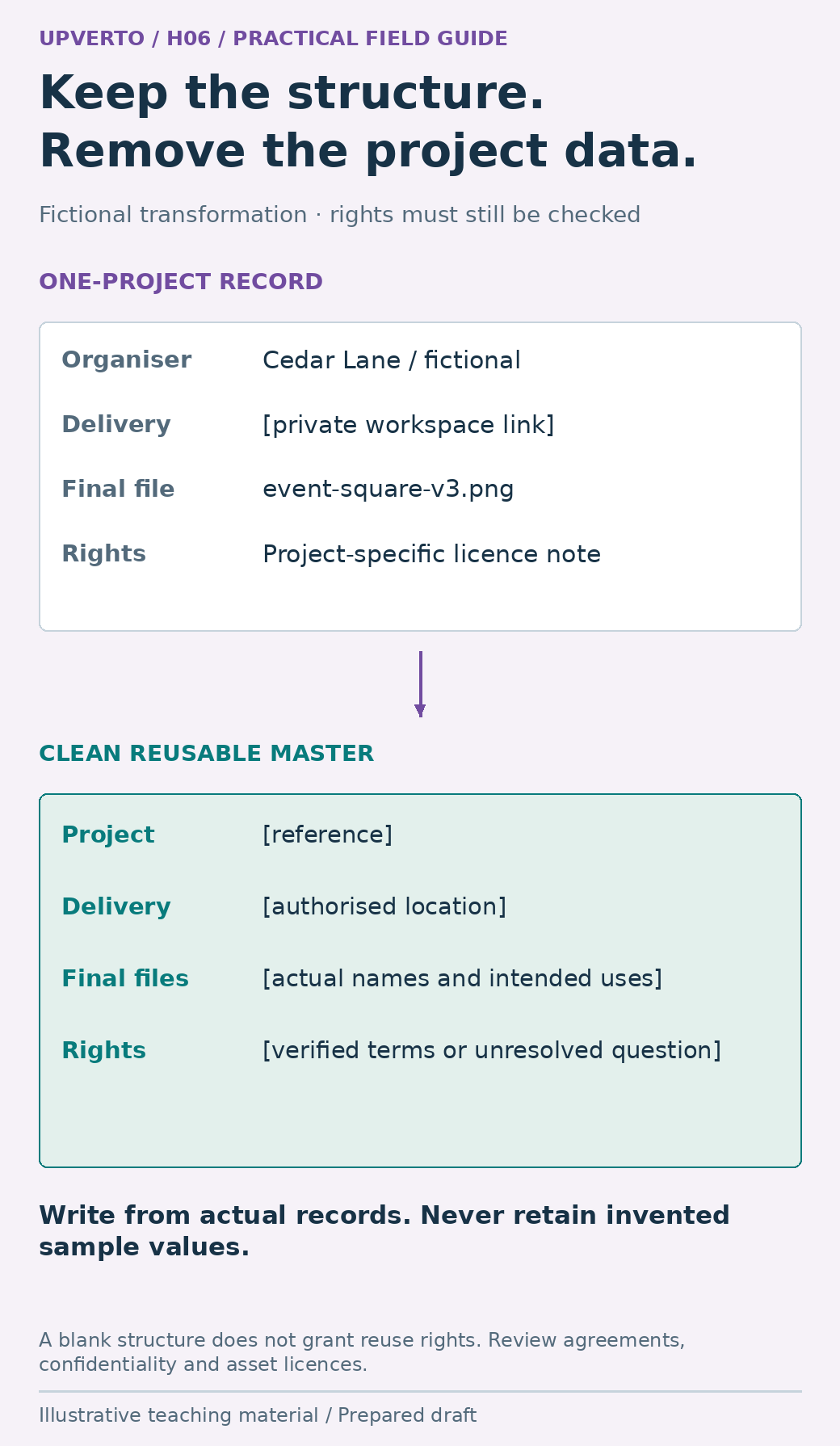
Read the text version: Transform a project handover record into a clean reusable structure
The fictional one-project record contains a named organiser, private delivery link, specific final filename and a project licence note. The reusable master instead has fields for project reference, authorised location, actual filenames and intended uses, and verified terms or unresolved questions. It is written from scratch as a clean structure. Agreements, confidentiality and licences still need review; removing names alone does not establish reuse rights.
Fictional master excerpt: “For each approved deliverable, record its exact final filename, intended use and location. List editable source only when it is included in the agreement and actually provided. Record unresolved permissions before release. Leave a field marked ‘not applicable’ only with a reason.”
This is an internal working aid, not a ready-made product to sell. If you later distribute a template, you need a separate review of the material included, permissions, instructions, support obligations and how a recipient might misunderstand it.
Write the process around checks and exceptions
A useful standard operating procedure explains the boundaries of a task, not only the clicks. Write it so another authorised person could understand what makes the output acceptable. Keep tool-specific instructions separate enough to update when the interface changes.
- Trigger: final deliverables have reached the agreed handover stage.
- Inputs: approved scope, current export files, known delivery permissions and the agreed recipient.
- Preparation: create a fresh index from the clean master; identify the project and version.
- Execution: fill fields from the actual files and agreement; do not leave invented sample values in place.
- Check: open the listed files, verify their intended use and confirm that recipient access is appropriate.
- Exception: if a required file, approval or permission is missing, record the blocker and send it to the named decision owner.
- Release: an authorised person approves the delivery action; retain the final index and version.
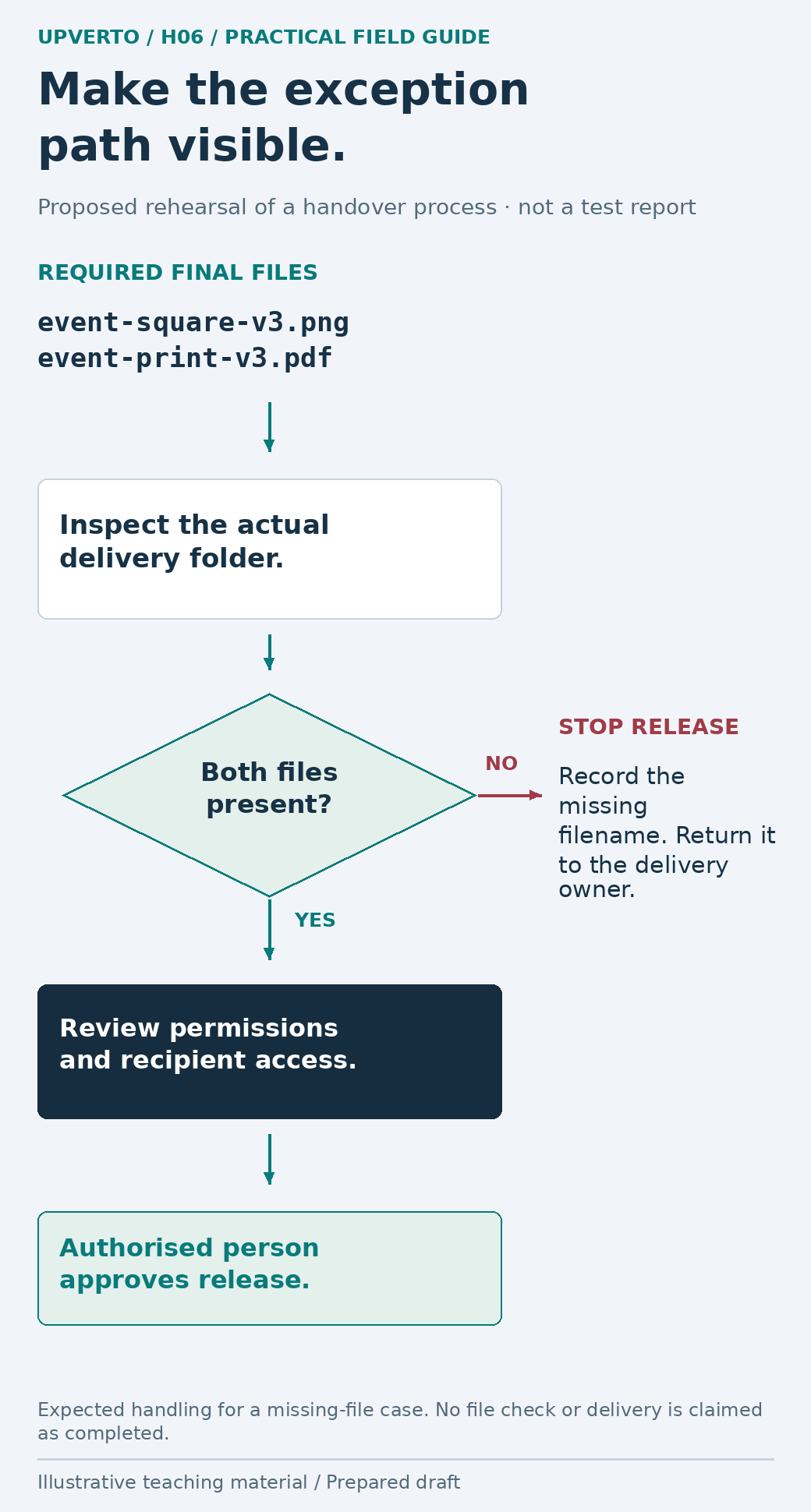
Read the text version: Add an explicit missing-file path to a handover procedure
Proposed rehearsal: the required fictional files are event-square-v3.png and event-print-v3.pdf. Inspect the actual delivery folder. If either file is missing, stop release, record the missing filename and return the issue to the delivery owner. If both are present, continue to permission and recipient-access review before an authorised person approves release. This is expected handling, not a claim that checks or delivery occurred.
The exception path matters. A blank “licence” field should not silently become “all rights included.” A missing export should not be replaced by an earlier file merely to complete the checklist. State the pause condition and the information needed to resume.
Try representative cases before relying on the template
Use harmless fictional records to rehearse the process. The following are proposed checks, not reports of tests already performed. A normal case should produce a complete index. A missing-file case should stop release and identify the missing filename. A rights-uncertain case should preserve the question and route it for a decision.
Also test a field that does not apply. For example, a project may include final PNG exports but no editable source. The index should explain the agreed boundary rather than display an empty heading that suggests an accidental omission. Ask whether a new reader can distinguish “not included,” “not yet ready” and “not known.”
Keep a version number, owner and change note on the master. When you fix a confusing instruction, record why. Do not silently overwrite a project’s final delivery record with a newer generic template; preserve the evidence of what was actually provided.
Reuse checklist and automation decision
Before adopting a reusable master, answer these questions in writing. A blank response is work to resolve, not a pass.
- Which repeated task and output does this cover?
- Which material is original, licensed, permitted or excluded?
- Have client-specific data, private links and sample values been removed from the master?
- What inputs and approvals must exist before the process begins?
- Which check catches a plausible wrong output?
- What stops the process, and who resolves the exception?
- Who owns the master, and what version did this project use?
Automation can help with a stable step, but it also repeats a wrong rule quickly. If you want to learn no code AI automation services, begin with a bounded operation using fictional or authorised data. Keep a review before external messages, publication, payments or changes that require separate authority. Sharing client information with an external service is a distinct decision; a template does not grant that permission.
When a repeated need is real, the process can support an ongoing service. Use retain freelance clients ongoing services to define its trigger, output and review point. A documented process can save confusion without becoming a product, an agency or a source of passive income.
Frequently asked questions
Can I reuse something I made for a client?
Check the agreement, confidentiality obligations, relevant rights and any third-party terms. Creating a file does not by itself settle every later use. Reuse your generic instructions only where you have a sound basis, and exclude client material while its status is unresolved. This guide does not decide ownership for a particular contract.
What is the difference between a template and a process?
A template provides a reusable structure, such as fields in a handover index. A process explains when to use it, where the information comes from, how to check the output and what to do with exceptions. A good structure can still produce a bad result if those decisions are missing.
Is removing the client’s name enough?
Often it is not. Private folder links, unusual project details, contact records, embedded metadata or distinctive artwork may still reveal information. Review the whole reusable file, including comments and sample data. A newly written fictional example is easier to separate from the project record.
Should I automate the process immediately?
First make the manual steps and checks reliable. Automate a narrow operation only when you understand its inputs, permissions, failure conditions and recovery. Rehearse with safe sample data and retain human review where the next action requires judgement or authority. Automation is not evidence that the result is correct.
Can I sell the template once I have used it myself?
Internal usefulness does not establish distribution rights or customer suitability. Review every included asset, licence and promise, and write instructions that work outside your own context. Consider the support and maintenance required. Many useful templates are best kept as internal aids rather than sold.
How do I stop templates becoming outdated?
Give the master an owner and version. Review it after a meaningful tool, requirement or process change, and after a real exception reveals a weakness. Preserve the project-specific record and note which version was used. Remove obsolete sample values rather than relying on memory to correct them each time.
Sources and scope
The worked examples, worksheets and diagrams are original fictional teaching materials. They are not reports of client results. Primary references were checked during preparation; verify current rules and account-specific features before acting.