Email marketing and CRM work helps an organisation maintain useful, appropriate relationships. It involves more than writing a message or importing a spreadsheet. You need to know why a contact is in the system, what they have agreed to receive, which message fits their situation and when the workflow must stop.

In this guide
Use which digital skill should I learn if you are still comparing skills. This roadmap uses an invented workshop newsletter to practise data organisation, a welcome sequence and review rules. It sends no messages and uses no real contact information.
Separate messages, records and workflow
Email work includes writing and assembling messages, checking links and layout, organising eligible recipients and reporting on the agreed objective. CRM work concerns the records and relationship process around those contacts: fields, stages, ownership, activity and data quality. An email platform may include CRM features, but the concepts are not interchangeable.
Learn to describe the process before configuring it. A new newsletter subscriber might receive an introduction and a preparation resource. A person who has asked a support question might need a direct response instead. A contact who unsubscribed should not re-enter a marketing sequence simply because their record was imported again.
Mailchimp’s permission guidance describes its own requirement for permission to send marketing email. That is a platform rule, not a complete statement of every jurisdiction’s law. In real work, confirm the applicable legal requirements, the organisation’s policy and the current provider rules. Do not treat a purchased list, a public email address or a business card as universal marketing permission.
Design a small, understandable contact record
Begin with fields that support a stated task. For the fictional Willow newsletter, use contact ID, example address, interest, permission status, permission source, recorded date, current journey stage and responsible owner. Keep only the information needed for the exercise. Use reserved example addresses such as [email protected].
A CRM stage describes a process state; it is not automatically a statement of permission. “Interested” and “subscribed” answer different questions. Likewise, an empty field means unknown, not an implicit yes. Define each field and its allowed values so another person can interpret the record consistently.
Mailchimp’s audience requirements and best practices provides a primary reference for maintaining useful contact and permission records. For a practice import, check unique IDs, field mappings, duplicates and suppression states before imagining any send. Keep the raw source and a change log so a correction can be explained.
Plan a welcome sequence with entry and stop rules
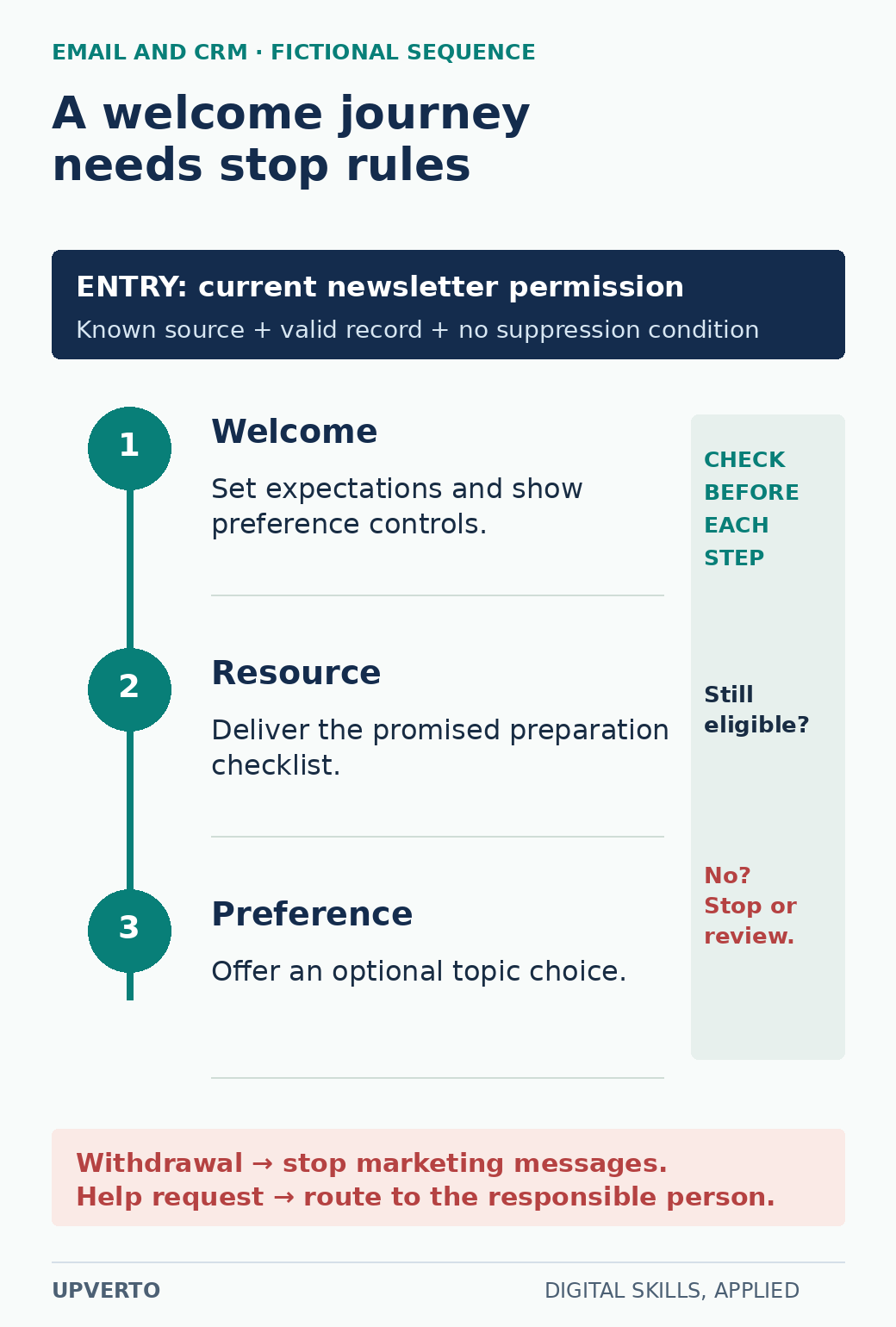
Read the text version: Plan welcome messages with continuing eligibility
Enter only with current newsletter permission, a known source, a valid record and no suppression condition. Message 1 sets expectations and preference controls. Message 2 delivers the promised checklist. Message 3 invites an optional topic choice. Check eligibility before every step. Withdrawal stops marketing; a help request goes to a responsible person. This fictional sequence sends nothing.
The invented sequence has three messages. The first explains what the newsletter contains and how to change preferences. The second provides a useful preparation checklist. The third asks which workshop topic interests the reader, using a clearly optional preference action. The timing is an exercise choice, not a universal recipe for engagement.
| Step | Purpose | Eligibility check | Stop or route elsewhere |
|---|---|---|---|
| Welcome | Confirm expectations and preference controls | Marketing permission recorded; address valid for testing | Missing permission → review; unsubscribed → suppress |
| Resource | Share the promised checklist | Still eligible; first message not blocked by an unresolved issue | Suppressed or invalid address → stop |
| Preference | Invite an optional topic choice | Still eligible; no conflicting journey rule | Help request → responsible human; withdrawal → stop |
Specify the event that starts the journey and which system records it. Avoid a rule such as “new contact means subscribe.” A contact can be new because of a support enquiry, a manual entry or a data migration. Check the purpose and permission before adding them to a marketing workflow.
Worked example: decide which records can enter
The practice dataset has four invented contacts. C01 has a recorded newsletter signup and current permission. C02 has an address but no permission source. C03 previously subscribed and later withdrew. C04 has a support request with no newsletter signup. Only C01 is eligible under this exercise’s stated entry rule.
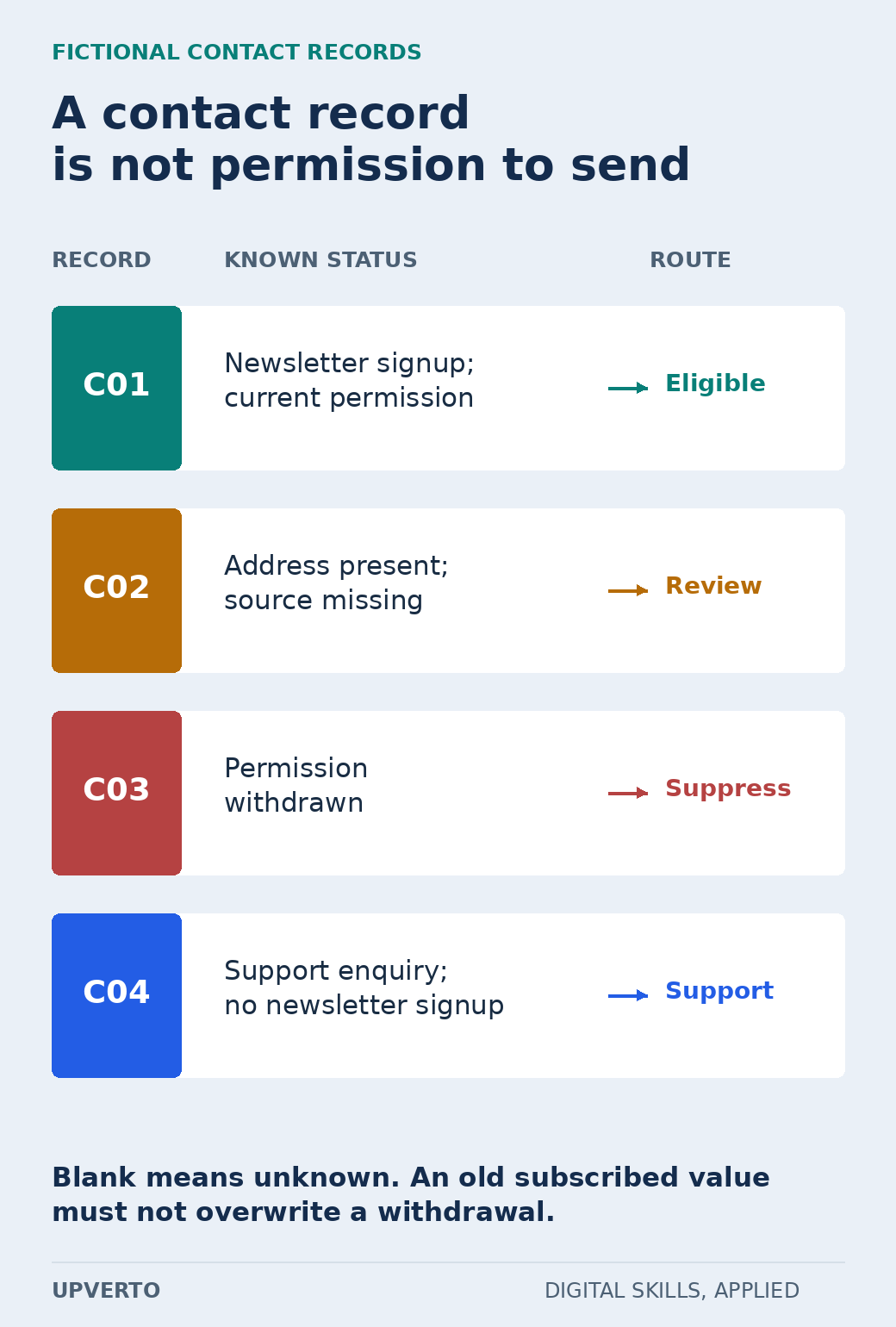
Read the text version: Route contacts by evidence and purpose
| Record | Status | Route under the exercise rule |
|---|---|---|
| C01 | Newsletter signup and current permission | Eligible |
| C02 | Address but missing permission source | Review |
| C03 | Permission withdrawn | Suppress |
| C04 | Support enquiry only | Support owner |
This is a fictional logic exercise, not a legal determination for real contacts.
C02 goes to a data-review queue, not a campaign. C03 remains suppressed even if another file contains the old subscribed value. C04 goes to the support owner. This is a logical training example; it does not establish that a particular real contact is lawful to email. In client work, preserve the relevant evidence and apply the current policy and jurisdictional requirements.
Write a plain-language rule alongside the automation: “Enter the welcome journey only when current newsletter permission is recorded, the source is known and no suppression condition applies.” Then test the four cases. A visual workflow is easier to review when its intended behaviour is also written in words.
Prepare a message that fulfils its promise
The first draft can open: “You asked for Willow’s beginner workshop updates. Here is what to expect and how to change your preferences.” That sentence is appropriate only for the fictional signup case described above. For a real message, the sender identity, reason for contact, links and preference or unsubscribe mechanisms need proper implementation and review.
Check the subject, preheader, content order, mobile layout, alternative text and destination links. Include important instructions as text rather than only in an image. Verify that the promised resource is actually available and relevant. A broken checklist link defeats the purpose even if the template looks polished.
Test with approved internal addresses and preview modes before any real send. Record what the platform preview can show and what the actual test message reveals. Do not claim that every email client renders identically. Keep a short log of the clients or devices actually checked.
Use this workflow brief and check log
Copy these fields into a document: purpose; eligible audience; permission source; required fields; trigger; messages; timing assumptions; suppression rules; owner; review process; test cases; report definition; and maintenance responsibility. Fill the fields before building the sequence.
- Check a valid entry, missing permission, withdrawal and support-only contact.
- Check what happens when the same record arrives twice.
- Verify the message links, preference action and stop behaviour in a permitted test.
- Record which data fields are necessary and who may edit them.
- Document how the owner pauses the journey and who reviews failures.
- Keep the original data, mapping decisions and reviewed version together.
A sample report should distinguish delivery, interactions and the organisation’s actual goal. State metric definitions and their limitations. A click may show an interaction; it does not establish that the reader attended or bought anything. Do not fill a portfolio report with invented results unless every table is plainly labelled as simulated.
Choose a service you can maintain
Possible limited deliverables include cleaning a permitted contact file under documented rules, drafting a short sequence, or mapping a journey for implementation by someone else. Building and operating the automation adds responsibility for access, testing, error handling and future changes. Ongoing list management and customer support are separate work unless included.
Use how to learn a digital skill for the learning routine and choose portfolio projects for freelance services to select a focused portfolio project. When you can repeat and explain the work, use create freelance service packages to state the inputs, deliverables and review limits. A useful service preserves trust and makes the process understandable to its owner.
Frequently asked questions
Is every CRM contact a marketing subscriber?
No. A record may exist because of support, an enquiry or an import. Keep relationship stage and marketing permission as distinct fields, and apply the actual organisation, platform and jurisdictional requirements.
Can I use purchased email lists for a practice project?
Use invented example addresses instead. A purchased list does not give you a safe training environment or automatically satisfy platform permission rules. You can demonstrate data mapping and journey logic without sending to real people.
What should happen when a permission field is blank?
Treat the value as unknown and route it for review. Do not convert blank to yes to make the import work. Preserve the source record and document what evidence is needed before any marketing use.
How many messages should a welcome sequence contain?
Use the number needed to fulfil the signup promise and the reader’s task. The three-message example is a bounded exercise. Actual cadence and content require context, review and evidence rather than a universal template.
Does a high open rate prove that the sequence generated business?
No. A platform metric has a specific definition and limitations, and an interaction is not the same as a completed business outcome. Report the metric accurately and state what it cannot establish.
What should I hand over with an automation?
Provide the entry and stop rules, field dictionary, approved message versions, test log, responsible owner and instructions for pausing or changing the workflow. State which ongoing monitoring and maintenance responsibilities are included.