Graphic design combines visual judgement, clear communication, and reliable production. To prepare for client work, learn how to organise information, choose type and colour deliberately, work from a brief, and deliver files suited to their intended use.
You can begin with a small communication task, such as an event announcement or a short information sheet. Learn to explain why the arrangement works before expanding into larger identity systems or complex campaigns.

In this guide
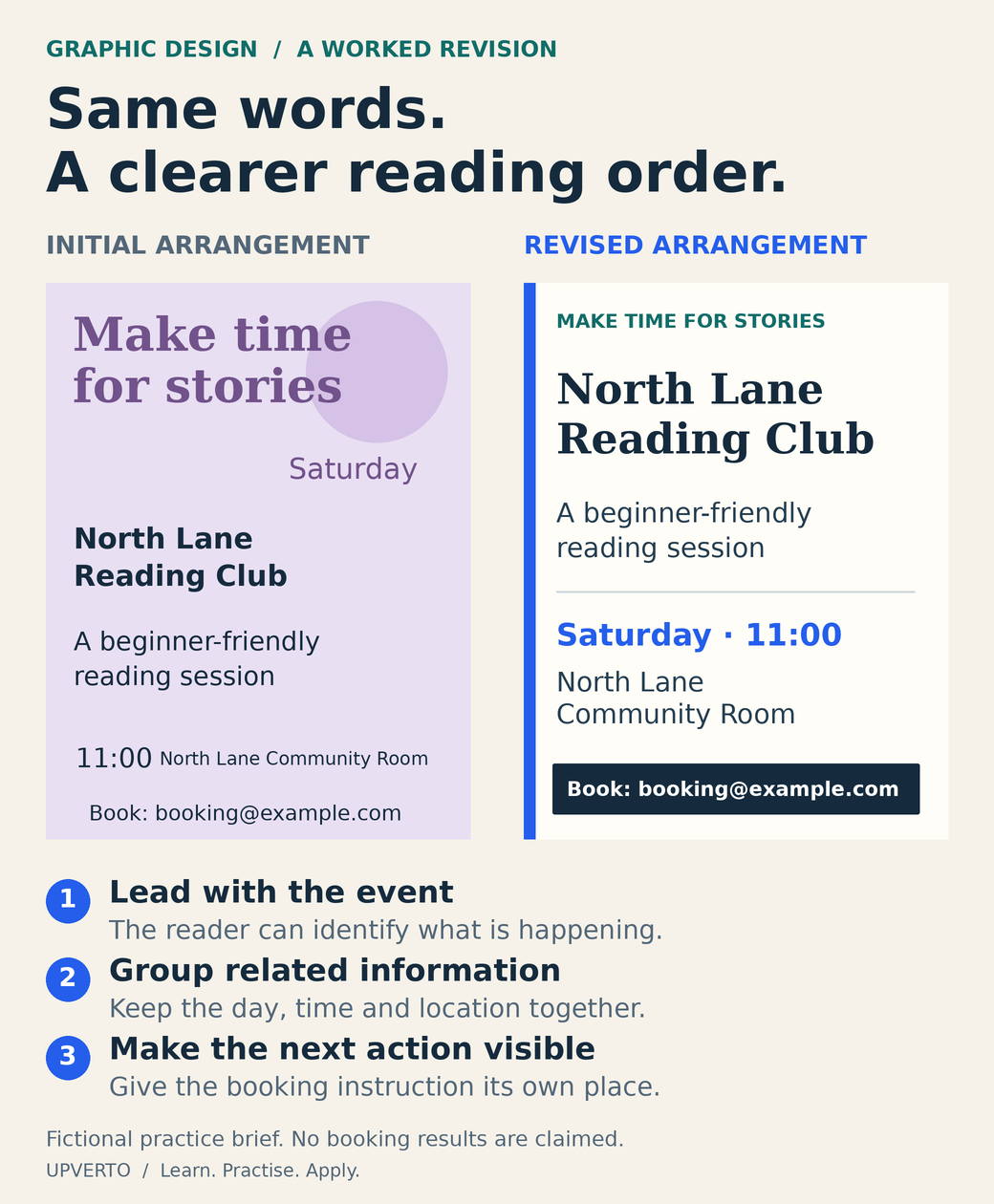
Read the text version: Revise the reading order
Both announcements contain the same fictional information: North Lane Reading Club; Make time for stories; a beginner-friendly reading session; Saturday at 11:00; North Lane Community Room; Book: [email protected].
- Hierarchy: the initial design gives the decorative slogan most emphasis. The revision makes the event name the main heading.
- Grouping: the initial day, time and location are scattered. The revision brings the related details together.
- Action: the initial booking line sits at the bottom without emphasis. The revision gives it a distinct, readable position.
This demonstrates design choices. It does not claim a measured increase in bookings.
Understand what a designer is helping a client do
A design has an audience, a message, and a context. A reader may need to recognise an event, understand a service, compare information, or find an instruction. Your decisions should help that task.
Possible outputs include social graphics, presentations, documents, advertisements, packaging, and identity assets. Each has different requirements. Designing a poster does not automatically establish readiness to create a complete brand identity or prepare every kind of commercial print file.
If you are comparing design with other fields, use the skill-selection guide. If you already want to pursue it, start by choosing a defined output and its foundations.
Learn the visual foundations
| Foundation | Question it helps you answer | Practice |
|---|---|---|
| Hierarchy | What should the reader notice first, second, and third? | Arrange the same event information in two different orders and explain the effect. |
| Typography | Is the wording readable and appropriate to the message? | Compare size, line spacing, line length, and emphasis using the same text. |
| Alignment and spacing | Do related items look related, and is the structure coherent? | Build a simple grid and use consistent spacing between information groups. |
| Colour and contrast | Can people distinguish and read the important information? | Check text against its actual background and avoid relying on colour alone. |
| Imagery | Does the image explain or support the message? | Choose a relevant, permitted image and document its source. |
| Production | Will the file work in its intended placement? | Export, open, and inspect the result at its intended size. |
For web text, the W3C’s minimum-contrast guidance explains a 4.5:1 requirement for ordinary text and 3:1 for qualifying large text, with defined exceptions. Use an appropriate contrast check and the full guidance when evaluating a design; a pleasant-looking colour pair is not evidence that it meets the criterion.
Learn the tool through the task
Choose a tool that can produce the required output and run on your available equipment. Learn text, alignment, shapes, image placement, layers or equivalent organisation, and export controls through a small project.
Understand the distinction between an editable source file and a final export. Also learn when the output depends on fonts, linked images, or other assets. Check current software features and licence terms with the provider rather than assuming every free or paid plan allows the same workflow.
Software speed is useful, but it does not replace judgement about the brief. You should be able to explain the communication choices even if you later use a different application.
Practice brief: a fictional reading-club announcement
Fictional organisation: North Lane Reading Club. Audience: adults interested in a weekend discussion. Message: a beginner-friendly reading session on Saturday at 11:00, at the fictional North Lane Community Room. Use a clearly fictional booking address such as [email protected] in the practice file.
Create a square announcement and a printable information sheet using the same content. The exercise’s specified sizes are practice constraints, not a statement of current platform requirements. For real work, confirm the current dimensions and print specifications with the destination or printer.
| Requirement | What to produce or check |
|---|---|
| Hierarchy | The event name, date and time, location, and booking instruction have a clear order. |
| Copy | All supplied information appears accurately; no unsupported claim is added. |
| Adaptation | Each format has a deliberate layout instead of an automatic crop. |
| Assets | Use your own or permitted material and record its source. |
| Exports | Open the final files and inspect readability, dimensions, and missing elements. |
| Explanation | Describe three decisions and one revision you made. |
Worked example: improve a confusing information order
| Initial arrangement | Revised arrangement |
|---|---|
| A large decorative slogan dominates the page. | The event name becomes the main heading. |
| Date and time are scattered among unrelated details. | Date and time are grouped directly below the event name. |
| The booking instruction is tiny and far from the useful information. | The next action has a clear position and readable type. |
This is an explanatory comparison. It describes design decisions rather than claiming a measured improvement in bookings.
After revising, ask someone to find the time and booking instruction without an explanation from you. Record where they hesitate. This small task can reveal a communication problem, although it is not a full usability study.
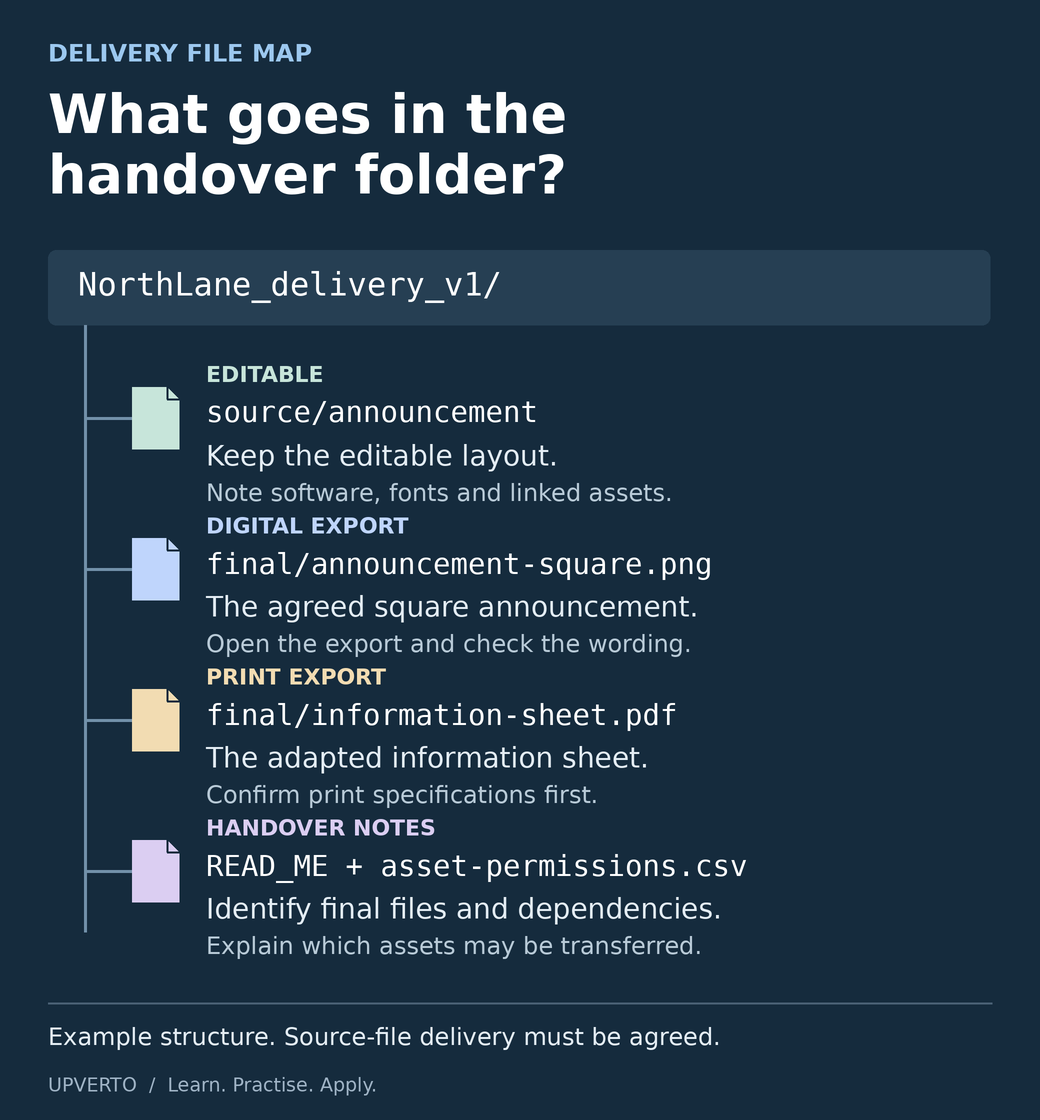
Read the text version: Deliver files the recipient can use
- Editable source: source/announcement holds the editable layout. Identify its software, fonts and linked assets. Include source files only as agreed.
- Digital export: final/announcement-square.png is the approved square announcement. Open and inspect the actual export.
- Print export: final/information-sheet.pdf is an adapted information sheet. Confirm the real printer’s required dimensions, bleed, colour and file settings before producing it.
- Handover notes: READ_ME identifies the final versions and dependencies; asset-permissions.csv records sources and permitted use. Do not imply that every font or asset can be transferred.
These are example filenames and an organisational structure, not a universal required format.
Build a review and export routine
Compare the wording with the approved source. Inspect spelling, dates, contact details, alignment, spacing, and contrast. View the design at the size and conditions in which it will be used.
Check the actual exported file, not only the editing canvas. For print work, obtain the printer’s required size, bleed, colour, resolution, and file specifications before promising production-ready delivery. For digital placements, confirm the destination’s current requirements.
Keep source files organised and record asset rights. If fonts or linked assets affect editability, explain that in the handover. Do not imply the client receives rights or files that you are not authorised to transfer.
Build evidence for a narrow service
Present the brief, initial problem, revised approach, final outputs, and checks. Label the reading-club project as fictional. Explain which parts you created and what assets or templates you used.
Use the portfolio guide to turn it into a case study. A second portfolio project could introduce a different audience or a longer set of information while staying relevant to your intended service.
When you can repeat the task reliably, define a package with quantities, formats, supplied copy, image permissions, revisions, and handover. A relevant first offer might focus on a specific set of graphics rather than promising every design service.
Check your readiness for client design work
- Can you restate the audience, message, and required outputs?
- Can you explain hierarchy and layout choices without relying on “it looks nice”?
- Can you adapt the work when the text or format changes?
- Can you check the exported files and identify production limitations?
- Can you explain asset rights, source-file delivery, and revisions?
Use the broader readiness rubric for the parts involving communication, estimation, troubleshooting, and handover.
Frequently asked questions
Do I need to be good at drawing?
Many graphic-design tasks focus on typography, layout, images, and information rather than original illustration. Examine the work you want to do. Illustration is a distinct capability to learn when the service requires it.
Can I use templates?
Templates can support learning and production when their licence allows the intended use. Adapt them thoughtfully, verify the output, and describe your contribution honestly. A lightly changed template should not be presented as an entirely original identity system.
Which graphic-design foundations should I learn first?
Start with hierarchy, spacing, alignment, typography, contrast and the relationship between text and images. Practise by making one message easier to understand. Learning tool controls is useful, but the design should also work for its audience, reading context and intended format.
How can I practise without a real client?
Create a fictional brief with an audience, message, required formats and constraints. For example, make an announcement for an imaginary reading club. Review whether someone can find the essential information quickly, and label the finished portfolio sample as a practice project.
What files should I send to a design client?
Send the formats and sizes agreed in the brief, with clear filenames and a note identifying the final versions. Discuss editable source files separately, including any fonts or assets the recipient needs permission to use. Open the actual exports before delivery.
How should I handle design feedback?
Ask the client to connect comments to the brief: audience, message, readability or required use. Consolidate the feedback, clarify conflicting instructions and distinguish corrections from additional deliverables. Keep a record of the approved version and any agreed scope change.
Build and review one communication task
Use the reading-club brief with a practical learning plan. Complete the two formats, review them, and keep the decision record. Then develop an honest portfolio and a service that matches what you can deliver.