To prepare for client video editing, learn to shape a clear sequence, handle sound and captions, manage source files, and check the final export. Editing decisions should serve the message and audience. Effects are useful when they help that purpose.
This roadmap focuses on post-production: working with supplied or self-recorded material to create an agreed deliverable. Filming, scriptwriting, animation, and channel management are related services with their own requirements.
In this guide
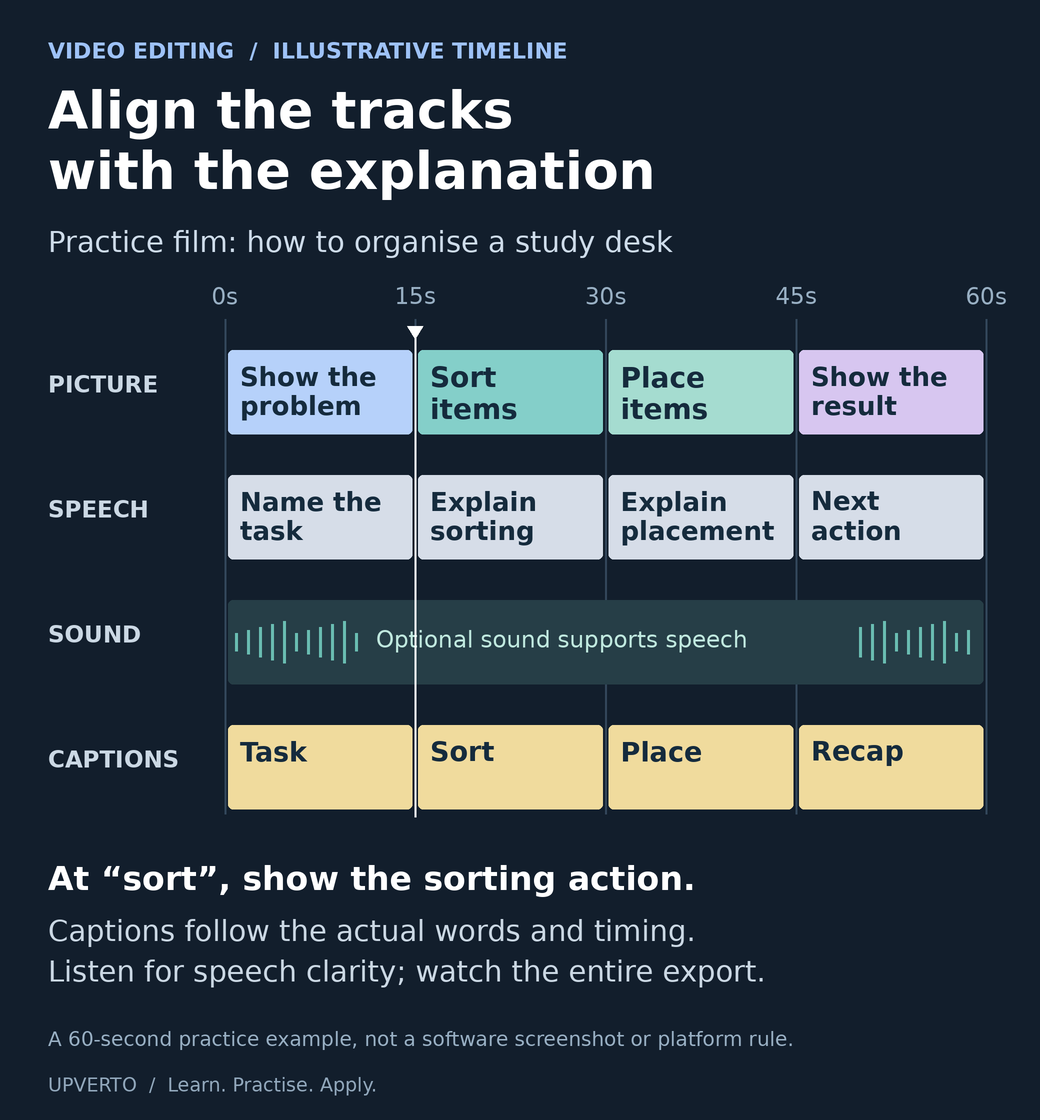
Read the text version: Align picture, speech, sound and captions
This fictional 60-second study-desk edit has four aligned tracks. It is not a screenshot of editing software and does not prescribe a platform format.
- 0–15 seconds: show the disorganised desk and explain the task.
- 15–30 seconds: show hands sorting the items while the explanation discusses sorting.
- 30–45 seconds: show placement while the speech explains where items go.
- 45–60 seconds: show the organised result and recap the next action.
- Supporting sound: any optional sound must allow speech to remain intelligible. No fixed level is implied by this drawing.
- Captions: the labelled segments indicate alignment only. Write and time the actual captions against the complete recording, including relevant sounds where appropriate.
Inspect the complete exported video, not just the timeline.
Understand the work behind an edited video
An editor may organise footage, review takes, select useful material, remove unnecessary sections, improve the flow, balance sound, add approved graphics or captions, and prepare versions for a destination.
The source material changes the task. A clear single-camera explanation is different from a multi-camera event, a complex documentary, or damaged audio. Match the learning project and eventual service to the work you can actually handle.
If you are comparing editing with other paths, use the skill-selection guide. It includes a small trial so you can experience the work before committing to a larger course.
Learn the foundations in order
| Foundation | What to practise | What to check |
|---|---|---|
| File organisation | Keep original media, project files, exports, and permitted assets in a clear structure. | You can reopen the project and locate its media. |
| Sequence and meaning | Select and arrange shots or speech so the message remains understandable. | The edit does not distort what a speaker meant. |
| Trimming and pacing | Remove unnecessary material while preserving useful context. | The result feels coherent rather than simply fast. |
| Sound | Listen for speech clarity, distracting noise, abrupt changes, and music balance. | The complete exported audio is intelligible and appropriate. |
| Text and captions | Use readable text, accurate wording, and suitable timing. | Names, technical terms, and important sounds are represented appropriately. |
| Export and delivery | Produce the agreed format and package the required files. | The actual export opens and plays correctly from start to finish. |
Blackmagic Design’s official training collection includes editing exercises and material on related disciplines such as sound and colour. Use official instructions for your chosen editor and version. You do not need to buy every application before learning the underlying decisions.
Test the workflow on your equipment
Before choosing a demanding project, test whether your device can import the source media, play it adequately for editing, save the project, and export the required result. Check current software requirements and supported formats with the provider.
Start with manageable footage. Learn the tool’s supported methods for lighter editing copies or proxies if needed, and verify that the final export uses the correct media. Keep enough storage for originals, working files, and outputs. Do not promise a format you have never successfully produced.
Practice brief: a short educational explanation
Fictional brief: Record yourself explaining how to organise a study desk. Edit the recording into a concise video that preserves the useful steps. The intended audience is a beginner who should be able to follow the advice without extra explanation.
Choose a final length and aspect ratio as exercise constraints before you begin. For example, you could aim for a 45–60 second vertical version. Those values define this practice task; they are not universal platform rules or a recommended formula for audience growth.
| Requirement | Practice output |
|---|---|
| Message | A clear opening, useful steps, and a complete ending. |
| Inputs | Your own recording and any additional material you have permission to use. |
| Edit | Remove unnecessary repetition while preserving the explanation. |
| Sound | Speech is understandable; any added music supports rather than obscures it. |
| Captions | Check the wording, timing, readability, and important non-speech information. |
| Delivery | One agreed export, an organised project folder, and notes about the checks performed. |
Worked example: explain the decisions behind the cut
Suppose the recording begins with a long pause and an unrelated comment. You remove those parts so the useful explanation begins sooner. You keep a short pause before the second step because it helps the viewer follow the change.
A caption tool misreads the name of a storage item. You compare the caption with the recording and correct it. If a word is genuinely unclear, you investigate or ask for clarification rather than inserting an unsupported guess.
The first export crops an object mentioned in the explanation. You adjust the framing and review the new export. Your case study can explain these decisions and show the relevant sections. It should not claim improved retention or sales unless those outcomes were actually measured in a suitable real context.
Treat captions and asset rights as part of the work
Captions need checking even when a tool creates them automatically. They may need to represent meaningful sounds as well as spoken words, depending on the content and accessibility requirements. Use the W3C guidance on captions when planning accessible media.
Confirm permission to use the footage, voices, music, images, fonts, and other assets. Keep licence information where needed. A track being available online is not proof that you may include it in a client’s commercial video.
If the client requires editable project files, discuss dependencies and third-party assets before agreeing. The ability to send a project file does not automatically mean the recipient has the software, media, or licences needed to use it.
Review the complete export
- Play the full export and check that it contains the intended beginning and ending.
- Listen to the sound at a sensible level, checking for unintelligible words and abrupt changes.
- Read every caption and verify names, numbers, and technical terms.
- Inspect framing, text placement, and any important visual detail.
- Confirm the agreed format, dimensions, and file naming.
- Reopen or hand over the project as agreed and check that required media is available.
Record the actual checks and any remaining limitations. A successful export message only confirms that a file was produced; it does not establish that the content is correct.
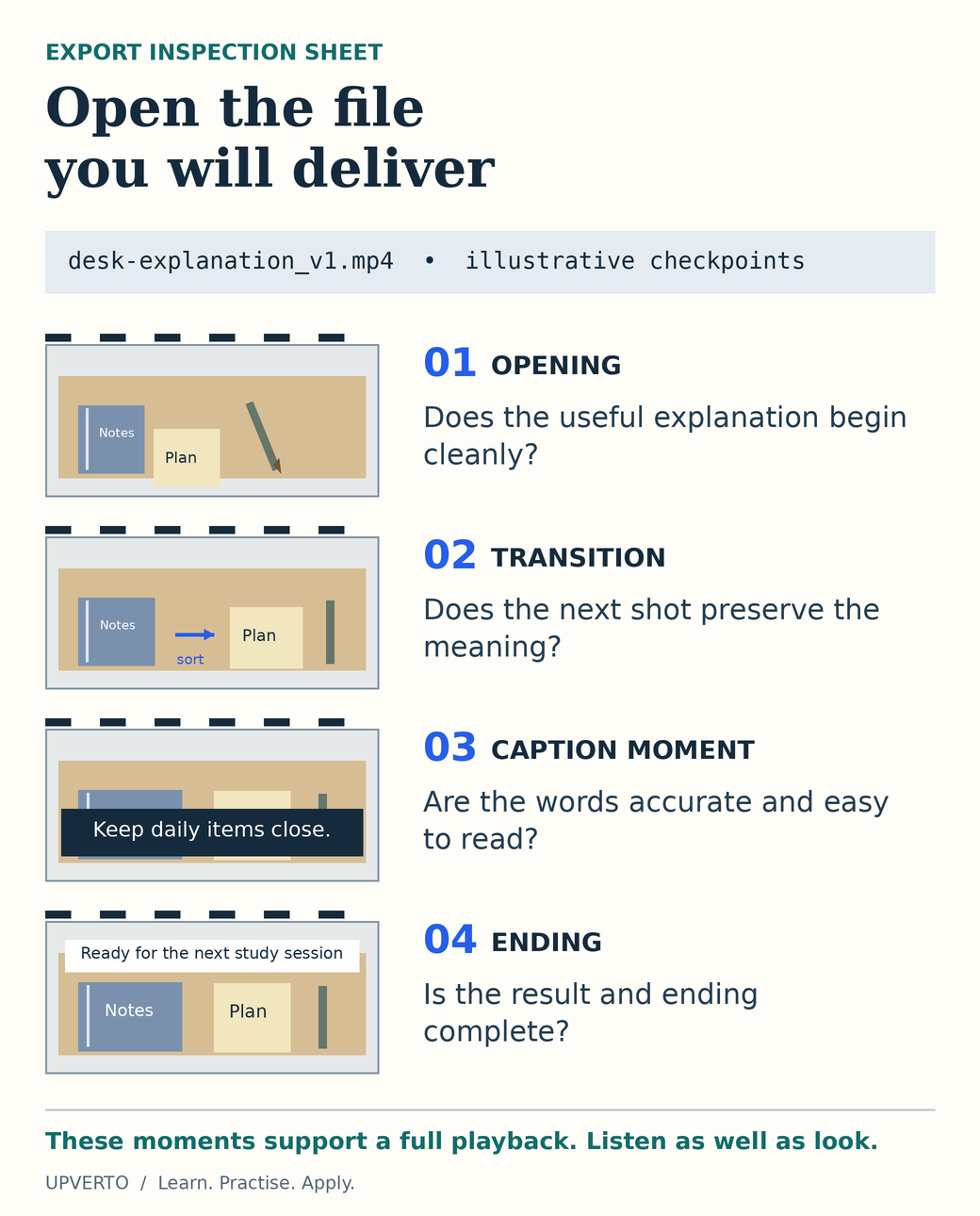
Read the text version: Inspect the actual export
- Opening: check that the useful explanation starts cleanly and that no unwanted pause or unrelated material remains.
- Transition: check the change of shot and speech. Trimming must preserve the intended meaning.
- Caption moment: compare the actual caption wording and timing with the recording. Check readability and whether important visual information is obscured.
- Ending: ensure the final result, closing message and sound finish as intended rather than being cut off.
These frames are conceptual drawings for the fictional desk exercise, not captured video or evidence of completed testing. Review the entire exported file with sound, then verify the agreed format, dimensions and filename. A successful export message does not prove correct content.
Build evidence and define an editing offer
Keep a short source excerpt, the corresponding final edit, and notes about the decisions. Label self-directed practice clearly. Use the portfolio guide to explain the brief, contribution, checks, and limitations.
When you can repeat the workflow, define a service with limits on the source material, deliverables, captions, revisions, formats, and handover. The service-package guide includes a worked editing example.
For client conversations, ask about the audience, message, source footage, approved wording, intended destination, and decision-maker. A promise to “edit anything” leaves too many responsibilities undefined.
Frequently asked questions
Do I need expensive software to begin?
Choose a tool that supports the task and your equipment. Check the provider’s current free and paid options and their limitations. Begin with a small workflow you can complete; the application’s price does not establish the quality of your editing.
Should I promise that my edits will go viral?
No. You can define and check your editing deliverables. Audience response depends on factors beyond the edit, and an example project does not establish future performance.
What should I practise before offering video-editing services?
Complete a short brief that includes organising source files, selecting shots, making clear cuts, balancing speech and music, checking captions and exporting the final video. Watch the entire export. Your sample should demonstrate the full task you want to offer, not only a striking transition.
Can I build an editing portfolio without client footage?
Use footage you created or material whose licence permits your intended use. Write a fictional brief and explain your editing contribution. Keep a record of sources and permissions, and avoid presenting practice footage as a completed client commission.
How much attention should I give to audio and captions?
Treat them as part of the brief and review them deliberately. Check that speech is understandable, background audio supports it, and captions match the spoken content. Watch with sound and, where captions are provided, check that the video still communicates its essential message without sound.
What belongs in a video-editing handover?
Identify the approved final exports, their formats and where they are intended to be used. Include project files only if agreed, and explain relevant assets or dependencies. Confirm the revision and support boundaries, and keep the source footage organised according to the project agreement.
Complete one brief, including the handover
Use the learning cycle to practise the short-video brief, then assess your work with the readiness rubric. Develop a service supported by that evidence and use the project workflow when handling real client delivery.