Category: Deliver projects

  • Quality Checks Before Delivering Digital Work to a Client

    Quality Checks Before Delivering Digital Work to a Client

    Quality checking begins with the agreed result and ends with the actual file, page or system the client will receive. A checklist helps you remember important checks, but the evidence comes from performing them and recording what happened. Different disciplines need different checks; no short list certifies every digital project. This guide develops the checking stage of manage freelance projects.

    Turn acceptance conditions into observable checks

    Use write project brief acceptance criteria to identify what the deliverable must do. Replace “looks good” with a condition a reviewer can inspect: approved wording appears, the specified format opens, the expected calculation produces the correct result, or a named form completes the agreed path.

    For each condition, identify the test object, the method and the expected result. A working file, an export and an uploaded version are different objects. If the client receives the PDF, opening only the design source does not establish that the delivered PDF works. If a website page links to a form, a screenshot of the page does not exercise the form.

    Prioritise by the consequences of failure. A wrong event date, inaccessible delivery link or incorrect total can be more consequential than a minor decorative inconsistency. Record unresolved issues openly. Do not average several minor passes into a score that hides one essential failure.
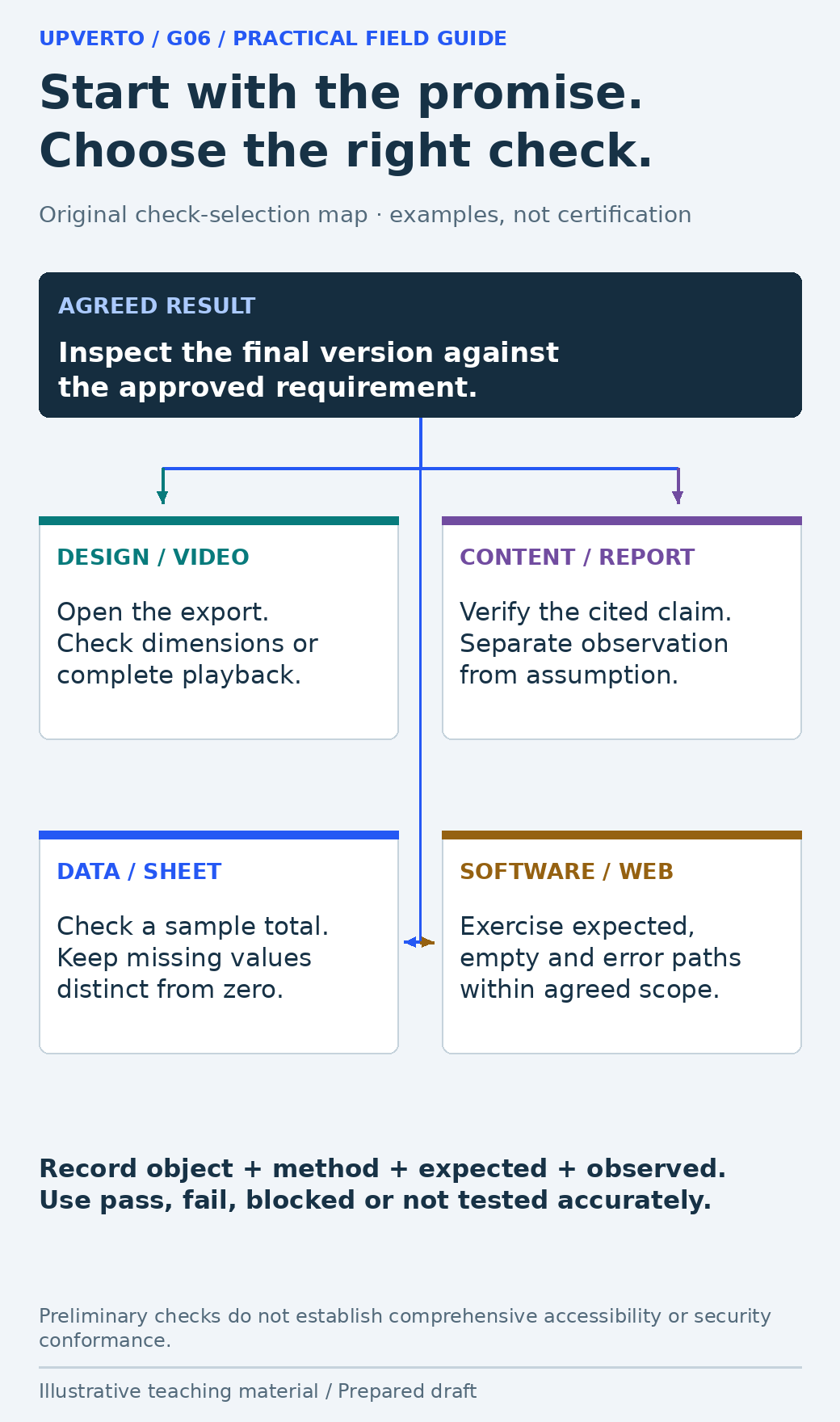
    An agreed-result header leads to distinct checks for design/video exports, sourced content, data calculations and software states, with a shared evidence-recording rule.
    Select quality checks that match the actual deliverable — A shared quality process needs discipline-specific methods. Use the enlarged view, then swipe or use arrow keys to inspect. View full-size infographic.
    Read the text version: Select quality checks that match the actual deliverable

    Start from the approved requirement and inspect the actual final object. Design/video work may need export dimensions or complete playback; content needs claims checked against sources; data needs sample calculations and explicit missing values; software needs relevant normal, empty and error paths. Record the object, method, expected result and actual observation. Preliminary checks are not a complete accessibility or security assessment.

    Run the checks shared by most digital work

    AreaEvidence to seek
    Correct version and scopeThe final item matches the agreed deliverables and approved input version
    Content accuracyNames, dates, numbers and labels are compared with the authorised source
    Usability and accessThe intended recipient can reach, open and understand the result
    Format and compatibilityThe required dimensions, file type, device or supported environment are checked
    Permissions and dependenciesThird-party assets, access and required software are identified
    Handover readinessFinal files are distinguishable from drafts and instructions explain what to do

    Use a preserved source of truth for factual checks. If the source is itself ambiguous, record the uncertainty and ask the owner. Checking a date against a second unapproved copy does not resolve the ambiguity. Never mark an unknown field as zero, false or complete merely to make the sheet look tidy.

    Keep the review proportional. A low-risk caption correction does not need a sprawling test programme, but it does need a check of the corrected caption and affected export. Broaden checks when the change could affect another function or when a previous problem gives you a concrete reason.

    Add the checks your discipline requires

    Work typeAdditional checks
    Graphic design or documentHierarchy at intended size; text clipping; required dimensions; readable export; supplied asset usage
    Video or audioComplete playback; intelligible audio; caption timing and wording; agreed aspect ratio and export
    Written content or reportSources support claims; observations differ from assumptions; links and headings work; limitations are accurate
    Spreadsheet or data taskSample calculations; expected types; duplicate handling; missing values; filters and formulas in the delivered file
    Website or software featureNormal, empty and error paths; relevant links and input handling; supported devices; access boundaries and recovery

    For websites, W3C WAI’s Easy Checks provides a preliminary accessibility review and explicitly warns that it is not comprehensive. Passing a few checks does not justify a blanket accessibility-conformance claim. Define the required level of assessment and obtain suitable expertise when the project needs it.

    Likewise, the OWASP authorisation guidance is useful when the task involves permissions, but reading a checklist is not a security audit. Be specific about the authorised checks you performed and what remains outside your competence or scope.

    Worked example: a date error survives export

    Fictional scenario: The approved workshop source says 21 November. A designer corrects the working layout, but the delivery folder still contains an older square export showing 14 November. The print export has the correct date. A review of the source file alone would miss the mismatch.

    Object checkedExpectedFictional observationDecision
    Approved source21 NovemberSource confirmed by organiserUse as comparison baseline
    Square delivery PNG21 NovemberOld export says 14 NovemberReplace and reopen final file
    Print delivery PDF21 NovemberDate matches sourceRecord pass for this check only
    Delivery folderOnly intended final outputsOld square file remainsRemove ambiguity using agreed version process

    The correction is to regenerate the square export from the approved working version, open the actual new file, compare its wording and dimensions, and update the delivery note. The graphic shows an illustrative check record; it is not evidence that a real project was tested. In your own work, record the real file identifier, observation and reviewer.
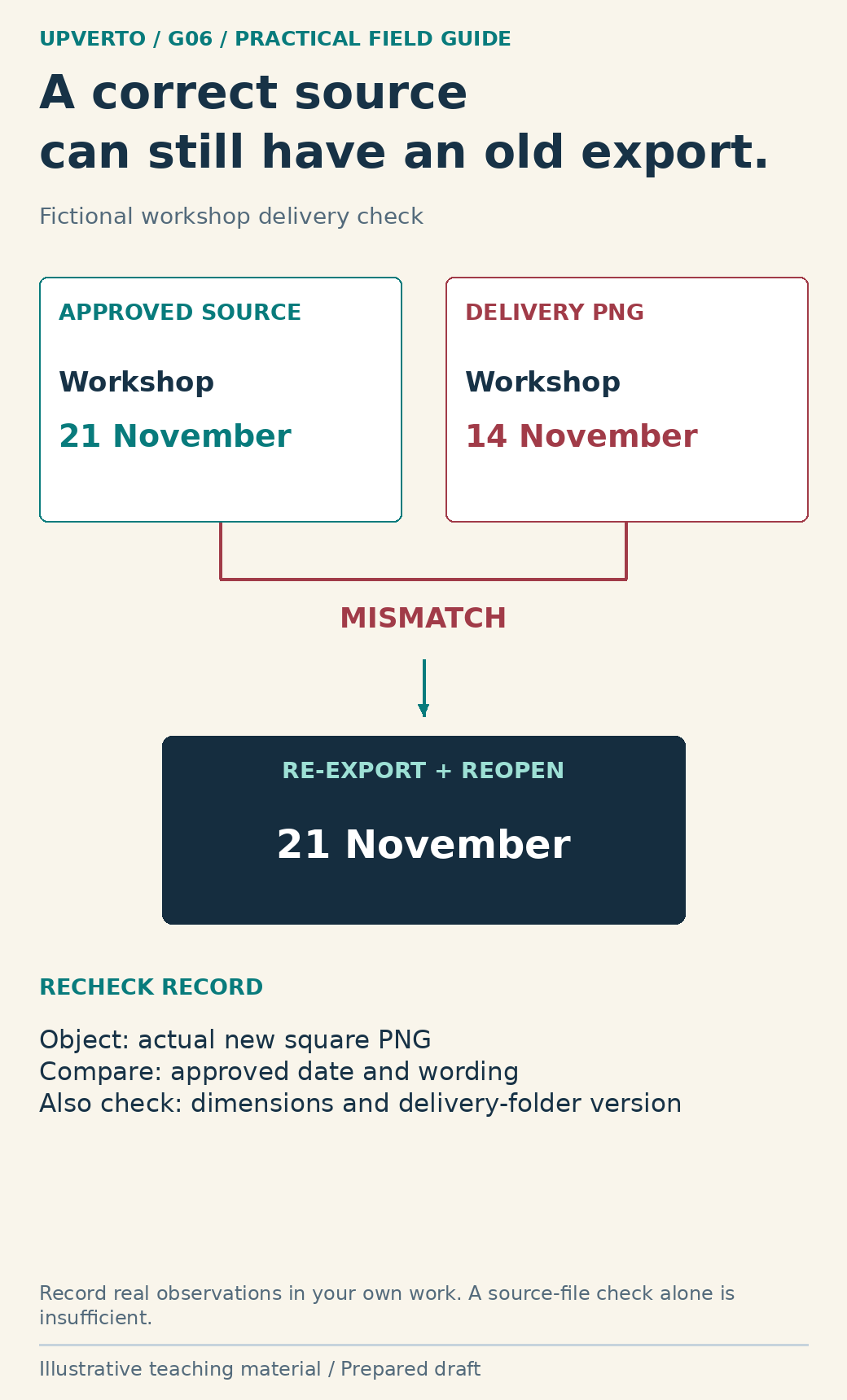
    A fictional approved source shows 21 November while the delivery PNG still shows 14 November. Re-exporting and reopening the actual final file leads to a focused recheck record.
    Check the delivered export rather than only its source — The delivered object can differ from the corrected working file. Use the enlarged view, then swipe or use arrow keys to inspect. View full-size infographic.
    Read the text version: Check the delivered export rather than only its source

    In this fictional scenario, the approved date is 21 November but an old delivery PNG still shows 14 November. Re-export from the approved source, reopen the actual new PNG and compare its date, wording and dimensions. Check that the delivery folder identifies the correct version. The illustration is not a claim that a real client file was tested.

    Copy a delivery check record

    FieldWhat a useful entry contains
    RequirementThe agreed condition being checked
    Object and versionExact file, page or build under inspection
    Method and environmentWhat you did and the relevant viewing or execution context
    Expected resultA concrete condition, not merely “fine”
    Observed resultWhat actually happened, including errors or missing evidence
    StatusPass, fail, blocked or not tested; do not merge these
    Correction and recheckWhat changed and what you checked afterwards
    LimitationsConditions, devices or cases not covered

    A failed check is useful if it leads to a controlled correction. Preserve enough detail to reproduce the problem without copying unnecessary personal data into the log. After fixing it, recheck the affected result. If the change can affect other relevant outputs, check those too; if it cannot, avoid expanding the exercise just to generate a longer report.

    Keep “not tested” separate from “failed.” A feature may be untested because access is unavailable, which is a different decision from observing a defect. Neither status should be presented as a pass. Explain any material remaining limitation before asking the client to accept delivery.

    Make a delivery decision with honest limits

    Deliver when the agreed conditions are satisfied or when remaining limitations have been explicitly discussed and handled within the appropriate agreement. Do not hide a required failure behind a green summary label. If a critical issue is beyond your ability, preserve the work, explain the effect and seek an authorised way forward.

    The ready for paid client work checklist helps assess whether you can reliably perform the specific task and its checks. Once the actual deliverables are ready, use freelance project handover to package files, evidence, instructions and support boundaries. Quality is the relationship between the promise and the inspected result, not the number of checkboxes.

    Frequently asked questions

    Should I check the source file or the exported file?

    Check the actual deliverable, using the source and approved inputs as references where appropriate. Exporting or uploading can introduce a new error or leave an old version in place. The recipient’s experience is the relevant final check.

    Does passing an accessibility checklist certify a website?

    No. Preliminary checks cover only some issues. Define the required assessment, perform suitable testing and avoid a conformance claim that exceeds the evidence. W3C’s Easy Checks states this limitation explicitly.

    What if I cannot test a required feature?

    Mark it blocked or not tested, explain why and identify what is needed. Do not convert lack of evidence into a pass. Resolve the material gap or agree an appropriate limitation before delivery.

    Do I need to retest everything after a small change?

    Recheck the changed result and anything plausibly affected by it. Expand testing to address a concrete risk, dependency or required gate. A relevant focused recheck is more useful than blindly repeating unrelated checks.

    How should I record a subjective design review?

    Name the purpose, intended viewing context and specific observation, such as a date being hard to locate. Distinguish that review from a measured user study. Do not invent reader feedback or results.

    What should I do with a serious issue outside my ability?

    Preserve the current state, explain the issue and its effect, and agree the next step. That may involve qualified help, narrowing the task or pausing delivery. Do not experiment on a live client system beyond the authorised scope.

    Sources and scope

    The worked examples, worksheets and diagrams are original fictional teaching materials. They are not reports of client results. Primary references were checked during preparation; verify current rules and account-specific features before acting.

  • How to Give Clients Clear Project Updates

    How to Give Clients Clear Project Updates

    A clear project update helps the client understand the present state and make the next necessary decision. State what is complete, what evidence is available, what remains uncertain and what action is needed. Avoid percentages that have no defined meaning or reassurances that conceal a blocker. Updates connect the stages of manage freelance projects.

    Report the state of the work, not the effort alone

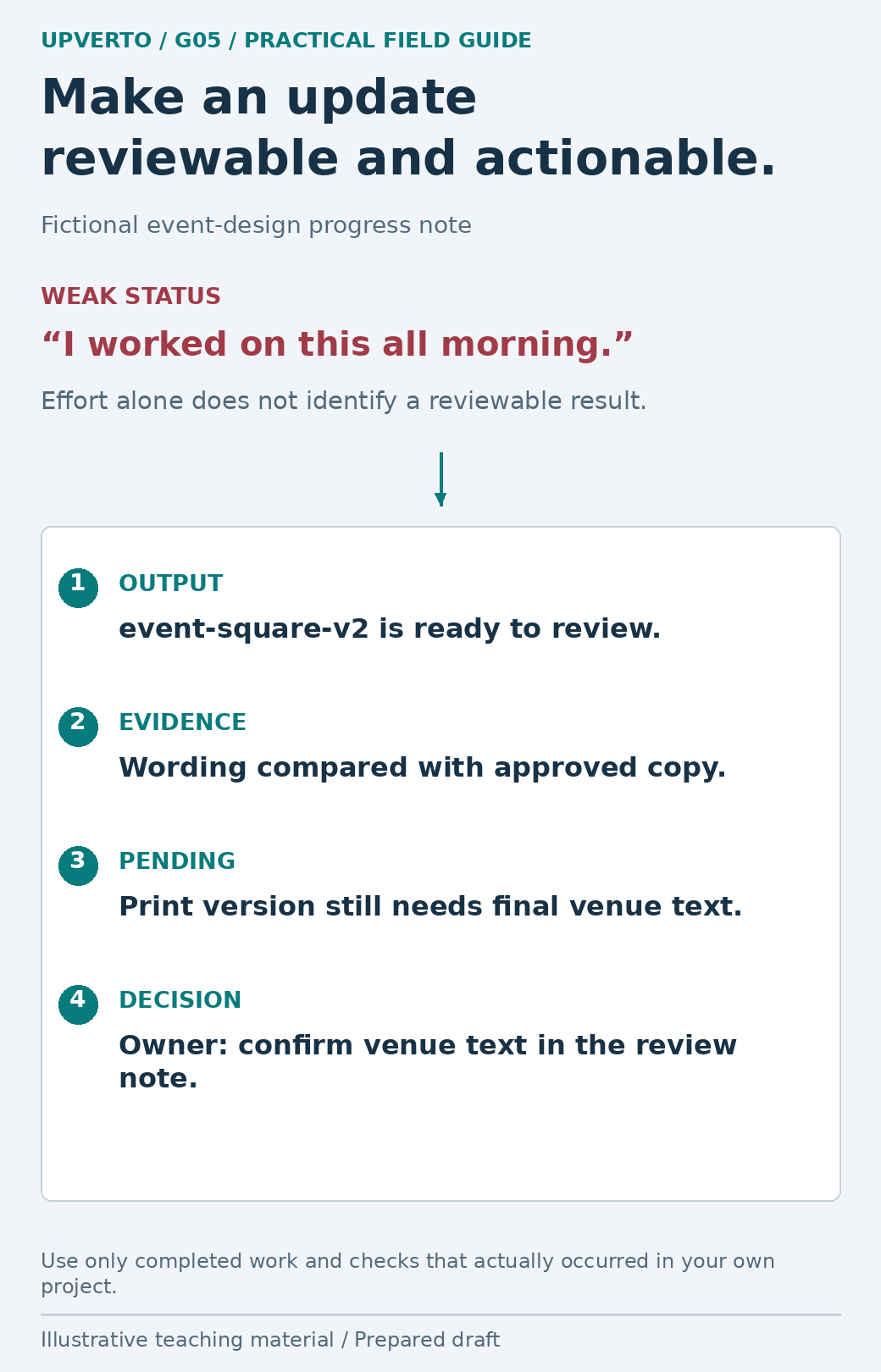
    “I worked on this all morning” describes effort but does not tell the client what they can review. “The square announcement draft is ready; the print version still needs the approved venue text” identifies an output and a dependency. Both effort and output can matter, but they answer different questions.

    The GOV.UK guidance on measuring and reporting progress connects reporting to the work and evidence produced during delivery. For a small freelance project, a useful adaptation is to link an update to a version, decision or checked result. Do not borrow an elaborate reporting system when a short, accurate note will do.

    Agree the channel, recipients and expected rhythm during the client onboarding checklist. A project with frequent decisions may need more contact than a straightforward file preparation task. A material problem should not wait for the next routine update merely because it was not scheduled.

    An effort-only message is replaced by an event-square-v2 output, a specific wording check, a pending venue-text dependency and a decision for the owner.
    Replace an effort-only update with a useful project state — A useful update names what exists and what someone must decide next. Use the enlarged view, then swipe or use arrow keys to inspect. View full-size infographic.
    Read the text version: Replace an effort-only update with a useful project state

    Instead of saying only that you worked all morning, name the reviewable output, evidence, remaining dependency and decision. In the fictional note, event-square-v2 is ready, wording was compared with approved copy within the scenario, the print version needs final venue text, and the owner must confirm it in the review note. Record only actual work and checks in a real update.

    Give the reader four things they can use

    ElementUseful contentCommon weak substitute
    CompletedA named output and its review state“Nearly done”
    EvidenceThe relevant file, preview or check noteA screenshot presented as proof of every function
    ConstraintA specific missing input or unresolved issue“There have been some delays”
    Next actionOwner, requested decision and effect of waiting“Let me know your thoughts”

    Use dates or times when they help coordinate an action, and include the relevant timezone when people could interpret them differently. Do not create a false deadline to make the client respond faster. Explain the real dependency: “I need the approved spelling before final captions can be exported.”

    Separate status from forecast. A draft ready for review is a current fact if it exists; a final file expected tomorrow is a forecast that may depend on approval. Name the dependency alongside the forecast. If you have not checked something, say “not yet checked” rather than using a broad quality claim.

    Example 1: a normal review update

    Fictional update draft; not sent: A designer has prepared the agreed square announcement but has not yet produced the print export. The following described work exists only within the teaching scenario.

    The square announcement draft, event-square-v2, is ready at the review link. I compared its wording with the approved copy; the printable version is next.

    Please send one consolidated set of comments on hierarchy and placement by the agreed review point. The event date and venue wording are already approved, so flag any proposed wording change explicitly. After that review I can prepare the revised square file and the print export.

    The version makes the update inspectable. The note describes one specific check without claiming the whole project is finished. The requested review is focused, and the next output is clear. In your real update, include only checks you actually performed and make sure the recipient has access to the review file.

    Example 2: a missing input changes the forecast

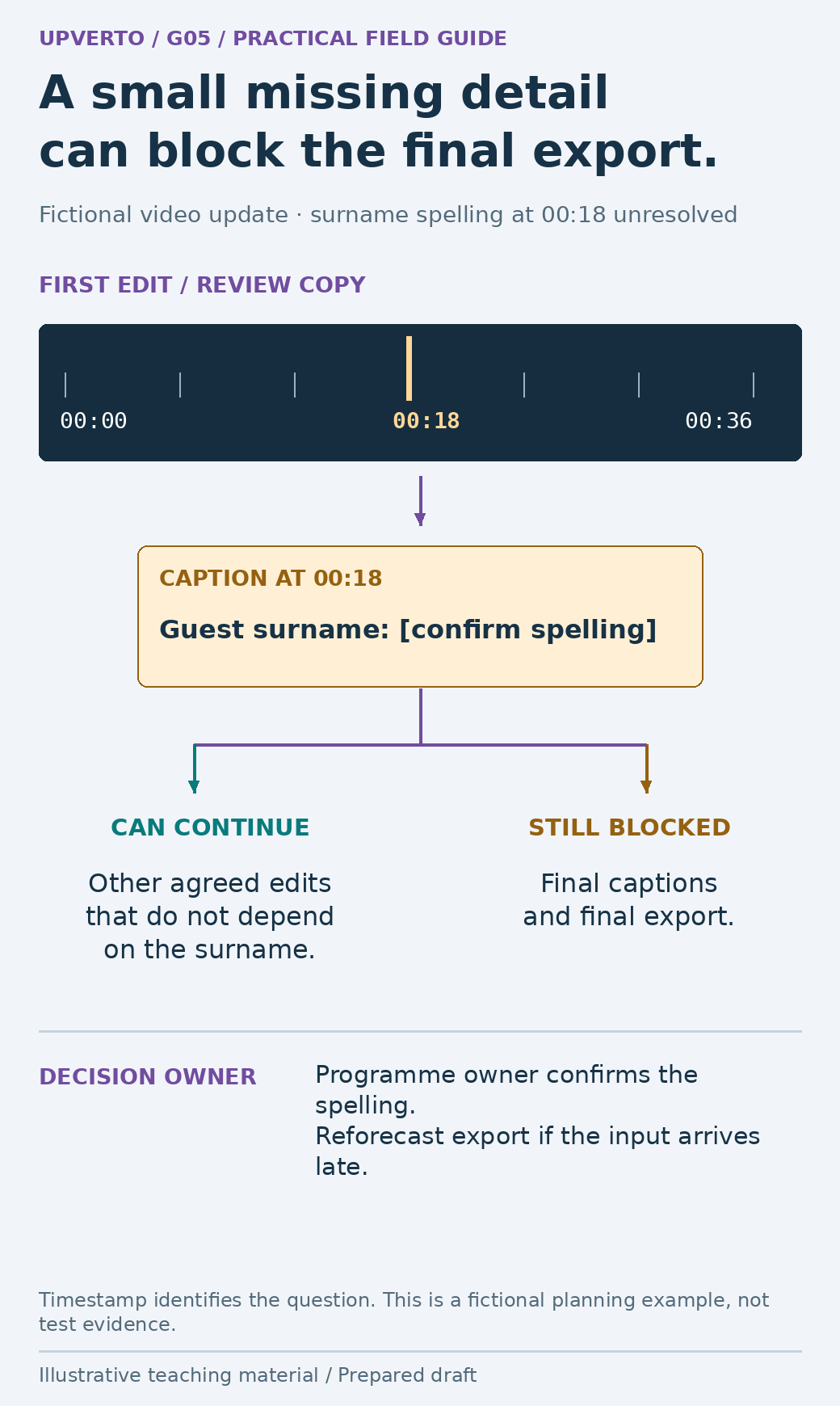
    Fictional update draft: A captioned video needs the approved spelling of a guest’s surname. Editing can continue on unrelated sections, but final captions and export depend on that information.

    The first edit is available for review. The guest’s surname at 00:18 is still marked for confirmation, so the captions are not final.

    Please ask the programme owner to confirm the spelling in the shared review note. I can continue the other agreed adjustments while waiting. If confirmation arrives after the planned export slot, I will give you a revised delivery time before exporting the final version.

    The timestamp points to the actual question. The update identifies the owner and explains which work can proceed. It does not blame the client or conceal the dependency behind “technical issues.” It also avoids promising that a missed input deadline has no effect on delivery.

    A fictional video timeline marks an unresolved surname at 00:18, then splits work into unrelated edits that may continue and final captions/export that remain blocked.
    Explain a blocker without hiding what can proceed — Name the missing input, owner and effect on the forecast. Use the enlarged view, then swipe or use arrow keys to inspect. View full-size infographic.
    Read the text version: Explain a blocker without hiding what can proceed

    Fictional video update: the surname at 00:18 needs confirmation by the programme owner. Unrelated agreed edits can proceed, but final captions and final export remain dependent on the spelling. If it arrives after the planned export slot, give a revised forecast. The timeline locates the issue; it is not evidence of a real completed review.

    Example 3: your own estimate was wrong

    Fictional update draft: A freelancer underestimated the time needed to repair a supplied spreadsheet’s inconsistent date fields. The work is still within the agreed task; the freelancer is responsible for explaining the changed forecast.

    I underestimated the time needed to check the mixed date formats. The records marked in the review sheet still need verification, so I will not describe the file as ready today.

    I have preserved the original and completed the checked rows identified in the log. My next step is to verify the remaining ambiguous dates against the source. I propose sending the corrected file at the revised time shown in the schedule. If that no longer meets your need, let us decide which bounded output would be useful first.

    The message owns the estimation error, identifies the remaining work and proposes a decision. It does not silently narrow the scope or label guessed dates as corrected. The appropriate revised timing depends on the actual work and agreement; the example is not a script for excusing repeated missed commitments.

    Copy an update worksheet and check the evidence

    FieldFill before sending
    Project and versionWhich work and review copy does this concern?
    Completed since last updateWhat can the client inspect now?
    Checks actually performedWhat did you compare, open, play or test?
    Still pendingWhat is incomplete, blocked or unverified?
    Decision neededWhat exact question needs an answer, and from whom?
    Next step and forecastWhat follows, with which dependencies?
    Link/access checkCan the intended recipient open the relevant material?

    Before sending, read the previous update. Explain any change in the forecast or scope instead of leaving the client to reconcile contradictory messages. Keep sensitive details in the appropriate restricted record; the update can identify the issue without reproducing confidential data in a broad email thread.

    When a requested action introduces extra work, use the process to handle client revisions scope changes and link to the decision record. A progress message should not smuggle a scope change into a sentence about what happens next. If a conversation resolves the issue verbally, write down the resulting decision where the project record lives.

    As delivery approaches, distinguish “ready for checks” from “ready to hand over.” Use the digital project quality checklist to inspect the final output. A well-written update supports reliable delivery; it cannot substitute for the work or evidence it describes.

    Frequently asked questions

    How often should I update a client?

    Agree a rhythm suited to the project and send an additional update when a material decision or change needs attention. Frequent messages without new information can create noise; a serious blocker should not wait merely for a scheduled reporting day.

    Should I report percentage complete?

    Only if the percentage has a clear, useful definition. A named output and its review state are usually easier to assess than “80% done.” Do not imply that the remaining work is predictable when major uncertainty remains.

    What if there is no progress because I am waiting for the client?

    Name the missing input, its owner and the specific work it blocks. Explain what can still proceed and how the forecast depends on the answer. Keep the message practical rather than blaming.

    How should I report my own delay?

    Acknowledge the cause accurately, show the present state, explain the effect and propose a realistic next step. Do not invent a technical problem or quietly lower the agreed quality standard to preserve an earlier promise.

    Can a screenshot prove the work is complete?

    It can show a visible state, but it does not prove behaviour that was not exercised. A form screenshot does not show that submission or delivery works. Match the evidence to the claim and state the checks actually performed.

    What if the client responds with a new request?

    Record it and compare it with the baseline. Clarify the impact before treating it as the next task. Keep a new requirement distinct from the decision the update originally requested.

    Sources and scope

    The worked examples, worksheets and diagrams are original fictional teaching materials. They are not reports of client results. Primary references were checked during preparation; verify current rules and account-specific features before acting.
  • How to Hand Over Client Work: Files, Ownership and Support

    How to Hand Over Client Work: Files, Ownership and Support

    A handover is complete when the intended recipient can identify the agreed deliverables, access them and understand what happens next. Sending a folder link is only one part of that job. Explain files, dependencies, access arrangements and support boundaries, and preserve an accurate record of what was delivered. This closes the delivery process in manage freelance projects.

    Build the pack around what the recipient needs

    Begin with the digital project quality checklist so the pack contains checked final outputs. Compare the contents with the agreed brief. Source files, alternative formats and setup work should be included when the agreement calls for them, not assumed merely because you happen to possess them.

    Use a short README or delivery note that names the project and final version, identifies the files, explains how to open or use them, and lists material limitations. Distinguish an editable source from an export intended for distribution. If the recipient needs a particular application, font or account, identify that dependency rather than letting the first failed opening attempt reveal it.

    A useful folder structure mirrors use: final outputs, agreed editable sources, reference or licence notes, and checks or instructions. Avoid a pile of “final-final-new” files. You can preserve working history elsewhere according to the agreed retention process without making the client search through every draft.

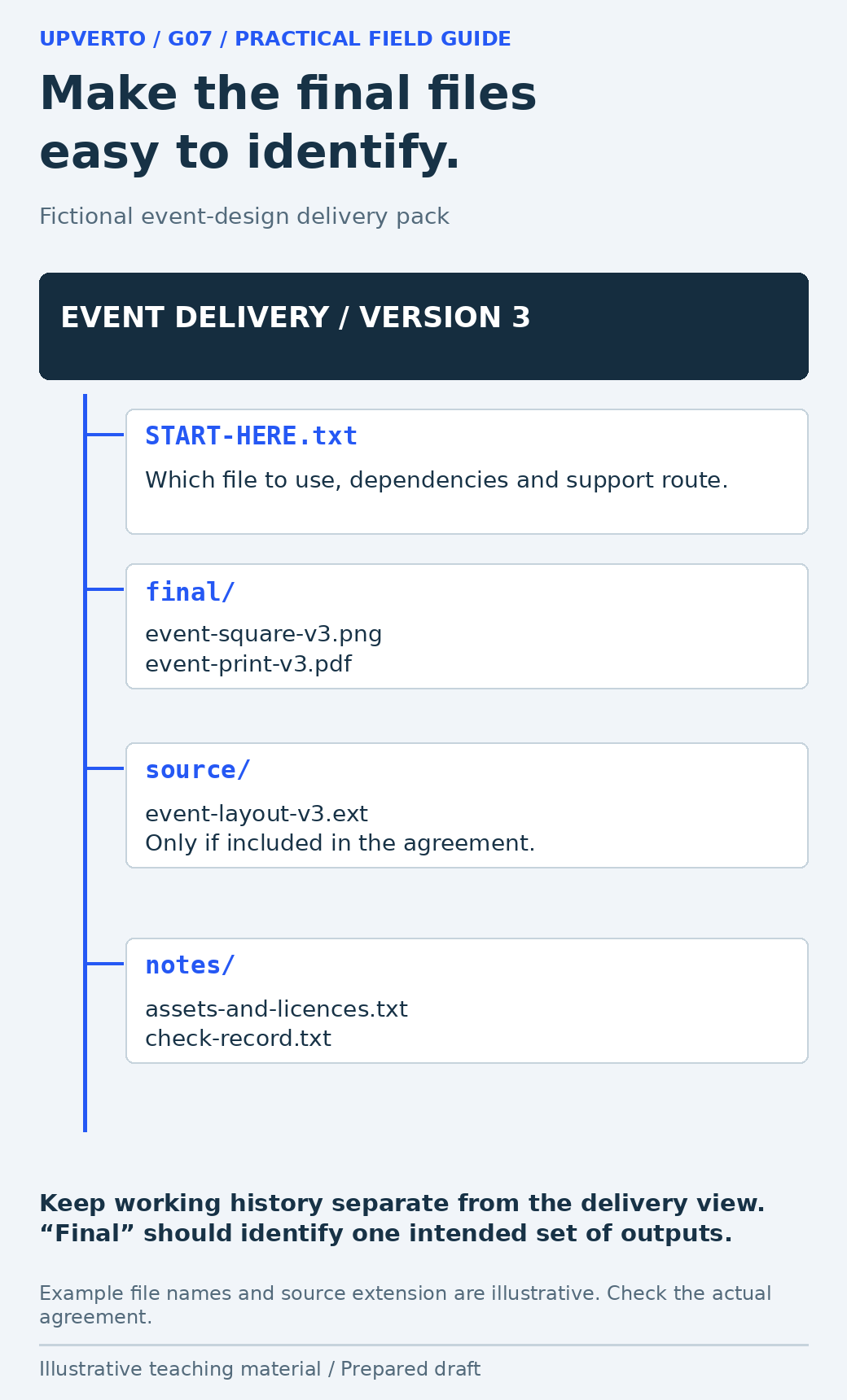
    A folder tree identifies START-HERE instructions, final square/print exports, agreed editable source and asset/licence plus check notes for a fictional event project.
    Organise a usable event-design handover pack — Organise the pack around the recipient’s use rather than every working draft. Use the enlarged view, then swipe or use arrow keys to inspect. View full-size infographic.
    Read the text version: Organise a usable event-design handover pack

    Fictional pack: START-HERE.txt explains the files, dependencies and support route. final/ contains event-square-v3.png and event-print-v3.pdf. source/ contains the agreed editable event-layout-v3.ext only where included. notes/ contains asset/licence notes and the real check record to prepare for your own work. Keep draft history separate from the clear delivery view.

    Separate file delivery from rights and licences

    WIPO’s copyright guidance describes rights that depend on the applicable legal framework. Do not assume that sending a file, paying an invoice or commissioning work automatically transfers every relevant right in every jurisdiction. Identify the arrangements in the actual agreement and obtain qualified advice when a specific legal conclusion is needed.

    Third-party materials need separate attention. For example, the Creative Commons Attribution 4.0 licence deed includes attribution and other conditions and notes that other rights may still matter. A file being downloadable or included in a project folder does not erase its licence. Check the particular asset, source and permitted use rather than treating all “free” resources as interchangeable.

    MaterialWhat the handover should clarify
    Your agreed original workWhich files and use or ownership arrangements the agreement covers
    Client-supplied materialWhich original owner or permission record applies
    Third-party assetSource, licence, required credit and relevant restrictions
    Software or subscriptionWho holds the account and pays for continuing access
    Confidential project dataWho may retain it, for what purpose and under what handling process

    This record can explain operational dependencies without making legal claims you cannot support. If a font or stock asset cannot be redistributed in the source pack under its terms, identify a permitted route for the client rather than copying it anyway.

    Transfer responsibility through the owner’s process

    Use the client’s supported account and sharing arrangements. The OWASP least-privilege guidance supports keeping access limited to the task. Confirm the intended owner and named users, and document which access should continue for an agreed support task and which should be reviewed or removed.

    Do not hand over passwords in a public README or leave recovery codes in a shared folder. Do not unilaterally delete the client’s account, revoke the wrong collaborator or move a live service to an unverified owner. Use the authorised platform process, preserve an appropriate recovery route and confirm the resulting access with the recipient.

    A delivery link should work for the intended recipient without exposing the pack publicly by accident. Check the sharing scope and ask the recipient to confirm access to the files they need. That is different from claiming they have tested every feature or formally accepted the project. Record the actual acknowledgement accurately.

    Worked example: an event-design handover

    Fictional scenario: A designer has agreed a square event announcement, a print PDF and the editable source. The event uses client-supplied text and logo, plus a third-party font. No attendance or sales result is claimed. The following is an illustrative pack, not a record of files delivered to a real client.

    Pack itemPurpose
    START-HERE.txtFinal version, file meanings, dependencies and support route
    final/event-square-v3.pngChecked square output for the agreed placement
    final/event-print-v3.pdfChecked printable output with agreed dimensions
    source/event-layout-v3.extEditable source in the agreed application format
    notes/assets-and-licences.txtClient-supplied assets and the font source/terms to verify
    notes/check-record.txtActual checks to record when producing your own pack

    The delivery note explains that the PNG is for the square placement and the PDF is for print. The source may require the agreed application and a correctly licensed font. The recipient should not have to guess whether opening the PDF in an editor will preserve the original layout.

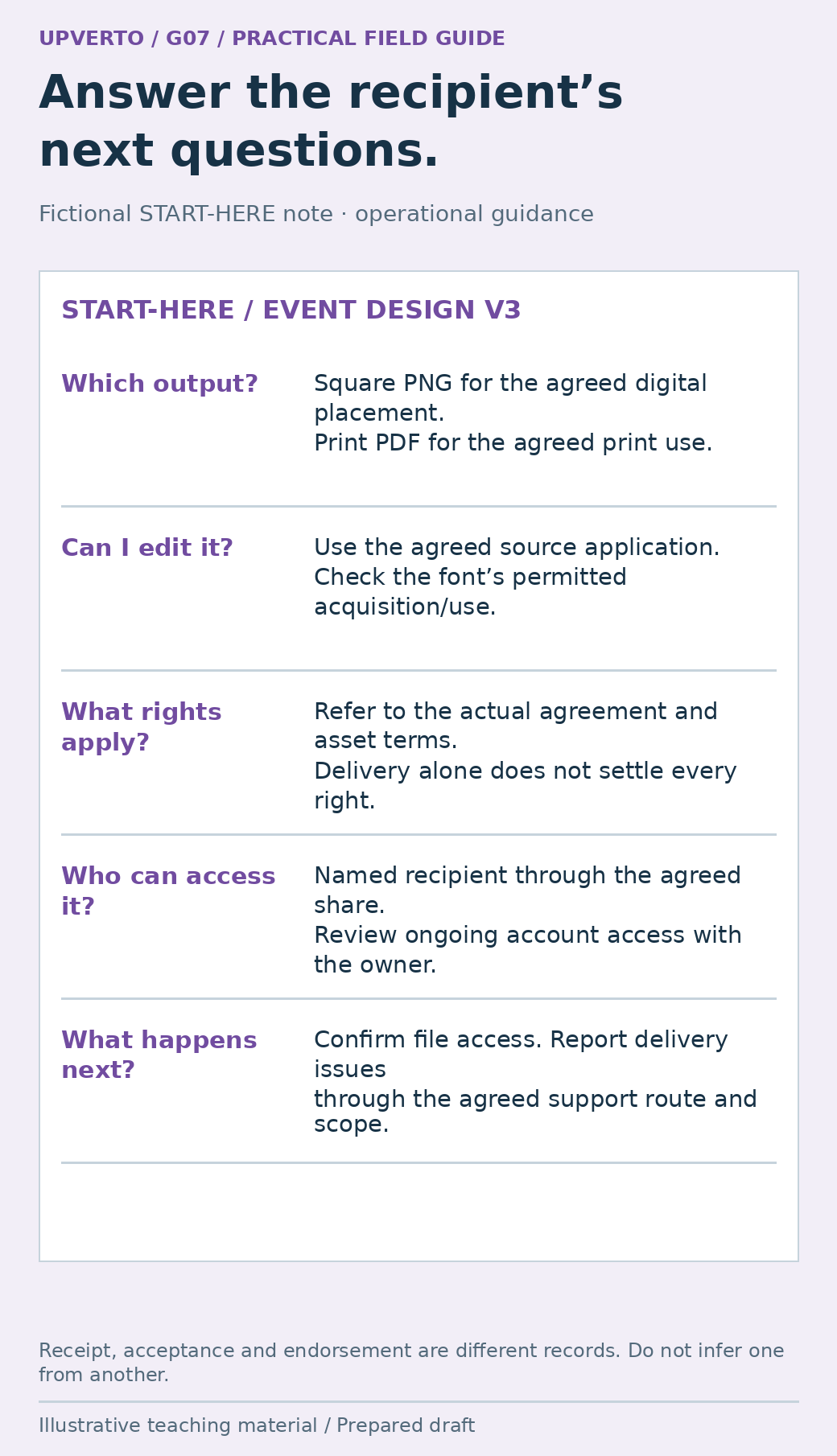
    A fictional START-HERE note explains output use, editable-source dependencies, rights references, authorised access and the support route without assuming ownership transfers.
    Write a handover note that clarifies files and responsibilities — Help the recipient use the pack and understand its boundaries. Use the enlarged view, then swipe or use arrow keys to inspect. View full-size infographic.
    Read the text version: Write a handover note that clarifies files and responsibilities

    The fictional delivery note identifies the square PNG and print PDF, the application and permitted font route for the editable source, the actual agreement and third-party terms governing rights, the named recipient’s access and the agreed support process. Ask for actual file-access confirmation. Receipt, acceptance and a testimonial are different statements.

    Explain what happens after delivery

    State the agreed support route, review window where applicable and what it covers. Distinguish a delivery issue from new content, a new format or an ongoing maintenance responsibility. A request to correct a file that differs from the approved text is different from a request for next month’s campaign. The actual agreement and circumstances govern how either is handled.

    Do not promise unlimited assistance as a substitute for a clear arrangement. Name response expectations only when you can meet them and the scope is understood. If a live system needs continuing maintenance, identify the owner; silence after handover should not leave both sides assuming the other is monitoring it.

    Use write project brief acceptance criteria to resolve any mismatch between the delivery note and the agreed acceptance conditions. If there is a genuine continuing need after handover, the guide to retain freelance clients ongoing services helps discuss an appropriate ongoing service separately.

    Copy this handover checklist

    CheckEvidence or decision to retain
    DeliverablesEach agreed output is present and clearly named
    Final inspectionThe actual supplied versions were checked
    InstructionsThe recipient can identify and use the files
    DependenciesApplications, fonts, accounts and licences are identified
    AccessCorrect recipient and sharing scope; authorised transfer/review process
    Rights questionsAgreement and relevant asset terms are recorded; unresolved legal questions referred
    SupportContact route, scope and expected next steps are clear
    Receipt and recordsActual acknowledgement, remaining issues and agreed retention/removal plan

    Before sending, open the pack from the delivery location rather than relying on your local folder. Check links, file names and the note’s references. A renamed file can break an instruction even when the file itself is correct. Remove unnecessary confidential information from the pack and retain the records needed under the applicable agreement and requirements.

    Close with a specific request: confirm that the intended files can be accessed and identify any delivery issue through the agreed channel. Do not describe silence as satisfaction or invent a testimonial from a receipt acknowledgement. A usable handover gives both sides a clear basis for finishing the project.

    Frequently asked questions

    Must I include editable source files?

    Follow the actual agreement. Identify whether sources, exports or both are included before delivery. If sources are included, explain the application and third-party dependencies needed to use them.

    Does payment automatically transfer all ownership?

    Do not assume a universal rule. Applicable law, the agreement and third-party rights can differ. Record the intended arrangement and seek qualified advice for a jurisdiction-specific ownership question.

    Can I include fonts and stock assets in the source folder?

    Only when their particular terms allow the intended redistribution and use. Otherwise explain the supported licensing or acquisition route. “Free to download” does not establish permission to redistribute every asset.

    How do I know the client received the work?

    Ask for confirmation that the intended recipient can access the agreed files and record what they actually acknowledge. Access confirmation, acceptance of the work and endorsement of its results are different statements.

    Should I remove my access immediately?

    Follow the agreed access plan with the account owner. Some support tasks may require limited continued access; other access should be reviewed or removed through the authorised process. Avoid unilateral changes that could lock out the client.

    What if the client asks for another format after handover?

    Compare it with the agreed deliverables and support scope. Explain whether it is a delivery correction or new work, then discuss the appropriate next step. Do not silently treat every future request as included.

    Sources and scope

    The worked examples, worksheets and diagrams are original fictional teaching materials. They are not reports of client results. Primary references were checked during preparation; verify current rules and account-specific features before acting.

  • Freelance Invoices, Payments and Records: What to Check

    Freelance Invoices, Payments and Records: What to Check

    Keep three questions separate: what amount has been billed, what payment has actually arrived, and what records or obligations apply to your situation. An invoice, a payment confirmation and a bank receipt describe related events but are not interchangeable. A simple operational record helps you spot a mismatch before it becomes a larger problem. This is part of manage freelance projects.

    Start with the agreed billing arrangement

    Confirm the customer or entity to bill, the work reference, the agreed amount and currency, the billing trigger, payment route and due-date arrangement. Use hourly vs fixed price vs retainer for the payment-model decision. Do not invent a deposit requirement, late fee or withholding rule after the engagement has begun.

    The operational record should match the brief prepared through write project brief acceptance criteria. A purchase order, approved milestone or other required reference may determine how the client processes an invoice. The UK Small Business Commissioner’s guidance highlights the importance of confirming the actual invoice recipient and relevant references. These practical questions are useful without assuming that its legal context applies everywhere.

    Ask whether the project contact and accounts-payable contact are different. Confirm the submission method and what acknowledgement means. A message saying an invoice was received is not proof that the invoice was approved, scheduled or paid. Record the actual state and the next appropriate action.

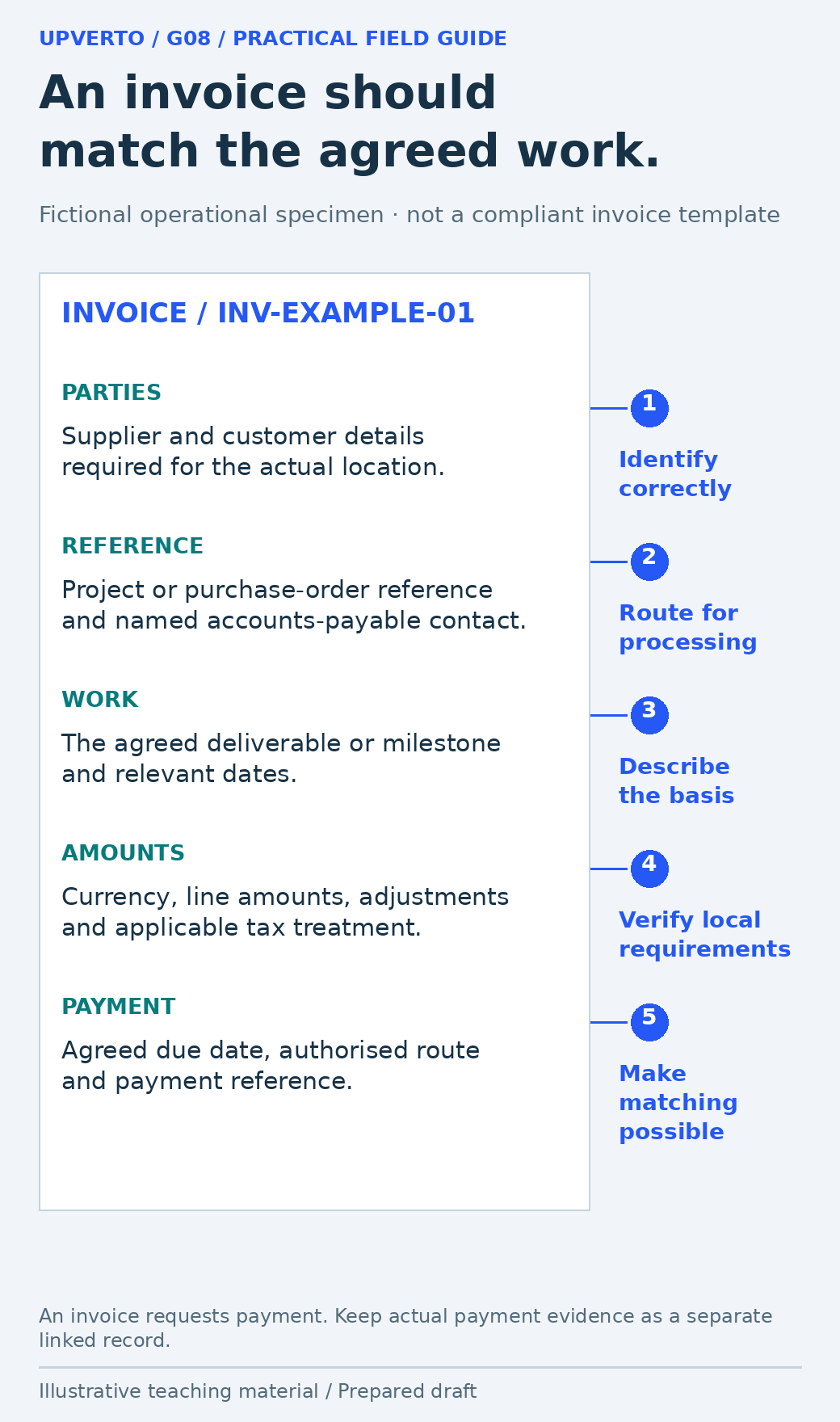
    A fictional invoice specimen annotates parties, project references, work and dates, currency/tax questions, and the agreed payment route without claiming universal legal compliance.
    Check the information behind an invoice — Use the fields as operational questions and verify the applicable local requirements. Use the enlarged view, then swipe or use arrow keys to inspect. View full-size infographic.
    Read the text version: Check the information behind an invoice

    The fictional invoice checklist asks for the correct parties, project/purchase-order reference, agreed work and dates, currency and amounts with applicable local tax treatment, and the agreed due date and payment route. It is not a universally compliant invoice template. An invoice requests payment; actual payment evidence is a separate linked record.

    Prepare an invoice that can be matched to the work

    Field groupOperational question
    IdentityWho is billing whom, using the details required in the applicable location?
    ReferenceWhat unique invoice number, project reference or purchase order identifies it?
    Work and datesWhat agreed work or milestone does it cover, and when was it supplied or invoiced?
    AmountsWhat currency, line amounts, applicable adjustments and total are being requested?
    Tax informationWhich local registration, tax, exemption or other requirements actually apply?
    PaymentWhat agreed due date, route and reference should the client use?

    Check local official requirements rather than treating this table as a universal compliant invoice. For example, GOV.UK’s invoicing guidance describes UK rules and distinguishes an invoice from a receipt. Whether a particular registration number, tax amount or additional field is required depends on the relevant rules and your circumstances. Obtain suitable accounting or legal help for those determinations.

    Use consistent identifiers so a payment can be matched without guessing. If an invoice needs correction, preserve an audit trail and follow the applicable correction process. Do not silently overwrite a previously issued amount and leave the client with two conflicting versions.

    Compare payment routes by eligibility and total operation

    A provider being well known does not establish that you can use its business services. Stripe’s availability page and Wise’s business eligibility guidance are examples of primary sources to check for current country, entity and activity support. They are not recommendations for a particular reader, and this guide does not assume account approval or international eligibility.

    Comparison fieldEvidence to record for each candidate
    EligibilityYour actual location, entity type, business activity and supported account/service
    Payment and withdrawalCan the client pay and can you receive or withdraw through the required route?
    CurrencyInvoice, charge, settlement and withdrawal currencies; conversion method
    FeesPublished current fee components and a dated quote for your specific transaction
    Timing and restrictionsAvailability of funds, limits, possible holds and required verification
    Records and supportExportable transaction references, statements and a support route
    Agreement fitWhether platform or client terms restrict how payment must occur

    Compare the whole route rather than one advertised fee. A payment may involve processing, conversion or withdrawal costs, and the party responsible for them should be clear. Do not use someone else’s account or misstate your location to bypass an eligibility restriction. Recheck changing provider details before relying on them.

    Worked example: a payment is not the net bank deposit

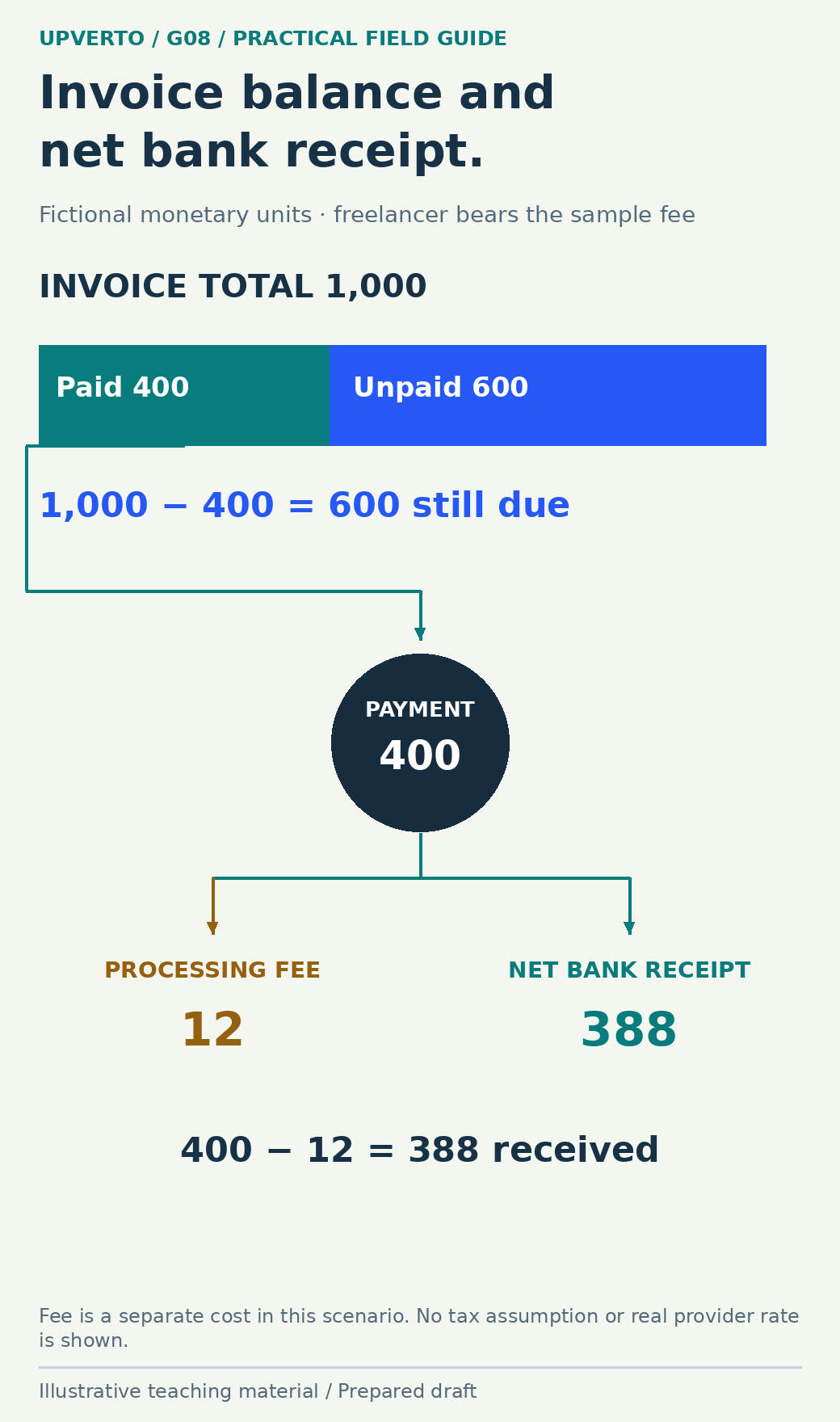
    Fictional arithmetic example: An already agreed invoice total is 1,000 monetary units. This illustration makes no tax assumption and uses no real provider rate. The client pays 400 units against it. Under the example’s agreed arrangement, the freelancer bears a 12-unit processing fee, so the bank receives 388 units.

    RecordAmountMeaning
    Invoice total1,000The amount billed in this sample
    Client payment applied400Payment allocated to this invoice
    Unpaid invoice balance6001,000 minus 400
    Processing fee12A separate cost borne by the freelancer in this scenario
    Net bank receipt388400 minus 12

    The remaining invoice balance is 600, not 612. The 12-unit cost explains the difference between the client’s payment and the net deposit; it is not automatically a new debt owed by the client. A different agreement or fee structure needs its own treatment. Record the transaction reference, allocation and fee separately so the reconciliation is visible.

    A 1,000-unit invoice is split proportionally into 400 paid and 600 unpaid. The 400-unit payment then separates into a 12-unit fee and 388-unit bank receipt.
    Reconcile an invoice payment, fee and net deposit — The net deposit does not determine the remaining invoice balance when the freelancer bears the fee. Use the enlarged view, then swipe or use arrow keys to inspect. View full-size infographic.
    Read the text version: Reconcile an invoice payment, fee and net deposit

    Fictional example: invoice 1,000 minus client payment 400 leaves 600 unpaid. The top bar is proportional to these amounts. Separately, the 400 payment minus a 12 processing fee leaves a 388 net bank receipt. The freelancer bears the fee under this scenario’s arrangement, so the invoice balance is not 612. No actual provider rate or tax treatment is assumed.

    Keep a small reconciliation trail

    Connect the agreed work, invoice, payment reference, fee record and bank receipt. Record dates and currencies accurately. If one payment covers several invoices, show the allocation. If a payment is partial, keep the balance visible rather than marking the whole invoice paid. If money is refunded or disputed, record that event separately.

    Record fieldExample or instruction
    Invoice ID and totalINV-EXAMPLE-01; 1,000 units
    StatusIssued, acknowledged, part paid, paid, disputed or corrected as appropriate
    Payment allocation400 units applied to INV-EXAMPLE-01
    Fee and settlement12 fee; 388 net deposit; actual transaction references in your own record
    Outstanding amount600 units, subject to any later agreed adjustment
    Next actionFollow up through the agreed process at the appropriate point

    Store records with access appropriate to their sensitivity and retain them according to the requirements that apply to you. This guide does not prescribe a universal retention period. If payment details change, verify the instruction through an established authorised route rather than treating an unexpected message as sufficient evidence.

    Use the records to make the next decision

    When payment is late or the records disagree, first check the invoice recipient, due-date arrangement, references, payment allocation and any documented issue. A calm, specific enquiry is more useful than assuming bad intent. Legal remedies, interest and collection steps depend on the applicable agreement and jurisdiction; check official guidance or obtain qualified advice before asserting them.

    Use track freelance income costs capacity to connect the records with costs and available time. Billed amounts are not automatically cash in the bank, and cash received is not automatically profit or spendable personal income. Good operational records make those questions easier to discuss with the appropriate adviser.

    Frequently asked questions

    Is an invoice the same as a receipt?

    No. An invoice requests payment for identified work or goods, while a receipt acknowledges payment. Keep the invoice and actual payment evidence connected, and follow the rules that apply to your location.

    Which payment provider should I use?

    Compare current eligibility, supported services, currencies, full costs, withdrawal options, records and agreement restrictions for your situation. This guide does not recommend a universal provider or assume that a business account will be approved.

    Should a processing fee increase the client’s unpaid balance?

    Not automatically. It depends on the agreed arrangement and applicable requirements. In the worked example, the freelancer bears the fee, so a 400-unit payment reduces a 1,000-unit invoice balance to 600 even though the bank receives 388.

    What tax should I put on the invoice?

    That depends on your location, registrations, customer and transaction. Consult current local official guidance or a qualified adviser. Do not copy a tax percentage from a generic online template.

    How should I record a partial payment?

    Record the amount, date, currency and transaction reference, allocate it to the invoice, and retain the remaining balance. Keep fees, refunds and later adjustments distinct so the record can be reconciled.

    How long should I keep payment records?

    Check the applicable tax, accounting, contractual and privacy requirements for your situation. There is no universal period in this guide. Keep records securely and avoid retaining unrelated personal information without a reason.

    Sources and scope

    The worked examples, worksheets and diagrams are original fictional teaching materials. They are not reports of client results. Primary references were checked during preparation; verify current rules and account-specific features before acting.
  • A Client Onboarding Checklist for Your First Project

    A Client Onboarding Checklist for Your First Project

    Onboarding turns an agreed project into a workable starting point. Collect the materials you actually need, confirm who can decide, and arrange appropriate access before production. A useful onboarding process reduces avoidable ambiguity without asking the client to hand over every account or complete an oversized form. It is the preparation stage of manage freelance projects.

    Separate onboarding from discovery and production

    Discovery determines what problem and scope are being considered; onboarding organises the agreed work. If the goal or deliverables remain unclear, return to freelance discovery call questions. Sending an intake form does not resolve a disagreement about what was purchased, and receiving credentials does not authorise every action the account allows.

    Begin with the current brief or agreement, not a blank request for information. Identify the approved outputs, input dependencies, review arrangements and any conditions for starting. The client should be able to see why each requested item matters. A small event graphic may need approved text, logo files and export requirements; it does not normally need access to the organisation’s email account.

    Use write project brief acceptance criteria to check the acceptance conditions. If the final output will be a PDF, record how it will be used. If the work changes a website, distinguish a draft or staging review from permission to publish. That distinction belongs in the onboarding record before anyone starts making changes.

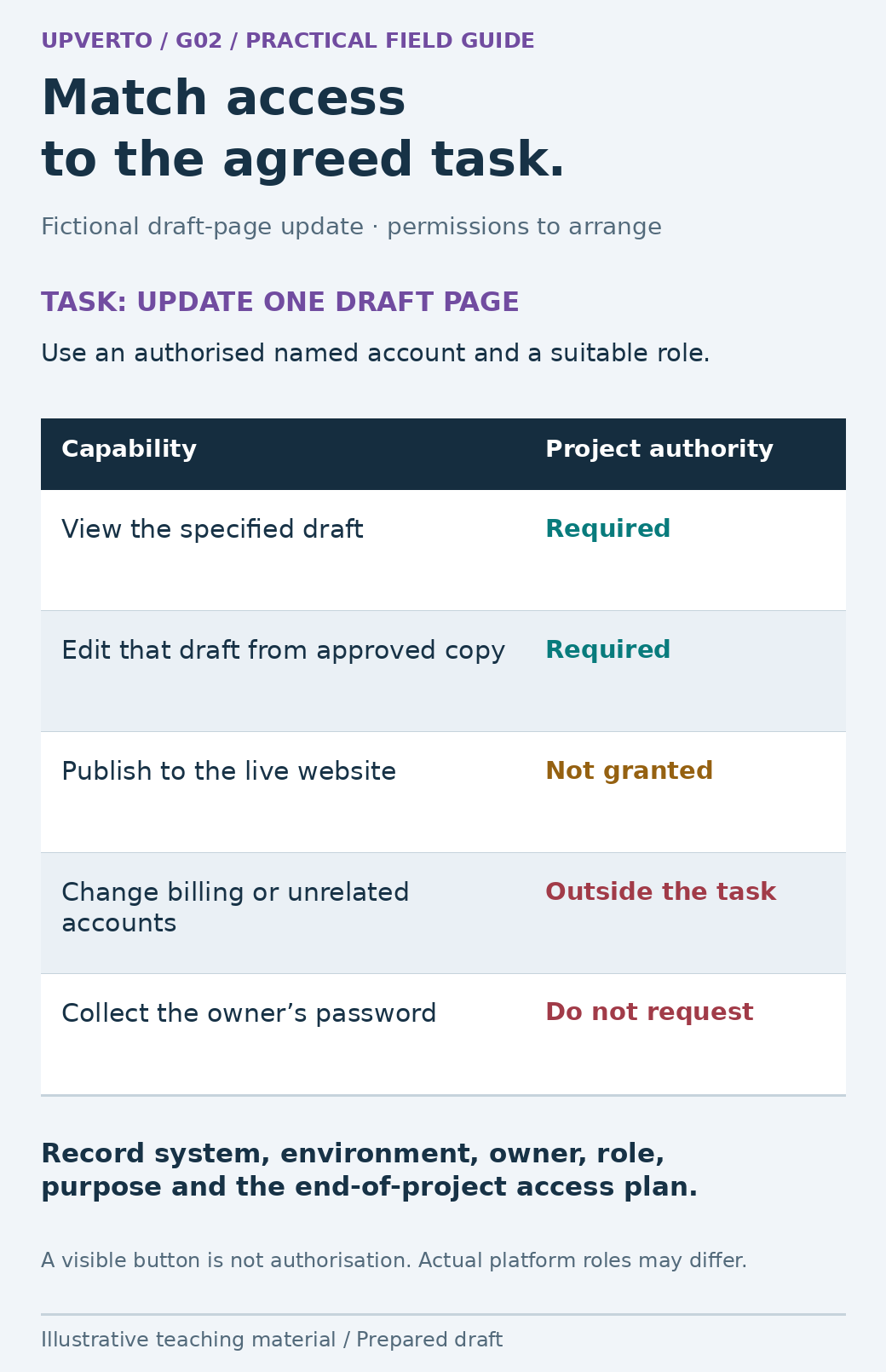
    A draft-page capability matrix marks viewing and editing as required, publishing as not granted, billing changes as outside scope and owner-password collection as inappropriate.
    Specify only the access the project requires — Request a supported role and record the action boundary separately from what the account can technically do. Use the enlarged view, then swipe or use arrow keys to inspect. View full-size infographic.
    Read the text version: Specify only the access the project requires

    For this fictional one-page draft update, the project needs authorised viewing and editing of the specified draft. It does not grant live publication or unrelated billing/account changes. Do not request the owner’s password. Record the system, environment, account owner, role, purpose and access review/removal plan. Platform roles vary, and a visible button does not confer project authority.

    Collect approved materials with a clear owner

    List the minimum inputs and name who supplies each one. Include the expected format and the evidence of approval where relevant. “Logo supplied” is incomplete if the file is a low-resolution screenshot and the intended output is a large printed poster. “Copy approved” is incomplete if two attached versions disagree.

    InputQuestion that makes it usable
    Text or recordsWhich version is current, who approves it and what should remain unknown?
    Brand or media assetsIs this the correct source file and is its intended use authorised?
    Output requirementsWhat dimensions, formats, devices or systems must the result support?
    Existing project filesWhich files are working copies and which must be preserved?
    Reference examplesWhich feature of the reference matters, and what should not be copied?
    Review contactsWho consolidates comments and who has final approval?

    Use an agreed shared location and meaningful file names. Record receipt separately from validation: a file can arrive and still be unsuitable. If something is missing, explain which step it blocks and ask the responsible person for the smallest necessary correction. Do not fill gaps with guessed customer data or unapproved wording.

    Request task-specific access, not shared passwords

    The OWASP Authorization Cheat Sheet describes least privilege: access should be limited to what the task requires. Apply that principle through the client’s authorised invitation or role-based process. A content-editing task should not casually become an administrator account with access to billing, unrelated projects and every customer record.

    Record the system, environment, account owner, requested role, purpose and end-of-project access plan. Use a named account where the system supports it and follow the owner’s authentication requirements. Never ask a client to paste a password, recovery code or one-time authentication code into an intake document. If a platform lacks suitable delegation, agree a supported alternative with the owner instead of improvising a shared login.

    Check access using the least consequential action that establishes the needed capability. Seeing a draft page does not prove that editing is possible, while having a publish button does not mean publishing is authorised. For changes requiring recovery, confirm the original copy, backup or rollback arrangement and who may use it. If the environment is uncertain, keep the affected work paused while that specific gap is resolved.

    Worked example: onboarding a workshop-page update

    Fictional scenario: A freelancer will update one draft workshop page for North Lane Studio. The booking service stays unchanged. The client has supplied two documents with different dates and has offered the main account password. The correct response is to resolve the inputs and access route, not to start editing whichever version is easiest.

    Onboarding itemFictional recordNext action
    Approved copyTwo conflicting dates; approval unknownOwner confirms one source document
    Website environmentDraft page onlyConfirm page identifier and preview route
    AccessMain password offered; not collectedOwner invites a suitable named editor account
    Booking boundaryLink to existing service; no account changesCheck supplied destination within agreed scope
    ReviewStudio owner is final approverCollect one consolidated review
    Start conditionCopy and editor access unresolvedBegin production only when relevant inputs are ready

    The freelancer can prepare a checklist and organise the supplied assets while awaiting the two unresolved items. That useful preparation does not justify promising that the content update is already underway. When the owner resolves the date and grants suitable access, record what changed and use the confirmed baseline.

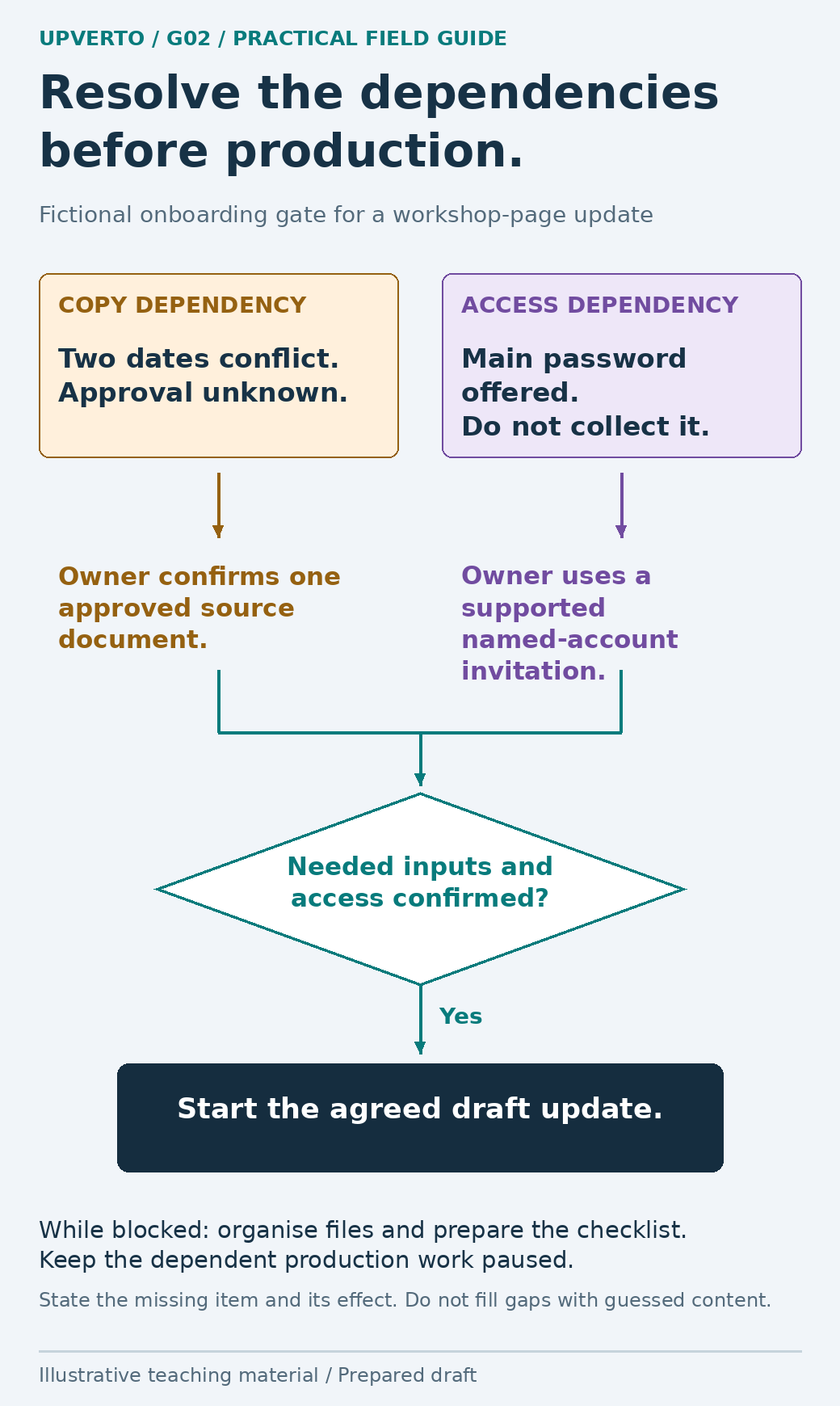
    Two unresolved onboarding paths—conflicting copy and unsuitable password sharing—lead to approved copy and an authorised invitation before the draft-update start gate.
    Use onboarding dependencies as a clear start gate — Preparation can continue while specific dependent work remains paused. Use the enlarged view, then swipe or use arrow keys to inspect. View full-size infographic.
    Read the text version: Use onboarding dependencies as a clear start gate

    The fictional page update has two unresolved dependencies. The owner must confirm one approved copy source and arrange appropriate named-account access rather than sharing the main password. Confirm both before starting the dependent production task. While waiting, organise the supplied files and prepare the checking list. Missing inputs are not permission to guess content.

    Copy this intake form and access register

    Keep the form short enough to answer, but specific enough to use. Explain which fields are required and why. For a business contact, request the information needed to coordinate the project, not a private identity dossier. Handle any personal or confidential data according to the applicable requirements and agreed process.

    Form sectionFields to copy
    ProjectProject reference; goal; approved brief version; deliverables
    PeopleDay-to-day contact; final approver; input owners; preferred channel
    MaterialsFile or link; version; approval status; permission note; unresolved question
    Access registerSystem; environment; account owner; role; purpose; grant date; removal/review plan
    Working arrangementsReview method; update rhythm; decision deadlines; timezone where necessary
    Start gateRequired inputs ready; access confirmed; recovery route; remaining limitations

    A start gate is a decision about dependencies, not a demand that every conceivable document be complete. If one deliverable can safely begin while another is blocked, record that boundary. For example, approved layout planning may proceed while a missing biography prevents final text placement. Avoid marking the whole project “ready” when the blocked dependency still controls delivery.

    Before closing onboarding, give the client a brief summary of what was received, what is still needed and what happens next. This provides a chance to catch an incorrect assumption while the work is still easy to redirect.

    Keep the setup current during the project

    Onboarding records change when a new approver joins, an input is replaced or the scope changes. Update the relevant entry rather than leaving the original form as a misleading snapshot. Preserve the history of significant decisions so the team can tell which version governs the current work.

    Once production begins, use client project update examples to report completed work, dependencies and decisions. At handover, revisit the access register and follow the agreed return, retention and removal process. An invitation should not remain indefinitely merely because nobody remembered why it was granted.

    Frequently asked questions

    Do I need a long onboarding questionnaire for every project?

    No. Tailor the questions to the agreed work. A small project may need a short form, an input list and an access record. Remove fields that do not help someone make or deliver the agreed result.

    What if the client sends their password without being asked?

    Do not copy it into the project record or use it as the default access method. Ask the owner to follow their account-security process and arrange supported delegated access. The appropriate response may include the owner replacing an exposed password.

    Can I start while some information is missing?

    Only the parts whose dependencies are satisfied and whose boundaries are clear. Record what is blocked and its effect on timing. Do not substitute guessed content or represent an incomplete setup as fully ready.

    Who should approve the work?

    Name a final approver and a person who consolidates comments. They can be the same person on a small project. Confirm who resolves conflicts before several stakeholders provide incompatible directions.

    Should I ask for administrator access to save time?

    Request the minimum suitable role through the owner’s authorised process. Administrative access can include capabilities unrelated to the work. If a specific task needs more access, explain it and agree a limited, supported arrangement.

    What should happen to access at the end?

    Follow the agreed review or removal process with the account owner. Confirm which ongoing responsibilities, if any, require continued access. Do not delete client accounts or records unilaterally during cleanup.

    Sources and scope

    The worked examples, worksheets and diagrams are original fictional teaching materials. They are not reports of client results. Primary references were checked during preparation; verify current rules and account-specific features before acting.
  • How to Handle Client Feedback, Revisions and Scope Changes

    How to Handle Client Feedback, Revisions and Scope Changes

    Client feedback becomes manageable when you compare it with a clear baseline, clarify the requested change and record the decision before altering the work. Some comments identify an error, some choose among agreed options and some introduce a new deliverable. Treat those situations differently while keeping the conversation practical. This is part of manage freelance projects.

    Keep the agreed version easy to find

    Before classifying a request, locate the brief, acceptance conditions, approved inputs and version under review. Use write project brief acceptance criteria if those are not clear. “That was included” and “that is extra” are difficult claims to assess when each person is remembering a different conversation.

    Record a baseline in ordinary language: two event-announcement formats, supplied approved text, one consolidated review stage and the final export requirements. The precise terms should reflect the actual agreement. Do not copy another freelancer’s revision allowance and assume it governs your project. A review stage describes a process; it does not excuse delivery that fails the agreed requirements.

    Keep comments attached to a version or identifiable item. “Change the second heading in event-square-v2” is more reliable than “change the bit we discussed.” Preserve the original before a substantial revision so you can compare decisions and recover if necessary. Version history is useful evidence of what changed, not a substitute for deciding what should change.

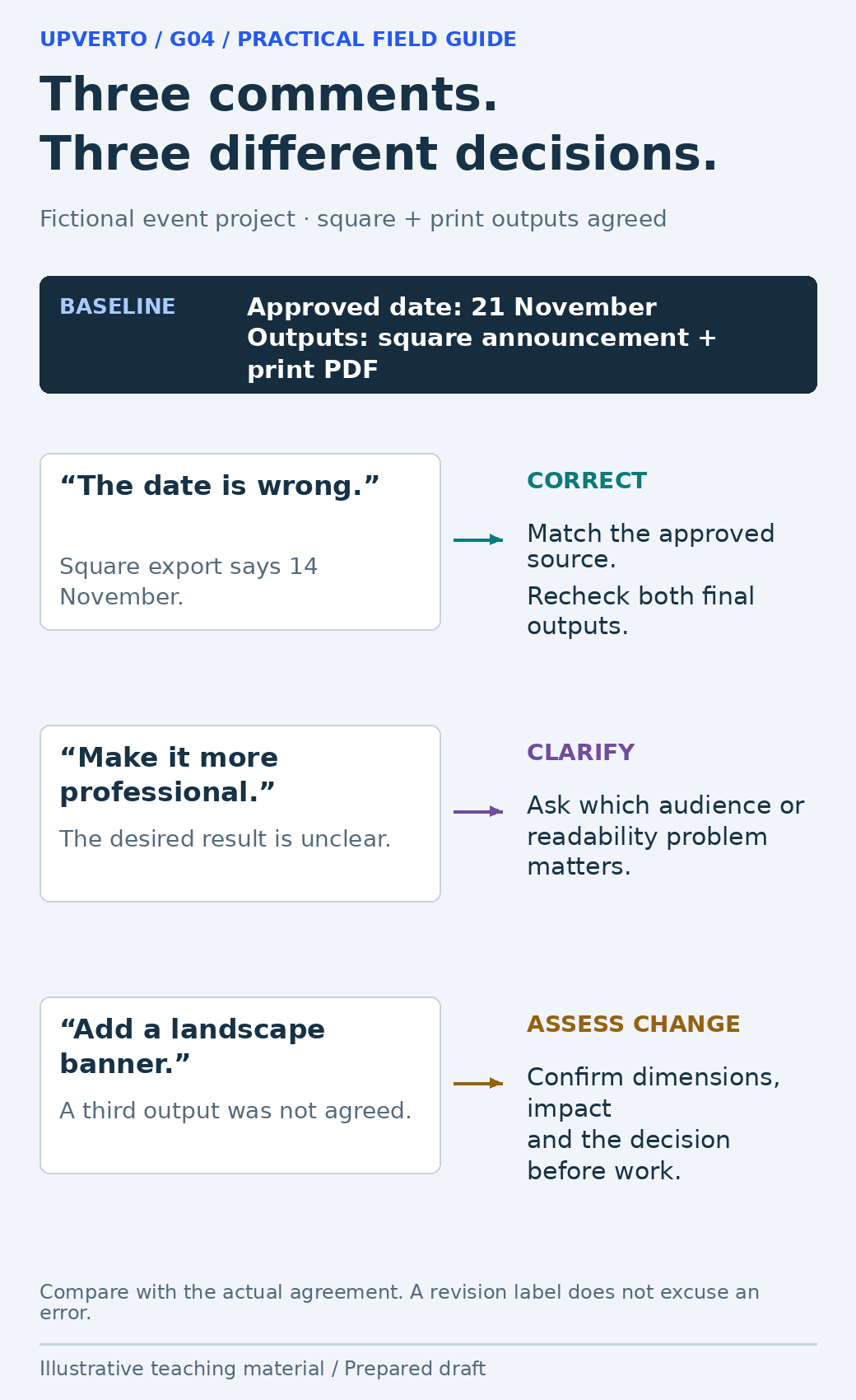
    Three fictional comments route to correction of a wrong date, clarification of a vague preference, and impact assessment for an additional landscape banner.
    Classify feedback against the agreed baseline — Use the baseline to choose a response before changing the work. Use the enlarged view, then swipe or use arrow keys to inspect. View full-size infographic.
    Read the text version: Classify feedback against the agreed baseline

    The fictional baseline has a square announcement and print PDF with an approved date of 21 November. An export showing 14 November needs correction. “Make it more professional” needs clarification of the desired result. A new landscape banner needs a scope and impact decision before work. Classify by the actual agreement rather than treating every comment as the same kind of revision.

    Classify the request before discussing the response

    Request typeExampleUseful response
    Correction against the briefExport contains the wrong approved dateAcknowledge and correct the mismatch; check affected outputs
    Clarification needed“Make it more professional”Ask which audience, hierarchy or usability issue the client means
    Choice within agreed workUse the second of two proposed headline treatmentsConfirm the chosen version and apply the agreed decision
    Potential new scopeAdd a third format with a different layoutAssess deliverable, effort, timing and commercial impact before starting

    Classification is a reasoned comparison, not a label you apply to win an argument. If the brief is ambiguous, show the relevant wording and explain the uncertainty. It may be sensible to agree a narrow resolution and improve the brief for future work. Do not retrospectively invent a boundary that the client could not have known.

    The GOV.UK guidance on deciding priorities recommends decisions informed by evidence and stakeholder input. For a small project, the useful adaptation is to compare the proposed change with the purpose and constraints. A visually exciting extra may be less important than correcting the essential event date.

    Turn vague or conflicting comments into a decision

    When a comment is vague, ask for the problem behind it. “Make the logo bigger” might mean that the organisation is hard to identify at the intended viewing size. The right response could be a clearer header or more space around the logo, not a proportional enlargement that pushes the venue off the page. Restate the problem and propose a reviewable adjustment.

    When comments conflict, identify the exact conflict and ask the agreed decision-maker to choose. Do not silently combine incompatible instructions or ask every stakeholder separately until someone gives the answer you prefer. Consolidated feedback reduces duplication, but it still needs a clear owner who can resolve competing priorities.

    Summarise the decision with the affected version and intended check. For example: “Use the shorter venue line approved by the organiser; retain the full address in the footer; check both exports at intended size.” This makes the next review about whether the decision was implemented, rather than repeating the whole discussion.

    Worked example: a third event format

    Fictional scenario: The agreed package contains a square announcement and a printable version. The first review identifies an incorrect date in the square export and asks for a new landscape banner. The designer separates the correction from the new output; no real project or client result is claimed.

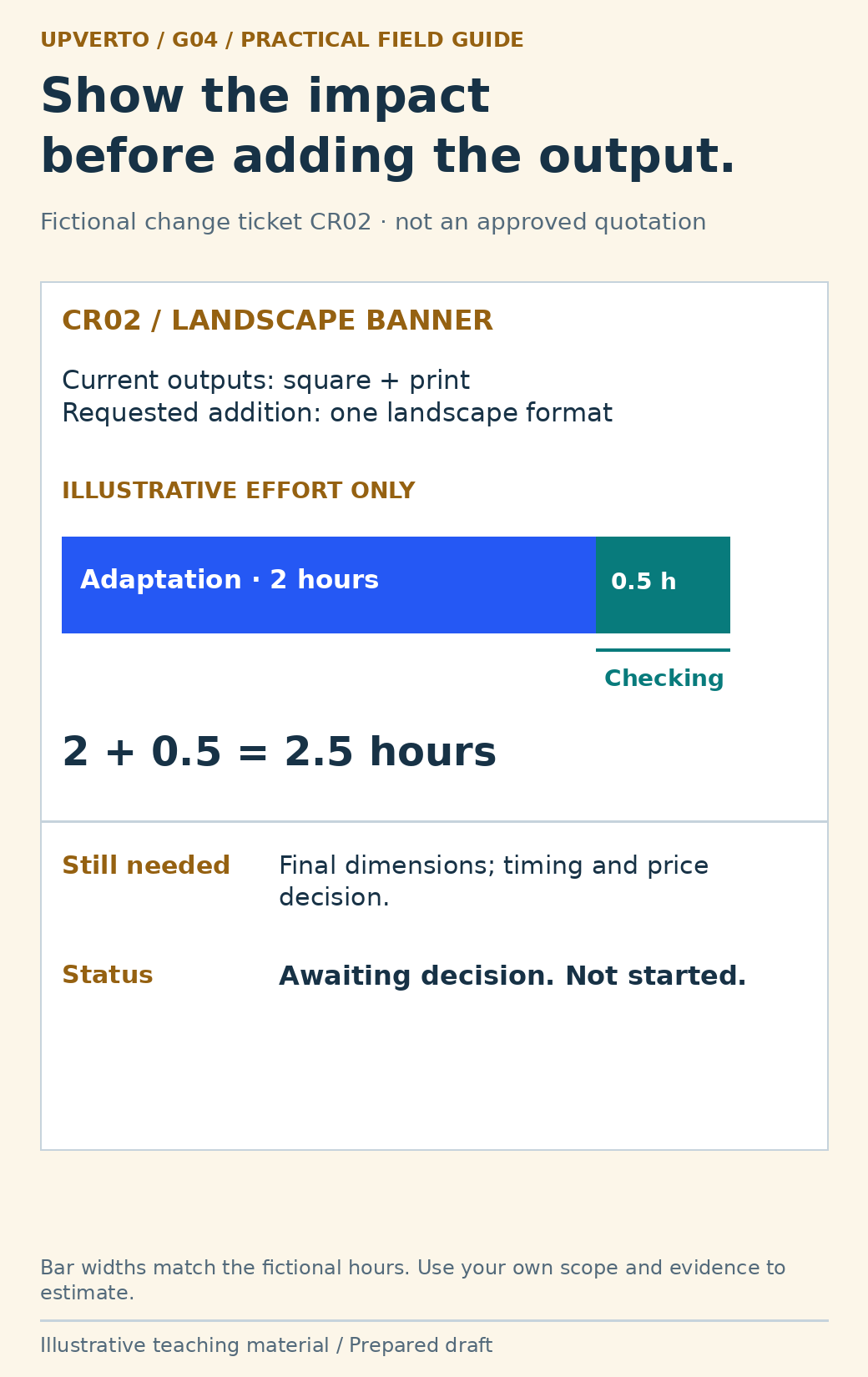
    The date must match the approved source across both original deliverables. The landscape banner introduces another layout and export to produce and check. The designer estimates an illustrative two hours for adaptation and half an hour for checking, subject to receiving the final dimensions. Those numbers explain an impact calculation, not a recommended rate or a universal time allowance.

    RecordCorrection C01Change request CR02
    Requested workReplace incorrect dateAdd a landscape banner
    Baseline comparisonRequired content already agreedThird format not in current outputs
    ImpactRecheck both original exportsIllustrative 2 + 0.5 = 2.5 hours; timing and price to agree
    DecisionApply correctionAwait dimensions and explicit decision
    StatusPlanned in fictional exampleNot started
    A landscape-banner change ticket separates two hours of adaptation from half an hour of checking, totals 2.5 hours and leaves dimensions, timing and price awaiting a decision.
    Inspect a change request and its illustrative effort — The arithmetic makes the impact visible without treating an estimate as approval. Use the enlarged view, then swipe or use arrow keys to inspect. View full-size infographic.
    Read the text version: Inspect a change request and its illustrative effort

    Fictional change request CR02 adds a landscape banner to the agreed square and print outputs. Illustrative effort is 2 hours adaptation plus 0.5 hours checking, totalling 2.5 hours. The bar segments are proportional to those values. Final dimensions, timing and price still need agreement; the request is not started or approved. These are sample planning numbers, not a recommended rate or duration.

    The client can approve the addition, replace another deliverable where appropriate, defer it or decline it. Record the chosen option before starting the extra. If the designer elects to include it without an additional charge, still record its scope and timing so that a one-off choice does not silently redefine future work.

    Copy the feedback and change log

    FieldWhat to record
    ReferenceA short comment or change identifier
    Source and versionWho requested it and which file or page they reviewed
    Requested resultThe actual desired change, without interpretation hidden as fact
    ClassificationCorrection, clarification, agreed choice or potential new scope
    Baseline referenceThe relevant deliverable or acceptance condition
    ImpactAffected outputs, dependencies, checks, timing and commercial questions
    Decision and ownerWho can decide, what was agreed and when
    Implementation evidenceVersion changed, check performed and unresolved limits

    The log can be a simple table; its value is a traceable decision. Do not mark a change approved because you sent an estimate. Do not mark it complete because a task card moved if the exported result has not been checked. Keep requested, agreed, implemented and verified states distinct.

    For the initial boundaries and estimation method, return to estimate freelance project scope. This guide concerns decisions during delivery. If a change alters a legal, security or specialist obligation, obtain the appropriate review rather than treating the log as authority to proceed.

    Explain the impact without blame or hidden pressure

    Use a short response: “The square and print versions remain in the current scope. The new landscape format adds a separate layout and check. I can prepare it once we confirm dimensions and the revised arrangement. Would you like that option, or should we complete the original two outputs first?” The message identifies the choice and preserves the original work.

    If your own mistake caused rework or delay, acknowledge it directly. Explain the correction and the effect on delivery. If a client dependency changes the schedule, describe that dependency without turning the update into an accusation. The aim is a shared decision about the next step.

    Use client project update examples to keep the latest decision visible in the next progress update. A concise record makes a changed project easier to deliver; it does not make every disagreement disappear.

    Frequently asked questions

    Does every client comment count as a paid revision?

    No. Compare it with the actual agreement and acceptance conditions. An error against approved requirements differs from a new deliverable. Do not use a revision label to avoid correcting your own mismatch.

    What should I do with “make it more professional”?

    Ask what is difficult for the intended audience or which quality the client wants to improve. Offer a specific interpretation and a reviewable change instead of repeatedly guessing at an undefined preference.

    Can I refuse a new format?

    You can explain whether it fits your ability, availability and agreed scope, then discuss suitable options. Do not imply it is already included or already approved. Follow the actual engagement terms when declining or changing work.

    What if two people give opposite instructions?

    Show the conflict to the agreed final approver and ask for one direction. Record it against the relevant version. Do not silently choose one person’s instruction while telling the other that all feedback was followed.

    Should I document a small extra I include for free?

    Yes. State what you are including, whether it changes timing and that it is a specific choice for this project. Clear documentation prevents the extra from becoming an accidental promise of unlimited future changes.

    When can I mark a change complete?

    After implementing the agreed decision and checking the affected delivery output. Record the relevant version and actual check. If validation is still pending, say so rather than using “complete” as a synonym for “edited.”

    Sources and scope

    The worked examples, worksheets and diagrams are original fictional teaching materials. They are not reports of client results. Primary references were checked during preparation; verify current rules and account-specific features before acting.

  • How to Manage a Freelance Project from Brief to Handover

    How to Manage a Freelance Project from Brief to Handover

    Part of How to Make Money Online with Digital Skills: A Beginner’s Roadmap.

    Manage a freelance project by keeping the brief, decisions, work, reviews, and handover visible from the start. A useful process tells both sides what happens next, what information is needed, and how the finished work will be checked.

    In this guide

    The process can be simple. A small project may need a brief, a task list, a shared review record, and an organised delivery folder. The amount of administration should fit the work and its consequences.

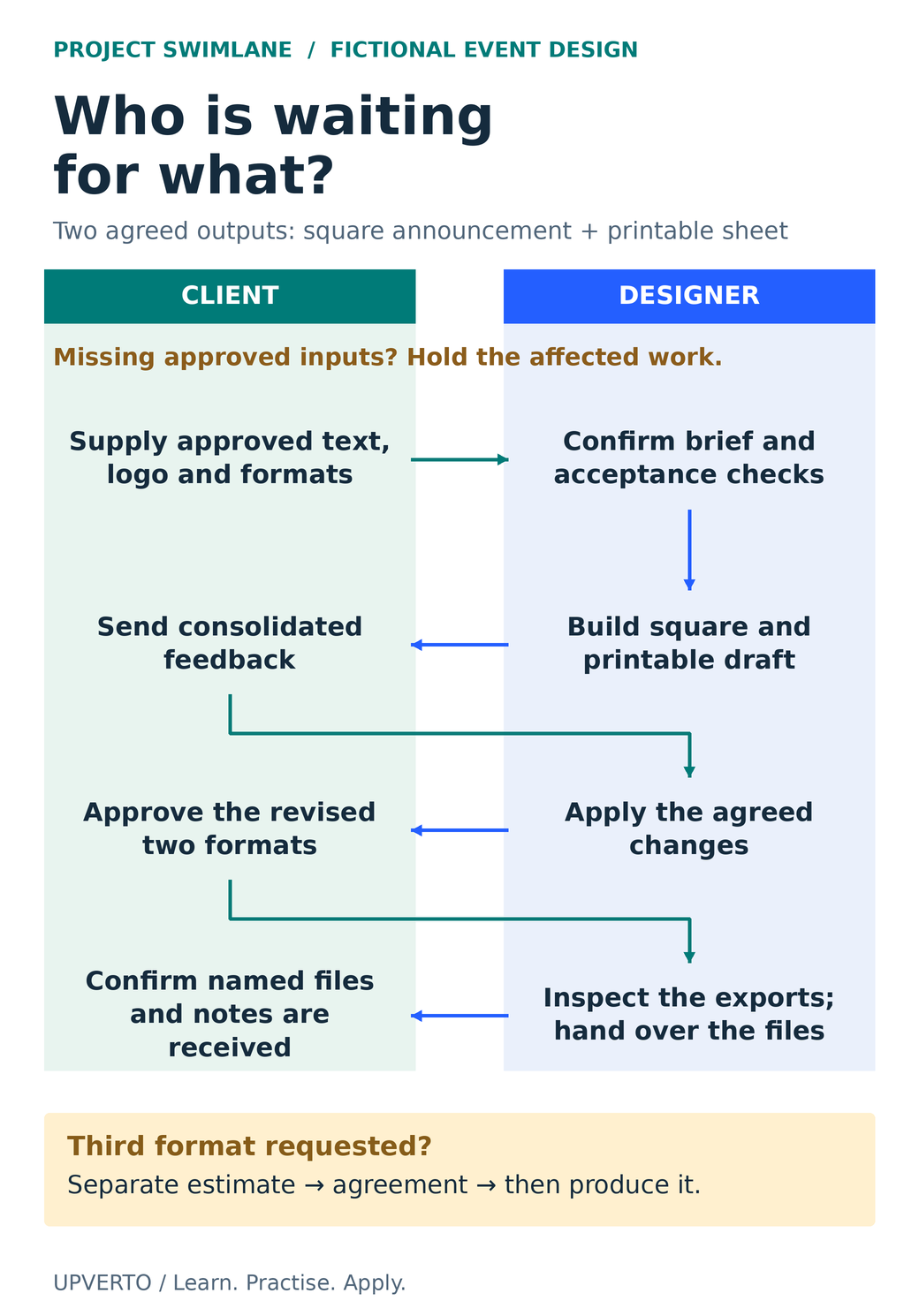
    A client/designer swimlane traces approved inputs, a square and printable draft, consolidated feedback, agreed revisions, final approval, export checks and confirmation of delivery, with a separate branch for a third format.
    Show the dependencies before handover — Follow the handoffs in a fictional event-design project. Missing inputs and new outputs change what can proceed. Use the enlarged view, then swipe or use arrow keys to inspect details. View full-size infographic.
    Read the text version: Show the dependencies before handover

    The fictional project includes two agreed outputs: a square announcement and a printable sheet.

    1. The client supplies approved text, logo and formats. The designer confirms the brief and acceptance checks. If necessary approved inputs are missing, hold the affected work.
    2. The designer builds the two drafts. The client supplies consolidated feedback.
    3. The designer applies the agreed changes and returns the revised outputs for the client’s approval.
    4. After approval, the designer inspects the actual exports and hands over the named files and notes. The client confirms receipt.

    If the client requests a third format, estimate and agree that additional output before producing it. Approval of the two existing outputs is not an instruction to create an extra one. The arrows show information and approval dependencies rather than measured durations.

    Practical summary
    From request to handover
    1. Clarify: agree on the task, deliverables, and conditions.
    2. Prepare: collect approved inputs and appropriate access.
    3. Produce: work in controlled versions and communicate progress.
    4. Review: compare feedback with the agreed brief.
    5. Check: inspect the actual deliverables.
    6. Hand over: explain files, ownership arrangements, and support.

    Confirm the brief before production

    Restate the client’s purpose, audience, requested outputs, and constraints. Identify the materials they will supply, the decisions they must make, and the assumptions still unresolved.

    Write acceptance criteria: conditions that help both sides decide whether the deliverable meets the brief. For a video, these might include approved wording, accurate captions, agreed format, and complete playback. For a website, they might include the named pages, working navigation, and specific functional checks.

    Agree on scope, timing assumptions, review arrangements, payment terms, and any legal requirements appropriate to the engagement. The service-package worksheet helps organise the operational details; it is not a substitute for a suitable contract where one is needed.

    Collect inputs and set up the working environment

    Use an intake checklist for source files, approved copy, access, asset permissions, and contact details needed for the project. Confirm who can approve changes and how feedback will be collected.

    Ask for access appropriate to the task. Use the client’s authorised sharing or account process, rather than collecting credentials casually. Make a backup or preserve an original copy before changes that need a recovery route.

    For work on a live system, clarify whether a staging or draft environment is available and who authorises a live change. Creating a design or draft does not automatically authorise publishing it, sending messages, spending money, or changing customer-facing functionality.

    Plan milestones around reviewable results

    A milestone should name an output or decision. “First version ready for review” is more useful than “work in progress.” Include dependencies such as receiving final copy or approval of a design direction.

    MilestoneReviewable resultDecision needed
    Brief confirmedWritten scope, inputs, deliverables, and checks.Both sides understand the intended work.
    Initial versionA coherent version suitable for the agreed review.Consolidated feedback against the brief.
    Revised versionApproved changes applied and documented.Whether remaining comments are corrections or new scope.
    Final checksThe actual output inspected in its delivery format.Any material issues resolved or clearly recorded.
    HandoverOrganised files and instructions.Receipt and any agreed completion steps confirmed.

    Give updates that help the client act

    A useful update says what is complete, what is next, what is blocked, and what decision is needed. Match the frequency to the project rather than sending repeated messages without new information.

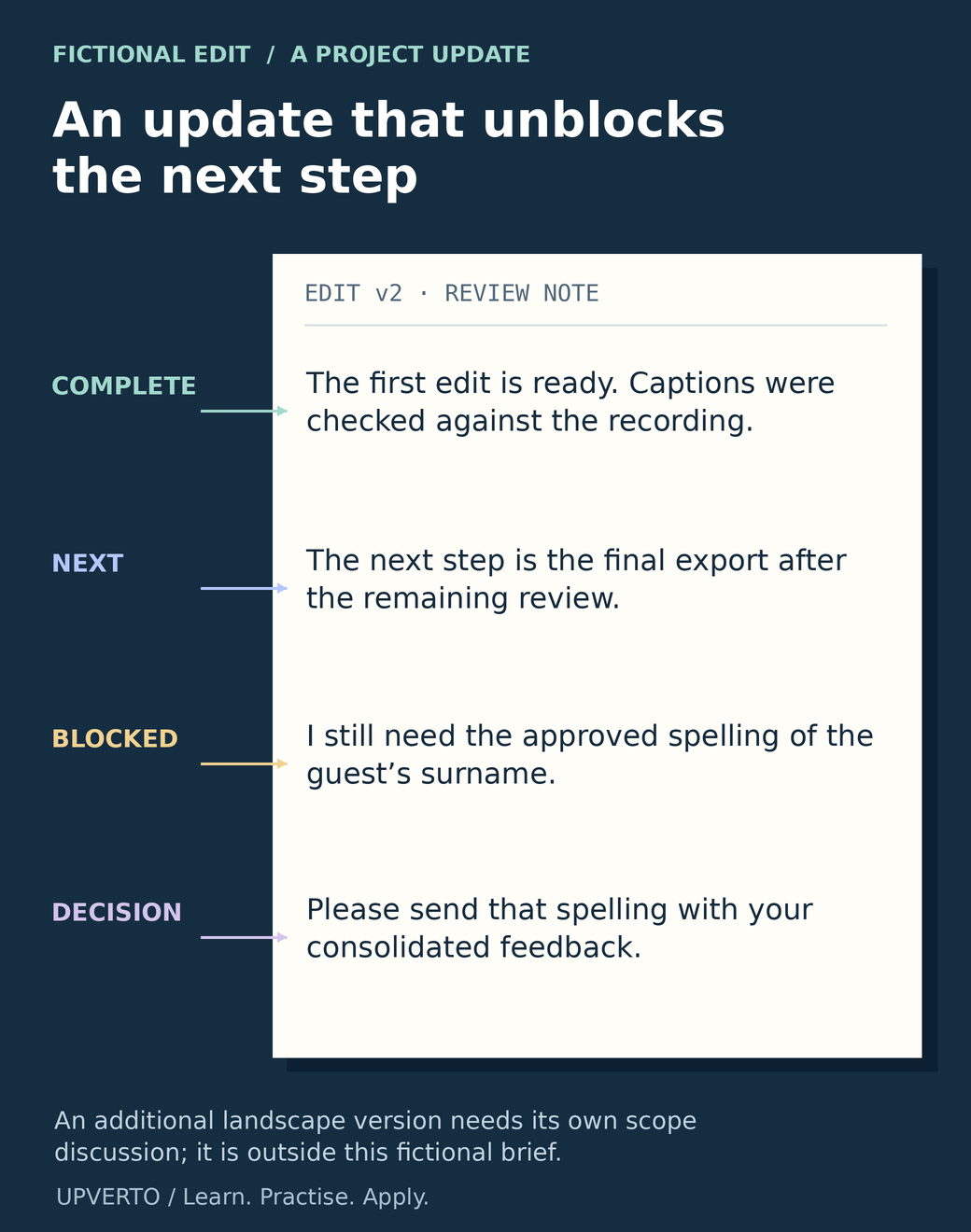
    Fictional update: “The first edit is ready and the captions have been checked against the recording. I still need the approved spelling of the guest’s surname before the final export. Please send that detail with your consolidated feedback. The additional landscape version is outside the current brief; I can estimate it separately.”

    If timing changes, explain the cause and its effect early. Distinguish your own delay from missing client information without using blame as a substitute for a practical next step.

    A fictional edit update has four margin annotations: completed edit and caption checks, next export, missing approved surname spelling, and a request for that spelling with consolidated feedback.
    Write an update that helps the client act — Inspect a useful project update: it reports work, explains the next step, names the blocker and asks for a specific decision. Use the enlarged view, then swipe or use arrow keys to inspect details. View full-size infographic.
    Read the text version: Write an update that helps the client act

    This is a fictional status note for an educational-video edit.

    The first edit is ready. Captions were checked against the recording.

    The next step is the final export after the remaining review.

    I still need the approved spelling of the guest’s surname.

    Please send that spelling with your consolidated feedback.

    The annotations identify complete, next, blocked and decision. The note states what can proceed and what information is needed. An additional landscape version is outside this fictional brief and requires a separate scope discussion. In real work, report only checks you actually completed and name the relevant version.

    Handle feedback and scope changes explicitly

    Read feedback against the approved brief and version. Correct your own errors. Clarify unclear comments. Group related changes so they can be assessed together.

    For a new requirement, explain the effect on deliverables, effort, price where applicable, and timing before starting it. Record the agreement. If you decide to include a small extra without charge, make that decision clear so it does not silently redefine every future project.

    Keep a decision log with the date, request, agreed action, responsible person, and affected version. The log can be a simple table. Its purpose is to prevent different understandings of the same conversation.

    Check the delivered result, not only the working file

    Exports, uploads, and handovers can introduce problems that were not obvious in the editor. Open the actual files you will send and test the relevant experience.

    Work typeExamples of checks
    DesignApproved wording, readable text, required dimensions, asset permissions, and correct exports.
    VideoComplete playback, intelligible sound, accurate captions, approved material, and correct format.
    WebsiteAffected links, forms where in scope, headings, responsive layout, permissions, and rollback information.
    Spreadsheet or admin workSample calculations, missing and duplicate records, access permissions, and clear instructions.
    Audit or reportEvidence for findings, distinction between observations and assumptions, clear priorities, and accurate limitations.

    Use checks appropriate to the task rather than treating this list as exhaustive. Document what was checked and what remains outside scope. A screenshot of a page does not prove its form or payment flow works.

    Make the handover usable

    Deliver the agreed exports and source files, if included, with meaningful names. Explain which file is final, what software or access is needed, and any third-party licences or dependencies the recipient must understand.

    State the agreed support period and what it covers. Distinguish correcting a delivery issue from new features, new content, or ongoing maintenance. Confirm that the recipient can access the files and understands the next steps.

    Follow the agreed process for returning or removing access and retaining or deleting project data. Do not make unilateral changes to client accounts or confidential records during handover.

    Copy this project workflow checklist

    StageComplete before moving on
    BriefPurpose, audience, inputs, outputs, scope, checks, timing, and commercial arrangements are clear.
    PreparationPermissions, approved materials, backups, working environment, and decision-maker are confirmed.
    ProductionVersions are organised and progress or blockers are communicated.
    ReviewFeedback is consolidated; corrections and new scope are distinguished.
    QualityThe final deliverables are checked against the brief and evidence is recorded.
    HandoverFiles, instructions, access, support boundaries, and completion steps are understood.
    Review your processRecord the estimate versus actual work, repeated problems, and one improvement.

    Worked example: an event-design project

    Fictional scenario: A client requests a square event announcement and a printable version. The designer confirms the text, supplied logo permissions, intended sizes, and one consolidated review round.

    The first version reveals that the supplied venue name is too long for the initial layout. The designer adjusts the hierarchy and explains the change. During review, the client requests a third format. The designer estimates that extra output before producing it.

    Before handover, the designer compares both agreed versions with the approved text, opens the exports, and checks their dimensions. The delivery note identifies the final files and explains the agreed source-file arrangement. The record shows what was delivered; it does not invent a claim about event attendance.

    Frequently asked questions

    What if a client gives conflicting feedback?

    Identify the conflicting instructions and ask the agreed decision-maker to confirm one direction. Record the decision before applying changes that would be difficult to undo.

    What if I discover a problem outside my ability?

    Preserve the current work, explain the problem and its effect, and agree on a response. That may involve narrowing scope, obtaining qualified help with permission, or stopping the affected work. Avoid experimenting on a live client system beyond your capability.

    What should I confirm before starting a freelance project?

    Confirm the purpose, audience, outputs, required inputs, acceptance checks, review process and timing assumptions. Clarify the commercial arrangements and who can approve decisions. Write down unresolved questions before production begins so that both sides understand the proposed work.

    How often should I update a client?

    Agree on a rhythm that fits the project and provide updates when a decision or material change matters. Explain what is complete, what comes next and what is blocked. A useful update helps the client act; repeated messages without new information can add noise.

    What should I do when the client asks for extra work?

    Compare the request with the agreed brief. Explain any effect on deliverables, effort, timing and price, then record the decision before starting. If you include a small extra without charge, make that choice explicit so it does not silently change future expectations.

    What should my final handover contain?

    Provide the agreed final files with clear names and instructions, identify relevant dependencies and explain support boundaries. Confirm the recipient can access and use the delivery. Follow the agreed process for account access and project records, and document anything that remains unresolved.

    Review one project and improve the next

    After completion, compare your estimate with the actual work and note where the process became unclear. Use the sustainable-growth guide to turn those observations into better scope, reliable capacity, and appropriate repeat work.

  • How to Write a Project Brief with Clear Acceptance Criteria

    How to Write a Project Brief with Clear Acceptance Criteria

    A project brief turns a conversation into a shared description of the work. It should explain the problem, deliverables, inputs, constraints and decisions needed to finish. Acceptance criteria make completion inspectable: the people involved can check the same result instead of relying on different meanings of “done.”

    In this guide

    The broader guide to manage freelance projects covers delivery. This article focuses on the brief that supports it. The sample is a practical planning document for a fictional page-update project, not a universal legal contract template.

    Start with the discovery outcome

    Collect the relevant decisions from the discussion: who needs the work, what problem they face, what output is expected and what is outside scope. Use freelance discovery call questions to prepare that conversation. Do not write a confident brief while material questions remain unanswered; mark them and assign an owner.

    Separate the purpose from the solution. “Visitors need current workshop dates and a clear request route” is the purpose. “Update three existing information pages” is the proposed deliverable. The purpose helps evaluate a change request; the deliverable defines what the current project actually includes.

    Record the source of required content and assets. Identify who approves them and when they must be available. If the project depends on access, a third-party response or another team’s work, make that dependency visible. A date without its conditions can create a promise nobody intended.

    Write a brief that another person can use

    A brief blueprint places current dates and clear request instructions above three named workshop pages, supported by approved inputs and authorised access, followed by review and exclusion notes.
    Define purpose, named deliverables and dependencies — The fictional brief identifies exactly which pages and responsibilities are included, and the conditions needed to start. Use the enlarged view, then swipe or use arrow keys to inspect details. View full-size infographic.
    Read the text version: Define purpose, named deliverables and dependencies

    Purpose: current workshop dates and clear request instructions. Named outputs: updated Repair Basics, Tool Care and Simple Sewing information pages. Each uses approved facts and an existing request route.

    Required inputs: approved copy, images, page URLs and authorised editing access. Review: one owner and one consolidated round. The schedule starts after inputs and access are confirmed.

    Excluded: a new booking system, payment changes, copywriting and unrelated pages.

    FieldFictional project entry
    ProblemThree workshop pages contain inconsistent dates and request instructions
    DeliverablesUpdated pages for Repair Basics, Tool Care and Simple Sewing
    InputsOwner-approved copy, images, page URLs and authorised editing access
    Included workApply supplied content, align the existing layout and check the agreed links and screen sizes
    ExclusionsNew booking system, payment changes, copywriting and unrelated pages
    ReviewOne consolidated review round from the named owner
    DependencySchedule begins after complete inputs and access are confirmed
    HandoverApproved pages, check record and unresolved items if any

    The brief does not need to reproduce every earlier message. It needs a current, consistent version of the decisions that affect delivery. Give the document a version date and identify the person authorised to approve changes. If several people review, specify how conflicting feedback is resolved.

    Make acceptance criteria observable

    GOV.UK’s user-story guidance describes acceptance criteria as outcomes used to check whether the task has been met. Its guidance on better criteria emphasises language that developers, reviewers and owners can understand. Apply that principle even when the project is not software.

    A weak criterion is “The pages look professional.” It can start a design discussion, but it does not identify what to inspect. A stronger criterion is “Each named page shows the approved title, date, location and request instruction, and its request link leads to the owner-approved destination.” The reviewer can compare the output with supplied facts.

    Include relevant conditions. Which screen sizes or browsers are in scope? What happens when required content is missing? Does a request action open an existing form or create a new booking? The criterion should fit the agreed deliverable and avoid silently expanding it.

    A link specimen connects to an approved destination for an actual navigation check; schematic 390px and 1280px viewports illustrate separate rendered-layout inspections, explicitly proposed rather than passed.
    Choose observable evidence for link and layout criteria — A link screenshot cannot verify navigation, and markup alone cannot verify visual overflow. The two chosen viewports define a limited check scope. Use the enlarged view, then swipe or use arrow keys to inspect details. View full-size infographic.
    Read the text version: Choose observable evidence for link and layout criteria
    AC2
    Follow each request link from the actual page to the owner-approved existing destination. Keep the observed destination and check date.
    AC3
    Inspect actual rendered pages at the agreed 390px and 1280px viewport widths. Check for horizontal overflow and visible essential text. Keep real observations and relevant screenshots.

    The graphic shows schematic surfaces and proposed checks, not passed results. Two widths do not establish universal compatibility or full accessibility conformance.

    Worked example: a small acceptance register

    IDCriterionHow to checkEvidence to keep
    AC1All three named pages contain the approved title, date and locationCompare each page with the approved copy versionPage checklist and copy reference
    AC2Each request link reaches the approved existing destinationFollow the actual link from each pageObserved destination and check date
    AC3At the agreed 390px and 1280px viewport widths, the page has no horizontal overflow and essential text remains visibleInspect the rendered page at both widthsActual render observations and relevant screenshots
    AC4Any missing or conflicting supplied fact is returned to the owner before approvalReview the issue log and resolved contentQuestion, owner response and final version

    These criteria are proposed examples, not passed checks. The two viewport widths are explicit scope choices for the fictional project; they do not prove compatibility with every device or full accessibility conformance. A real brief should choose appropriate coverage for the actual use and responsibility.

    Notice that AC2 asks someone to follow the link. A screenshot of blue underlined text cannot establish its destination. AC3 asks for actual rendered inspection. Source markup alone cannot establish that there is no visual overflow. Match each criterion with evidence that can genuinely support it.

    Distinguish defects, missing inputs and changed scope

    If a page contains the wrong date compared with the approved copy, that is a mismatch to fix. If the owner has not supplied the date, that is a missing input. If the owner asks for an additional event page after the three-page scope is agreed, that is a possible scope change. These situations need different responses.

    Use estimate freelance project scope when estimating the work and its uncertainties. Do not use a revision allowance to hide unlimited new deliverables. A change record should describe the request, its effect on effort and timing, and the decision by the authorised person.

    A clear brief can still evolve. Update the controlled version when a change is agreed, then adjust the acceptance register. Otherwise the team may build to one set of requirements while the reviewer checks another.

    Copy the practical project-brief template

    Use these headings: purpose; intended user or buyer; deliverables; supplied inputs; assumptions; constraints; exclusions; dependencies; acceptance criteria; reviewer and approval owner; review process; schedule conditions; handover; and change process. Add a short unresolved-questions table with an owner and required decision date.

    • Can a person unfamiliar with the discussion identify the finished outputs?
    • Does each criterion describe an observable result or condition?
    • Is the checking method capable of proving that result?
    • Are supplied facts and assets linked to an approved version?
    • Are missing inputs and exclusions visible?
    • Is one person or defined process responsible for accepting the work?
    • Does a new request have a clear route for scope and schedule review?

    For the fictional project, the practical resource is the completed brief and four-row acceptance register above. Copy them into a document and adapt the values to a real assignment. Remove any criterion you cannot responsibly verify, or arrange appropriate support before promising it.

    Use the brief during delivery and handover

    At the start, confirm the inputs and unresolved decisions. During work, use the criteria to guide checks and identify changes. At review, record pass, fail or unresolved beside each criterion with the actual evidence. Do not mark a planned check as passed because the implementation looks plausible.

    Then use the client onboarding checklist to organise the access, contacts and working arrangements around the brief. At handover, provide the accepted version, relevant checks and maintenance responsibilities. The brief remains useful because it connects the original purpose to the specific work that was delivered.

    Frequently asked questions

    Is a project brief the same as a contract?

    A brief describes the work and completion expectations. Legal and commercial terms may be addressed elsewhere or incorporated into an agreement. This practical template does not replace context-specific legal documentation.

    How detailed should acceptance criteria be?

    Detailed enough that the involved people can check the same result, but focused on the agreed outcome rather than unnecessary implementation instructions. Include the conditions that materially affect whether the work is complete.

    Can “looks professional” be an acceptance criterion?

    It is too subjective by itself. Clarify the relevant design reference, content, layout and review process, then add observable checks. Some judgment may remain, but the decision should not depend on an undefined phrase alone.

    What if a required fact is missing from the client’s input?

    Record the question and responsible owner. Do not invent the fact to complete the page. Update the schedule or deliverable status if the missing input blocks work, and preserve the final approved answer.

    Do two viewport checks prove the page works everywhere?

    No. They verify only the agreed conditions actually inspected. Choose appropriate coverage for the project and state its limits. Do not turn a small test set into a universal compatibility or accessibility claim.

    How should a new request affect the brief?

    Assess whether it changes deliverables, effort, dependencies or timing. Obtain the appropriate decision, update the controlled brief and criteria, and make sure the reviewer uses the same version as the person doing the work.