Category: Choose a skill

  • Video Editing Skills: What to Learn, Practise and Offer Clients

    Video Editing Skills: What to Learn, Practise and Offer Clients

    To prepare for client video editing, learn to shape a clear sequence, handle sound and captions, manage source files, and check the final export. Editing decisions should serve the message and audience. Effects are useful when they help that purpose.

    This roadmap focuses on post-production: working with supplied or self-recorded material to create an agreed deliverable. Filming, scriptwriting, animation, and channel management are related services with their own requirements.

    In this guide
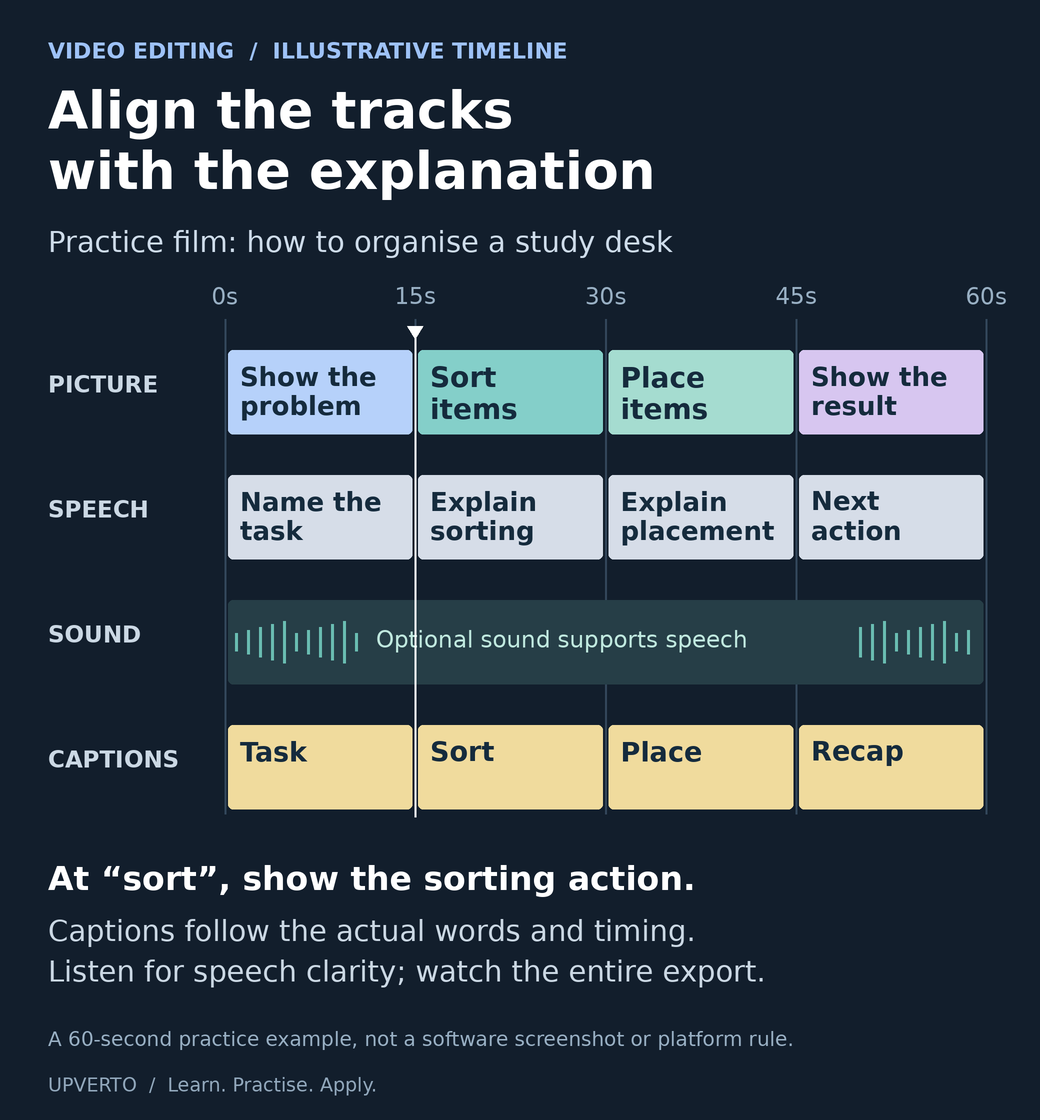
    Four aligned tracks illustrate a 60-second study-desk explanation. Sorting and placement footage support the corresponding speech, while caption segments follow each spoken section.
    Align picture, speech, sound and captions — An authored timeline for the article’s educational-video practice brief. Timings are illustrative. Use the enlarged view, then swipe or use arrow keys to inspect details. View full-size infographic.
    Read the text version: Align picture, speech, sound and captions

    This fictional 60-second study-desk edit has four aligned tracks. It is not a screenshot of editing software and does not prescribe a platform format.

    • 0–15 seconds: show the disorganised desk and explain the task.
    • 15–30 seconds: show hands sorting the items while the explanation discusses sorting.
    • 30–45 seconds: show placement while the speech explains where items go.
    • 45–60 seconds: show the organised result and recap the next action.
    • Supporting sound: any optional sound must allow speech to remain intelligible. No fixed level is implied by this drawing.
    • Captions: the labelled segments indicate alignment only. Write and time the actual captions against the complete recording, including relevant sounds where appropriate.

    Inspect the complete exported video, not just the timeline.

    Understand the work behind an edited video

    An editor may organise footage, review takes, select useful material, remove unnecessary sections, improve the flow, balance sound, add approved graphics or captions, and prepare versions for a destination.

    The source material changes the task. A clear single-camera explanation is different from a multi-camera event, a complex documentary, or damaged audio. Match the learning project and eventual service to the work you can actually handle.

    If you are comparing editing with other paths, use the skill-selection guide. It includes a small trial so you can experience the work before committing to a larger course.

    Learn the foundations in order

    FoundationWhat to practiseWhat to check
    File organisationKeep original media, project files, exports, and permitted assets in a clear structure.You can reopen the project and locate its media.
    Sequence and meaningSelect and arrange shots or speech so the message remains understandable.The edit does not distort what a speaker meant.
    Trimming and pacingRemove unnecessary material while preserving useful context.The result feels coherent rather than simply fast.
    SoundListen for speech clarity, distracting noise, abrupt changes, and music balance.The complete exported audio is intelligible and appropriate.
    Text and captionsUse readable text, accurate wording, and suitable timing.Names, technical terms, and important sounds are represented appropriately.
    Export and deliveryProduce the agreed format and package the required files.The actual export opens and plays correctly from start to finish.

    Blackmagic Design’s official training collection includes editing exercises and material on related disciplines such as sound and colour. Use official instructions for your chosen editor and version. You do not need to buy every application before learning the underlying decisions.

    Test the workflow on your equipment

    Before choosing a demanding project, test whether your device can import the source media, play it adequately for editing, save the project, and export the required result. Check current software requirements and supported formats with the provider.

    Start with manageable footage. Learn the tool’s supported methods for lighter editing copies or proxies if needed, and verify that the final export uses the correct media. Keep enough storage for originals, working files, and outputs. Do not promise a format you have never successfully produced.

    Practice brief: a short educational explanation

    Fictional brief: Record yourself explaining how to organise a study desk. Edit the recording into a concise video that preserves the useful steps. The intended audience is a beginner who should be able to follow the advice without extra explanation.

    Choose a final length and aspect ratio as exercise constraints before you begin. For example, you could aim for a 45–60 second vertical version. Those values define this practice task; they are not universal platform rules or a recommended formula for audience growth.

    RequirementPractice output
    MessageA clear opening, useful steps, and a complete ending.
    InputsYour own recording and any additional material you have permission to use.
    EditRemove unnecessary repetition while preserving the explanation.
    SoundSpeech is understandable; any added music supports rather than obscures it.
    CaptionsCheck the wording, timing, readability, and important non-speech information.
    DeliveryOne agreed export, an organised project folder, and notes about the checks performed.

    Worked example: explain the decisions behind the cut

    Suppose the recording begins with a long pause and an unrelated comment. You remove those parts so the useful explanation begins sooner. You keep a short pause before the second step because it helps the viewer follow the change.

    A caption tool misreads the name of a storage item. You compare the caption with the recording and correct it. If a word is genuinely unclear, you investigate or ask for clarification rather than inserting an unsupported guess.

    The first export crops an object mentioned in the explanation. You adjust the framing and review the new export. Your case study can explain these decisions and show the relevant sections. It should not claim improved retention or sales unless those outcomes were actually measured in a suitable real context.

    Treat captions and asset rights as part of the work

    Captions need checking even when a tool creates them automatically. They may need to represent meaningful sounds as well as spoken words, depending on the content and accessibility requirements. Use the W3C guidance on captions when planning accessible media.

    Confirm permission to use the footage, voices, music, images, fonts, and other assets. Keep licence information where needed. A track being available online is not proof that you may include it in a client’s commercial video.

    If the client requires editable project files, discuss dependencies and third-party assets before agreeing. The ability to send a project file does not automatically mean the recipient has the software, media, or licences needed to use it.

    Review the complete export

    1. Play the full export and check that it contains the intended beginning and ending.
    2. Listen to the sound at a sensible level, checking for unintelligible words and abrupt changes.
    3. Read every caption and verify names, numbers, and technical terms.
    4. Inspect framing, text placement, and any important visual detail.
    5. Confirm the agreed format, dimensions, and file naming.
    6. Reopen or hand over the project as agreed and check that required media is available.

    Record the actual checks and any remaining limitations. A successful export message only confirms that a file was produced; it does not establish that the content is correct.
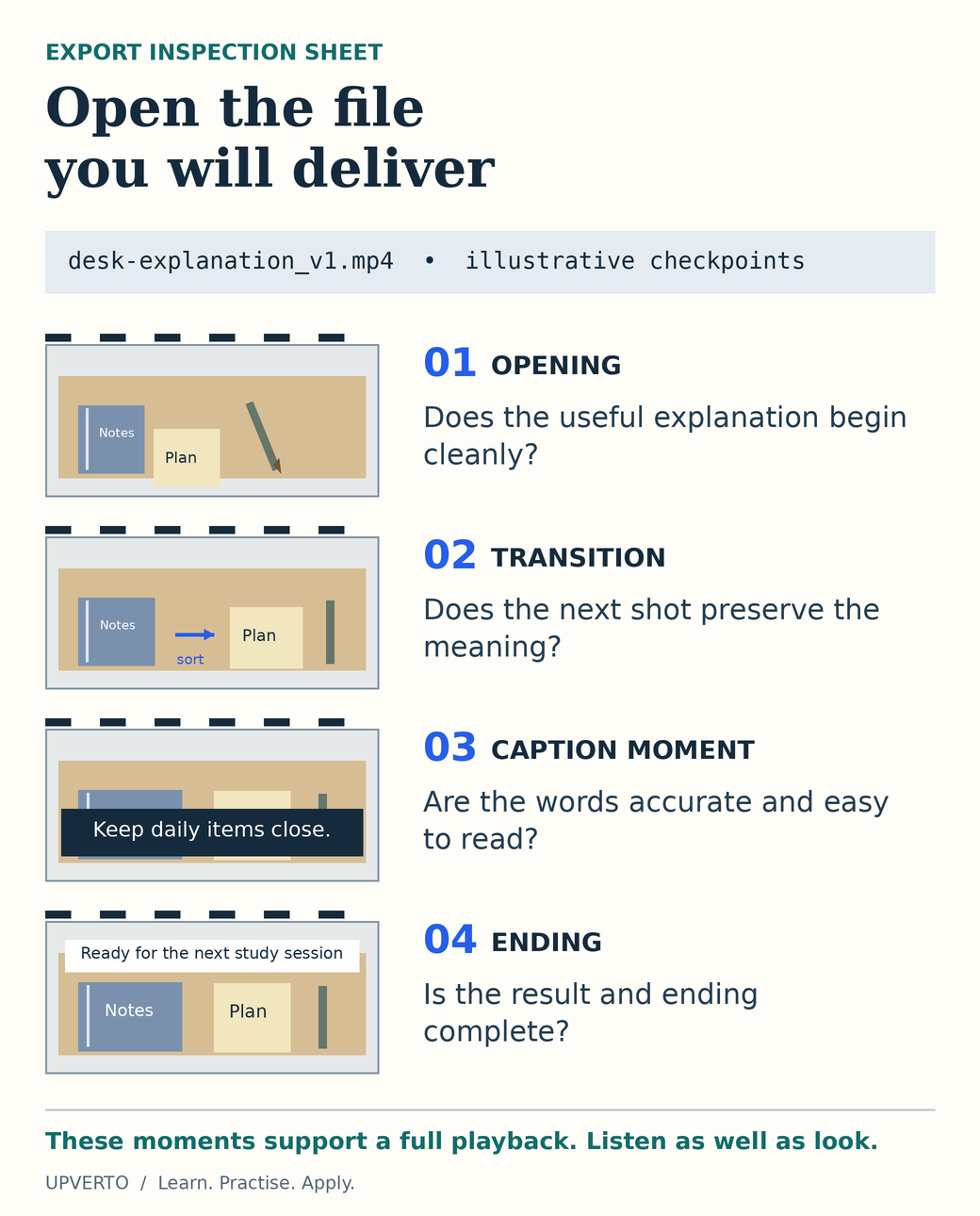
    Four illustrated frames from a fictional study-desk video mark checks at the opening, a transition, a caption moment and the ending. A note requires complete playback with sound.
    Inspect the actual export — Use specific checkpoints while reviewing the delivered video file from start to finish. Frames are explanatory drawings. Use the enlarged view, then swipe or use arrow keys to inspect details. View full-size infographic.
    Read the text version: Inspect the actual export
    1. Opening: check that the useful explanation starts cleanly and that no unwanted pause or unrelated material remains.
    2. Transition: check the change of shot and speech. Trimming must preserve the intended meaning.
    3. Caption moment: compare the actual caption wording and timing with the recording. Check readability and whether important visual information is obscured.
    4. Ending: ensure the final result, closing message and sound finish as intended rather than being cut off.

    These frames are conceptual drawings for the fictional desk exercise, not captured video or evidence of completed testing. Review the entire exported file with sound, then verify the agreed format, dimensions and filename. A successful export message does not prove correct content.

    Build evidence and define an editing offer

    Keep a short source excerpt, the corresponding final edit, and notes about the decisions. Label self-directed practice clearly. Use the portfolio guide to explain the brief, contribution, checks, and limitations.

    When you can repeat the workflow, define a service with limits on the source material, deliverables, captions, revisions, formats, and handover. The service-package guide includes a worked editing example.

    For client conversations, ask about the audience, message, source footage, approved wording, intended destination, and decision-maker. A promise to “edit anything” leaves too many responsibilities undefined.

    Frequently asked questions

    Do I need expensive software to begin?

    Choose a tool that supports the task and your equipment. Check the provider’s current free and paid options and their limitations. Begin with a small workflow you can complete; the application’s price does not establish the quality of your editing.

    Should I promise that my edits will go viral?

    No. You can define and check your editing deliverables. Audience response depends on factors beyond the edit, and an example project does not establish future performance.

    What should I practise before offering video-editing services?

    Complete a short brief that includes organising source files, selecting shots, making clear cuts, balancing speech and music, checking captions and exporting the final video. Watch the entire export. Your sample should demonstrate the full task you want to offer, not only a striking transition.

    Can I build an editing portfolio without client footage?

    Use footage you created or material whose licence permits your intended use. Write a fictional brief and explain your editing contribution. Keep a record of sources and permissions, and avoid presenting practice footage as a completed client commission.

    How much attention should I give to audio and captions?

    Treat them as part of the brief and review them deliberately. Check that speech is understandable, background audio supports it, and captions match the spoken content. Watch with sound and, where captions are provided, check that the video still communicates its essential message without sound.

    What belongs in a video-editing handover?

    Identify the approved final exports, their formats and where they are intended to be used. Include project files only if agreed, and explain relevant assets or dependencies. Confirm the revision and support boundaries, and keep the source footage organised according to the project agreement.

    Complete one brief, including the handover

    Use the learning cycle to practise the short-video brief, then assess your work with the readiness rubric. Develop a service supported by that evidence and use the project workflow when handling real client delivery.

  • UI and UX Design: A Learning Path Toward Useful Client Work

    UI and UX Design: A Learning Path Toward Useful Client Work

    UI and UX work becomes useful when someone can complete a real task with less uncertainty. A polished screen can support that task, but appearance alone cannot tell you whether people understand the choices or recover from a mistake. Learn to connect the user’s purpose, the sequence of actions, the interface and the evidence you have collected.

    In this guide

    If you are deciding whether this work suits you, compare it with the other options in which digital skill should I learn. The project below uses an invented neighbourhood workshop with a booking prototype. It gives you a concrete way to practise without implying that fictional visitors have been researched or that a design has improved a real business.

    Learn the work behind the screen

    UI design concerns the controls, layout, hierarchy and feedback people interact with. UX work also examines the wider task: why someone arrives, what information they need, what happens before and after the screen, and which constraints prevent completion. The responsibilities overlap, and job titles vary. Ask what a particular brief expects rather than relying on the label.

    Start with observation and clear writing. Can you describe a user’s task without embedding your preferred solution? “A visitor needs to know whether a beginner can attend” leaves room to investigate. “A visitor needs a carousel” already assumes an interface. GOV.UK’s user-needs guidance is a useful primary reference for that distinction.

    Practise visual hierarchy, spacing, typography and responsive layout alongside flows and interaction states. Learn enough accessibility to recognise labels, focus, contrast, meaningful order and error feedback. MDN’s accessibility module provides a foundation for web interfaces. A design file can record these requirements, but implementation must still be checked in the actual product.

    Define the fictional booking task

    Willow Workshop is an invented provider of beginner repair sessions. A visitor wants to find a suitable date, understand what to bring and request one place. The prototype uses two fictional dates and a fictional availability count. It does not make a real reservation or collect real personal data.

    The practice brief asks for a workshop detail view, a date choice, a short request form and confirmation. Include the branch where the preferred date has no places and the case where a required field is missing. The constraint is a small-screen experience that can also be understood on a larger screen. Do not add membership, payment or account features.

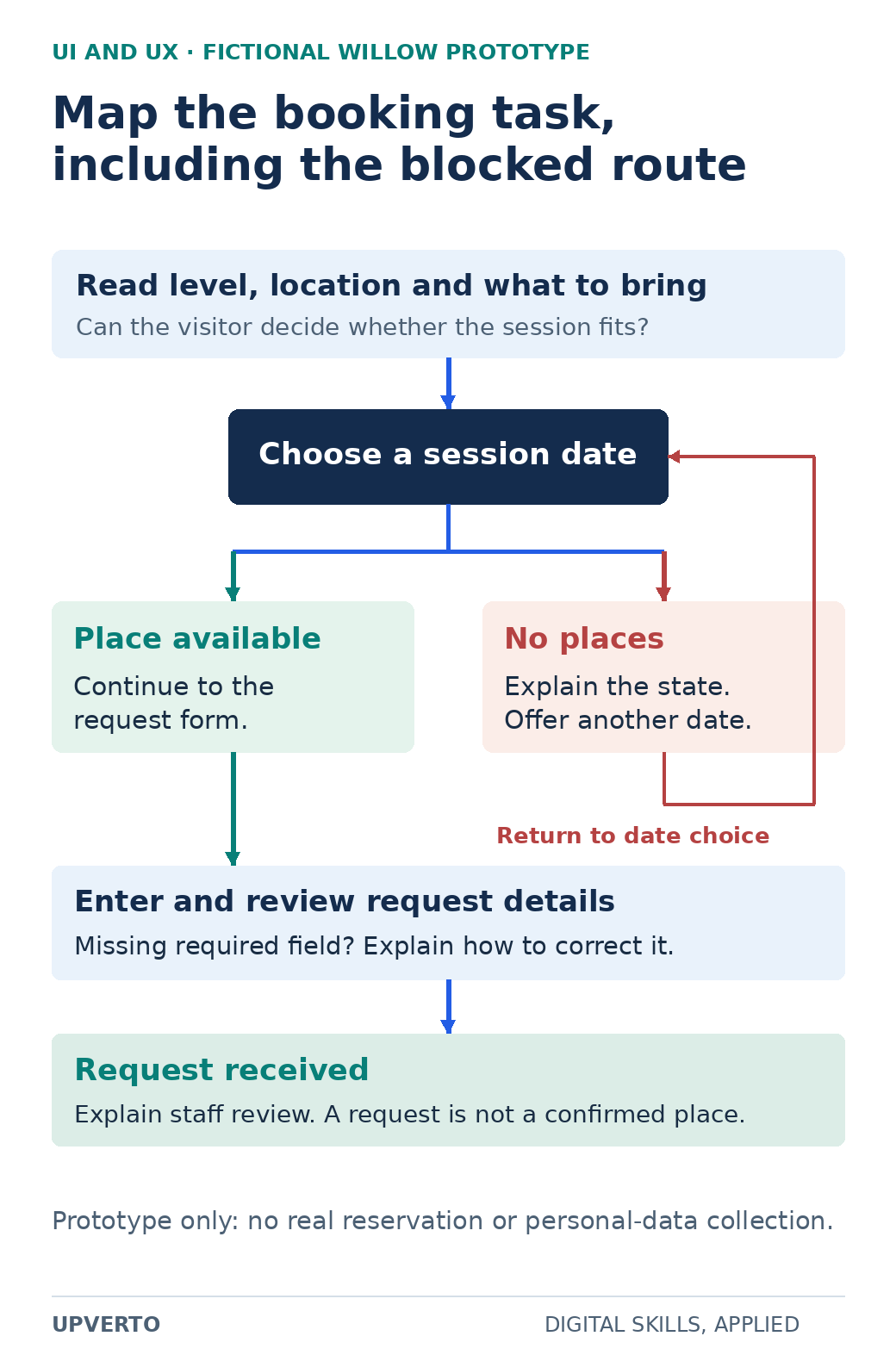
    A task flow moves from workshop details to date selection, branches between available and unavailable dates, and ends with a request received after form review.
    Map a booking task with an unavailable route — The unavailable-date branch returns to choosing a date; confirmation explains the difference between a request and a reserved place. Use the enlarged view, then swipe or use arrow keys to inspect details. View full-size infographic.
    Read the text version: Map a booking task with an unavailable route
    1. Read the level, location and what to bring.
    2. Choose a date.
    3. If places are available, continue to the request form. If no places are available, explain the state and offer another date.
    4. Enter and review details; a missing required field needs clear correction guidance.
    5. Show request received and explain staff review. It is not yet a confirmed place.

    This fictional prototype makes no real reservation.

    The flow begins with a question: can the visitor decide whether the session fits? If the detail page omits the level or location, changing a button colour will not resolve that uncertainty. Place essential information before the booking action. When a date is unavailable, preserve context and offer another date. At confirmation, explain what the request means and what happens next.

    Move from a rough flow to a testable prototype

    Sketch the necessary states before choosing fonts. Give each state a name and each arrow an action. For example: workshop details → choose date → enter details → review request → request received. Keep error and unavailable states visible in the diagram. A single ideal path hides much of the work.

    Create a low-detail prototype with realistic sample wording. “Continue” may be enough in one place; “Request a place” explains a different commitment. Decide whether confirmation is immediate or whether a staff member must approve the request. That decision belongs in the service design and the text, not only in the prototype links.

    Check your own prototype against the brief before asking anyone to use it. Can all relevant controls be followed? Are the two dates consistent across screens? Does a missing field show where to correct the entry? A static mockup cannot prove keyboard behaviour or screen-reader output; record those as implementation requirements instead of claiming they passed.

    Observe a task without inventing evidence

    GOV.UK’s moderated usability-testing guidance describes watching participants attempt specific tasks. For a small practice session, explain that the interface is being tested, obtain consent for any notes or recording, and avoid collecting unnecessary personal information. Ask a neutral task, then watch what the person does before offering help.

    A suitable task is: “You want to attend a beginner repair session next month. Find a date you could attend and request a place.” Avoid saying “Click the blue button,” because that supplies the action you wanted to observe. Use invented contact details and make it clear that no real place is being booked.

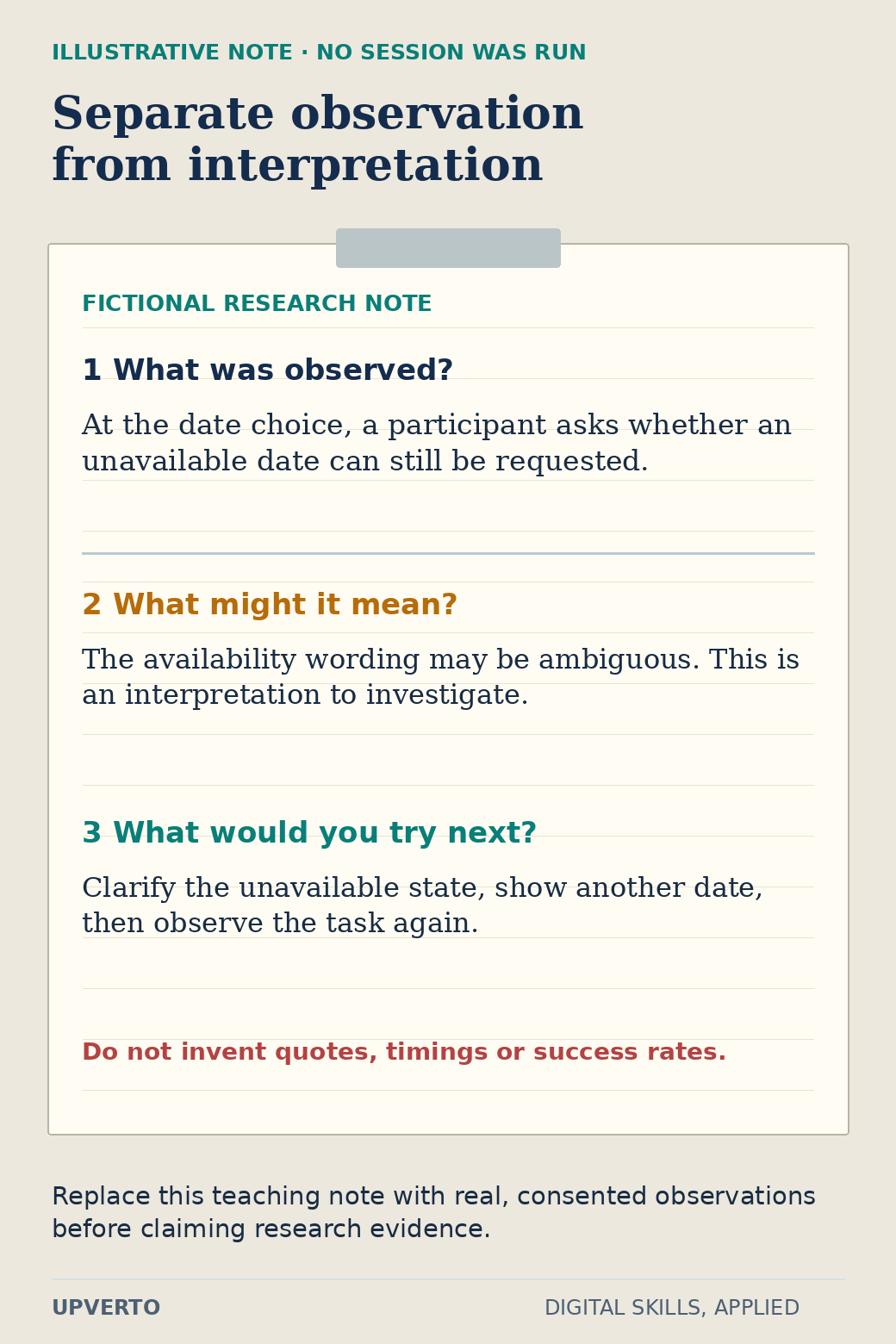
    A clipboard distinguishes a fictional observation about an unavailable date, an interpretation about ambiguous wording, and a proposed revision to check in another session.
    Turn an observation into a testable revision — This note teaches the recording method. It is explicitly fictional and is not a usability result. Use the enlarged view, then swipe or use arrow keys to inspect details. View full-size infographic.
    Read the text version: Turn an observation into a testable revision
    Illustrative observation
    A participant asks whether an unavailable date can still be requested.
    Interpretation
    The wording may be ambiguous; this requires investigation.
    Next design hypothesis
    Clarify the unavailable state, offer another date and observe the task again.

    No session was run for this example. Do not claim invented quotes, timings or success rates as evidence.

    The graphic contains an explicitly fictional observation note to demonstrate the format: at the date choice, a participant asks whether an unavailable date can still be requested. The corresponding design hypothesis is that the state needs clearer wording and an alternative. This note is an instructional example, not a report from an actual research session. If you run your own session, replace it with what you really observed.

    Separate observation, interpretation and decision. “Paused for twelve seconds” is an observation only if you actually measured it. “Did not trust the service” is an interpretation requiring more evidence. A practical change might be to replace an ambiguous availability label, but that change remains a hypothesis until checked again.

    Use this prototype case-study brief

    FieldWhat to recordWillow practice example
    User and taskA concrete purpose and relevant contextFirst-time visitor choosing a beginner session
    Known factsInformation supplied by the briefTwo fictional dates; staff review requests
    AssumptionsUnverified beliefs needing investigationVisitors understand the difference between a request and a confirmed place
    StatesNormal, unavailable, error and confirmation viewsNo places on one date; required contact field missing
    EvidenceActual observations and their sourceLeave blank until a session occurs; mark illustrative notes as fictional
    DecisionSpecific change and why it may helpClarify the unavailable-date message and show the alternative
    Remaining limitsWhat the sample cannot establishNo live booking integration or measured business outcome

    Keep versions of the prototype so you can explain one meaningful revision. A case study becomes stronger when a reader can follow the reason for a change, inspect the relevant screen and see the limits of the evidence. Use write a portfolio case study when you turn those materials into a portfolio narrative.

    Offer the part you can actually deliver

    Possible bounded services include documenting an existing task flow, preparing wireframes from an agreed brief, or producing specified interface states for implementation. Research planning, participant recruitment, usability facilitation, accessibility auditing and production development each require additional competence and agreement. A prototype delivery does not automatically include them.

    Before a project, agree the screens, states, device assumptions, supplied content, review rounds and handover format. Clarify who can approve changes and who will implement them. If the client requests evidence of improved usability, discuss an appropriate research method and what it can establish before promising a result.

    For your learning sequence, use how to learn a digital skill to alternate a small concept with an applied task. Before offering paid work, compare the specific brief with the ready for paid client work checklist. Your immediate goal is an inspectable design decision and a clear handover, not a claim that attractive screens guarantee conversions.

    Frequently asked questions

    Can I learn UI design without becoming a researcher?

    You can begin with interface craft and a clearly limited deliverable. Still learn to identify user tasks and distinguish evidence from assumptions. If research is outside your role, say who supplies it and avoid presenting an untested design as proven UX.

    How many screens should my first prototype contain?

    Use the states needed to complete one bounded task, including at least a relevant error or unavailable case. The Willow example needs more than a landing screen but does not need an entire service. Screen count follows the task rather than a portfolio quota.

    Can friends take part in a practice usability session?

    They can help you practise facilitation, provided they consent and understand the exercise. Explain how they differ from the intended users, avoid leading them, and do not generalise their responses to an entire audience.

    May I use the fictional observation in the graphic as a research result?

    No. It demonstrates how to separate a note, interpretation and revision. Label it as illustrative, or replace it with a real consented observation from your own session. Do not invent participant quotes, timings or success rates.

    Does a clickable prototype prove accessibility?

    It can communicate intended order, labels and error states, but it cannot establish all behaviour of a coded product. Record implementation requirements and check the real interface with appropriate methods before claiming conformance.

    What should I hand over after a small UI project?

    Provide the agreed screens and states, reusable styles where included, content assumptions, interaction notes and unresolved questions. Identify the version approved by the client and make clear whether implementation or further research is included.

  • Social Media Management: Skills, Practice Projects and Service Options

    Social Media Management: Skills, Practice Projects and Service Options

    Social media management combines planning, coordination, publishing and review. The useful output is not simply a stream of posts. It is relevant content that the organisation can approve, maintain and explain, with a record of what was published and what the available evidence says. Start by learning that operating routine on a small fictional project.

    In this guide

    This is one route within which digital skill should I learn. It covers organic social content and related coordination. Managing paid campaigns involves separate budget, measurement and policy responsibilities; do not quietly add them to a basic posting service.

    Understand the responsibilities before choosing tools

    Begin with the audience’s task. A local workshop’s visitors may need to understand the session level, check the date and know what equipment to bring. Those needs give you more useful content ideas than an arbitrary instruction to publish daily. Ask the owner which information is confirmed, which questions recur and which action a visitor can actually take.

    Learn to turn those inputs into a brief, prepare copy, coordinate images, check permissions and accessibility, and route the draft for approval. Publishing requires the correct account role and an agreed schedule. Community work requires response boundaries: which questions you can answer, what must go to the owner and how sensitive messages are handled.

    LinkedIn’s Page publishing documentation is an example of why platform instructions and permissions need to be checked in their current form. An account credential is not a substitute for an authorised role. Practise with drafts or a permitted test account; you do not need to publish an invented business to demonstrate the planning work.

    Build a calendar from an actual information need

    Willow Workshop is fictional. Its practice brief is to prepare three posts about a beginner repair session. The date, capacity and booking route are invented for this exercise. No post is scheduled or published, and no real audience response is claimed.

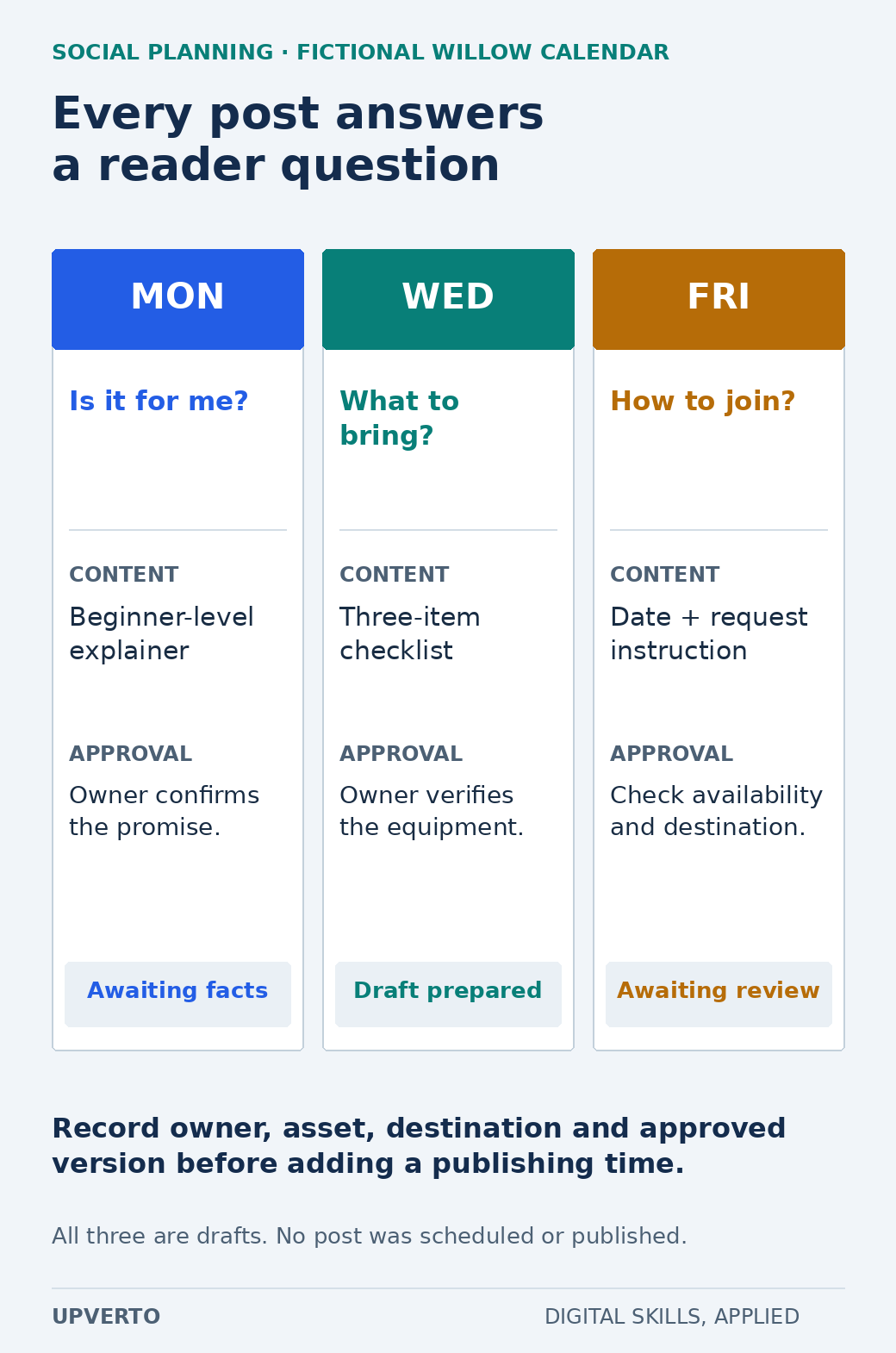
    Three calendar columns connect Monday, Wednesday and Friday drafts to a reader question, content purpose, required approval and draft status.
    Plan three posts through questions and approvals — This fictional calendar coordinates content and review; a scheduled time does not replace approval. Use the enlarged view, then swipe or use arrow keys to inspect details. View full-size infographic.
    Read the text version: Plan three posts through questions and approvals
    DraftQuestionContentReview
    MondayIs it for me?Beginner-level explainerOwner confirms the promise; awaiting facts
    WednesdayWhat should I bring?Three-item checklistOwner verifies equipment; draft prepared
    FridayHow do I join?Date and request instructionCheck availability and destination; awaiting review

    Record owner, asset, destination and approved version before scheduling. Nothing was published.

    DraftReader questionContent and inputApproval and status
    Monday explainerIs this suitable for a beginner?Short explanation of the level; owner confirms the task taughtOwner checks the promise; awaiting confirmation
    Wednesday preparationWhat should I bring?Three-item checklist with an original labelled illustrationOwner verifies equipment; draft prepared
    Friday reminderHow do I request a place?Date, location and the agreed request linkCheck availability and destination before approval

    The calendar is a coordination document. Add an owner, due date, asset location, destination URL and last-approved version to each row. A scheduled time belongs after approval, not in place of it. If the date changes, the same record helps you find affected posts and update the source information.

    Choose a realistic cadence for the information and production capacity available. Three well-prepared draft posts are enough for this exercise; they are not a universal recommendation for a business. Repeating an unsupported claim more frequently does not make the service useful.

    Prepare one post all the way to review

    Draft the Wednesday preparation post as a complete package. The fictional brief confirms that visitors bring one small repair item, a notebook and closed shoes. Write a short opening explaining the session, list those items and provide a clear way to ask about suitability. Mark the date and destination as sample details until replaced with approved information.

    For the visual, use an original illustration or a photograph you have rights to use. Provide alternative text that describes useful information. If the image contains essential instructions, include those instructions in the post text too. Do not use a stock photo to imply that a particular session has already taken place.

    Review the text against the brief: level, equipment, date, location, availability and link. Then check the platform preview for truncation or awkward line breaks. Save the approval and version before publishing in a real assignment. A new client request after approval should update the record rather than silently altering a scheduled draft.

    Report what the numbers can support

    First learn the definitions of the platform’s metrics. LinkedIn’s Page content-analytics help describes the reporting available for that product; other platforms can define impressions, views or interactions differently. State the account, period, time zone, metric definition and data source in your report. Do not compare unlike numbers as though they measured the same thing.

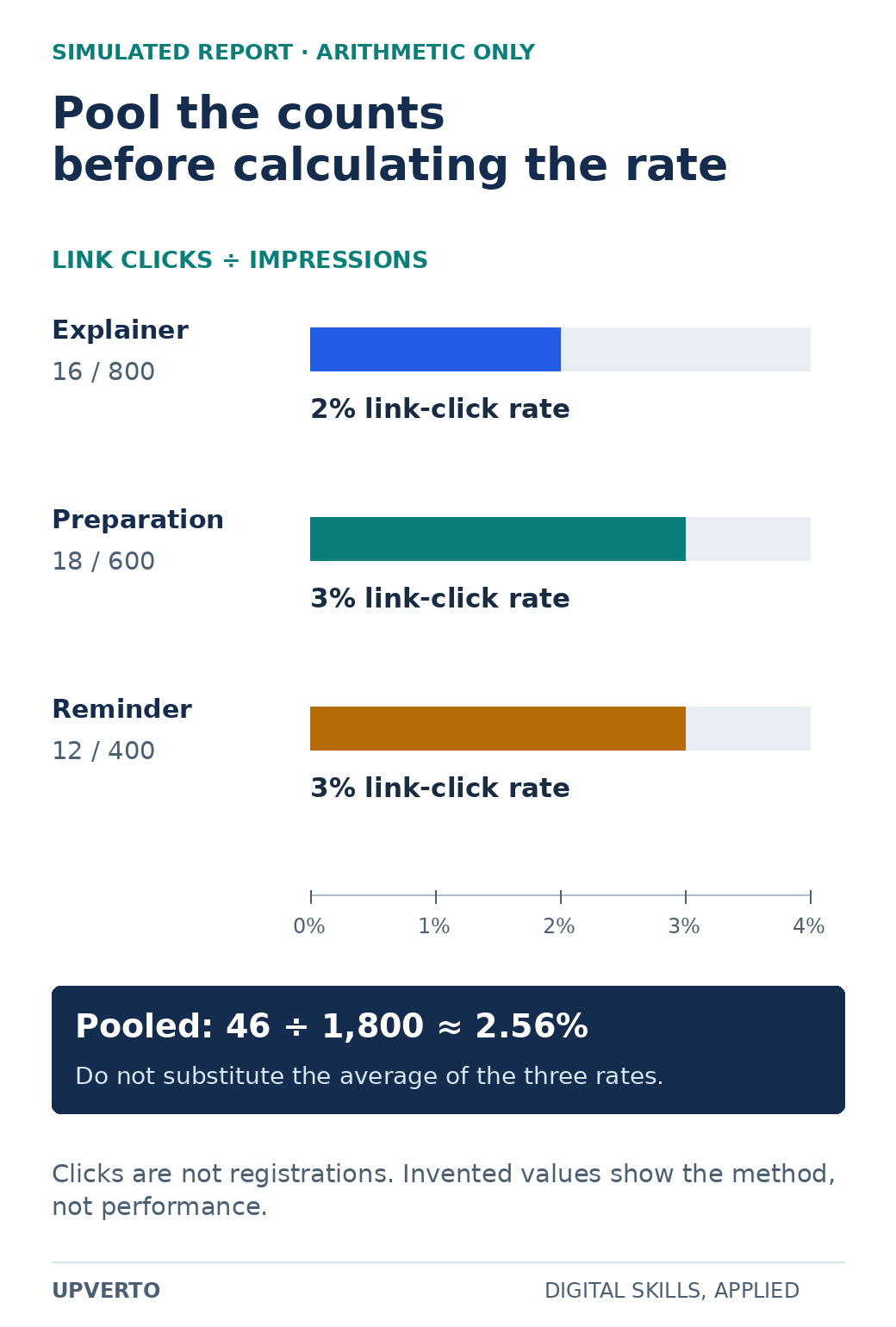
    Three horizontal bars show simulated link-click rates of 2%, 3% and 3%, followed by the pooled calculation 46 clicks divided by 1800 impressions, approximately 2.56%.
    Calculate a pooled link-click rate — Use summed clicks and impressions for the pooled rate, and keep that interaction separate from registrations or sales. Use the enlarged view, then swipe or use arrow keys to inspect details. View full-size infographic.
    Read the text version: Calculate a pooled link-click rate
    PostImpressionsClicksDefined link-click rate
    Explainer800162%
    Preparation600183%
    Reminder400123%

    Pooled rate = (16 + 18 + 12) / (800 + 600 + 400) = 46/1800 ≈ 2.56%. These invented metrics do not demonstrate registrations, sales or causal effects.

    The reporting exercise uses invented values: the explainer has 800 impressions and 16 link clicks, the preparation post has 600 and 18, and the reminder has 400 and 12. The explicitly defined link-click rate is clicks divided by impressions. That gives 2%, 3% and 3%, respectively. Across the sample, 46 clicks divided by 1,800 impressions is approximately 2.56%; averaging the three percentages would answer a different question.

    These numbers are arithmetic practice. They are not platform exports, reach estimates, customers or registrations. Impressions can include repeat exposure, and a click does not demonstrate a completed request. Even real differences between these three posts would not establish that one format caused better business results; timing, content and audience can vary together.

    A useful report can say what is observable and what to inspect next. For the sample, you might propose checking whether the destination explains the request process clearly. You cannot conclude that the business should spend money on the apparent winning post. Keep the interpretation proportionate to the data and its limitations.

    Use this operating checklist

    • Before drafting: identify the reader question, approved facts, intended action and available assets.
    • Before review: attach the full copy, visual, alternative text, destination and relevant claim sources.
    • Before publishing: record approval, verify current details and confirm the authorised account and time zone.
    • After publishing: save the actual post URL and check the visible result.
    • During responses: use agreed answers, protect personal information and route unresolved issues to the owner.
    • At review: report definitions, period, data source, useful observations and questions requiring more evidence.

    For the practice portfolio, retain the brief, calendar, one complete post package and the sample report with a conspicuous “simulated data” label. Add a short decision note explaining why each post exists. Use choose portfolio projects for freelance services to keep the project focused on a service you might later offer.

    Define a service around deliverables and boundaries

    A limited planning service might deliver a calendar and six draft posts from owner-supplied information, with one review round. A publishing service adds approved scheduling and verification on named accounts. Community management adds response windows, escalation rules and a clear limit on the subjects you may address. Reporting adds the agreed data access and interpretation.

    State which of these you include. Photography, video production, paid advertising, crisis response and around-the-clock inbox monitoring are separate responsibilities unless agreed. Do not promise follower growth, leads or sales that you cannot control. Your service can promise completed work and specified checks.

    Use how to learn a digital skill to build the learning routine, then create freelance service packages to define inputs, outputs and review boundaries. A reliable small workflow is useful evidence of readiness; a large collection of unsourced post ideas is much harder to assess.

    Frequently asked questions

    Do I need a large personal following to practise this work?

    No. You can demonstrate a well-researched brief, calendar, complete draft posts and a responsible reporting method without claiming audience results. Client requirements vary, so distinguish planning ability from a track record you do not yet have.

    Can I practise by posting for a real business without asking?

    Prepare a clearly labelled private sample instead. Publishing, accessing an account or representing a business requires its permission. Never invent an endorsement or imply that the business hired you.

    Should every calendar include daily posts?

    No. Choose a cadence based on the audience questions, available material, review capacity and agreed objective. Explain the reason for each post. The three-post exercise is a manageable practice scope, not a universal schedule.

    Are clicks divided by impressions always called engagement rate?

    No. Platforms and reports can use different numerators and denominators. The worked example calls its calculation link-click rate and states the formula. Use the current platform definition when reporting an actual platform metric.

    Who should reply to a complaint or a sensitive message?

    Agree an escalation route before managing responses. A basic service can acknowledge a message and send it to the authorised owner without requesting private details publicly or making a promise it cannot fulfil.

    Can I include paid advertising in my first package?

    Only if you separately understand and agree the budget authority, measurement, policy and ongoing monitoring responsibilities. Organic planning experience does not by itself establish readiness to manage a client’s advertising spend.

  • WordPress Skills to Learn, Projects to Build and Services to Offer

    WordPress Skills to Learn, Projects to Build and Services to Offer

    To offer WordPress services, learn to organise content, build usable pages, manage the tools involved, test the result, and hand over a site someone else can maintain. Installing a theme is one step. Client work also involves understanding requirements, protecting existing content, and checking what visitors can actually do.

    WordPress is a content management system: software for creating and managing website content. This roadmap focuses on the abilities behind useful client work and the projects that can demonstrate them. If you are comparing it with other directions, use the digital-skill selection guide.

    In this guide
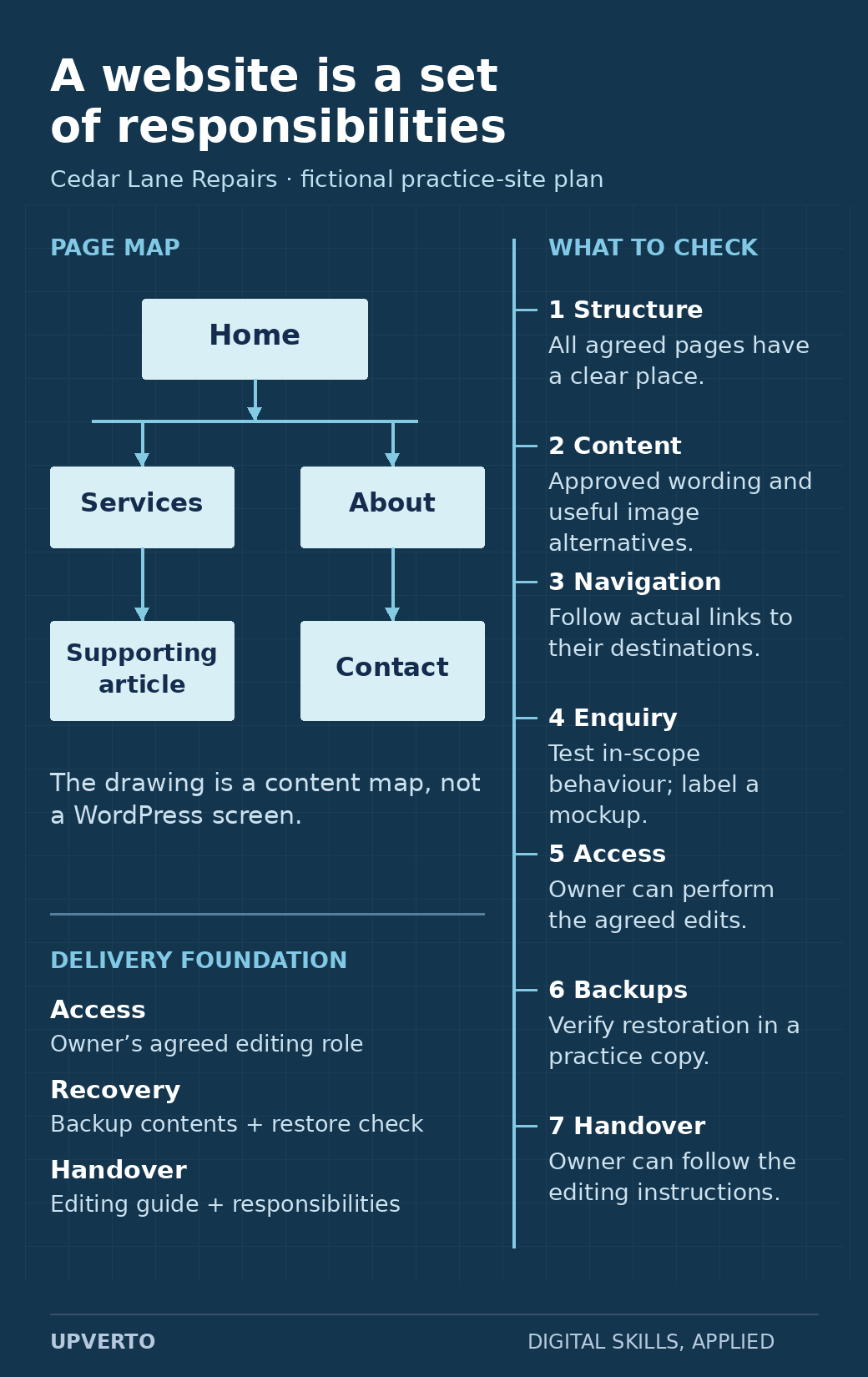
    A fictional Cedar Lane Repairs page map sits beside seven inspection responsibilities: structure, content, navigation, enquiry behaviour, owner access, backups and handover.
    Connect website responsibilities to checks — Use the map and check rail together: arranging pages is one part of a complete, maintainable site delivery. Use the enlarged view, then swipe or use arrow keys to inspect details. View full-size infographic.
    Read the text version: Connect website responsibilities to checks

    This is a content and responsibility diagram for the fictional Cedar Lane Repairs practice site, not a WordPress screenshot.

    • Page structure: place the agreed Home, Services, About, Contact and supporting article pages in a clear content map.
    • Content: check complete approved wording and appropriate image alternatives.
    • Navigation: follow the actual links and confirm their destinations.
    • Enquiry: check the behaviour within the agreed scope; clearly identify a visual mockup if no working interaction exists.
    • Access: check that the owner can perform the routine edits agreed for their role.
    • Backups: identify the backup contents and verify restoration in a practice copy.
    • Handover: provide instructions the owner can follow, along with maintenance and support responsibilities.

    The illustrative map does not establish that any live website has passed these checks.

    Understand the kinds of WordPress work

    Work typePossible deliverableResponsibility to understand
    Content and layout updatesApproved changes to named pages or posts.Preserving unrelated content, checking links and layout, and obtaining approval.
    Small information websitesA defined set of pages, navigation, and agreed features.Content structure, usability, accessibility, configuration, and handover.
    MaintenanceAn agreed set of checks, updates, backups, and reports.Recovery, compatibility, access, responsibilities, and support boundaries.
    Custom developmentSpecific theme, plugin, or integration functionality.Programming, testing, security, compatibility, and ongoing ownership.

    These categories require different depths of ability. Do not describe basic page editing as evidence that you can safely manage every integration, migration, or security incident. Use the readiness rubric for the particular work you want to accept.

    Learn the foundations in a practical order

    Begin with files, browsers, accounts, domains, and hosting concepts. Learn the difference between an address, the server that hosts a site, and the software that manages its content. You need enough understanding to ask sensible questions when a site is unavailable or a change does not appear.

    Next, practise pages, posts, media, navigation, themes, plugins, and the editing tools used by the site. WordPress’s official beginner pathway covers these introductory areas and includes lessons on settings, backups, and security. Use current documentation for the version and tools you actually use.

    Then connect the parts into a useful visitor journey. Decide which information belongs on each page, how a visitor reaches it, and what the next action should be. A layout is successful only when it supports the intended content and task.

    Four layers of WordPress competence
    • Content: pages, posts, images, and clear navigation.
    • Presentation: readable layouts and behaviour across screen sizes.
    • Operation: access, backups, updates, and recovery.
    • Delivery: requirements, checks, approval, and handover.

    Understand the editor and theme before changing them

    A site may use WordPress blocks, a page builder, theme-specific controls, or a combination. Inspect how the actual page is built before replacing its content or settings. A change in one editor may not control the output you expect.

    Practise keeping content editable and preserving structure. Avoid placing all text inside a screenshot simply to reproduce a design. Use headings, paragraphs, lists, links, and appropriate image alternatives that people and assistive technology can interpret.

    For images, use the text alternative that fits their purpose. An informative image and a purely decorative image need different treatment; the W3C images tutorial explains the distinction.

    Practice brief: a small service-information site

    Fictional project: Build an information site for Cedar Lane Repairs, an invented repair service. Use fictional details and permitted assets in a private practice environment. Do not configure real payments or collect actual customer information for this exercise.

    RequirementPractice output
    AudienceA visitor who wants to understand the services, service area, and enquiry process.
    PagesHome, services, about, and contact information, with a short supporting article.
    NavigationA clear route between pages, with meaningful link labels.
    ContentReadable headings and text using supplied fictional copy.
    Enquiry exampleA clearly labelled test-only interaction if your environment supports it; no real submissions.
    ChecksPage links, text, images, responsive layout, keyboard access, and any test interaction.
    HandoverA short guide explaining how to edit a page and what needs maintenance.

    Keep the brief, a content plan, the site output, and a check log. Record what you actually tested. If the contact interaction is only a visual mockup, label it as such instead of presenting it as a working form.

    Practise recovery and maintenance in a safe environment

    Before offering maintenance, learn how backups are created, what they include, and how restoration is verified. A backup file existing is different from evidence that the intended site can be restored.

    In a practice copy, record the current state, make a small authorised change, check it, and practise reverting it. Learn how to recognise whether a problem comes from content, a theme, a plugin, or another dependency. Do not disable broad protections just to make an error disappear.

    For client work, agree on the access and recovery process before production. Live payments, personal data, and business-critical workflows require capabilities and permissions beyond a beginner’s visual site exercise.

    Check a website as a visitor and an owner

    • Content: approved wording is complete; headings describe the sections; contact details are correct for the intended environment.
    • Navigation: important links lead to the intended destinations, including on smaller screens.
    • Interaction: test each in-scope control and its error or empty state.
    • Presentation: text remains readable; tables and images fit; keyboard focus is visible.
    • Operation: the required backup, access, and maintenance arrangements are documented.
    • Handover: the owner can identify how to make the agreed routine edits.

    This is a starting checklist, not an exhaustive accessibility, security, or performance audit. Use more specialised checks when the scope requires them and state the actual limits of your review.

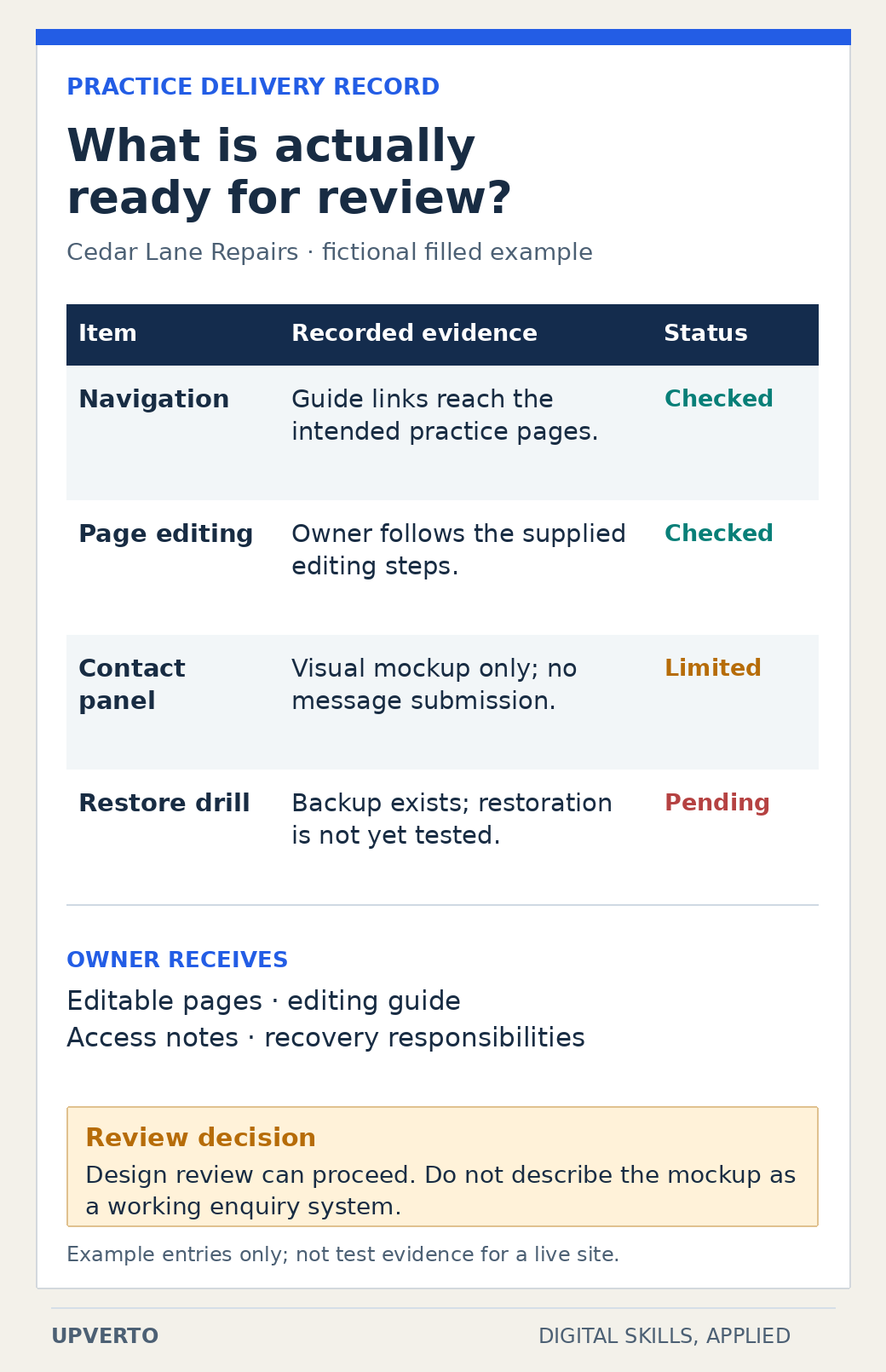
    A fictional practice-site inspection sheet labels navigation and editing checks, a contact-panel mockup limitation and an untested restoration drill, then lists the owner handover and review decision.
    Read a release inspection record — The example makes completed checks, limitations and pending work visible instead of treating a polished page as proof of a complete system. Use the enlarged view, then swipe or use arrow keys to inspect details. View full-size infographic.
    Read the text version: Read a release inspection record

    This is a filled fictional planning record, not actual WordPress test evidence.

    ItemExample recordStatus
    NavigationGuide links reach the intended practice pages.Checked in the fictional example
    Page editingThe owner follows the supplied editing steps.Checked in the fictional example
    Contact panelIt is a visual mockup only, with no message submission.Limited
    RestorationA backup exists, but restoration has not yet been tested.Pending

    The owner handover contains editable pages, an editing guide, access notes and recovery responsibilities. The example decision permits design review while keeping the unimplemented enquiry behaviour and pending restore check explicit. Actual delivery records must contain evidence from the real project.

    Turn the project into evidence and a service

    Write a case study showing how the page structure serves the visitor, what changed during review, and which checks passed. Include only results you performed. A visually attractive screenshot does not prove a working website.

    Use the portfolio structure and project-selection guidance. Once the evidence supports a defined task, use the package worksheet to specify the pages, inputs, functionality, revisions, and handover involved.

    For a potential client, ask what exists now, what needs to change, who owns the content, which systems are involved, and what approval is needed. These questions help you distinguish a content update from a broader redevelopment.

    Frequently asked questions

    Do I need programming before starting WordPress?

    You can begin learning content management and page building before custom programming. More advanced themes, integrations, debugging, and bespoke functionality require deeper technical knowledge. Match the work you offer to the capabilities you have demonstrated.

    Can I offer maintenance immediately after building one site?

    Assess maintenance separately. You need to understand updates, backups, recovery, permissions, compatibility, and the agreed support responsibility. One successful build does not demonstrate every maintenance scenario.

    What should my first WordPress portfolio project include?

    Use a small brief with a clear audience, a few purposeful pages, working navigation and a defined contact or enquiry requirement. Check the completed experience and document your decisions. Explain that it is a practice project, and separate what you built from third-party themes or assets.

    Do I need to learn every page builder?

    Begin with one editor and theme combination so you can understand a complete workflow. Learn how content, layout and theme settings interact before collecting more tools. Investigate another builder when a project requires it, then test its behaviour before promising that service.

    What should I check before handing over a website?

    Check the agreed pages, important links, relevant forms, mobile layout and any functionality within scope. Confirm that the owner can access the site and understands the editing process. Record what was tested, what remains outside scope, and the agreed backup, recovery and support arrangements.

    Can I make changes directly on a client’s live site?

    Use the client’s authorised workflow. Preserve a recovery route, understand the impact of the change and use a staging or draft environment where appropriate. Agree on who approves publication. Completing a practice site does not automatically prepare you to change every live system safely.

    Choose one task and practise the whole delivery

    Begin with the fictional site brief and a learning plan. If WordPress is your chosen path, inspect Upverto’s WordPress course outline for its actual curriculum. Then use the readiness rubric and the project-delivery guide before offering paid work.

  • Which Digital Skill Should You Learn? A Practical Selection Guide

    Which Digital Skill Should You Learn? A Practical Selection Guide

    Choose a digital skill by comparing the work you would do, the foundations you need, the equipment available to you, and a small task you can actually try. A popular skill is only useful to your plan if you can learn to apply it to a real problem.

    You do not need to identify your lifelong career in one afternoon. Make an informed choice about what to investigate and practise next. This guide compares 15 skill families, provides trial tasks, and gives you a worksheet for choosing a starting direction.

    In this guide
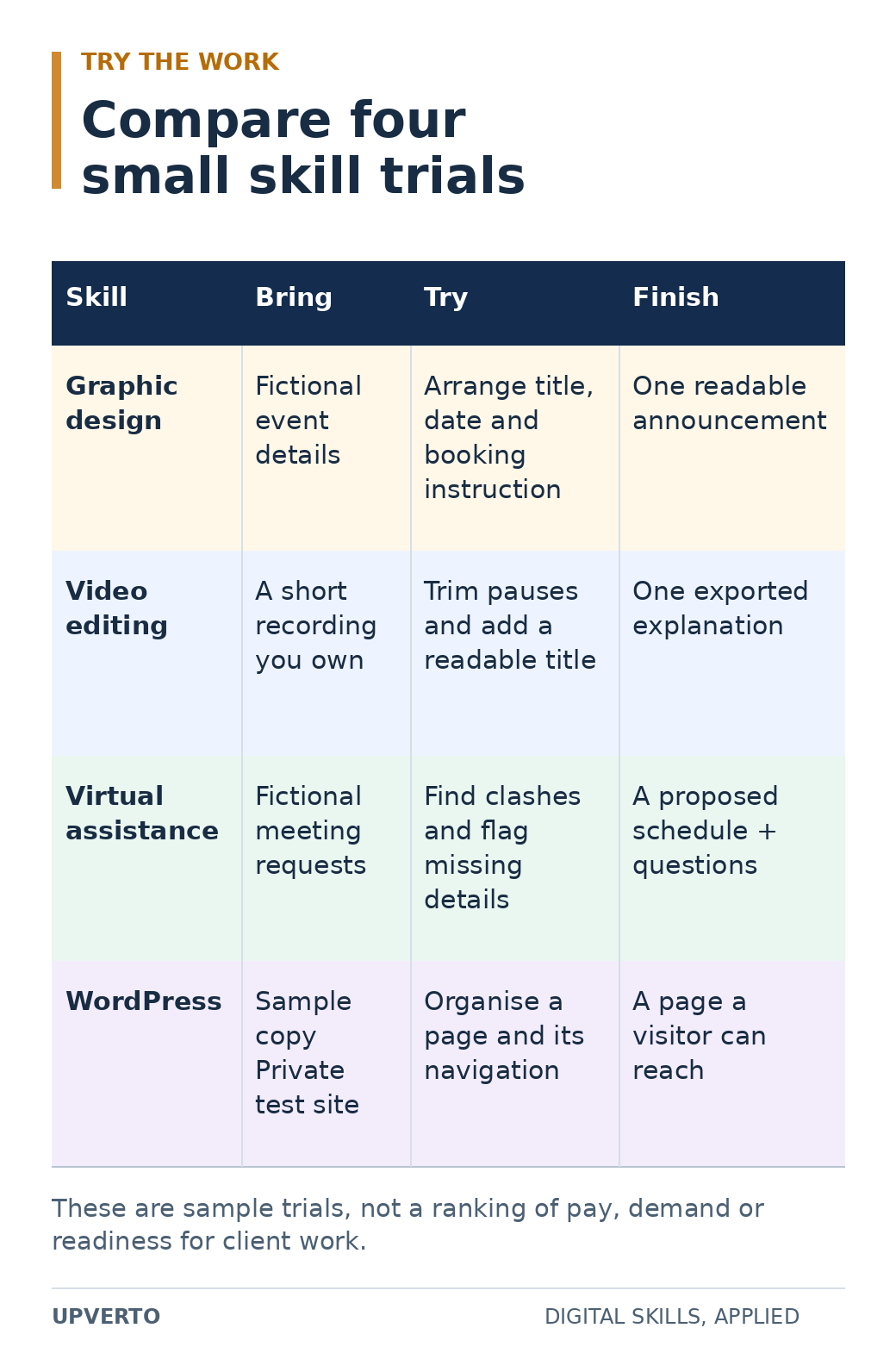
    A four-row matrix compares graphic design, video editing, virtual assistance and WordPress through required inputs, a concrete trial task and a finished output.
    Compare the work through a small trial — Compare a small finished task in each direction before making a larger learning commitment. Use the enlarged view, then swipe or use arrow keys to inspect details. View full-size infographic.
    Read the text version: Compare the work through a small trial
    SkillInputsTrial taskFinished output
    Graphic designFictional event detailsArrange the title, date and booking instructionOne readable announcement
    Video editingA short recording you ownTrim pauses and add a readable titleOne exported explanation
    Virtual assistanceFictional meeting requestsIdentify clashes and flag missing detailsA proposed schedule and questions
    WordPressApproved sample copy and a private test siteOrganise a page and its navigationA page a visitor can reach

    These four examples come from the article’s wider set of skill families. They compare tasks, not pay, demand or professional readiness.

    Practical summary
    Four questions before you choose
    • Work: Do I want to make, analyse, organise, or explain?
    • Foundations: Which prerequisite skills do I need?
    • Access: Can I complete the work with my equipment and time?
    • Evidence: What small output could show that I am improving?

    Start with tasks, not impressive job titles

    A job title can hide several very different activities. “Digital marketing” might involve researching customers, writing advertisements, managing campaign settings, analysing results, or coordinating content. “AI work” can mean building software, connecting tools, evaluating outputs, or supporting an existing process.

    Pick a concrete task to examine. Would you enjoy making a confusing page easier to read? Investigating why a website feature fails? Turning a long recording into a clear short video? Checking a set of records for inconsistencies? These questions get you closer to the day-to-day work.

    If you are unsure how a skill connects to paid work, read the digital-skills earning roadmap. A skill can support different routes, including employment, freelance services, or a product. Your first learning choice does not force you to use only one route forever.

    Compare 15 digital-skill families

    The examples below describe possible practice outputs. They are not a list of services every beginner is ready to sell, and the order is not a ranking of pay or demand.

    Skill familyWork you would practiseExample starting output
    WordPressOrganising and maintaining website content, layouts, and functionality.A small information site with tested navigation and a handover guide.
    Web developmentWriting and debugging code for interfaces and applications.A responsive page with a working interaction and documented checks.
    Graphic designUsing layout, typography, colour, and imagery to communicate.A clear event announcement adapted for two different placements.
    Video editingSelecting material, shaping a sequence, working with sound, and preparing exports.A concise explanation video with checked captions.
    UI and UX designUnderstanding user needs and designing usable flows and interfaces.A simple booking flow with explained decisions and a usability exercise.
    SEOInvestigating how useful website content is discovered, understood, and measured in search.A small-site audit with evidence and prioritised recommendations.
    Social media managementPlanning, preparing, scheduling, and reviewing content for a defined audience.A short content plan with clear objectives and approval steps.
    Writing and copywritingResearching, structuring, and editing information for a reader and purpose.A useful article or service page supported by checked facts.
    Paid advertisingPlanning campaigns, configuring tracking, managing budgets, and interpreting results.A campaign plan using fictional data, without spending a client’s money.
    Email marketing and CRMOrganising permitted contact data and preparing appropriate communication sequences.A sample customer journey and email sequence using fictional contacts.
    Spreadsheets and analyticsCleaning information, building calculations, and explaining patterns.A checked reporting sheet using non-sensitive sample data.
    No-code and AI automationConnecting steps, defining rules, testing exceptions, and monitoring a workflow.A demonstration workflow with a documented failure case and recovery.
    AI engineeringBuilding and evaluating software that uses models and data.A narrow application with tests, limitations, and safe handling of inputs.
    Virtual assistanceOrganising information, coordinating tasks, researching, and communicating.A fictional operations task pack with a repeatable written procedure.
    Linux and IT supportManaging systems, investigating problems, and documenting reliable operations.A private practice environment with a tested setup or recovery procedure.

    The five detailed roadmaps in this starting collection cover WordPress, graphic design, video editing, SEO, and virtual assistance. Use them to understand what learning and delivery involve before choosing a service.

    Compare the foundations you need

    Some prerequisites are shared: managing files, naming versions, reading a brief, searching for help, and explaining a decision. Others depend on the work. A coding task may require programming fundamentals. An analytics project may require understanding the meaning of the data and checking calculations. A design task requires judgement about communication as well as tool operation.

    Write down the gap between what you can do today and the smallest meaningful task in that family. A gap is not a reason to give up. It tells you what belongs at the beginning of your learning plan.

    Also distinguish a task’s visible simplicity from its responsibility. Editing text on a test website is different from changing a live checkout. Drafting a sample advertisement is different from managing a client’s budget. Organising fictional records is different from handling confidential customer information.

    Check equipment and time before committing

    Try the actual workflow on the device you have. Can you open the files, use the necessary application, inspect the result properly, export the required format, and keep a backup? A tool opening successfully is only the first check.

    Video projects can involve large files and demanding playback. Development may require running several tools together. Administrative and writing tasks still benefit from a reliable way to organise documents and compare information. Check current requirements with the software provider before purchasing hardware or subscriptions.

    Choose a learning schedule that fits your existing responsibilities. You might reserve three short sessions for focused practice and one longer session for a project. That is an example arrangement, not a required timetable. The useful question is whether you can return to the work regularly enough to build and review an output.

    Try a small task before buying a large course

    Choose two or three families that seem plausible. Give each a small, comparable trial. The time boxes below are suggested exploration limits; finishing within them does not prove professional competence.

    TrialTaskWhat to notice
    Graphic designSpend 30–45 minutes arranging a fictional event’s title, date, location, and booking instruction on one page.Can you explain what the reader should notice first? Are you willing to revise spacing and readability?
    Video editingRecord a short explanation yourself, then trim pauses and add a readable title.Do you enjoy choosing what to keep? Can you organise the files and review the export?
    Virtual assistanceTurn a fictional list of meeting requests into a tidy schedule with unresolved questions flagged.Do you enjoy checking details and making a repeatable process?
    WordPressUse a private practice environment to organise a page, navigation, and a short article.Do you enjoy connecting content, layout, and navigation? Can you explain how a visitor finds information?
    SEOReview three public pages for the questions they answer and the usefulness of their headings and links.Do you enjoy investigation and written reasoning? Can you separate observation from a guess?

    WordPress’s official beginner pathway links to a private demo environment and introduces its basic site-building tools. Blackmagic Design’s official editing training provides worked training materials. These are examples of places to investigate a workflow, not requirements to buy a particular tool.

    After each trial, record what you produced, where you got stuck, what help you used, and whether you want to improve the result. Enjoying a polished finished video is different from enjoying the work of editing it.

    Look for evidence that people need the work

    Review a small sample of current, relevant opportunities. Search for the specific output as well as the broad skill name. A useful note might say, “Several requests ask for interview edits with captions and organised source files.” A less useful note says, “Video is booming.”

    For each request, record the buyer, task, inputs, required experience, deliverables, and any uncertainties. Do not treat an advertised budget as proof of what a beginner will earn. A small sample of listings can help you understand the work; it cannot establish a reliable market average.

    If you can speak to an appropriate potential buyer, ask how they currently handle the task and what makes it difficult. Do not begin by trying to sell an undefined service. The service-definition guide explains how to connect these observations to an offer.

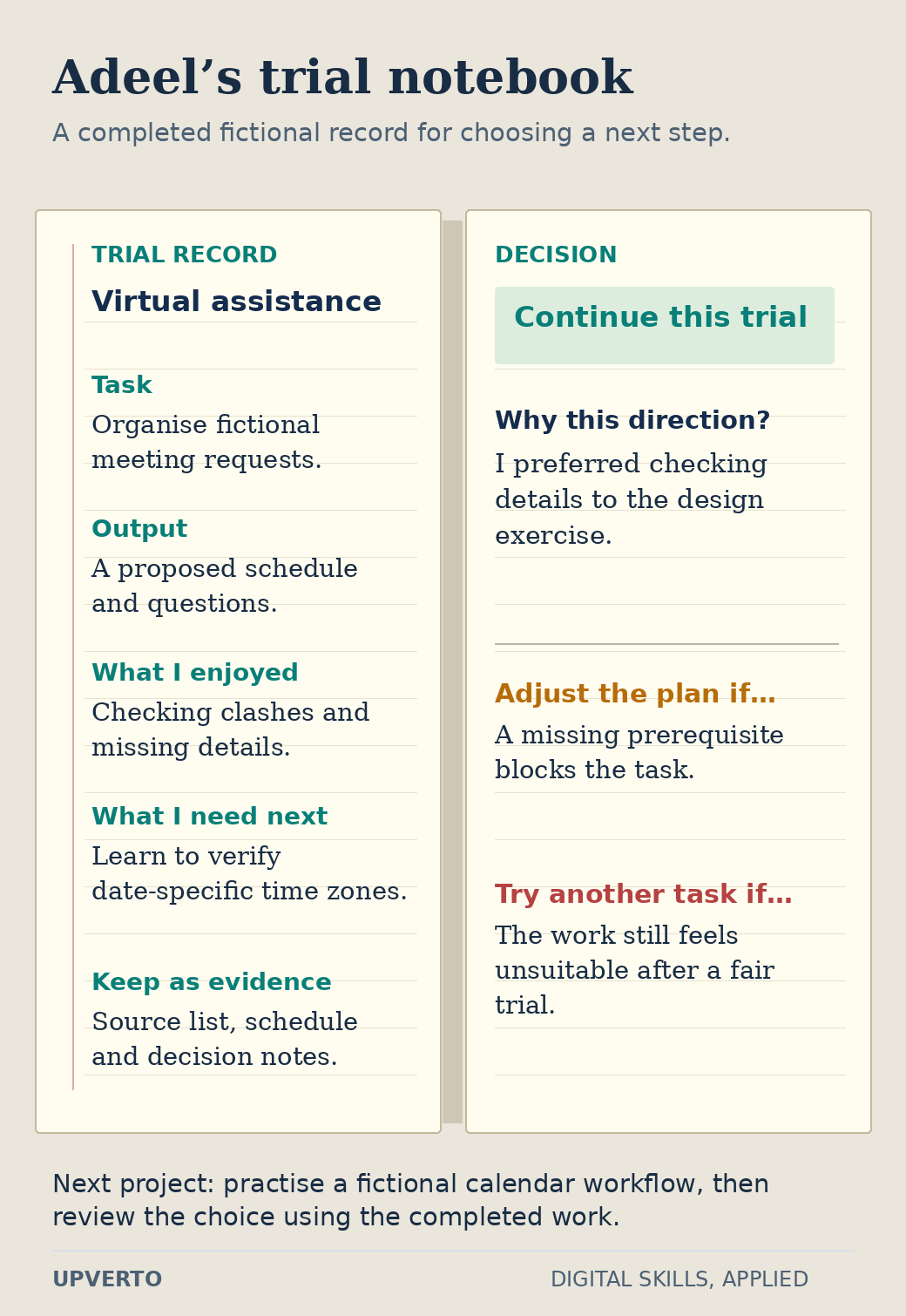
    An open fictional notebook records Adeel’s scheduling task, output, enjoyment of checking details, missing time-zone knowledge and decision to continue, with conditions for adjusting or trying another direction.
    Use a trial notebook to choose a next step — A completed record makes the decision traceable to the work Adeel tried and the next gap he needs to address. Use the enlarged view, then swipe or use arrow keys to inspect details. View full-size infographic.
    Read the text version: Use a trial notebook to choose a next step

    This is a fictional extension of the article’s Adeel example.

    Trial
    Virtual assistance: organise invented meeting requests.
    Output
    A proposed schedule and questions.
    Observation
    Adeel enjoyed checking clashes and missing details, and preferred this work to the design exercise.
    Learning gap
    He needs to verify time zones for the particular meeting date.
    Evidence to keep
    The source list, schedule and decision notes.
    Decision
    Continue by practising a fictional calendar workflow, then review the choice using the completed project.

    Adjust the learning plan when a missing prerequisite blocks the work. Try another direction when a fair trial shows that the task itself is unsuitable. The record is a starting decision, not an earnings prediction.

    Use a decision worksheet

    QuestionEvidence to write down
    What did I try?The actual task and the output I produced.
    What felt engaging?A specific activity, such as organising, writing, investigating, or revising.
    What foundations are missing?The prerequisite lessons or practice I need.
    Can I access the workflow?Device, software, connectivity, accessibility, and file-handling needs.
    What does a buyer need?A specific request or problem, with its source and date.
    What will I build next?One slightly harder project with clear acceptance checks.
    When will I review the choice?A project milestone at which I will compare progress with my expectations.

    Teaching example: Adeel enjoys organising information and has experience maintaining a study timetable. After trying a design exercise and an operations task, he prefers checking schedules and writing procedures. He chooses to investigate virtual assistance and practises a fictional calendar workflow. This is a reasoned starting choice; it does not predict his income or prevent him from learning another skill later.

    Questions that can make choosing harder

    Which skill is easiest?

    That depends on the task and your starting knowledge. A simple introductory exercise may be accessible while professional delivery in the same field requires substantial judgement. Compare a defined task, its prerequisites, and its consequences instead of relying on one universal difficulty label.

    Should I choose a skill because AI can do part of it?

    Investigate what remains your responsibility: understanding the request, checking correctness, choosing an appropriate result, protecting information, and delivering useful work. A tool can assist a task without making every output suitable for a client.

    What if I choose and then change my mind?

    Review the choice after completing a small project. Identify whether the problem is missing foundations, an unsuitable learning resource, an equipment constraint, or genuine dislike of the work. Change direction for a clear reason and keep transferable skills such as research and communication.

    Should I choose a skill only because it appears popular?

    Popularity is a starting point for investigation. Examine the tasks people actually request, the required experience and the evidence you would need to provide. Then compare those requirements with your interests and constraints. An attractive job title is not enough to choose a learning path.

    How can I test a skill before committing to it?

    Choose a small task that resembles real work, use an introductory resource and finish a reviewable output. Record what you enjoyed, what was difficult and which prerequisites were missing. Compare a few finished trials rather than only watching introductory videos.

    When should I add a complementary skill?

    Add it when a project reveals a clear gap. For example, basic layout knowledge may improve a website project, while clearer writing may improve a report. Keep the first service or project manageable so that adding skills does not prevent you from finishing useful work.

    Choose a project to learn through

    Pick one family, complete a trial, and write down the evidence from your worksheet. Then build a practical learning plan. Once you can perform a meaningful task, choose a portfolio project and use the readiness checklist before accepting paid responsibility.

  • Web Development Skills to Learn Before Offering Client Services

    Web Development Skills to Learn Before Offering Client Services

    A web-development service is a promise about behaviour: a visitor can find information, submit a request, or complete another agreed task on a working website. Learning the syntax is part of that promise. You also need to understand what happens when the input is missing, the screen is narrow, a request fails, or the owner needs a change. Build your learning path around these responsibilities before offering a complete application.

    In this guide

    If you are still comparing directions, start with which digital skill should I learn. This guide follows one fictional community-library catalogue from a simple page to a small application. Each stage produces evidence you can inspect; none sets a deadline for becoming a full-stack developer.

    Start with a page you can explain

    Be comfortable creating folders, recognising file extensions, installing tools from official sources and recovering an earlier file. The preparation guide on computer basics for digital skills covers that groundwork. Keep a practice folder with a short README, your source files and a record of checks. Separate it from client data and personal documents.

    Learn HTML as the structure of the page. A heading identifies a section; a button performs an action; a link leads somewhere. CSS controls presentation, spacing and adaptation to different screens. JavaScript handles interaction and changing state. Starting with these distinctions helps you diagnose whether a problem belongs to content, layout or behaviour.

    MDN’s HTML accessibility guidance explains why meaningful elements, associated labels and useful link text matter. Apply that guidance to your own page rather than treating accessibility as a final decoration. Try the page with only a keyboard, check that focus is visible, and read its headings in order. These are useful checks, although they do not constitute a complete accessibility audit.

    Use a project ladder with separate completion tests

    The fictional library has three sample books. A visitor should see the title, author and availability, then filter the list by a word in the title. The sample has no personal records, reservations, accounts or payments. Those exclusions keep the first project inspectable.

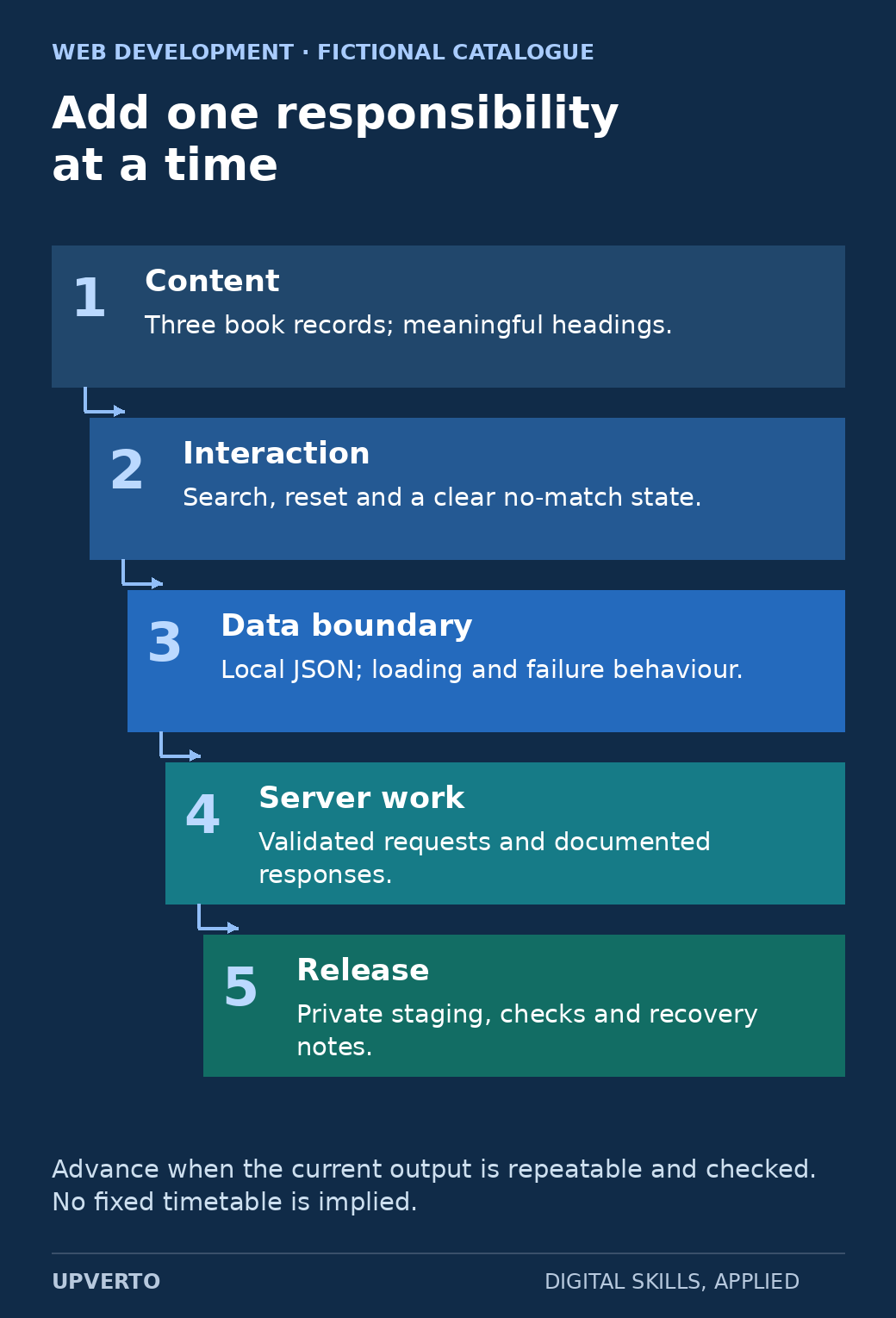
    Five ascending steps add static content, interaction, a data boundary, server work and a private release, each with a distinct completion responsibility.
    A catalogue project ladder — Use the ladder to add one inspectable responsibility to a fictional catalogue at a time. Use the enlarged view, then swipe or use arrow keys to inspect details. View full-size infographic.
    Read the text version: A catalogue project ladder
    1. Content: three book records with meaningful headings.
    2. Interaction: search, reset and a clear no-match state.
    3. Data boundary: a local JSON source with loading and failure behaviour.
    4. Server work: validated requests and documented responses.
    5. Release: private staging, actual checks and recovery notes.

    Advance based on repeatable evidence, not a fixed completion timetable.

    StageBuildEvidence before advancing
    1. Static contentA catalogue page containing three fictional book recordsSemantic headings, readable narrow-screen layout and working navigation
    2. InteractionA labelled search field and a reset actionKnown query, no match, empty query and keyboard checks
    3. Data boundaryRead the same records from a local JSON fileLoading, successful response and unavailable-file states
    4. Server workA separate practice service with validated requestsDocumented inputs, response shapes and rejected invalid requests
    5. ReleaseA private staging deployment and handover notesConfiguration, actual deployed checks and a tested recovery procedure

    Do not add a database merely to make the project sound advanced. First ask what information must persist, who may change it, and which relationships need to be represented. A database adds responsibilities for validation, access, backups and migrations. A login adds identity and session responsibilities. A payment adds a further boundary. Each deserves a separate learning and review step.

    Worked example: inspect the search rule

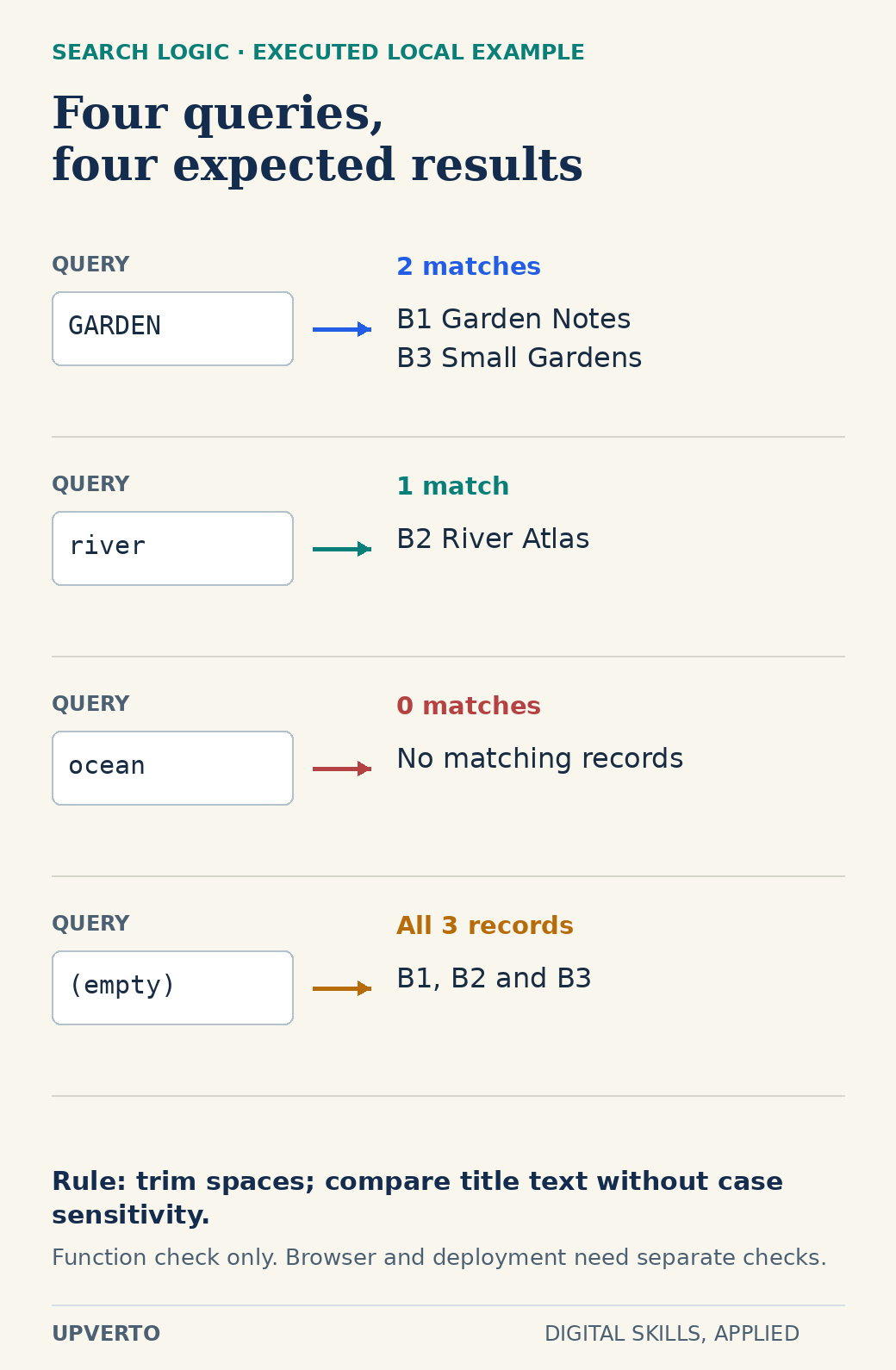
    The following invented data is enough to reason about a filter. Record B1 is Garden Notes, B2 is River Atlas, and B3 is Small Gardens. The rule trims surrounding spaces and compares titles without case sensitivity. An empty query returns all three records; a missing match returns an empty list. The interface must translate that empty list into an understandable message.

    const books = [
      { id: "B1", title: "Garden Notes" },
      { id: "B2", title: "River Atlas" },
      { id: "B3", title: "Small Gardens" }
    ];
    function searchBooks(query) {
      const term = query.trim().toLowerCase();
      return books.filter(book =>
        book.title.toLowerCase().includes(term));
    }

    A local check of the sample function verifies that GARDEN returns B1 and B3, river returns B2, ocean returns no records, and an empty string returns all three. This checks the function only. It does not prove that a browser interface announces updates, handles focus correctly, or works on a deployed server. Keep those claims separate.

    Four query specimens connect GARDEN to B1 and B3, spaced river to B2, ocean to no records, and an empty query to all three records.
    Inspect the catalogue search cases — These four locally executed cases check the filter function, not the browser interface or deployment. Use the enlarged view, then swipe or use arrow keys to inspect details. View full-size infographic.
    Read the text version: Inspect the catalogue search cases

    The search rule trims surrounding spaces and compares lowercase title text.

    QueryExpected and locally checked result
    GARDENB1 Garden Notes and B3 Small Gardens
    river B2 River Atlas
    oceanNo records
    Empty stringAll three records

    The JavaScript function check does not verify keyboard feedback, layout or deployment.

    For the user-facing version, show “2 books found” after the garden search and “No books match this title. Try another word” after the ocean search. Preserve the typed query so the visitor can edit it. Decide whether filtering occurs as they type or after submission; explain that decision in the README. A loading message becomes relevant only when the interface actually waits for data.

    Copy this practical project brief

    Purpose: help a visitor locate a title in a small fictional catalogue. Inputs: three invented book records and a written filtering rule. Deliverables: source files, a working practice page, a test log and setup instructions. Boundary: no real library integration, visitor accounts or reservation service.

    • Write the expected results for four searches before implementing the filter.
    • Check the label, submit or reset control, keyboard path and visible focus.
    • Test long titles and a narrow viewport; record any wrapping or overflow problem.
    • If you load JSON, simulate a missing file and display an appropriate failure message.
    • Give another person the setup instructions and record where they need clarification.
    • Save a version before changing the data format, then practise returning to it.

    Use a log with columns for condition, expected behaviour, observed behaviour, environment, date and next action. A screenshot is useful evidence of appearance. It cannot demonstrate a filter result, an error path or a restore by itself. Link each claim in your project notes to the relevant evidence.

    Translate capability into a limited service

    A beginner who can reliably build and check static layouts might prepare a specified informational page from approved copy and design. A developer who can implement and test a bounded interaction might add a filter to an existing interface after reviewing its environment. Neither description automatically includes server administration, security review, payment processing or ongoing support.

    For each possible service, name the required inputs, the exact output, the checks you perform, the changes included and the handover. Ask who controls hosting and deployment, who supplies content, and how a change will be approved. If a prospective client needs something outside your demonstrated ability, narrow the scope or involve an appropriately experienced person.

    Use the ready for paid client work checklist against the actual proposed brief. Being able to follow a tutorial once is different from diagnosing a variation independently. Rebuild a feature without copying the solution, explain the tradeoffs and handle a deliberately introduced error. These exercises reveal a more useful next learning step than collecting another framework name.

    Choose the next project deliberately

    MDN’s accessibility learning module is a primary reference for the interface work. Pair reference reading with small changes you can inspect. Keep a question list rather than opening several unrelated courses at once. After the catalogue works, use choose portfolio projects for freelance services to choose a second project that adds one meaningful responsibility, such as an editable data model or a documented API boundary.

    A course may help with sequence and feedback, but compare its current syllabus with your gap. This guide does not assume that a course covers every deployment, database or security responsibility. Your portfolio should describe what you actually built and checked, including remaining limitations.

    Frequently asked questions

    Do I need to learn a framework before offering any web service?

    A framework is not the first acceptance criterion. Learn the underlying HTML, CSS and JavaScript needed for the work, then use a framework when the project or team requires it. A narrowly scoped static-page service can have different prerequisites from maintaining a complex application.

    When should I add a backend to the catalogue project?

    Add it when you have a concrete requirement that a static file cannot satisfy, such as authorised editing or shared persistent records. First document inputs, permissions and failure behaviour. Do not add real accounts or personal data just to make the sample appear more advanced.

    Does passing the search-function check prove the website works?

    No. It verifies four specified logic cases. The actual interface still needs checks for keyboard use, visible feedback, layout and integration. A deployed version also needs its own configuration and recovery checks.

    Can I use AI-generated code in my practice project?

    You can inspect it as a draft, but you remain responsible for understanding, testing and maintaining it. Do not submit secrets or client data without permission. Keep the parts you can explain and verify, and record any external code and its licence.

    What should I show if the project has no real users?

    Label it as a fictional practice project. Show the brief, source, normal and error-state checks, design decisions and limitations. Report observed test behaviour without inventing visitor satisfaction, conversions or commercial results.

    How do I know which service is small enough to begin with?

    Write its exact inputs and completion checks, then compare those with work you can repeat independently. If you cannot explain a failure or hand over the result, reduce the responsibility and practise that gap before promising delivery.