Category: Learn and practise

  • How to Know Whether You Are Ready for Paid Client Work

    How to Know Whether You Are Ready for Paid Client Work

    You are ready to consider a particular paid task when you can complete it, check it, handle likely problems, explain your decisions, and deliver within a clear scope. Readiness belongs to a defined task. It is not a permanent label attached to you or your entire skill.

    You might be ready to prepare a small set of graphics from supplied text while still learning brand strategy. You might confidently organise a spreadsheet but be unprepared to redesign an organisation’s reporting system. This guide helps you examine those boundaries before accepting responsibility.

    In this guide

    First, define the task you want to offer

    Write the client’s input, your deliverable, the limits, and the checks. “Manage social media” is too broad to assess. “Prepare six draft posts from an approved content plan and supplied assets, for client approval before publication” gives you a more concrete starting point.

    Use the service-package worksheet if the boundaries are unclear. Then assess your ability against that exact task. A course result or attractive profile is supporting information; neither replaces evidence that you can do this work.
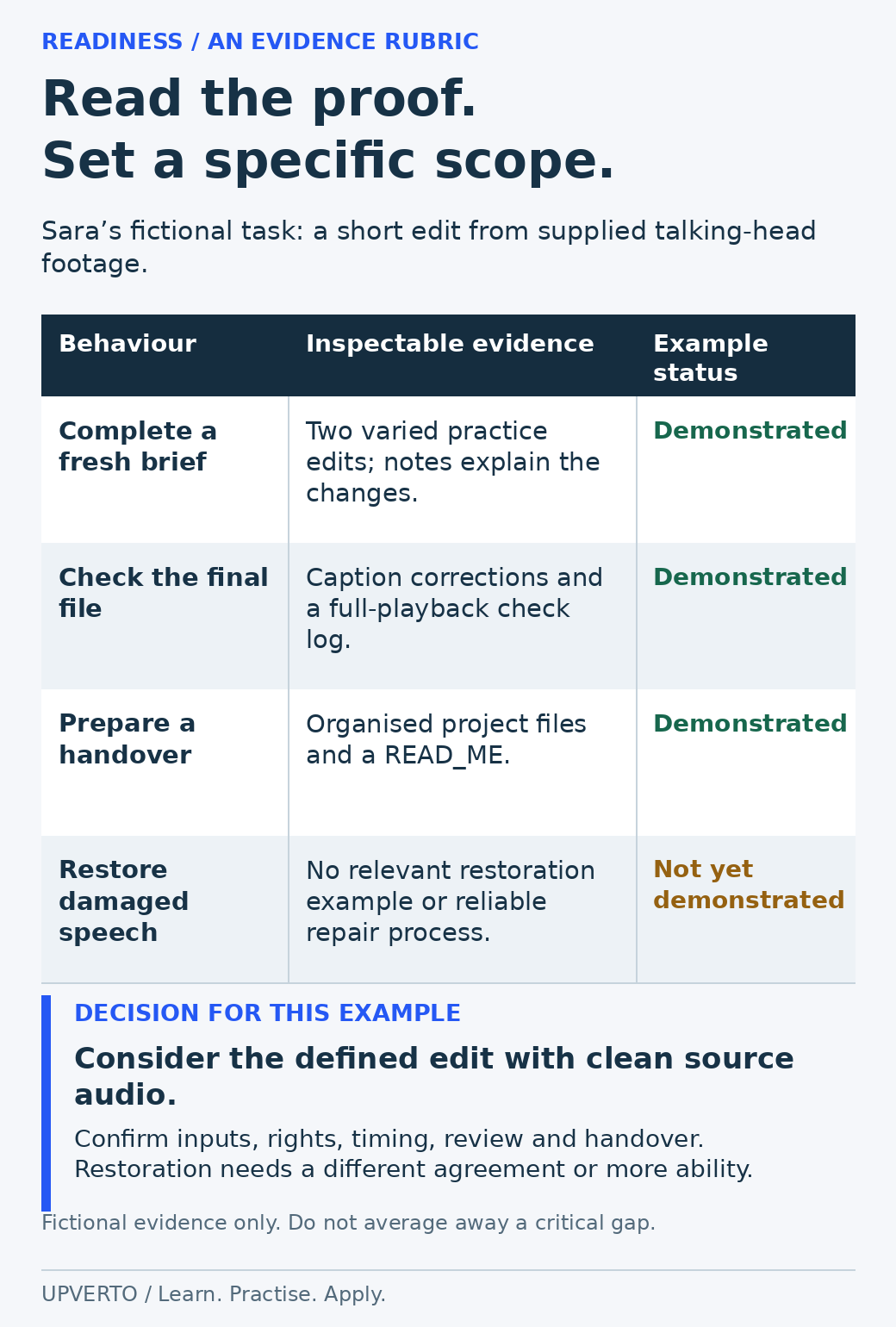
    A fictional rubric matches Sara’s editing behaviours to example artefacts. Editing, caption checks and handover are demonstrated in the scenario; advanced restoration is not.
    Assess readiness using inspectable evidence — The rubric illustrates a narrow readiness decision. Use artefacts from your own work; there is no readiness percentage or certification. Use the enlarged view, then swipe or use arrow keys to inspect details. View full-size infographic.
    Read the text version: Assess readiness using inspectable evidence

    This is a fictional evidence rubric for Sara’s narrowly defined talking-head editing task.

    BehaviourIllustrative evidenceExample status
    Complete a fresh briefTwo varied practice edits and notes explaining changesDemonstrated in the scenario
    Check the final fileCaption corrections and a full-playback check logDemonstrated in the scenario
    Prepare a handoverOrganised project files and a READ_MEDemonstrated in the scenario
    Restore damaged speechNo relevant restoration example or reliable repair processNot yet demonstrated

    The resulting scope is a defined edit with suitable clean source audio, subject to confirming inputs, rights, timing, review and handover. An advanced restoration request requires a separate readiness decision. In your own rubric, use demonstrated, needs support or not yet demonstrated, and supply real evidence. This is not a score or a certification.

    Practical summary
    Three possible decisions
    • Ready for this scope: repeatable evidence supports the task and its checks.
    • Ready with a narrower scope: remove or supervise the parts you cannot yet handle.
    • More practice needed: a material gap prevents reliable delivery.

    Use a task-based readiness rubric

    For each area, write an example from your own practice. Mark it demonstrated, needs support, or not yet demonstrated. This is a planning worksheet, not a certification or a statistically validated score.

    AreaEvidence to look forA gap that needs attention
    Understand the briefYou can restate the purpose, audience, inputs, outputs, and unanswered questions.You start by guessing missing requirements.
    Execute the taskYou complete a fresh variation using appropriate references.You can only reproduce the instructor’s exact example.
    Check qualityYou have explicit checks and inspect the exported or delivered result.You assume that saving or exporting means the work is correct.
    TroubleshootYou can diagnose likely problems, preserve a backup, and recover safely.One missing file or unexpected input stops you completely.
    Estimate and organiseYour practice record includes actual time, dependencies, and review work.Your estimate ignores preparation, revisions, or handover.
    CommunicateYou ask clear questions and explain progress or limitations.You hide uncertainty until a deadline is missed.
    Handle access and rightsYou know what permission is needed for files, systems, and assets.You use materials or accounts without checking authority.
    Deliver and hand overThe recipient can locate, open, and understand the agreed files.The result depends on undocumented settings only you understand.

    Do not average away a critical gap. Strong visual design does not compensate for using an unlicensed image. A working test website does not prove you can safely change a live payment system. The consequence of failure matters when choosing an appropriate first service.

    Run a realistic practice assignment

    Choose a fresh brief and complete it from start to handover. Work with a practice copy and permitted assets. Record the actual time spent on understanding, preparation, production, checks, revision, and packaging.

    Introduce one reasonable change after your first version. For a graphic, change the supplied event time. For a video, revise a caption and supply a second export size. For an administrative task, add a conflicting request and explain how you would resolve it. The purpose is to test your process, not create an artificially difficult examination.

    Compare the result with the brief. Where possible, ask someone suitable to review the work or perform a defined use task. Record the limits of that review. A friend checking whether a file opens has not assessed every technical or professional requirement.

    Worked example: ready for one edit, not a whole channel

    Fictional scenario: Sara can edit a supplied talking-head recording into a short video, correct captions, check the export, and organise the project files. She has completed two varied practice briefs and can explain the changes she made.

    She has not learned filming, complex animation, channel strategy, or performance analysis. Her readiness decision is therefore narrow: she can consider a clearly defined editing task within the conditions she has practised. She should not describe herself as able to run every part of a client’s video operation.

    If a prospective project needs advanced sound restoration she cannot reliably perform, she can ask whether clean source audio is available, exclude that work, or decline the assignment. A clear limit is more useful than an unsupported promise.
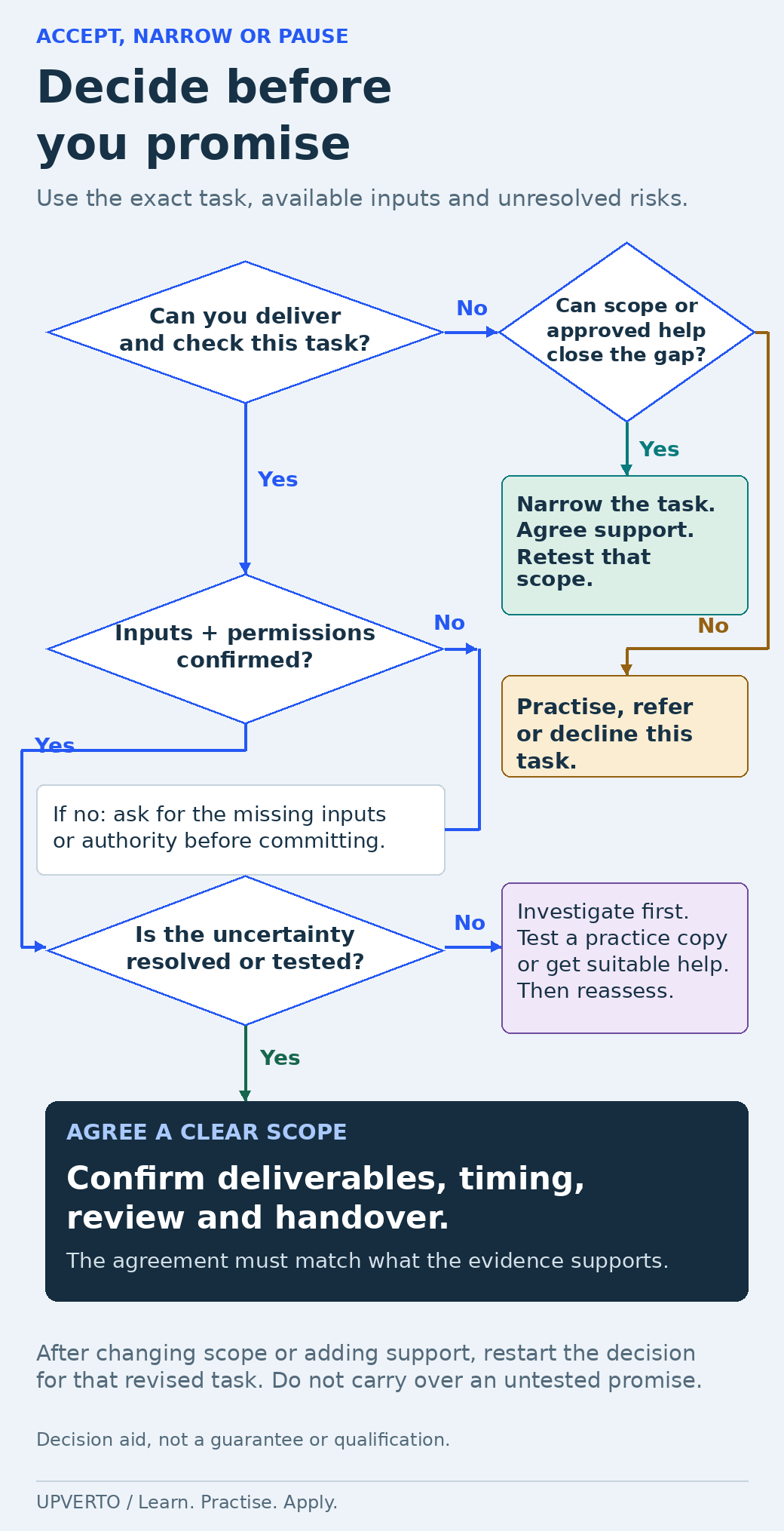
    A branching decision tree checks delivery ability, inputs and permissions, and unresolved uncertainty. It routes gaps to narrower scope, approved support, clarification, testing, practice, referral or decline.
    Decide whether to accept, narrow or pause — Follow the branches for a specific request. Reassess whenever the scope or supporting arrangements change. Use the enlarged view, then swipe or use arrow keys to inspect details. View full-size infographic.
    Read the text version: Decide whether to accept, narrow or pause
    1. Can you deliver and check the exact task? If not, assess whether a narrower scope or suitable authorised support can close the gap. If it can, agree that change, test the revised task and restart the decision. If it cannot, practise further, refer or decline.
    2. Are the necessary inputs and permissions confirmed? If not, ask for the missing materials, decisions or authority before committing.
    3. Have important uncertainties been resolved or tested? If not, investigate, use an appropriate practice copy or obtain suitable help, then reassess.
    4. If the conditions are supported: agree deliverables, timing, review, checks and handover within that scope.

    This decision aid does not guarantee readiness. Any change of scope or support requires a fresh assessment of the revised task.

    Reduce uncertainty before you accept

    When a gap appears, choose a practical response. Learn and test the missing skill, make the service smaller, obtain appropriate supervision, or refer the work to someone qualified. Be explicit about any supervision or collaboration that affects confidentiality, responsibility, or delivery.

    For a first project, favour a defined output with visible checks and a recoverable workflow. That does not mean the work is automatically safe or simple. It means you can explain the responsibility you are accepting and the conditions needed to fulfil it.

    The project-delivery guide shows how to carry this clarity into a brief, review process, and handover. The portfolio guide explains how to present evidence honestly.

    Common readiness questions

    Do I need to know everything in my field?

    No. You need the ability and judgement required for the scope you accept, including its likely problems and checks. Recognise when a request crosses that boundary.

    Can I use documentation or AI while working?

    Using suitable references is normal. You remain responsible for checking the work, following permissions, and meeting the brief. If you cannot verify an AI-produced answer or output, that uncertainty belongs in your readiness decision.

    What if I feel nervous despite good evidence?

    Separate confidence from demonstrated capability. Review the specific evidence and unresolved risks. A small, clear scope can make the decision more concrete, but nervousness alone does not prove either readiness or unreadiness.

    Does finishing a course mean I am ready for client work?

    A course can support learning, but readiness depends on the task you plan to accept. Complete a realistic assignment, inspect the final deliverable and explain your decisions. Check whether you can handle likely problems, communicate clearly and recognise work that exceeds your ability.

    Should my first paid project be small?

    A clear, limited scope can make responsibilities and checks easier to understand. Small does not automatically mean low risk, so still review the systems, information and consequences involved. Accept a task whose complete workflow you can support, including review and handover.

    What if I can complete most of a project but not one important part?

    Treat that gap as part of the decision before accepting the work. You may need more practice, a narrower scope or qualified help that the client understands and authorises. Do not promise the complete result while assuming you will somehow solve a critical unknown later.

    Write your readiness decision

    Complete this sentence: “I can offer [defined task] when [required inputs and conditions] are available. My evidence is [practice output and checks]. I still need to learn [remaining gap].” Return to the learning cycle for the gap, or move to defining your service if the evidence supports that next step.

  • Which Complementary Skill Should You Learn Next?

    Which Complementary Skill Should You Learn Next?

    A useful complementary skill solves a specific problem in work you can already do. It might help you inspect an export, understand a client’s input or handle a repeated dependency. It does not need to be the next popular tool.

    Start with evidence from your primary skill. If you cannot yet complete its basic task, another roadmap may hide the gap instead of resolving it. The broader guide to how to learn a digital skill explains the learning cycle. Here, the decision is narrower: which additional capability is worth learning next, and how will you tell?

    In this guide
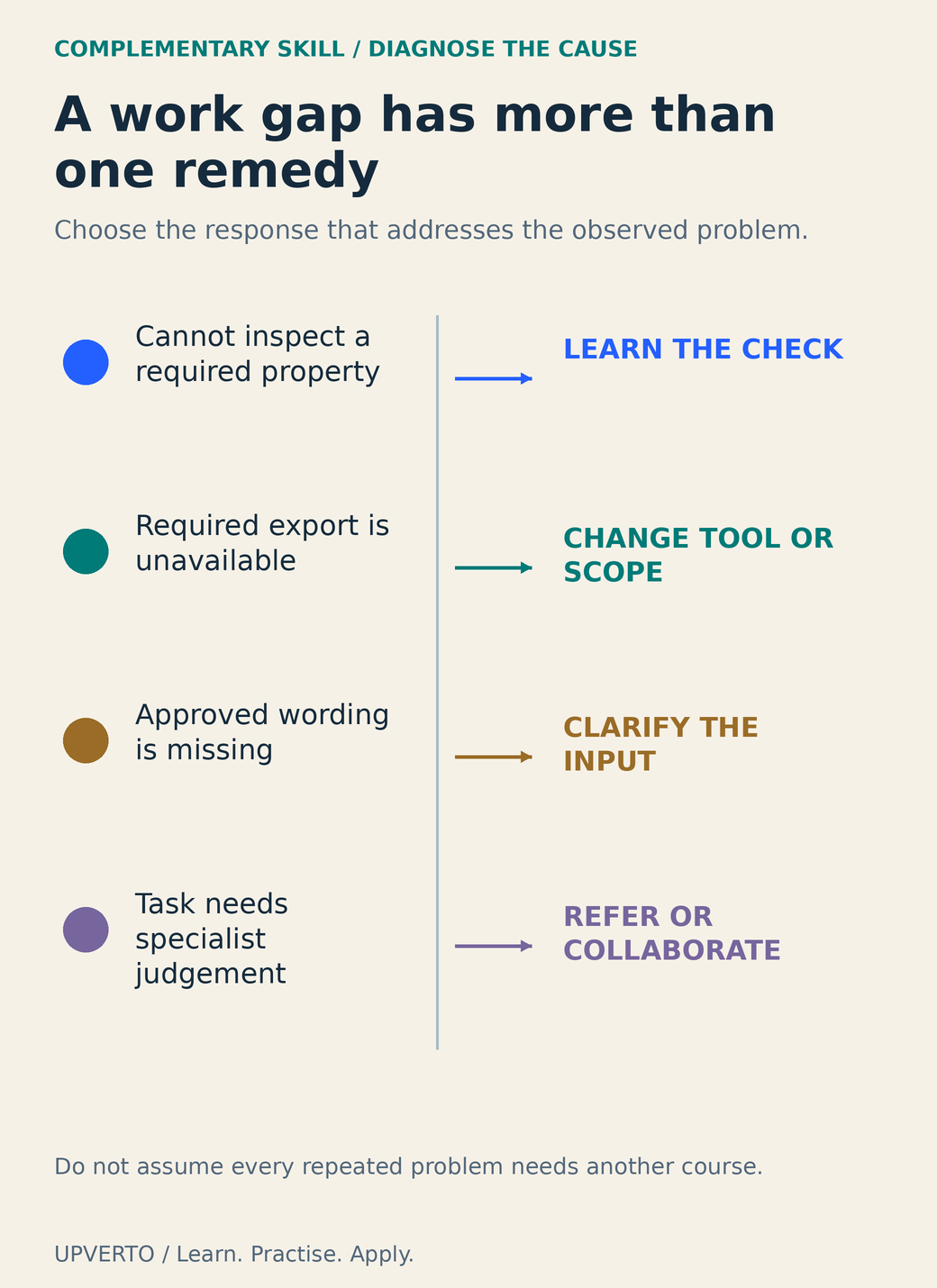
    Four cause-and-response tracks distinguish learning a check, changing a tool or scope, clarifying an input, and involving a specialist.
    Match an observed gap to a suitable response – Four cause-and-response tracks distinguish learning a check, changing a tool or scope, clarifying an input, and involving a specialist. Use the enlarged view, then swipe or use arrow keys to inspect details. View full-size infographic.
    Read the text version: Match an observed gap to a suitable response

    Choose a response from the observed cause. If you cannot inspect a required output property, learn the checking method. If the necessary export is unavailable, investigate another tool or revise the scope. If approved wording is missing, clarify the input and approval responsibility. If the work requires specialist judgement beyond your competence, refer or collaborate. These are illustrative mappings to investigate, not automatic rules. Another course is not the solution to every repeated problem.

    Establish a reliable primary task first

    Name an output you can produce, check and explain. “I can format a short information document from approved copy and inspect the exported PDF” is a useful starting point. “I know design, marketing and AI” does not reveal which work is reliable enough to extend.

    Review the ready for paid client work checklist for the primary task. A complementary skill is not a substitute for communication, estimation or recovery. If the main task repeatedly fails because files are disorganised, a new animation course may not be the relevant next step.

    Collect observations from practice or permitted real work. Record the point where you stopped, the help you needed and the consequence for the output. Keep facts separate from interpretations. “I could not confirm the PDF reading order” identifies an observed gap; “clients want me to become an accessibility expert” would require additional evidence.

    Distinguish a learning gap from other problems

    Observed problemPossible responseWhat to check first
    Repeatedly cannot inspect an important output propertyLearn the relevant checking method.Is the check within the service you want to offer?
    Client supplies ambiguous copyImprove briefing and approval questions.Is copywriting actually included or simply missing?
    Tool cannot export the required formatChange tool or delivery agreement.Is the limit technical, contractual or just unfamiliar?
    Specialist work is occasional and high consequenceRefer or collaborate with a qualified specialist.Can a short course genuinely support the responsibility?
    Too many unrelated tasks compete for timeNarrow the service or prioritise work.Would another skill increase the overload?

    Learning is one possible intervention. A checklist, clearer input requirement, different tool or professional referral may solve the problem more directly. Choose the response that fits the actual cause.

    Compare candidates by the task they unlock

    For each candidate, write the precise improvement it could enable. A video editor might learn basic audio inspection to identify an unusable recording before promising a clean edit. A document designer might learn accessible heading and reading-order checks. A website builder might learn version control to keep changes inspectable. These are examples of adjacent capabilities, not claims about market demand.

    Primary curricula can help you define the content of a gap. MDN’s accessibility curriculum treats accessible styling, interaction and assistive technology as connected capabilities in web work. It is a scope reference, not proof that completing one module qualifies someone to certify every website.

    Compare the learning effort, tool access, risk and frequency of use. Avoid a numerical score that looks scientific without a basis. A short written decision is often clearer: “Learn basic heading structure now because it affects every information page I build; defer advanced animation because the current service does not use it.” If you are still choosing your first field, return to which digital skill should I learn instead.

    Worked example: document layout plus reading-order checks

    Fictional learner: Leila can create a two-page information sheet. In a practice review, the document looks orderly, but she cannot explain how its headings and content will be read by assistive technology. She considers learning logo animation, advanced illustration or document structure and reading-order checks.

    Her current output is a document. The third option addresses the observed problem directly. She defines a small trial: create a document with proper heading styles, export it, inspect the structure using appropriate available tools and record any limitation she cannot resolve. Adobe’s PDF accessibility guidance provides a reference for tags and verification; it does not make visual inspection alone sufficient.

    The trial result is not a promised accessibility certification. It is a concrete set of files and notes showing what she could check. If the tool cannot expose the required structure, she identifies that limitation and seeks suitable help rather than claiming compliance from appearance.

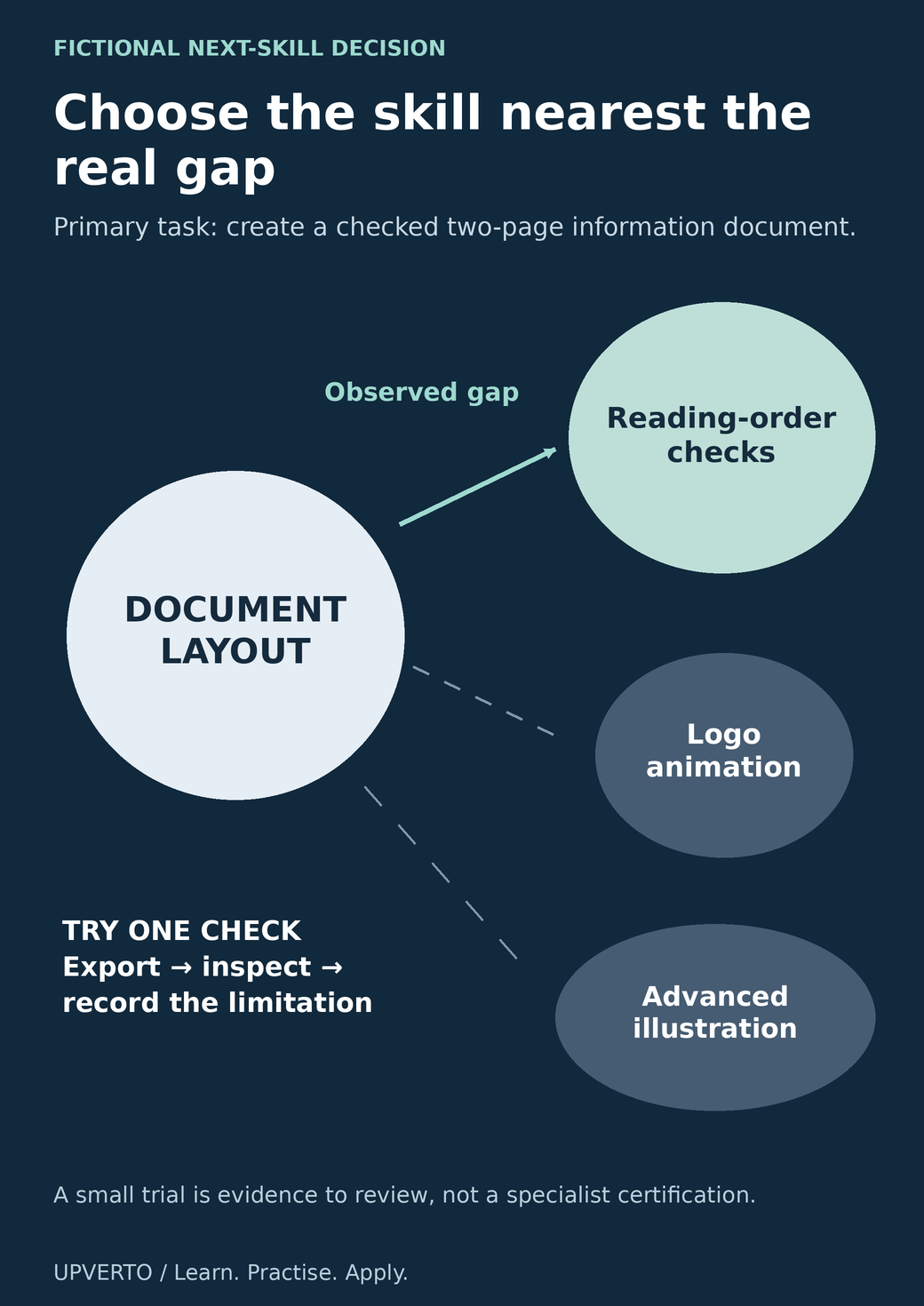
    A strong connection links document layout to reading-order checks, while logo animation and illustration remain deferred options outside the current gap.
    Select a complementary capability from the observed gap – A strong connection links document layout to reading-order checks, while logo animation and illustration remain deferred options outside the current gap. Use the enlarged view, then swipe or use arrow keys to inspect details. View full-size infographic.
    Read the text version: Select a complementary capability from the observed gap

    In the fictional example, the reliable primary task is two-page document layout. The observed gap is an inability to inspect reading order. Learning that check is connected directly to the task. Logo animation and advanced illustration may be future interests, but they do not address the current gap and are shown as deferred options. Run a small trial: export the document, inspect its structure and record unresolved limitations. The trial is evidence for the next learning decision, not a specialist certification.

    After the trial, she can decide whether to continue learning, change the format or collaborate with a specialist. Logo animation remains a possible future interest, but it is not the response to the current document gap.

    Use the gap-to-next-step worksheet

    FieldYour entry
    Reliable primary outputName the task and the evidence that it works.
    Observed gapDescribe a specific failure, dependency or unanswered question.
    Frequency and consequenceRecord when it occurred and what it affected; do not invent a percentage.
    AlternativesLearning, process change, different tool, narrower scope or referral
    Candidate capabilityState the operation or judgement you want to add.
    Trial outputChoose one file, check or demonstration you can inspect.
    Decision after trialContinue, defer, change approach or seek specialist support

    Set a review point for the trial. You need not commit to a full course catalogue before discovering whether the capability fits. Keep the original and revised work so the comparison shows the actual difference. Explain what remains outside your competence.

    When adding a capability changes the service, revise the package, proof and estimate accordingly. Do not quietly bundle extra responsibilities into an unchanged promise. The guide to grow a sustainable freelance business connects learning decisions to capacity, delivery and business review. A useful next skill should make that system clearer, not simply make the list of tools longer.

    Frequently asked questions

    How is a complementary skill different from choosing a new career?

    It supports a defined task you already perform or intend to perform reliably. A new career direction can be valid, but it may require a separate foundation and evidence. Name the work gap first so you know which decision you are making.

    Should I learn marketing after every creative skill?

    Only if a specific marketing task belongs in your intended work and you can define its responsibility. A designer does not automatically need to own campaign strategy, advertising or analytics. Client communication and clear service explanation may be the more immediate gap.

    What if the gap appears only once?

    Investigate its consequence and likely recurrence before investing heavily. A rare specialist task may be better referred or excluded. One occurrence can still justify learning when it exposes a fundamental check you need, but record the reason rather than assuming frequency.

    Can a short course qualify me to offer a specialist audit?

    Course completion alone does not establish that you can assess every relevant condition or support the conclusions. Use practice, appropriate references and review to understand your limits. Narrow the offer or collaborate when the work exceeds your demonstrated competence.

    How should I compare two possible next skills?

    Write the task each would improve, the observed evidence for that need, the learning and tool requirements and the consequences of getting it wrong. Choose a small trial for the stronger candidate. Avoid treating an invented weighted score as objective evidence.

    When should I update my portfolio after learning the new skill?

    When you have a checked example that demonstrates the new capability and can explain its limits. Show the specific improvement and your contribution. Do not add a broad expert label simply because you completed an introductory module.

    Sources and review notes

    Primary sources checked on 27 October 2026 (UTC). Check the current provider pages before relying on a changing feature, policy or price. Worked examples and worksheets are original teaching material; fictional examples are not evidence of client results.

  • Computer and Internet Basics to Learn Before a Digital Skill

    Computer and Internet Basics to Learn Before a Digital Skill

    Before a specialist tool becomes useful, you need to find your work, save it safely and send the right version to the right person. These computer and internet basics are part of design, editing, coding and administrative work alike.

    You do not need to become a system administrator first. Start with a small file-handling exercise, then add specialist skills around it. The guide to how to learn a digital skill explains the broader practice process. This guide focuses on the everyday operations that prevent a lesson or client task from getting stuck before the actual work begins.

    In this guide
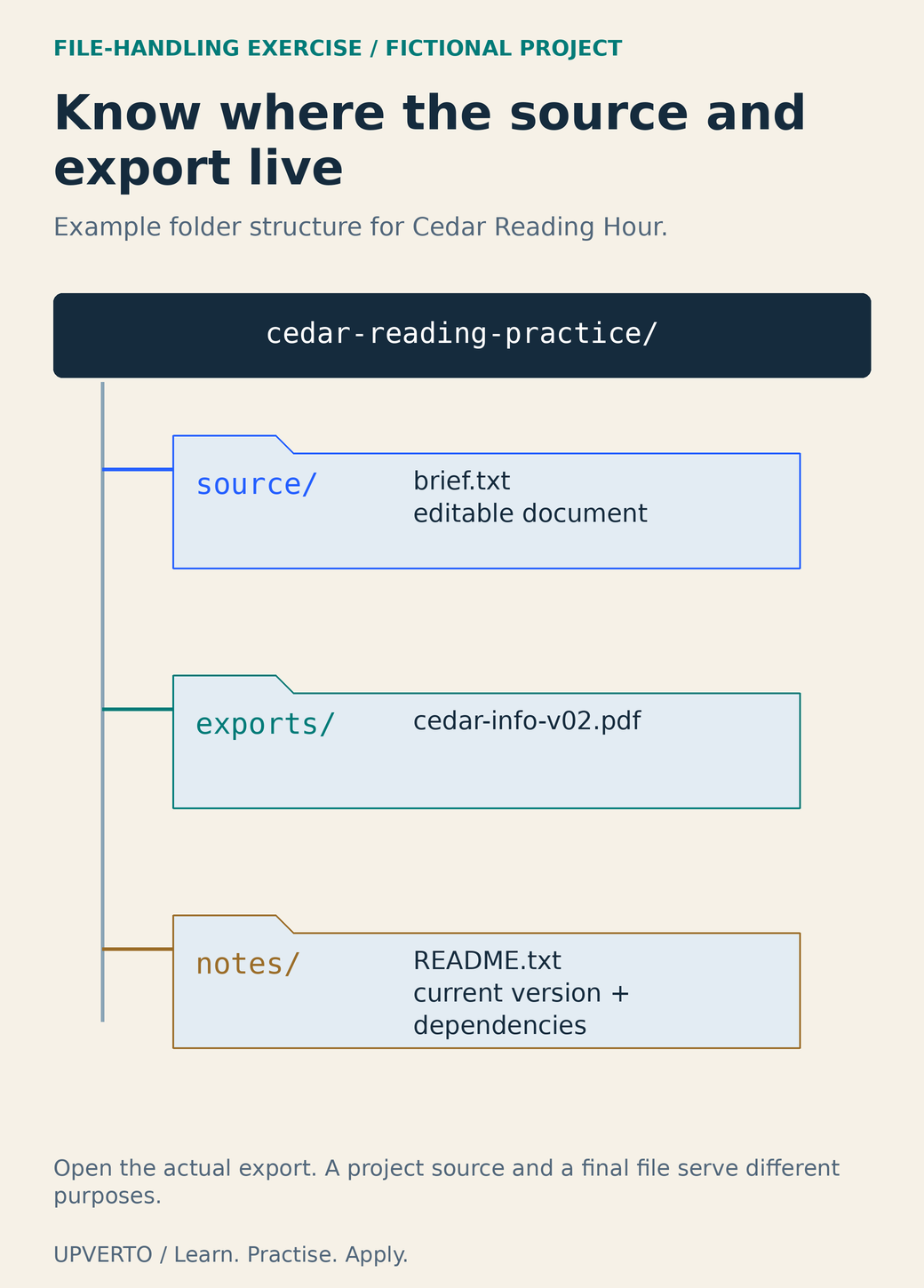
    An actual folder tree separates approved text and editable source, the current exported PDF, and a README identifying versions and dependencies.
    Inspect an example project folder — An actual folder tree separates approved text and editable source, the current exported PDF, and a README identifying versions and dependencies. Use the enlarged view, then swipe or use arrow keys to inspect details. View full-size infographic.
    Read the text version: Inspect an example project folder

    The fictional root folder is cedar-reading-practice. Its source folder holds brief.txt and the editable document. The exports folder holds the current cedar-info-v02.pdf. The notes folder holds README.txt, which identifies the current version and dependencies. This is an example convention, not a required universal structure. Open the actual export to inspect it. An editable source and a final export serve different purposes; keeping them in clearly named locations helps prevent sending the wrong file.

    Know what you saved and where it lives

    A filename identifies an item; a folder groups items; a path describes its location. A file extension such as .png, .pdf or .csv usually indicates a format, but renaming the extension does not convert the contents. Export or convert through a suitable application and reopen the result to check it.

    Keep editable sources distinct from final exports. A design project may depend on linked images or fonts. A video project file may describe edits without containing the original footage. A PDF may be a final document without the same editing structure as the source. Ask what the recipient needs before assuming that one file replaces the others.

    Use names that show the project, content and version, such as cedar-info-v02.pdf. Avoid a pile of files called final, final-new and final-really-new. A date can be useful when it is part of an agreed naming convention. Do not place passwords or sensitive personal details in filenames that will be widely shared.

    If the idea of an online service is still new, start online work with no experience will help you choose a task small enough to practise these basics with confidence.

    Use browsers and downloads deliberately

    A browser tab is not necessarily a saved copy of the page or document. Bookmarks preserve a location, not a backup of its contents. Before closing a tool, check whether your changes are saved, whether the file is local or in an account and how to reopen it later.

    Download software from the provider’s official site or an authorised store you have verified. Read the address rather than relying on an advertisement’s appearance. A familiar icon or an encrypted connection does not by itself establish that a site is the genuine provider. Avoid opening unexpected executables or enabling document features just because a message insists they are required.

    For a normal document download, choose a known destination, identify the file and open it with the expected application. If the contents or file type differ from what you expected, pause. Keep your browser and applications updated through their supported mechanisms, and follow any device rules set by the organisation that owns the computer.

    Protect access before you rely on it

    Use a separate, strong password for each account and a reputable password manager where appropriate. CISA’s password guidance explains this approach, and its multifactor-authentication guidance explains adding another verification factor. These measures reduce avoidable risk; they do not make every message, download or login request trustworthy.

    Keep recovery options current and store recovery codes securely. Never send someone a password or one-time login code as a way to “confirm” a work enquiry. If a collaborator needs access, use the service’s invitation or role system and grant only the access required for the task.

    Shared devices need extra care. Check whether files remain in Downloads, whether the browser saved credentials and whether you are still signed into another service. Follow the owner’s rules. Private client materials may be unsuitable for a shared session even if the application technically runs.

    Distinguish backup, synchronisation and sharing

    Synchronisation keeps locations aligned; changes and deletions can propagate. A backup is a recoverable copy appropriate to the situation. Check the provider’s version history or recovery options, but do not assume they meet every retention need. Practise restoring a harmless file before you depend on recovery during a deadline.

    Cloud placeholders can look like files without being available offline. Microsoft’s Files On-Demand guidance distinguishes online-only content from downloaded copies. Confirm the status of the actual file you need, especially before travel or unreliable connectivity.

    Sharing creates an access decision. Microsoft’s OneDrive sharing guidance explains recipient and editing settings; other services have their own controls. Choose the intended people and the least permissive role that supports the review. A review normally needs viewing or commenting, not ownership or unrestricted editing. Test the intended recipient’s access without making private material public.

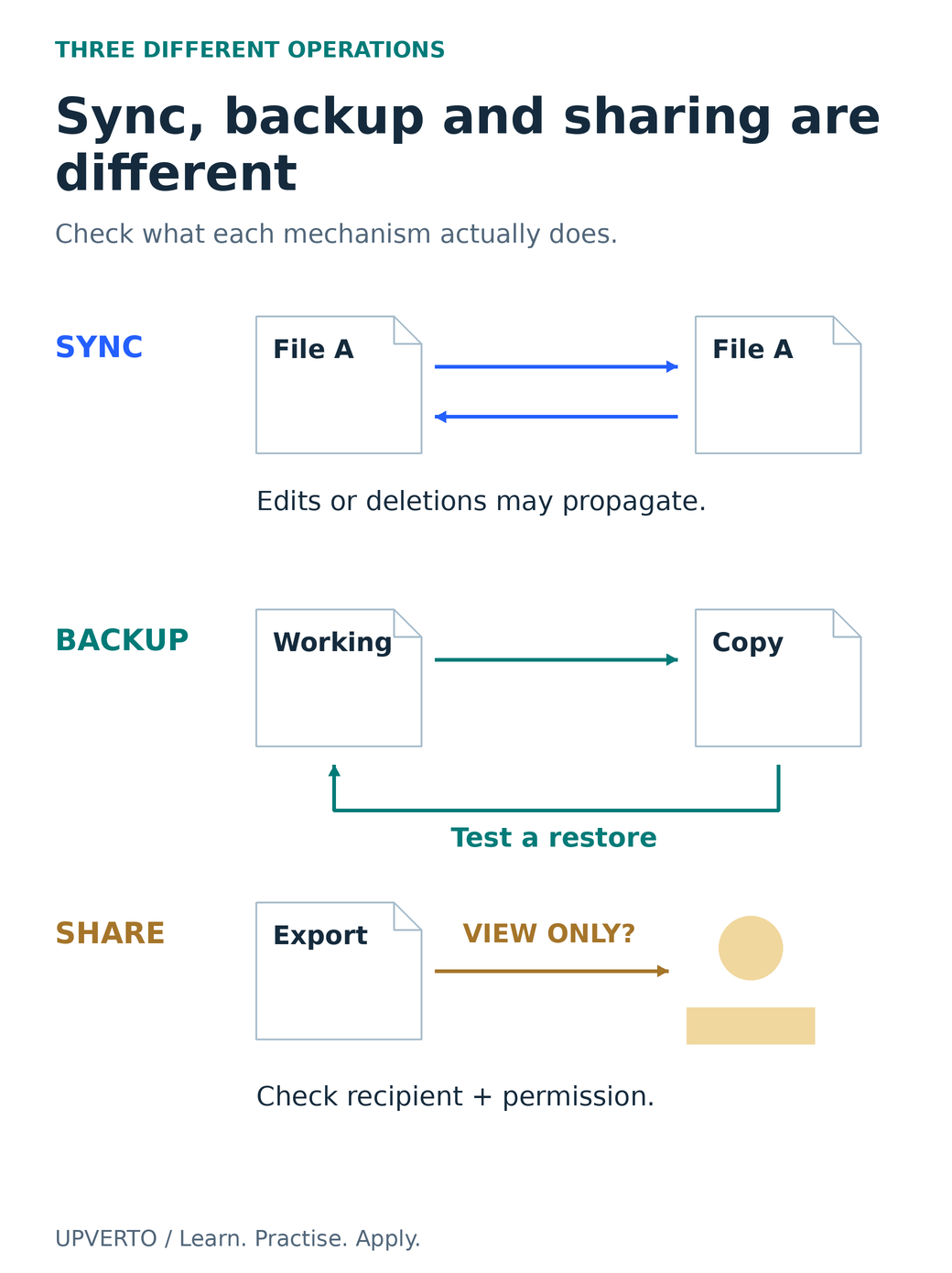
    Three mechanism diagrams show bidirectional synchronisation, a recoverable backup with a restore path, and a recipient-specific sharing permission.
    Distinguish synchronisation, backup and sharing — Three mechanism diagrams show bidirectional synchronisation, a recoverable backup with a restore path, and a recipient-specific sharing permission. Use the enlarged view, then swipe or use arrow keys to inspect details. View full-size infographic.
    Read the text version: Distinguish synchronisation, backup and sharing

    Synchronisation aligns locations; edits or deletions may propagate. Backup provides a recoverable copy appropriate to the situation; test restoration rather than assuming it works. Sharing grants access to a recipient; choose and verify the required view, comment or edit permission. These operations are different. A synchronised file is not automatically a sufficient backup, and a copied link is not evidence that access is limited to the intended person.

    Complete the Cedar handover exercise

    Fictional exercise: prepare a one-page information sheet for Cedar Reading Hour. Use only invented details: Saturday 11:00, Cedar Community Room and [email protected]. No real client data is needed.

    1. Create a cedar-reading-practice folder with source, exports and notes subfolders.
    2. Save the approved wording as source/brief.txt. Create the editable document in source using a format your application supports.
    3. Export exports/cedar-info-v01.pdf. Open the PDF outside the editor and compare every event detail with the brief.
    4. Write notes/README.txt identifying the final export, editable source, application and any dependencies.
    5. Copy the exercise to your backup location. Restore a harmless copy to a new temporary folder and confirm it opens.
    6. Prepare a view-only review link or a correctly named attachment. Check the intended recipient and file version before sending anything.
    7. Make an invented correction to the venue wording, save version two and update the README so there is one clearly identified current export.

    The exercise is complete when you can find, reopen, check and recover the files and explain the sharing permission. A neatly named folder without a readable export or tested recovery is incomplete. The structure is an example, not a universal file convention.

    Use a self-check before adding a specialist tool

    Can you demonstrate this?Evidence to keep
    Find the source and final exportA folder path and filenames you can reopen
    Tell a format from a misleading nameAn export opened in its intended application
    Recover a working copyA restored practice file, with the restore method noted
    Share the intended accessA checked recipient and view/comment/edit decision
    Resume after an interruptionA README identifying the current version and next action

    Repeat the operations that remain uncertain using harmless practice data. If your device or application prevents a required operation, consult learn digital skills phone or computer and test a supported setup. Once the basic workflow is reliable, practise skills beyond tutorials will help you use it for a new task rather than merely repeat a demonstration.

    Frequently asked questions

    Why is changing .jpg to .pdf not a conversion?

    The extension is part of the name; the file contents still follow their original format. Use an application’s export or conversion function, then open the resulting file in an appropriate viewer. Renaming can confuse recipients and does not establish that the format is correct.

    Is a cloud folder enough as a backup?

    It depends on the service and your recovery needs. Synchronised deletions or edits can affect multiple copies. Check version history, retention and restore options, and practise recovery with a harmless file. Identify what would remain accessible if the account or connection were unavailable.

    What should I include in a handover README?

    Name the current final files, explain the editable source and application, note essential dependencies and state any agreed limitations. Include clear opening or review instructions where needed. Do not put passwords, private credentials or unnecessary personal information in the file.

    Should reviewers receive editing access?

    Give the access required for the agreed review. Viewing or commenting may be enough. Editing lets a person change the shared source and can create version confusion. Use the provider’s actual permission controls and check the intended recipient rather than assuming the copied link is private.

    What if I cannot find a downloaded file?

    Check the browser’s download record and the destination chosen during download. Search by the expected name or type in the appropriate location. Before downloading again, establish which copy is current so you do not create several versions with unclear differences.

    Do I need command-line skills before learning design or editing?

    Not for every beginner task. You first need reliable file, account, application and sharing habits. Command-line or system-administration skills become relevant when the specific workflow requires them; they should not replace practising the actual output you want to produce.

    Sources and review notes

    Primary sources checked on 27 October 2026 (UTC). Check the current provider pages before relying on a changing feature, policy or price. Worked examples and worksheets are original teaching material; fictional examples are not evidence of client results.

  • How to Practise a Skill Without Following a Tutorial Step by Step

    How to Practise a Skill Without Following a Tutorial Step by Step

    To practise independently, give yourself a task whose answer is not already on the next screen. Keep the task small, change one meaningful constraint and attempt a solution before consulting the exact tutorial step.

    Independent practice still includes documentation, feedback and help. The aim is to understand what to do and why, including how to recognise a wrong result. The guide to how to learn a digital skill provides the wider learning process; this guide gives you concrete ways to move from a demonstration to your own decisions.

    In this guide
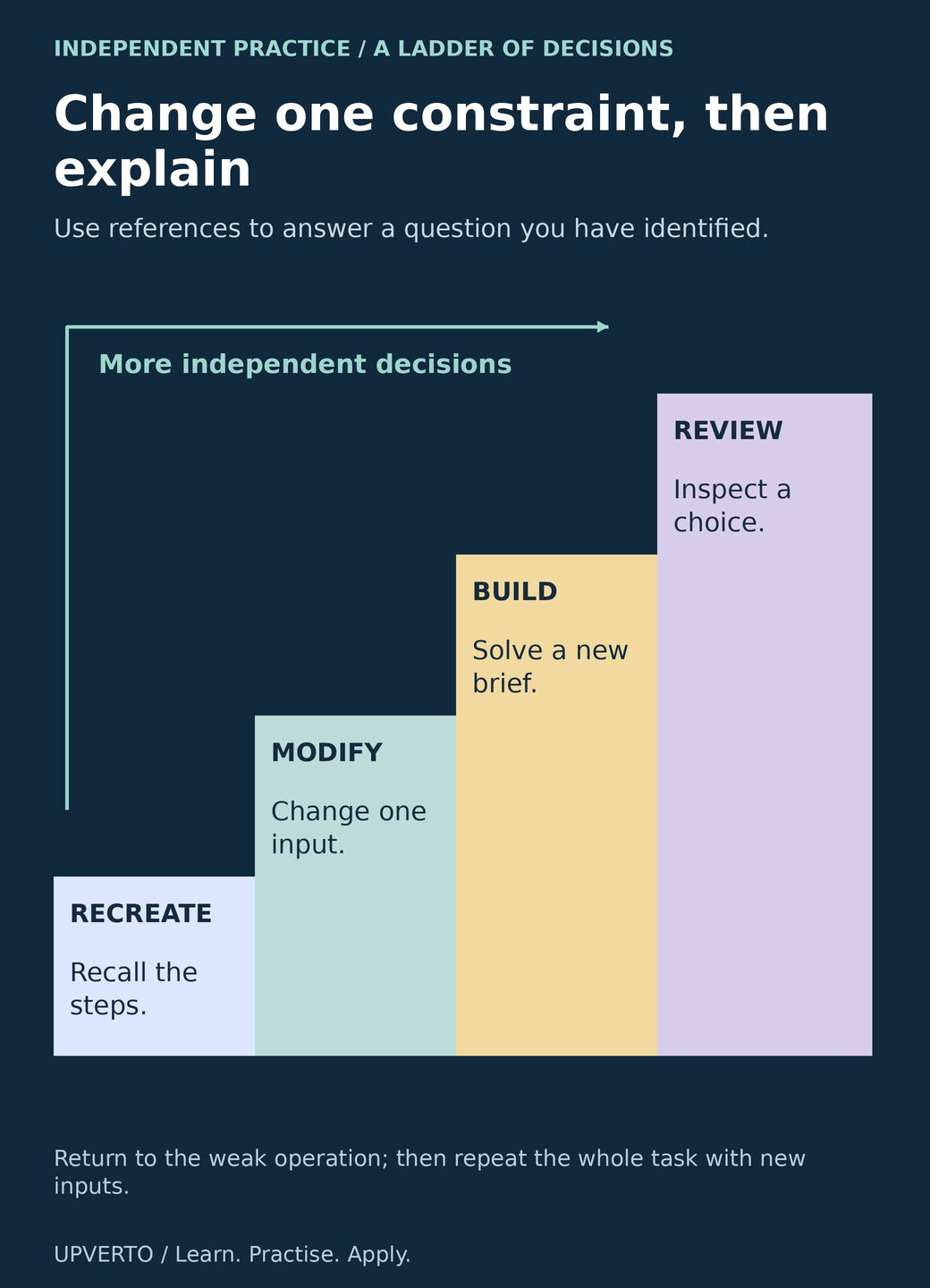
    A four-step staircase distinguishes reconstructing a known task, modifying an input, building a new brief and reviewing a decision.
    Climb from reconstruction to review – A four-step staircase distinguishes reconstructing a known task, modifying an input, building a new brief and reviewing a decision. Use the enlarged view, then swipe or use arrow keys to inspect details. View full-size infographic.
    Read the text version: Climb from reconstruction to review

    The practice ladder has four levels of independence: reconstruct a small known task by recalling its steps; modify one meaningful input or constraint; build a new brief using the core skill; review an actual choice and its result. Use references to answer identified questions. Return to a weak operation, practise it and then repeat the whole task with different inputs. The steps are not a fixed timetable and do not represent hours or a guarantee of paid readiness.

    Identify what the tutorial is doing for you

    A lesson often chooses the brief, supplies clean files, selects the tool, decides the order and explains the error before you encounter it. Completing those steps can build useful familiarity. It does not show which of those decisions you can make when the inputs change.

    After a guided exercise, close the video and write the task in your own words. List the required output, the main operations and the checks you would use. Mark the parts you cannot yet explain. Those gaps are more useful than a vague feeling that you need to watch everything again.

    There is research behind taking recall seriously. Karpicke and Roediger’s vocabulary-learning experiment found a delayed-recall benefit from repeated retrieval. It studied memory under particular conditions, not every creative or technical workflow. The ladder below is an original practice design: attempt, inspect, seek targeted help and try again with a changed task.

    Use the modify-build-review ladder

    1. Reconstruct: recreate a small known task without following each instruction. Use your notes after the attempt to identify missing steps.
    2. Modify: change one requirement that affects decisions, such as a longer headline, a missing value or a smaller screen.
    3. Build: solve a new brief with the same core skill and different inputs. Write acceptance checks before you begin.
    4. Review: compare the output with the brief, explain a choice and record a specific weakness.
    5. Repeat selectively: practise the weak operation in a second small task, then return to the whole workflow.

    These are levels of independence, not a fixed timetable. You may return to a demonstration when the tool itself is unfamiliar. Do so with a question: “How do I preserve heading structure in the export?” A targeted question helps you reconnect the reference to the work.

    Do not introduce every possible complication at once. If you change the software, audience, format and source quality together, it becomes difficult to identify what caused the problem. Change enough to require judgement while retaining a clear way to check the answer.

    Choose a meaningful change for your kind of work

    FamilyGuided taskIndependent changeCheck
    CreativeLay out a short event announcement.Use a much longer venue name and adapt a second format.All details remain accurate and readable; the layout is deliberately adapted.
    TechnicalBuild a simple page with a heading and link.Add a second section and make the page usable with a keyboard.Headings describe the structure; focus and links work.
    OperationsSort a clean list of fictional registrations.Add a duplicate, a blank required field and inconsistent date text.Exceptions are identified and recorded without inventing missing information.

    The changed constraint must relate to the skill. Recolouring a finished graphic may practise a control, but it does not necessarily test hierarchy. Copying a different code snippet may change the output without improving debugging. Ask which decision the new condition forces you to make.

    For a web exercise, W3C’s page-structure tutorial gives a primary reference for semantic organisation. Use such references to define the check. A visually large line of text is not evidence that it is marked up as the correct heading.

    Worked example: the longer venue name

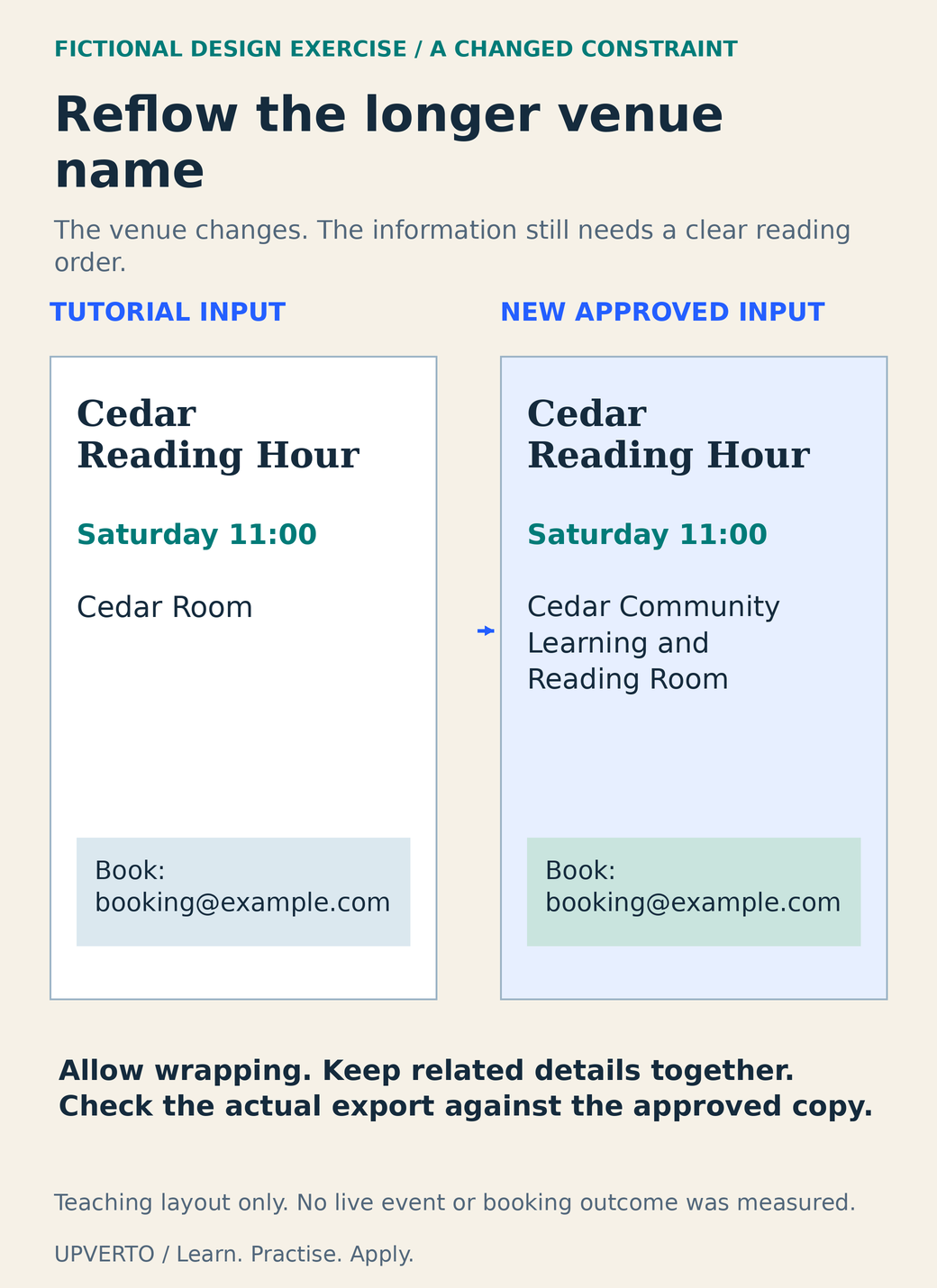
    Fictional brief: Cedar Reading Hour needs an announcement with the event name, Saturday 11:00, a location and [email protected]. The tutorial used “Cedar Room.” Your new approved location is “Cedar Community Learning and Reading Room.” Produce one square graphic and one portrait information sheet. These are practice formats, not platform specifications.

    The first independent attempt squeezes the new location into a small single line. The problem is observable: the location becomes much harder to read than the date. Instead of copying the original layout literally, allow the venue to wrap onto two lines, align it with the date and move the booking instruction into a clear separate group.

    The second format requires another decision. A portrait sheet has different space, so use the event name at the top and place the date and venue together beneath it. Do not simply crop the square output. Open both exports and compare the approved wording character by character.

    The revision record can say: “I allowed the venue to wrap and adjusted the information group to preserve readable type. I checked the actual exported files.” It cannot say that the change increased attendance or bookings, because no such outcome was measured.

    Two actual fictional announcements compare the short venue Cedar Room with the longer Cedar Community Learning and Reading Room, reflowed without hiding the booking instruction.
    Adapt a layout to a longer approved input – Two actual fictional announcements compare the short venue Cedar Room with the longer Cedar Community Learning and Reading Room, reflowed without hiding the booking instruction. Use the enlarged view, then swipe or use arrow keys to inspect details. View full-size infographic.
    Read the text version: Adapt a layout to a longer approved input

    Both teaching announcements are for Cedar Reading Hour on Saturday at 11:00, with [email protected] as the fictional booking address. The tutorial input uses Cedar Room. The changed brief uses Cedar Community Learning and Reading Room, which is wrapped across readable lines. The date and venue remain grouped, and the booking instruction retains a clear separate position. Allow the layout to change when approved input changes, then inspect the actual export against the brief. No live event, attendance or booking result was measured.

    Keep an attempt log that helps the next attempt

    FieldExample or instruction
    New constraintVenue name is longer; two formats are required.
    Independent attemptDescribe what you tried before finding a reference.
    Observed problemLocation text became too small in the square export.
    Targeted helpRecord the reference or feedback that answered the specific question.
    Revision and checkWrap the venue; reopen both exports and compare the copy.
    Next taskTry a different long information group without the tutorial.

    Keep the first attempt as well as the revision. A reviewer can then inspect the change instead of relying on your description. Ask a concrete question such as “Where did you look for the location?” or “Which input caused the formula to fail?” Avoid asking only whether the work looks professional.

    Once an exercise fits a service you want to offer, use choose portfolio projects for freelance services to decide whether it belongs in a portfolio. Label tutorial-derived work accurately and explain your contribution. Before accepting a client task, use the ready for paid client work checklist; a successful practice variation is useful evidence, but delivery also requires estimation, communication and handover.

    Frequently asked questions

    Should I stop using tutorials completely?

    No. Use them to learn unfamiliar operations and answer specific questions. Then attempt a task without following every step. Alternating guided help with independent work shows which parts you understand and which still depend on the demonstration.

    Is looking up documentation cheating?

    Documentation is part of professional work. The useful distinction is whether you understand the requirement, choose the relevant reference and check the result. Copying an answer you cannot explain leaves an unresolved gap even if the output appears to work.

    What should I change first in a practice project?

    Change one condition that affects the skill you are learning. Try a longer text block for layout, an unexpected input for a formula or a second screen size for a webpage. Keep a clear acceptance check so you can identify the effect of the change.

    How do I practise debugging when I am a beginner?

    Use a small harmless example and record expected versus actual behaviour. Change one likely cause, test again and keep the result. Ask for help with that evidence. Avoid random changes to a large project or practising on a live system you cannot safely restore.

    Can tutorial projects go in my portfolio?

    They can be learning evidence if the source and your contribution are clearly labelled and permissions allow it. A stronger service sample usually adds an independent brief, meaningful decisions and checks. Do not present copied assets or guided decisions as entirely your own.

    How do I know the exercise is finished?

    Compare the output with the checks you wrote before starting, reopen the final files and explain one decision and one limitation. If a check fails, record it and revise. Finishing the tutorial video is not the same as meeting the new brief.

    Sources and review notes

    Primary sources checked on 27 October 2026 (UTC). Check the current provider pages before relying on a changing feature, policy or price. Worked examples and worksheets are original teaching material; fictional examples are not evidence of client results.

  • How to Use AI While Learning Without Skipping Understanding

    How to Use AI While Learning Without Skipping Understanding

    AI is useful for learning when it helps you ask a better question and inspect an answer you can verify. It becomes less useful when a polished response replaces your own explanation, test or decision.

    Choose a small task, make an attempt and ask for help with the part you can identify. Keep confidential information out of practice prompts. This guide fits inside how to learn a digital skill and includes a complete calculation exercise you can check without trusting any model’s confidence.

    In this guide
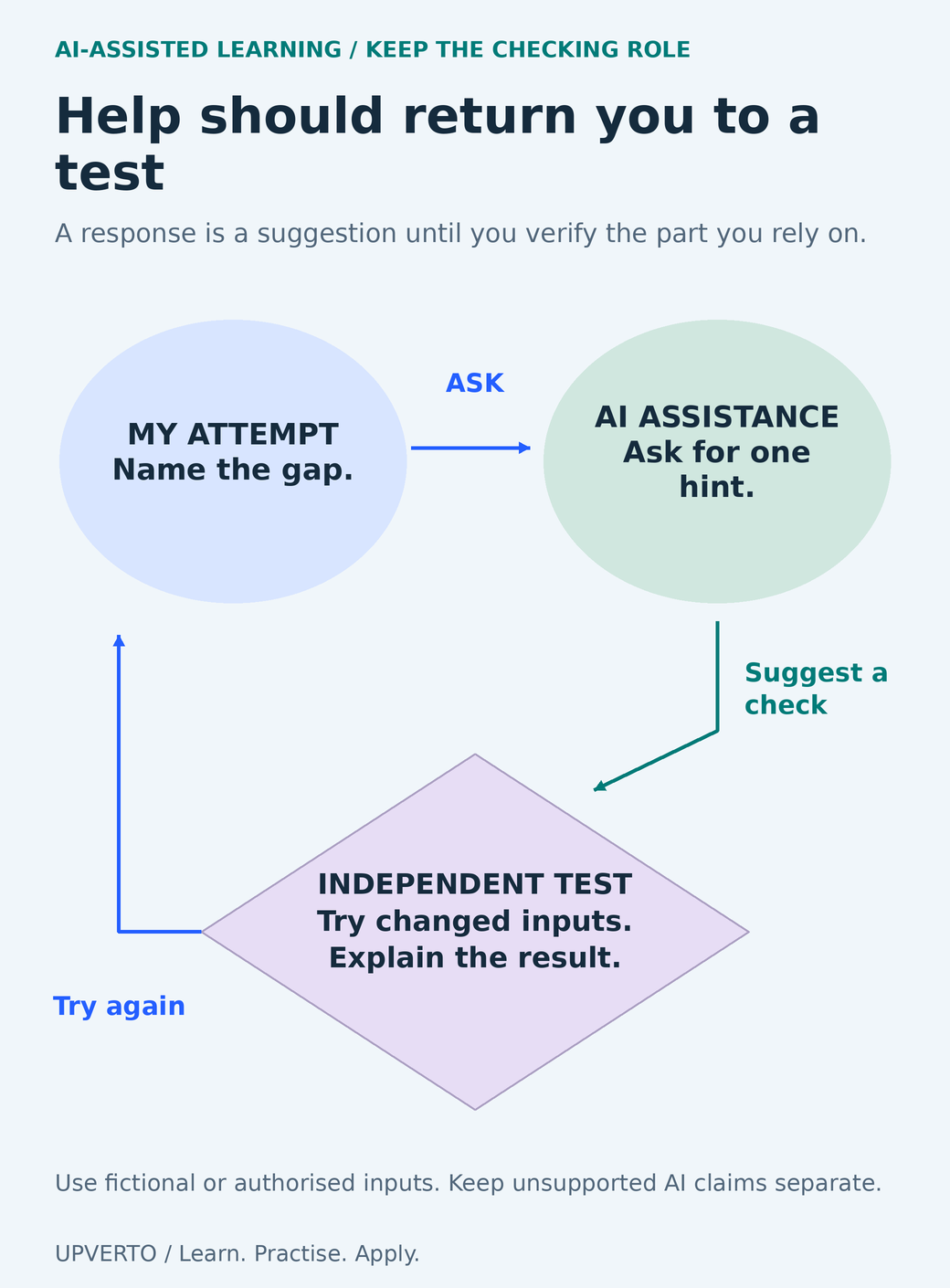
    A learner attempt leads to a bounded AI hint, then to an independent changed-input test and back to another attempt.
    Use AI assistance inside an inspectable learning loop – A learner attempt leads to a bounded AI hint, then to an independent changed-input test and back to another attempt. Use the enlarged view, then swipe or use arrow keys to inspect details. View full-size infographic.
    Read the text version: Use AI assistance inside an inspectable learning loop

    Start with your own attempt and name the gap. Ask AI for a bounded hint or suggested check. Independently test the part you rely on using changed inputs, and explain the result in your own words. Return to another attempt when the test reveals a gap. A model response is a suggestion until verified. Use fictional or authorised material and keep unsupported claims separate from checked notes. This process diagram does not report a tested model result.

    Give AI a bounded role in the exercise

    Different requests create different learning conditions. “Do the project” can hide every decision. “Ask me to explain why this formula should work” leaves the reasoning with you. “Suggest three edge cases” can help you design a test, provided you check whether those cases matter to the actual task.

    RoleUseful requestYour responsibility
    ExplainerExplain this operation using my harmless example.Restate it and try a changed input.
    QuestionerAsk one question that checks my understanding.Answer before requesting the explanation.
    CriticCompare my draft with these acceptance checks.Verify each criticism against the actual work.
    Test assistantSuggest inputs that might expose an error.Run the tests and inspect expected versus actual results.

    An AI response may invent a feature, misread an input or provide a plausible citation that does not support its claim. Ask for sources when needed, open the actual primary source and check the specific passage. A citation’s presence is not verification.

    Decide what you can share before writing the prompt

    Use invented data or material you are authorised to process. Remove names, account details, secrets and unnecessary context. Replacing a name alone may not anonymise a distinctive project or a small dataset. When the learning task can use fictional data, there is little reason to upload a real client’s records.

    Provider settings matter. The Gemini Apps Privacy Hub, checked on 27 October 2026, describes human review of some data and warns against entering confidential information. Its controls and account arrangements can differ. Read the policy for the actual product and account you use; do not assume that a work account, temporary session or disabled history grants permission to share someone else’s material.

    The exercise below is tool-independent and requires no paid generation. It is a prompt and a verification method, not a report that a particular model produced the illustrated error. The incorrect answer is deliberately constructed to make the checking task inspectable.

    Worked exercise: inspect a plausible but wrong total

    Fictional input: a practice order has three rows. Quantity and unit price are separate fields; every amount is an invented USD value for arithmetic, not a price recommendation.

    ItemQuantityUnit priceCorrect line total
    Notebook2$182 × 18 = $36
    Pencil pack3$43 × 4 = $12
    Folder set1$121 × 12 = $12

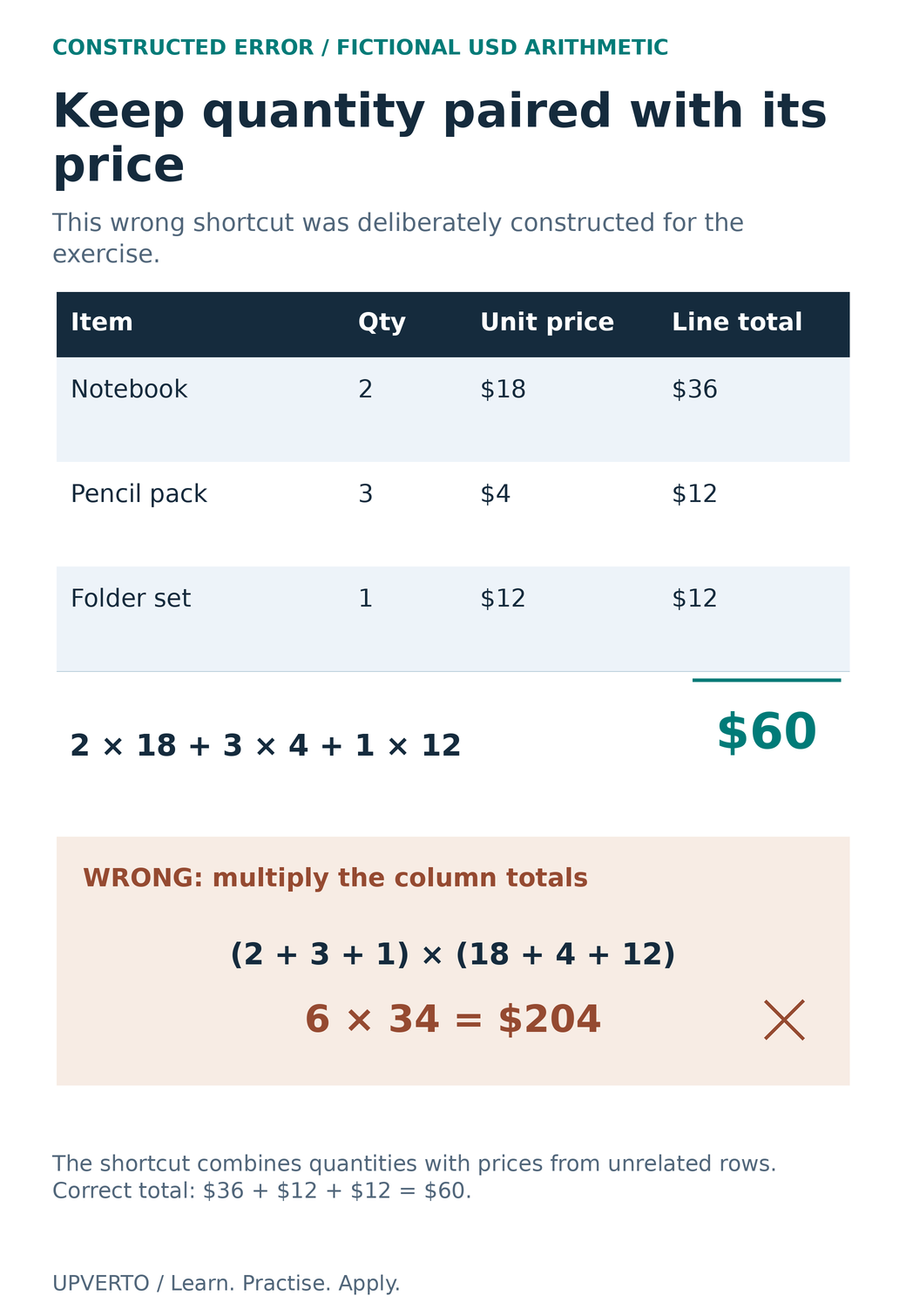
    The correct order total is 36 + 12 + 12 = $60. A deliberately wrong shortcut adds the quantities, adds the unit prices and multiplies the two totals: (2 + 3 + 1) × (18 + 4 + 12) = 6 × 34 = $204. It combines each quantity with prices from unrelated rows.

    Before asking AI, calculate the three line totals yourself. Then use this prompt: “I am learning to calculate a total from quantity and unit price. Use this fictional table. Ask me to explain why multiplying the sum of quantities by the sum of prices is wrong. Give one hint first. After my answer, show a row-by-row check and suggest a new input that would expose the same mistake.”

    A correct explanation should preserve the row relationship. The operation is the sum of each row’s quantity multiplied by that row’s unit price. If you use a spreadsheet, check its current function syntax and your actual cell ranges; a formula that references the wrong rows can still return a plausible number.

    A worked table pairs each quantity with its own unit price to total 60 USD, while a separately marked wrong cross-column shortcut gives 204 USD.
    Inspect the row relationship behind a calculation – A worked table pairs each quantity with its own unit price to total 60 USD, while a separately marked wrong cross-column shortcut gives 204 USD. Use the enlarged view, then swipe or use arrow keys to inspect details. View full-size infographic.
    Read the text version: Inspect the row relationship behind a calculation

    The fictional USD table contains 2 notebooks at 18 each, 3 pencil packs at 4 each and 1 folder set at 12. Correct line totals are 36, 12 and 12, giving 60. The correct operation is 2 x 18 + 3 x 4 + 1 x 12. The deliberately wrong shortcut multiplies total quantity 6 by the sum of unit prices 34, giving 204. It combines quantities with prices from unrelated rows. This is a constructed verification exercise, not an observed output attributed to any model and not a price or earnings recommendation.

    Test the idea with changed inputs

    Try a zero quantity for one item. Its line total should become zero while the other lines remain unchanged. Try one item with quantity one: its line total should equal its unit price. Try two identical rows: the combined total should double that row’s amount. These checks test the relationship, not only the original answer.

    Then explain the method without reading the AI response. If you can only reproduce the wording, rebuild the table with different values. Use practise skills beyond tutorials to choose a variation that makes you decide rather than copy.

    The same pattern applies outside arithmetic. For code, run a harmless example and inspect errors. For a design critique, compare the feedback with the audience and brief. For a claimed software feature, verify the current documentation and test the relevant operation. A generated judgement cannot replace the observable result.

    Keep a prompt-and-verification log

    FieldWhat to record
    Learning objectiveThe operation or decision you want to understand
    My attemptYour answer and the point of uncertainty
    Safe inputFictional data or permission to use the supplied material
    AI assistanceThe prompt, useful suggestion and unsupported claim
    Independent evidenceCalculation, actual file, test or primary documentation
    Changed-input resultWhat happened when a meaningful constraint changed
    Remaining gapWhat you still cannot explain or perform

    Keep the model’s output separate from your verified notes. You can mark a suggestion “not checked” rather than accidentally promoting it into an instruction. If a response is wrong, preserve the counterexample and explain the failure; do not ask repeatedly until a confident answer feels reassuring.

    Before using AI-assisted work in a client task, check the agreement, data permissions and any required disclosure. Your responsibility for the delivered output remains. Use the ready for paid client work checklist to review whether you can independently check, explain and support the work you propose to deliver.

    Frequently asked questions

    Should I ask AI for the answer before attempting the task?

    Try a bounded attempt first when possible, then ask about the specific uncertainty. If you need an introduction, ask for a small explanation and immediately apply it to a changed example. The aim is to expose your understanding rather than hide it behind a finished response.

    Is the $204 mistake a real model result?

    No. It is a deliberately constructed wrong answer used to teach verification. The input and arithmetic are fully visible, so you can inspect why it fails. The guide does not claim a particular model made this error or attach a fabricated success rate to a tool.

    Can I upload a client spreadsheet if I remove names?

    Not automatically. Other fields may identify people or reveal confidential business information. Check permission and the actual provider policy, and minimise the data. For learning, replace the material with an invented table that tests the same operation.

    What if AI cites an official page?

    Open the page independently and confirm that it supports the specific statement, version and context. Links can be wrong or insufficient. For an operation you will rely on, test the relevant behaviour as well as reading the documentation.

    How do I use AI for design feedback?

    Supply a harmless brief and clear criteria such as hierarchy, wording and required formats. Treat each comment as a suggestion to inspect. Check the actual exported design and, where useful, ask a person to perform the intended reading task. Do not turn an AI preference into a measured audience outcome.

    Can AI-assisted practice become portfolio work?

    Yes, if the work, tool use, permissions and your contribution are represented honestly. Keep evidence of what you checked and changed. Do not imply that you independently created or verified parts you cannot explain, and follow any applicable client or platform disclosure requirements.

    Sources and review notes

    Primary sources checked on 27 October 2026 (UTC). Check the current provider pages before relying on a changing feature, policy or price. Worked examples and worksheets are original teaching material; fictional examples are not evidence of client results.

  • How to Learn a Digital Skill and Build Practical Ability

    How to Learn a Digital Skill and Build Practical Ability

    To learn a digital skill, choose a clear task, learn its prerequisites, practise with feedback, and gradually remove the instructions you depend on. Progress becomes easier to assess when you can show what you built, explain your decisions, and correct a problem yourself.

    This guide helps you turn a broad ambition such as “learn design” or “learn WordPress” into a practical learning sequence. It applies across creative, technical, marketing, and administrative work. If you have not chosen a direction yet, start with the skill-selection guide.

    In this guide
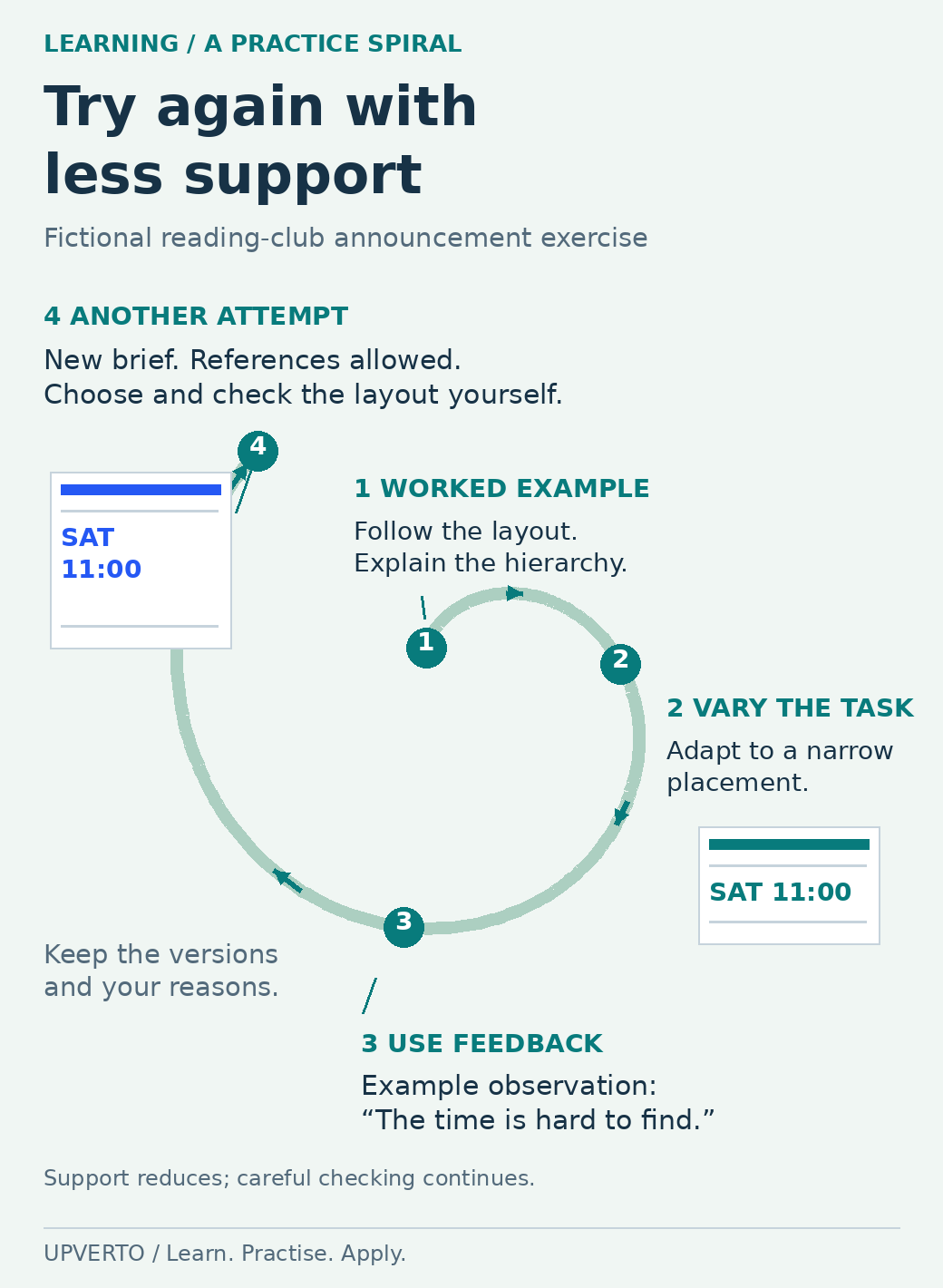
    An open widening spiral links an explained reading-club layout to an independent narrow version, feedback about a hard-to-find time, and another attempt from a new brief.
    Repeat the task with less support — Use the reading-club exercise to move from a worked example to a fresh attempt. The feedback shown is fictional. Use the enlarged view, then swipe or use arrow keys to inspect details. View full-size infographic.
    Read the text version: Repeat the task with less support

    This illustrative practice spiral uses a fictional reading-club announcement.

    1. Worked example: follow an explained layout, then explain why its event name and related details are grouped.
    2. Independent variation: adapt the announcement for a narrower placement, choosing the changes yourself.
    3. Feedback: an illustrative reviewer observation says the time is hard to find. Record the actual observation in your own work.
    4. Another attempt: use a new brief and suitable references, with less dependence on a walkthrough. Check the exported result and keep your reasons.

    The widening path represents increasing independence, not a score or a fixed timetable. Repeat the cycle when a new gap appears.

    Practical summary
    A practical learning cycle
    1. Follow: complete one explained example.
    2. Explain: describe the purpose of the important steps.
    3. Change: adapt the example to a new requirement.
    4. Build: make a related output from a brief.
    5. Check and fix: identify a fault, correct it, and check again.
    6. Repeat independently: complete a new variation with suitable reference material.

    Define a result you can inspect

    Replace a topic name with an observable objective. “Study spreadsheets” might become “create a small expense sheet with consistent categories, a checked total, and clear instructions.” “Learn video” might become “edit a short explanation with intelligible speech and accurate captions.”

    A useful objective names the output, the constraints, and the checks. For a simple website, the constraints could include a supplied set of pages and a mobile layout. Checks might include working navigation, readable text, and a tested contact route in a safe environment.

    Keep the first objective small enough that you can finish and review it. A complete small output will reveal gaps that are difficult to notice while collecting introductory lessons.

    Identify the prerequisites explicitly

    Before the subject-specific work, check whether you can create and find folders, identify file types, keep versions, install or access the required tool safely, and understand the brief. If one of these steps is unfamiliar, include it in the learning plan.

    Next, list the concepts the task depends on. For a design, this might include hierarchy and alignment. For an editing task, it might include timelines, source media, and export settings. For an administrative task, it might include time zones, sorting, and permission boundaries.

    Prerequisites should be linked to the intended task. You do not need to finish every possible background topic before practising, but you do need enough understanding to recognise when the result is incorrect.

    Choose one main learning resource and a reference source

    Use a structured resource for the sequence and official documentation for exact behaviour or current software instructions. Check whether the resource matches your starting level, available tools, and intended task.

    For example, Learn WordPress’s beginner pathway organises introductory site tasks into lessons. For video work, Blackmagic Design’s training collection offers editing and related practice material. Select the material that matches the task you are learning; completing every available lesson is not the immediate objective.

    When comparing a free resource and a paid course, inspect the actual exercises, explanations, prerequisites, and support. A clear syllabus can help organise your study. A completion badge by itself cannot show whether you can deliver a particular client task.

    Move from following an example to solving a brief

    Begin with a worked example and save the result. Then close the instructions and explain the purpose of the main steps in your own words. If you can only remember where to click, return to the concept that makes the action useful.

    Change one requirement. Use different text, a different input file, a different audience, or a different output format. Observe which parts of your previous solution still apply and which must change.

    Next, attempt a related brief using reference documentation when needed. Independent work does not require memorising everything. It requires choosing a sensible approach, using references accurately, and checking the result without reproducing a tutorial line by line.

    Finally, introduce a recoverable problem in a practice copy. Remove a media file, change a formula input, or make a layout too narrow. Diagnose and repair it. Do this in your own practice environment, with backups, rather than experimenting on a client’s live system.

    Worked example: learning to produce a clear event graphic

    Fictional brief: Create an announcement for a Saturday reading club. The audience must be able to find the event name, date, time, location, and booking instruction. Use invented details and assets you can lawfully reuse.

    StagePracticeEvidence to keep
    FollowComplete a basic layout exercise that explains alignment and hierarchy.The first version and a note about each main decision.
    ExplainDescribe why the event name is prominent and why related details are grouped.A short explanation in plain language.
    ChangeAdapt the announcement for a narrow placement.The adapted version and what you changed.
    BuildCreate a second announcement from a fresh brief without copying the first layout.The new brief and output.
    CheckInspect the exported file at its intended viewing size.A list of missing details, readability issues, and corrections.
    RepeatComplete a variation with different text and constraints.A final file and a record of where reference help was needed.

    This sequence is an Upverto practice method, not a certified assessment. Its purpose is to make learning observable and reveal the next gap.

    Ask for feedback that can change the work

    Give the reviewer the brief and ask focused questions. “Can you find the event time quickly?” is more useful than “Do you like it?” For a spreadsheet, ask whether the calculations match a manually checked sample. For a website, ask the reviewer to complete a named navigation task.

    Keep observations separate from preferences. A missing date is a factual omission. A preference for a different colour may require discussion against the audience and brief. Record what you changed and why.

    If you cannot get a suitable reviewer, perform a documented self-check and label it honestly. Do not describe self-review or an AI response as an independent professional evaluation.

    Use AI to support your understanding

    You can ask an AI tool to explain an unfamiliar concept, suggest questions to investigate, or create a fictional practice brief. Check important information against reliable sources, particularly when the advice concerns software behaviour, security, prices, or platform rules.

    If the tool produces code, calculations, copy, or a design suggestion, inspect and test the output. Try explaining why it works and how you would recognise a failure. If you cannot check it, treat it as material to investigate rather than a finished client deliverable.

    Use fictional or appropriately anonymised practice inputs. Follow the relevant owner’s permissions and tool policy before entering real client material into an external service.

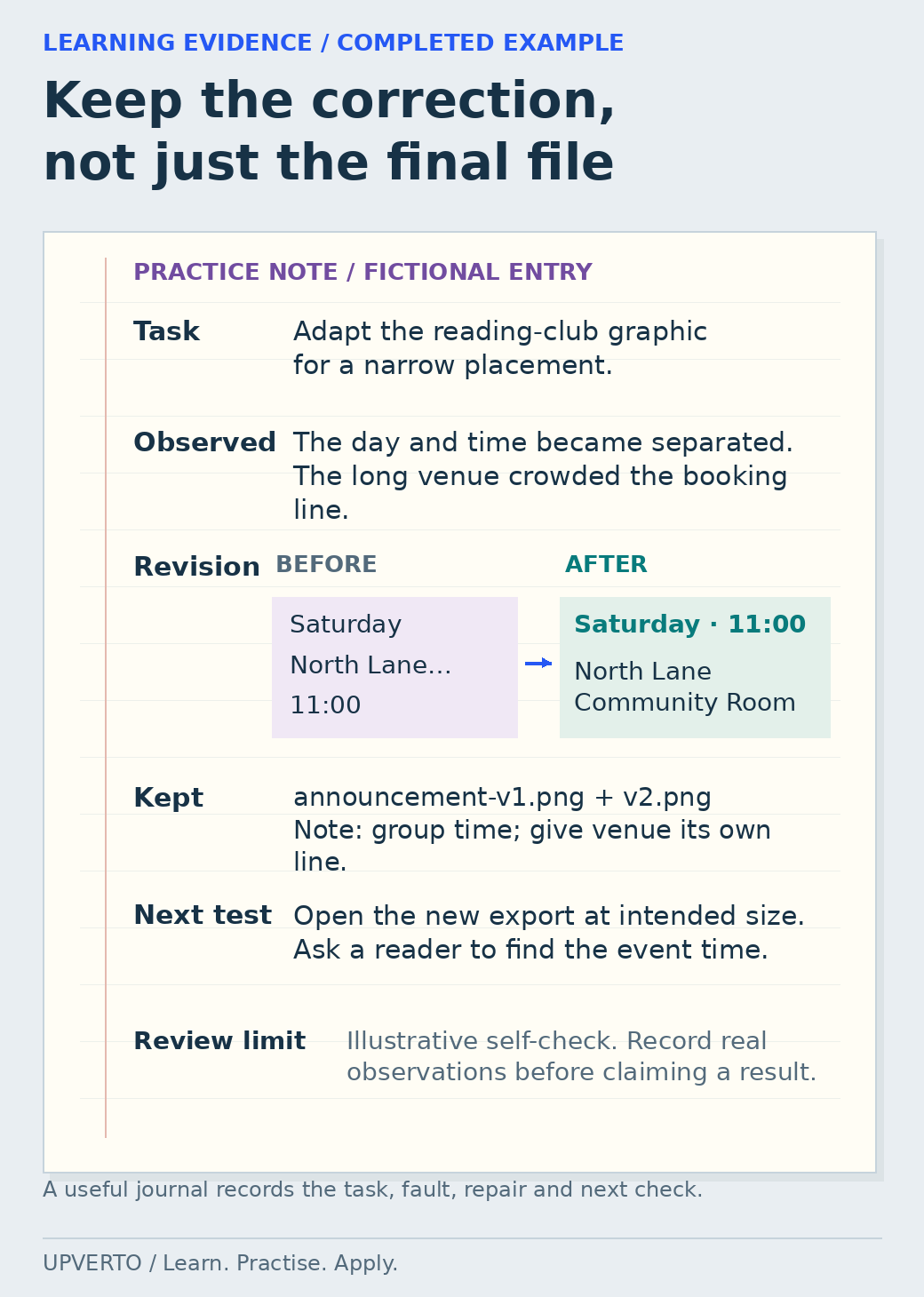
    A fictional practice journal records a narrow event-graphic task, a separated day and time, a before-and-after grouping revision, saved versions and the next export check.
    Record a correction and its next test — A completed illustrative journal makes the learning visible: what failed, what changed, and what should be checked next. Use the enlarged view, then swipe or use arrow keys to inspect details. View full-size infographic.
    Read the text version: Record a correction and its next test

    Fictional practice entry: adapt a reading-club announcement to a narrow placement.

    Observed problem
    The day and time became separated, and the long venue name crowded the booking instruction.
    Correction
    Group Saturday and 11:00 together. Give North Lane Community Room its own lines rather than squeezing every detail into one line.
    Evidence retained
    Keep announcement-v1.png, announcement-v2.png and a note explaining the grouping decision.
    Next test
    Open the actual new export at its intended viewing size and ask a reader to locate the event time.
    Review limit
    This is an illustrative self-check entry, not evidence that a real reader test occurred. Record your actual observations and label the kind of review accurately.

    Build your own learning plan

    FieldYour plan
    ObjectiveI will produce [output] for [purpose], meeting [checks].
    PrerequisitesList the concepts, file skills, and tool access you need first.
    Main resourceName one structured learning resource and relevant official references.
    Practice sequenceWorked example → changed requirement → fresh brief → fault and repair.
    Study sessionsChoose sessions you can realistically protect around other responsibilities.
    ReviewWho or what will check the result, and against which criteria?
    EvidenceKeep the brief, versions, final output, checks, and explanation.
    Next gapAfter review, name the most useful thing to improve.

    When learning feels stuck

    If every task requires replaying the same tutorial, reduce the scope and practise one decision at a time. If you keep switching tools, define the missing capability before changing. If your projects never finish, shorten the brief and agree on what “done” means before starting.

    If you can repeat an example but cannot adapt it, focus on explanation and variation. If your outputs look finished but fail checks, make quality review a separate stage. A visible problem is useful learning information when you record and correct it.

    Frequently asked questions

    How long should learning take?

    The time depends on your starting knowledge, the task, the quality of practice, and the standard you need to meet. Use project milestones and observable checks instead of treating a fixed number of days as proof of readiness.

    Can I learn while studying or working?

    Build a smaller plan around time you can actually use. Keep your files and notes organised so each session has a clear starting point. Review the scope if the schedule repeatedly becomes unrealistic.

    How do I stop getting stuck watching tutorials?

    Choose a small output before starting the lesson. Follow one example, then close the walkthrough and rebuild or change it using your own notes. Write down the point where you become stuck, use a relevant reference and test the result. Keep finishing small tasks rather than collecting more videos.

    What should I do when I cannot understand a prerequisite?

    Name the missing concept or action as precisely as you can. Learn it through a smaller example, explain it in your own words and use it again in the original task. Files, folders, terminology and basic tool controls may need explicit practice before the larger lesson makes sense.

    How can I use AI without depending on it for every step?

    Ask for explanations, examples or feedback, then check the answer against suitable references and the actual result. Make an independent variation and explain why it works. If you cannot identify an incorrect output or recover from a mistake, return to the missing foundation.

    How do I know whether my learning plan is working?

    Look for changes in what you can complete, explain, check and repair. Keep dated examples and notes about repeated errors. Adjust the next practice task to address a specific gap, and use the readiness guide before treating a finished course as evidence that you can deliver paid work.

    Turn one practice output into evidence

    Choose a relevant portfolio project once you can complete a small task. Before selling the work, use the client-work readiness rubric. The broader earning roadmap shows how learning connects to a portfolio, a service, and client delivery.

  • How to Make a Weekly Learning Plan You Can Follow

    How to Make a Weekly Learning Plan You Can Follow

    A weekly learning plan should tell you what to make, when you will work and how you will recognise progress. A timetable filled only with videos does not show whether you can use the skill. Start with the time you actually have and one small output you can check at the end of the week.

    In this guide

    The guide to how to learn a digital skill explains the wider learning process. This page turns that process into a practical week. The schedule is a fictional example, not a promise of mastery or a required pace.

    Begin with a realistic time budget

    Look at your existing commitments before adding study blocks. Identify sessions you can usually protect and a small reserve for interruptions. A plan that assumes every evening is free may fail for reasons unrelated to motivation. If your availability changes, use the guide to learn digital skills part time to think through a part-time routine.

    Distinguish available time from concentrated working time. Opening files, resolving a setup issue and reviewing notes all take time. Include them in the plan rather than treating them as a personal failure. If a task repeatedly takes longer than expected, use that observation to improve the next estimate.

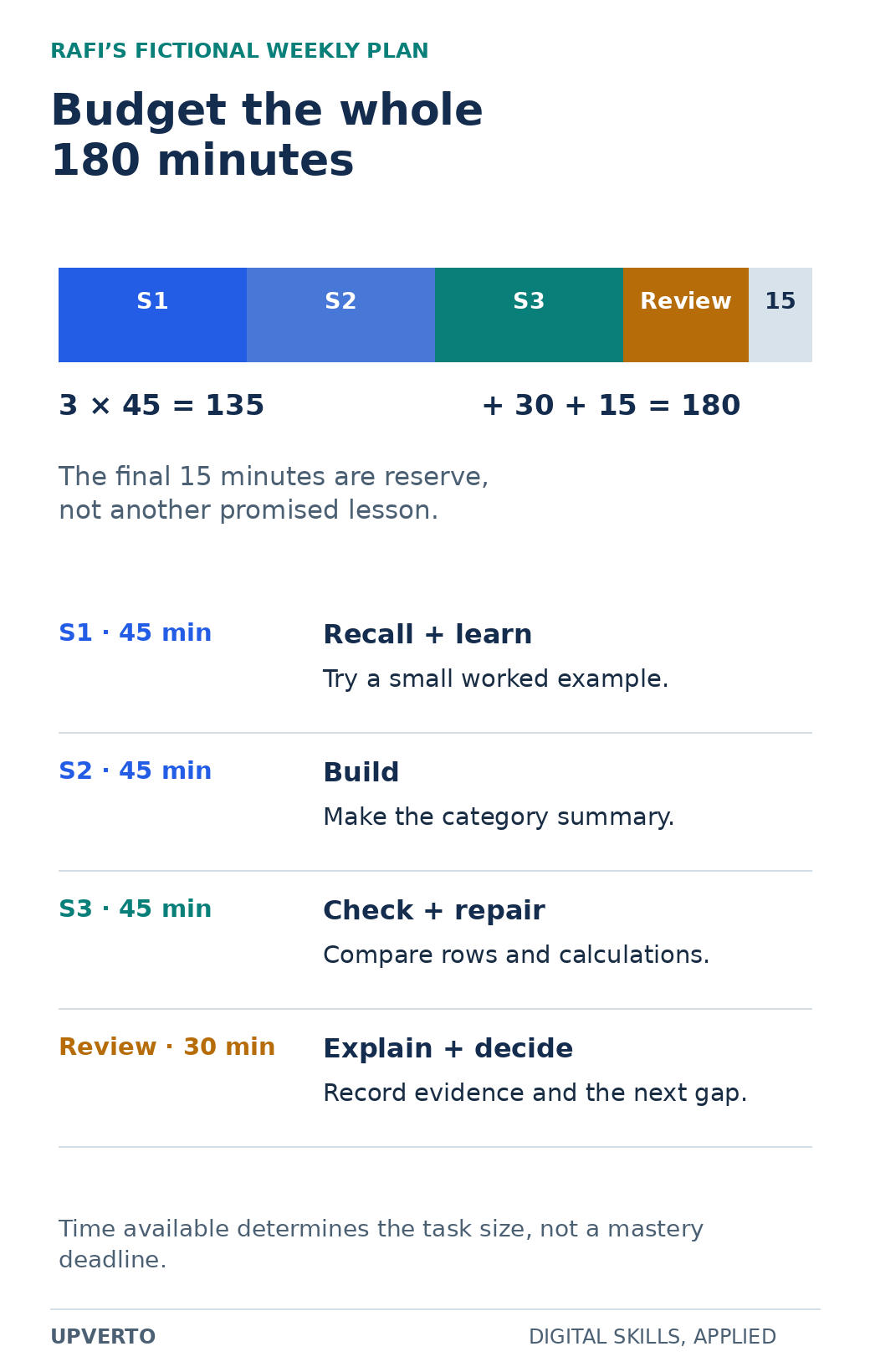
    For the fictional learner Rafi, the weekly budget is 180 minutes. He plans three 45-minute sessions, a 30-minute review and a 15-minute reserve. That is 135 + 30 + 15 = 180 minutes. The reserve is not secretly assigned to another lesson.

    A proportional 180-minute bar assigns three 45-minute sessions, a 30-minute review and 15 minutes of reserve, followed by distinct session purposes.
    Account for all minutes in a weekly learning plan — The reserve remains available for interruptions; the fictional schedule does not promise a rate of mastery. Use the enlarged view, then swipe or use arrow keys to inspect details. View full-size infographic.
    Read the text version: Account for all minutes in a weekly learning plan

    Three 45-minute sessions total 135 minutes. Add 30 minutes for review and 15 minutes reserve: 180 minutes. Session 1 recalls and learns through a worked example. Session 2 builds the category summary. Session 3 checks and repairs it. Review explains the method and selects the next gap. Reserve is not preassigned to another lesson.

    Choose an output that fits the budget

    Rafi is practising a spreadsheet summary. His objective is: “From a five-row fictional input, create a checked category total and explain one data-quality issue.” This is narrower than “learn Excel” and more observable than “understand formulas.” He will keep the input, workbook and a short review note.

    Choose the smallest useful variation that stretches your present ability. If you have never opened a spreadsheet, file handling and a simple formula may be the right objective. If you can already repeat a tutorial, use a different input and explain your decision without the tutorial open.

    Write the completion check at the same time as the objective. Rafi will compare the total with a manual calculation, identify the included rows and describe what happens to a missing value. The check prevents a visually finished workbook from being mistaken for a correct one.

    Give each session a different job

    BlockMinutesTaskSaved output
    Session 145Recall the previous method, read the needed reference and try a small exampleWorked example and one question
    Session 245Build the category summary from new fictional inputFirst complete workbook
    Session 345Check calculations, investigate one error and repair itRevised workbook and check log
    Review30Explain the method without the lesson and choose the next variationReview note and next objective
    Reserve15Handle an interruption or setup problem if neededNo extra task promised in advance

    The blocks do not need to occur on consecutive days. Separating practice can create opportunities to recall what you learned rather than merely repeat what is still on screen. The Institute of Education Sciences practice guide discusses spacing and retrieval in an educational context. Applying those principles here is a learning-plan choice, not evidence that this exact schedule guarantees adult professional outcomes.

    Begin the next session by trying a small part from memory, then consult the reference to correct it. The purpose is to reveal what you can retrieve and where help is needed. Do not spend the whole session struggling with an unknown concept; use feedback and documentation after a fair attempt.

    Review evidence instead of counting attendance alone

    Rafi’s fictional review records that his first total included a pending row. He compared the selected rows with the written rule, corrected the formula and saved the before-and-after values. He can now explain the inclusion rule, but he still needs practice with ranges that expand when new data is added.

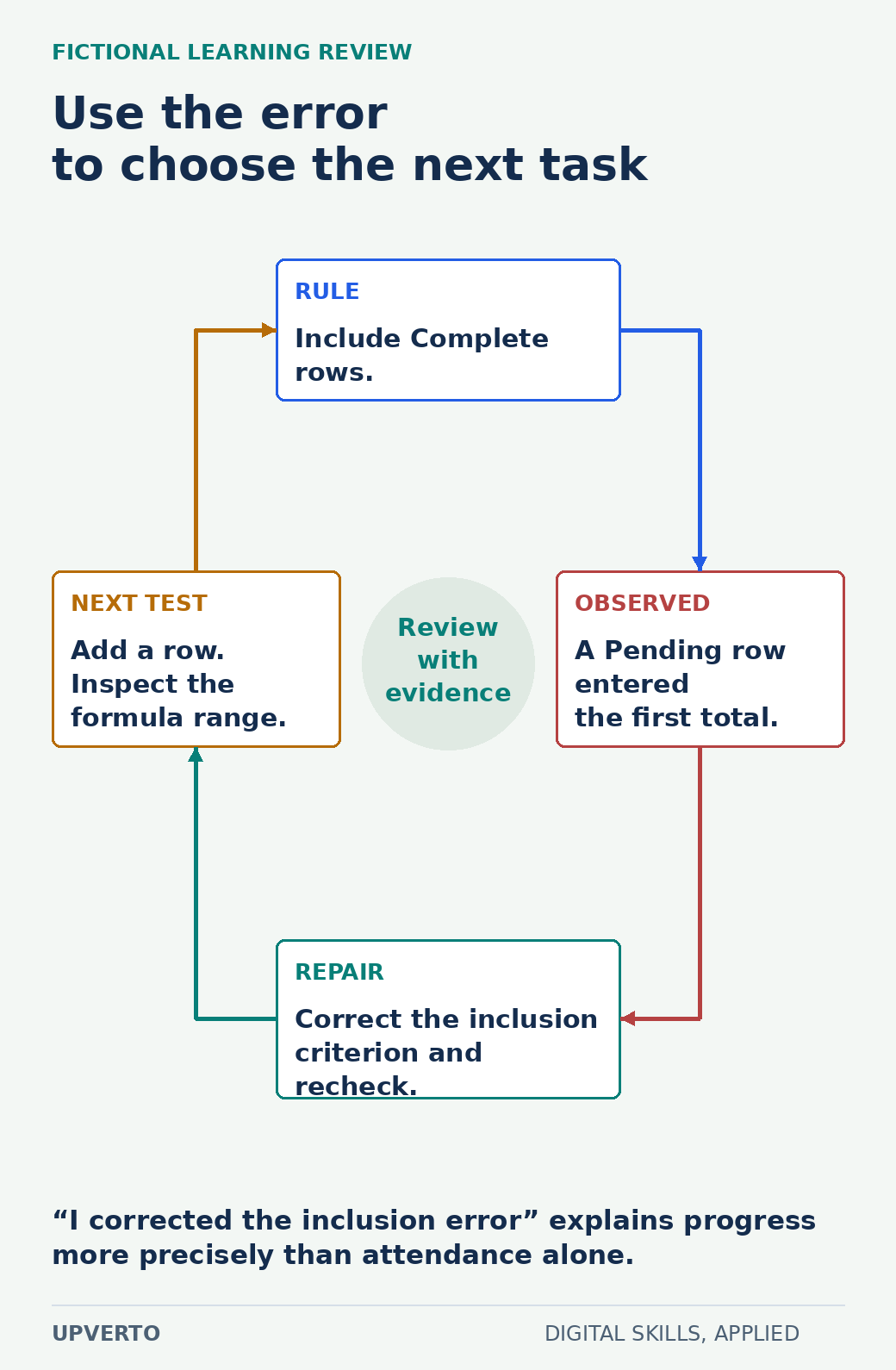
    A four-part cycle connects a Complete-only rule, an observed Pending-row error, a corrected inclusion criterion and a next test that adds a row to inspect range behaviour.
    Turn a learning error into the next practice task — Use a specific observed gap to choose the next variation in practice. Use the enlarged view, then swipe or use arrow keys to inspect details. View full-size infographic.
    Read the text version: Turn a learning error into the next practice task
    1. Rule: include Complete rows.
    2. Observed in the fictional review: a Pending row entered the first total.
    3. Repair: correct the inclusion criterion and recheck.
    4. Next task: add a row and inspect the formula range.

    Keep the evidence behind the review rather than reporting study time alone.

    That review gives him a specific next objective. “I studied for three hours” describes effort; “I corrected an inclusion error and can explain why” describes a learning observation. Keep both if useful, but do not confuse them.

    Use three questions: What can I now do without copying? What evidence supports that? Which remaining gap matters most for the next task? If the output is incomplete, identify the blocker. It might be an unrealistic scope, a missing prerequisite, unclear instructions or an interrupted week.

    Adjust the plan without turning it into a backlog trap

    If one session is missed, decide what still fits. Do not automatically double the next session or carry every unfinished task forward. Preserve the core output and reduce optional work. If the prerequisite is missing, replace the planned project with a smaller exercise that addresses it.

    If the week feels too easy, add one meaningful variation rather than several unrelated tools. For example, use a new category or a deliberate blank value in the spreadsheet. The variation should test the same underlying method. Use practise skills beyond tutorials to move beyond reproducing a tutorial.

    If the task repeatedly overwhelms the available time, split it at an observable boundary. “Import the data and record its issues” can be a complete weekly output before “build the report.” Avoid dividing only by lesson number when the lessons do not map to a useful action.

    Copy the weekly learning planner

    Fill these fields at the start of the week: available minutes; protected sessions; reserve; one output; required inputs; reference; prerequisite; completion check; likely interruption; and review date. At the end, add actual time, evidence saved, error found, feedback received and next decision.

    • Continue: the task fits, and a new variation will test understanding.
    • Reduce: the output was too large for the available time.
    • Repair: one prerequisite blocked the main task.
    • Seek feedback: the result is complete but you cannot judge an important aspect.
    • Change direction: a fair trial reveals a mismatch with the work or your constraints.

    Keep the planner short enough to update. A complicated tracking system can consume the time intended for practice. One page with links to the actual work is sufficient for many beginner projects.

    Use the plan to build evidence over time

    Several finished weeks can produce a useful record of increasing independence, but the count alone does not establish client readiness. Compare your actual work with the proposed responsibility. The ready for paid client work checklist helps you inspect repeatability, quality checks, communication and handover when you reach that decision.

    For now, choose the next output and reserve its first session. A useful plan survives ordinary interruptions because its priority is clear: complete a small task, check it and use the evidence to decide what to practise next.

    Frequently asked questions

    How many hours should I study each week?

    Use the hours you can sustain while meeting existing responsibilities. There is no universal weekly number that guarantees competence. Define a smaller output when time is limited and review what you actually completed.

    Should I schedule a different skill every day?

    For a beginner project, a focused sequence often makes it easier to finish and check an output. Related concepts can be combined when the task needs them, but switching among unrelated tools can make progress difficult to assess.

    What should I do if I miss a session?

    Reassess the remaining time and preserve the most useful part of the objective. Reduce optional work or move the review point deliberately. Do not automatically create an unrealistic catch-up plan.

    Does watching a lesson count as practice?

    It can support learning, but the plan should also include doing the task and checking the result. Keep a concrete output so you can distinguish exposure to a concept from the ability to use it.

    How can I review when I have no teacher?

    Compare the work with a written requirement, use a manual or independent check where possible, and explain the method without copying. Seek appropriate feedback for aspects you cannot judge reliably, rather than inventing a pass.

    When should I increase the difficulty?

    Increase it when you can repeat and explain the current task with the agreed checks. Add one relevant variation so you can identify what changed. A larger project is useful only if its new responsibility is clear.

  • Free Resources or a Paid Course: How to Choose What You Need

    Free Resources or a Paid Course: How to Choose What You Need

    A free resource can be exactly what you need, and a paid course can still leave your main difficulty unresolved. Start by naming the learning gap. Then inspect whether a resource provides the explanation, practice, feedback or structure needed to close it. Price is one condition in that decision, not a measure of learning quality by itself.

    In this guide

    The broader guide on how to learn a digital skill explains how to combine learning with practice. This page helps you choose the materials for that process without assuming that every reader should buy a course.

    Name the problem before comparing products

    “I need to learn web design” is too broad to evaluate a resource. A more useful statement is: “I can copy a page layout, but I do not understand how to check the keyboard path and form labels.” That identifies a subject and a practical task. It may call for official documentation and an exercise rather than a complete beginner course.

    Other gaps need different support. If you do not know the learning sequence, a structured curriculum may help. If your work is complete but you cannot judge it, feedback may matter more than another explanation. If you repeatedly stop because of setup problems, check prerequisites and environment instructions before adding advanced content.

    Write one test task that would show progress. For the web example, the learner should identify the controls, connect labels properly, follow the page with a keyboard and record remaining issues. The resource can then be judged by whether it helps with that task.

    Compare the learning design, not the sales page

    A resource review sheet uses five margin markers to inspect scope, practice, feedback, updates and terms through specific questions.
    Inspect five types of learning-resource evidence — Use actual curriculum and support information, and record missing details as not stated. Use the enlarged view, then swipe or use arrow keys to inspect details. View full-size infographic.
    Read the text version: Inspect five types of learning-resource evidence
    • Scope: which lesson addresses the gap?
    • Practice: what will the learner make and check?
    • Feedback: who reviews what, and with which limits?
    • Updates: which versions and dates are stated?
    • Terms: what does access cost and include?

    Record missing evidence as not stated. Ask a specific question if its answer would change the decision.

    QuestionEvidence to inspectWarning sign
    Does the scope match my gap?Actual syllabus, lesson sample and stated outcomesBroad promises with no inspectable content
    Can I start with my current skills?Prerequisite list and setup requirementsHidden tools or assumed knowledge
    Will I make something?Exercises, projects and completion checksOnly passive viewing presented as competence
    How is work reviewed?Feedback method, reviewer and limits“Support included” without a clear meaning
    Is the material current enough?Update dates, version notes and recent samplesUnexplained mismatch with the tools used
    Can I sustain the commitment?Total cost, access period and realistic study timeUrgency that discourages reading the terms

    Use a sample lesson if available. Check whether the explanation makes sense to you and whether you can apply a small part. A polished trailer may show production quality without revealing teaching quality. A long curriculum can still omit the exact feedback you need.

    Use free material where it does the job

    Official documentation can be a strong source for how a tool or platform currently behaves. For example, MDN’s accessibility learning module provides public material on web-interface foundations and identifies prerequisite knowledge. It can support a targeted study task without requiring you to assume that a separate paid course is necessary.

    Free material may be fragmented or assume that you know what to study next. You can address that by making a short sequence around one project and keeping a question list. Do not judge a reference manual as though it promises individual tutoring; understand the format it actually provides.

    Feedback can come from a teacher, a suitable peer, a community with clear rules or an experienced reviewer. Check the quality and relevance of the response. A comment that something “looks good” may be encouraging, but it does not replace a specific check against the project’s requirements.

    A paid resource may offer organised progression, assessed projects, individual feedback, scheduled sessions or support. Verify which of these are actually included. Ask how many submissions are reviewed, who reviews them, how long access lasts and which tools require separate payment. Read the current purchase and refund terms before deciding.

    Distinguish course access from professional readiness. A certificate may document completion under the provider’s rules, but a client or employer can still require evidence of the actual work. Avoid courses whose main proposition depends on guaranteed earnings or a fixed promise of mastery.

    The SBA’s cost-planning guidance separates one-time and recurring costs. Apply that simple distinction to your learning budget: course fee, software subscription, equipment access and time. The guide on the cost to start digital services can help you identify the wider commitment. Do not spend a whole budget on access if the required tools remain unaffordable.

    Worked example: a choice based on the missing support

    Leena is fictional. She has built a sample page but needs to understand labels, keyboard interaction and error messages. She has four short study sessions available and a learning budget she does not want to spend without a clear reason.

    Option A is a free official module with examples and exercises but no individual review. Option B is a fictional paid course with a broad design curriculum and a discussion forum, but its description does not promise review of her project. Option C is a fictional paid feedback session with a named scope: review one page against agreed interface checks.

    A decision path begins with a free official module and page revision, then branches between further practice and investigating feedback based on whether Leena can judge important aspects.
    Choose a resource by the unresolved learning gap — This fictional decision connects spending to a verified support gap, rather than to the size of a course catalogue. Use the enlarged view, then swipe or use arrow keys to inspect details. View full-size infographic.
    Read the text version: Choose a resource by the unresolved learning gap

    Leena first needs to understand labels, keyboard use and errors. She starts with a free official module and revises one page. If she can judge the relevant aspects, she continues with a variation. If she cannot, she investigates suitable feedback and verifies the reviewer, scope and terms. A broader paid course is not automatically the solution to a specific feedback gap.

    Leena begins with Option A because her immediate gap is understanding the concepts. She schedules a small page revision and a self-check. If she later cannot judge an important aspect, she will investigate suitable feedback, including the actual terms of Option C. She does not buy Option B merely because it has more lessons.

    This is a decision exercise, not a review of real products. The lesson is to connect the purchase to a defined gap. A different learner who needs a structured sequence from the beginning could reasonably make a different choice after inspecting the evidence.

    Use the resource-evaluation checklist

    Record the resource title, provider, URL, date checked, target skill, prerequisites and test task. Then write the evidence for scope, practice, feedback, currency, support, cost and access. Use “not stated” when a claim cannot be verified. Send a specific question to the provider if that answer would change your decision.

    • Which lesson or exercise addresses my current gap?
    • What will I produce, and how will I check it?
    • What support is included, and what is excluded?
    • Which tools, subscriptions or prior skills are required?
    • What happens when access ends or the software changes?
    • Can I try a representative sample before committing?
    • What evidence will make me continue, supplement or stop?

    Do not turn the checklist into a false-precision score. Missing feedback may be decisive for one learner and irrelevant for another. Write the reason for your decision in a sentence so you can review it later.

    Make the chosen resource part of a practice plan

    Use weekly digital skill learning plan to reserve time for reading, application and review. The IES learning practice guide discusses spacing and retrieval in educational settings; here, those ideas inform a practical choice to revisit and use the material rather than only watch it once. They do not guarantee a particular professional outcome.

    After the first defined task, inspect the output. Did the resource help? Was the real blocker different from what you expected? Continue when the evidence supports it, supplement a specific gap when necessary and stop accumulating material that you are not using. The useful outcome is an improved capability you can demonstrate.

    Frequently asked questions

    Are paid courses usually better than free resources?

    Price alone cannot establish that. Compare the actual scope, practice, feedback, prerequisites and support with your learning gap. A free reference can be ideal for one task while a structured or reviewed course may help with another.

    What does “support included” need to mean?

    Find out who responds, which questions or projects are covered, the response process and any limits. A discussion forum, technical help desk and individual project critique are different kinds of support.

    Should I buy a course because it provides a certificate?

    Consider what the certificate represents and whether the role or client you want values it. Completion evidence can be useful, but it does not replace the ability to perform and check the relevant work.

    How can I judge whether material is current?

    Inspect update dates, version notes and a representative lesson against the current official documentation. Some foundational concepts remain useful longer than interface instructions. Identify the parts where a mismatch would block your task.

    What if I already own several unfinished courses?

    Choose one current task and inspect which resource best supports it. Finish a small output before buying another broad course. If the blocker is feedback or a prerequisite, address that specific gap.

    When is paying for feedback a reasonable choice?

    When you have work to review, a clear question and a suitable reviewer whose scope and terms you understand. Feedback is more useful when it points to observable issues and next actions, rather than offering only general encouragement.

  • Turn Feedback Into a Better AI Product Without Rebuilding Everything

    Turn Feedback Into a Better AI Product Without Rebuilding Everything

    After someone tries your prototype, you may receive several kinds of feedback at once. One person wants a new feature. Another cannot find a button. A third says an answer is wrong but cannot explain why. The useful next step is to sort these observations before changing the product.

    For a beginner, improvement should be a sequence you can follow: record the problem, understand its effect, reproduce it, make a focused change and check both the new and old behaviour. This keeps learning connected to evidence instead of a growing list of requests.

    The fictional example in this guide concerns a community-event notice helper. It is a learning scenario, not a report of a real deployment, student result or commercial success.

    Start with a record of what actually happened

    Omar’s prototype turns an organiser’s approved event details into a short notice draft. It does not invent venues, publish announcements or contact participants. A person checks the draft against the source before using it.

    During a safe trial with invented events, a participant says, “It keeps getting dates wrong.” Omar could immediately rewrite the prompt, but first he asks which input produced the problem and what the expected notice should have said.

    The example contains “04/05” without a year. The participant intended 4 May, while the draft treated it as 5 April. The feedback has uncovered an unclear input convention as well as a model response problem. A longer prompt alone may leave the same confusion in place.

    Omar records the original input, output, intended meaning and software version. He removes unnecessary personal information from the feedback record. When someone reports a problem involving real data, do not encourage them to paste private records into an unrestricted support channel.

    Separate observations, explanations and requests

    A useful feedback record has three distinct parts. The observation describes what happened: “The draft used 5 April.” The explanation is a possible cause: “The date format was ambiguous.” The request is a suggested solution: “Add a calendar picker.”

    These are related, but they are not interchangeable. The calendar picker might be helpful, yet the underlying need is an unambiguous event date. A simpler form with a written month and required year might also solve the problem.

    Ask a clarifying question when the evidence is incomplete. “Can you show an invented example with the same structure?” is often more helpful than “What features do you want?” Reproducing the problem gives you something concrete to check after a change.

    Do not overwrite the original report with your later interpretation. Keep the evidence and add your conclusion beside it. If the repair fails, you can revisit the earlier assumptions rather than relying on memory.

    A feedback record separates the observed result, a possible cause and the requested solution.

    View full-size diagram.

    Figure 1. Preserve the observation even when your explanation changes.

    Decide what needs attention first

    Sort issues by their effect on the task. A notice that states the wrong date deserves attention before a request for extra font choices. A problem that exposes private information or triggers an unintended action requires stronger containment than a cosmetic inconvenience.

    Omar uses four practical questions: What could go wrong for the user? How often has it been observed? Can the user recognise and recover from it? Does it block the product’s central task? He records uncertainty instead of pretending to know the frequency from one report.

    He also considers scope. A participant requests automatic social-media publishing. That introduces permissions, external actions and new failure modes beyond the draft-only prototype. Omar can record the request without accepting it. Improving a small product does not require expanding its authority every time someone asks.

    Choose a small set of changes for the next version. If everything is urgent, explain which issue prevents useful testing and address that first. Keep a separate list of ideas so that an interesting feature does not displace a necessary repair.

    Form a hypothesis you can test

    A hypothesis is a proposed explanation or change with an expected result. Omar writes: “If the input requires a written month and year, and the draft copies the approved date exactly, ambiguous-date mistakes should decrease on our test cases.”

    He identifies what would challenge that idea. If a clear “4 May 2027” input still becomes “5 April 2027,” the issue is not only the form. If the correct date appears in the draft but is hard to see during review, presentation also needs attention.

    This step prevents random editing. You should be able to say why a change might help and what observation would show that it did not. Keep the expected result specific enough to inspect without asking the same model to declare its own work correct.

    For fields such as dates and venue names, compare the output directly with the approved source. Human judgement can assess clarity, but a pleasant writing style must not compensate for a changed factual detail.

    Make the smallest change that addresses the cause

    Omar changes the input form to require a day, written month and four-digit year. He adds a visible source-date line beside the draft for review. The tool flags missing dates rather than supplying one.

    He does not simultaneously change the model, rewrite every instruction and redesign the whole page. Making many changes at once would make it harder to identify what helped or caused a new problem.

    For a learning prototype, keep a copy of the previous working version before editing. Record what changed and why. If the project is shared, agree on how versions are identified so that feedback can be connected to the right build.

    A small change may require new learning. Return to the relevant concept, practise it separately and then apply it to the project. This fits Upverto’s self-learning pattern of explanation, exercise, project work, checking and independent revision. The point is to understand the repair well enough to maintain it later.

    Rerun old checks as well as the new case

    A regression is a previously working behaviour that breaks after a change. Omar’s date repair should not stop notices without optional venue directions from being created. He reruns ordinary cases, missing-information cases and the original date failure.

    Keep a stable test set for comparing versions, plus a few fresh examples to check unfamiliar patterns. Record outputs and important settings. If the model or configuration changes, treat that as a meaningful change requiring review rather than assuming the old results still apply.

    Avoid summarising a tiny test with a broad claim such as “now fully accurate.” Instead say, “The revised version preserved the approved date in these twelve test cases; further trial review is still needed.” That statement tells the reader exactly what evidence exists.

    A revision loop runs from reproduce to change, retest, small trial and keep or roll back.

    View full-size diagram.

    Figure 2. A change earns its place by passing checks and helping the intended task.

    Check usefulness in a limited follow-up trial

    Technical checks answer whether the revision behaved as expected under test. A follow-up trial asks whether a person can use it more reliably. Omar asks the participant to prepare another invented notice and review its date without coaching.

    He watches for a new problem: perhaps the required fields are clear, but users still overlook the source comparison. That would be evidence for another focused improvement, not proof that the entire design has failed.

    Define success before collecting feedback. In this example, success means the participant enters an unambiguous date, the draft preserves it and the participant can verify it against the source. It does not mean they say the interface looks better.

    Keep the trial bounded. Do not replace a working operational process merely to obtain more feedback. Where mistakes could have serious consequences, retain suitable human checks and seek experienced review before widening use.

    Close the feedback loop clearly

    Tell the participant what changed, what remains limited and what you want checked next. A useful update might say: “The date now uses a written month and required year. Please check whether entering and reviewing it is clear. The tool still only prepares drafts.”

    Do not promise every requested feature. If an idea is deferred, explain the relevant scope decision. Users can understand “automatic publishing is outside this draft-only trial” more easily than a vague promise that it is coming soon.

    Maintain a short change record: issue, evidence, decision, version, checks and remaining questions. This helps distinguish completed work from plans you have not implemented.

    Your improvement worksheet and next step

    Choose one feedback item and fill in these fields: observed problem; intended task; consequence; reproduction input; likely cause; smallest proposed change; expected result; old checks to rerun; follow-up observation; and decision to keep, revise or roll back.

    Your next step is to reproduce one problem with safe data before adding another feature. If it cannot be reproduced, record what is missing and ask a focused question. If it can, use the smallest useful repair and verify the result.

    This habit can support an internal tool, a community project or a product business of your own. Sustainable improvement comes from understanding what changed and whether it helped, rather than continually adding features that nobody has tested.

    Frequently asked questions

    Should I build every feature a user requests?

    No. Understand the need behind the request and compare it with the product’s purpose. Record ideas separately from committed work, especially when they require new permissions or consequential actions.

    What if two users ask for opposite changes?

    Look at their tasks and contexts. They may need different workflows, or one may be outside your intended audience. Do not assume that adding a setting is always simpler than choosing a clear scope.

    How much feedback is enough before changing something?

    It depends on the consequence and evidence. One reproducible serious failure can justify immediate containment. A minor preference may need more observations before it becomes a priority.

    Can I ask AI to decide which feedback matters?

    It can help organise non-sensitive notes, but you should review the evidence and decision. Do not let a generated summary erase uncertainty, invent frequency or replace the original observations.

    What should I do when a repair makes another feature worse?

    Use the previous working version when appropriate, record the regression and investigate. A rollback is a practical recovery step, not evidence that the learning effort was wasted.

    When is an improvement finished?

    When the intended change is implemented, relevant checks pass and the available user observation supports keeping it within the stated scope. Record remaining uncertainty; completion of one repair is not completion of all product testing.

    Explore the AI Engineering curriculum preview.

  • Find a First Customer by Demonstrating One Useful Task Honestly

    Find a First Customer by Demonstrating One Useful Task Honestly

    A first customer conversation does not need a dramatic sales pitch. It needs a clear problem, a small working example and enough honesty for the other person to decide whether the tool is worth exploring.

    If you are learning to build AI products, start by understanding a workflow rather than asking strangers to admire your software. A useful conversation may lead to a trial, a change in direction or a decision to stop. Each can save you from building features around assumptions nobody has tested.

    Use this guide after investigating the problem and building a bounded prototype. It focuses on an honest demonstration and trial agreement, rather than proving a market from scratch. The example is fictional. It illustrates a process, not a customer success story or a promise that following these steps will produce a sale.

    Choose someone who actually encounters the problem

    Sana is learning to build a tool for a small equipment-rental business. The prototype turns an operator’s rough equipment-condition notes into a structured draft checklist. It does not judge safety, approve equipment for use or send the checklist to customers.

    She initially thinks her audience is “every small business.” She narrows it to rental operators who repeatedly rewrite condition notes before a supervisor reviews them. This helps her ask specific questions and recognise where the prototype might fit.

    The first person to speak with could be a business owner she already knows or someone introduced with permission. She should explain the purpose of the conversation and make declining easy. Repeated unsolicited messages and exaggerated claims are poor substitutes for a relevant introduction.

    Before arranging anything, Sana writes what she wants to learn: whether rewriting condition notes is a recurring problem, how mistakes are corrected and who decides whether a new tool can be tried. She does not assume that the person who uses the tool is also the person who can authorise its purchase.

    Ask about recent work before showing your solution

    “Would you use an AI assistant?” is difficult to answer meaningfully. A more useful question is, “Can you describe the last time you prepared a condition checklist?” It invites the person to explain an actual sequence rather than predict their future enthusiasm.

    Sana can ask what information arrives, where it is copied, who reviews it and what happens when a note is unclear. She can also ask what works well in the current method. A paper checklist may have advantages her prototype lacks, such as being usable during a network failure.

    She should not request private customer records to make the conversation convincing. The operator can describe the process without sharing names or confidential files. Sana can build invented examples from the general structure with permission to discuss the workflow.

    Separate statements from interpretations in your notes. “The operator rewrites notes at closing time” is something they said. “They will pay for automation” is your inference, which still needs evidence. Keeping those separate prevents friendly conversation from becoming an invented market result.

    Write a small demonstration agreement

    Before the demo, state what will happen in plain language. Sana’s example is: “We will try three invented equipment notes. The tool prepares a draft for review. It cannot decide whether an item is safe, and nothing will be sent or saved to your business systems.”

    This agreement can be short, but it needs to match the actual setup. If the prototype saves inputs or sends them to a model provider, explain that route accurately. Do not promise “nothing is stored” unless you have checked every relevant part of the system.

    Decide the demonstration’s limits in advance: no real records, no connected business account, no payments and no automatic actions. These limits make early learning easier. A request to connect a real system is a separate decision requiring appropriate permissions and preparation.

    A first conversation moves from the current workflow through a problem example and narrow prototype to a decision about a trial.

    View full-size diagram.

    Figure 1. Understand the current task before asking someone to consider a trial.

    Show ordinary work and one awkward case

    Sana prepares three invented notes. The first clearly names an item and its condition. The second leaves out the equipment identifier. The third contains conflicting statements: “handle secure” and “handle loose.”

    The demo should reveal how the tool handles these differences. A useful response to the conflicting note is to highlight the inconsistency for a person to resolve. Quietly choosing one description could conceal an important problem.

    Sana begins with the ordinary case, then asks the operator to try the missing-information case. She watches without explaining every button. Finally, she shows the conflicting note and discusses what the tool should do. She states which checks have been run and which have not.

    If the demonstration uses a prepared output because live generation is unavailable, label it as a prepared example. If a person corrected the text beforehand, say so. A mock-up can be useful for discussing a workflow, but it must not be presented as functioning software.

    Observe the task without rescuing every mistake

    Ask the participant to explain what they expect before clicking. Notice whether labels make sense, whether they can find the source note and whether they recognise that the result is a draft. When they become confused, record the point of confusion before helping.

    A demonstration becomes less informative if the builder continuously guides the user through hidden problems. You want to know whether someone can understand the workflow without your memory of how it was built.

    Ask specific questions afterwards: “Which part would you check before using this?” “What would stop you trying it again?” “Where would this fit in your current process?” Avoid treating compliments as commitments. “Interesting idea” tells you much less than a participant explaining a real next task they would want to test.

    Record observations without inventing precision. One person completing one invented checklist is a small observation. It is not evidence of a general time-saving percentage or a reliable forecast of adoption.

    Four evidence levels distinguish a compliment, a completed demo task, an agreed trial and a paid purchase.

    View full-size diagram.

    Figure 2. These signals answer different questions; none guarantees the next one.

    Offer a bounded trial only when you can support it

    If there is genuine interest, propose a trial with a clear purpose, scope and ending. For Sana, a safe next step might still use invented records while the operator checks whether the draft structure matches their workflow. A trial does not need to begin with sensitive data or payment.

    Write down who will participate, what the tool does, what it excludes, how feedback will be collected and what would cause the trial to stop. If real operational data is later proposed, review access, storage, consent and appropriate obligations before using it. A friendly introduction does not settle those questions.

    If the trial is paid, make the price, included work, limitations, support expectations and cancellation arrangements clear before agreement. Do not accept a broad promise to “automate the business” when you have demonstrated only a checklist draft. Commercial arrangements may require professional advice suited to the location and business.

    Your role is to offer a testable proposition, not to pressure someone into validating your learning project. A person can find the concept useful and still decide that the cost, change in habits or review burden makes it unsuitable.

    Turn the conversation into a decision

    Afterwards, review the evidence while it is fresh. Sana might discover that operators can already write condition notes quickly, but supervisors struggle to locate missing identifiers. That would suggest a different feature: flag incomplete records rather than rewrite every sentence.

    She should test that interpretation before rebuilding. A short follow-up question can confirm whether she understood the problem. Avoid adding every feature mentioned during one conversation. Requests are clues about needs; they are not automatically the best design.

    This is where practical self-learning becomes valuable. Upverto’s approach connects explanation, exercises, projects and independent changes. A user observation gives you a reason to revisit a concept, practise the missing skill and test a changed prototype. You are learning to make decisions about a product, not merely collecting a portfolio of copied demonstrations.

    Your preparation checklist and next step

    Before your first conversation, write the intended user, one recurring task, the current alternative, the question you want answered and the authority needed for any proposed trial. Prepare invented inputs, clear limitations and a way to record observations with the participant’s knowledge.

    Before your demonstration, check that no private data, credentials or unrelated browser tabs are visible. Confirm that draft outputs cannot trigger real actions. Practise an ordinary case, a missing-information case and a failure message so you can explain them calmly.

    Your next step is one respectful problem conversation, not a mass sales campaign. Aim to leave with a better description of the task and a specific decision about what to test next. Your eventual outcome might be an internal tool, a small product business or a decision that the existing method is good enough.

    Frequently asked questions

    Do I need a complete product before speaking to someone?

    No. You can discuss a workflow before building anything. Clearly label sketches, mock-ups and working prototypes so the other person understands what exists and what is only proposed.

    Should I offer the first trial for free?

    That depends on the arrangement and your capacity. Free does not remove privacy or support responsibilities. Define scope and ending either way, and avoid promising indefinite work you cannot sustain.

    What if someone asks whether AI is always accurate?

    Explain the actual limits and required review. Show a relevant failure case rather than making a universal claim. Say what you have tested and what remains uncertain.

    Can one positive meeting prove demand?

    No. It supplies information about that person’s situation. Stronger evidence may include repeated use or a clear purchase decision, but each observation still has limits.

    Should I demonstrate every feature I have built?

    Usually a narrow task is easier to evaluate. Show the features needed for that task and its important limitations. A long tour can hide whether the core workflow helps at all.

    What if the person says their current method is better?

    Ask what makes it better and record the reason. You may improve the idea or stop pursuing it. Avoid arguing someone into a problem they do not have.

    Explore the AI Engineering curriculum preview.