Category: Earning routes

  • How to Build Digital Skills Alongside a Job or Your Studies

    How to Build Digital Skills Alongside a Job or Your Studies

    A part-time learning plan works best when it fits the time and attention you actually have. Begin with your existing job, studies, care responsibilities and rest. Then choose a small project whose next step can fit into the remaining capacity.

    The purpose is to create reliable practice and useful evidence, not to reach an earnings deadline. Someone else’s “thirty-day” schedule may assume access and free time you do not have. The wider route to make money online with digital skills includes delivery and client responsibilities; you can develop the foundations without pretending those responsibilities have already disappeared.

    In this guide
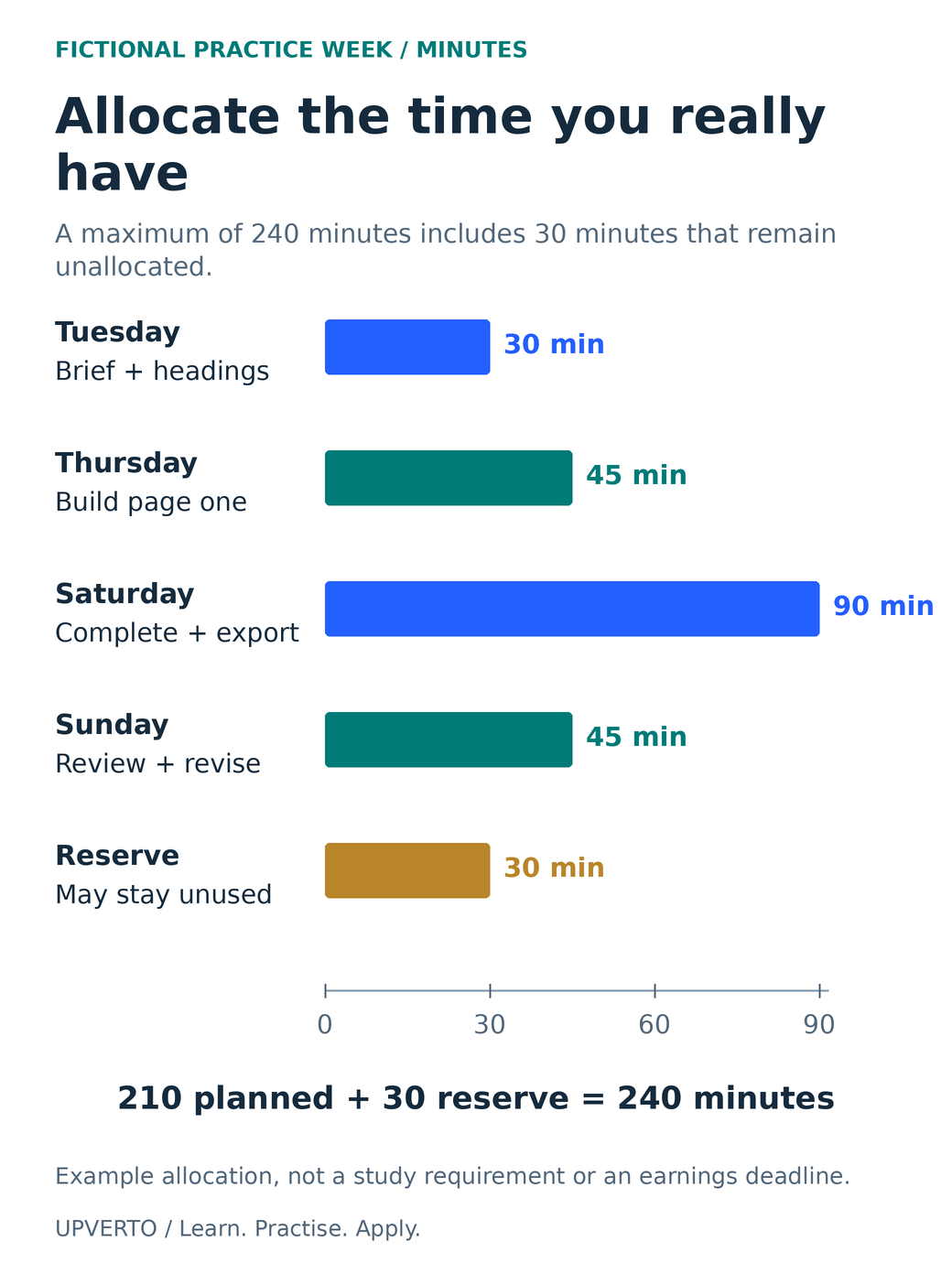
    Five proportional minute bars show Tuesday 30, Thursday 45, Saturday 90, Sunday 45 and an unallocated 30-minute reserve.
    Check a realistic weekly practice allocation — Five proportional minute bars show Tuesday 30, Thursday 45, Saturday 90, Sunday 45 and an unallocated 30-minute reserve. Use the enlarged view, then swipe or use arrow keys to inspect details. View full-size infographic.
    Read the text version: Check a realistic weekly practice allocation

    In the fictional week, Tuesday has 30 minutes for the brief and headings, Thursday 45 for page one, Saturday 90 for completing and exporting, and Sunday 45 for review and revision. Those four sessions total 210 minutes. A 30-minute unallocated reserve brings the maximum to 240 minutes. Reserve may remain unused; it is not another required lesson. Bar lengths are proportional to minutes on a 0–90 scale. The example is not a recommended study requirement or a deadline for earning.

    Count available sessions before choosing course volume

    Look at a normal week and a difficult week. Mark fixed commitments first, including travel, meals, essential administration and recovery time. Then identify windows in which practice is genuinely possible. A thirty-minute gap between unpredictable obligations may not be equivalent to thirty quiet minutes at a suitable computer.

    Record access as well as time. If the device you need is available only on Saturday, use shorter weekday sessions for reviewing a brief, planning changes or recalling concepts. Save production tasks for the session where you can use the appropriate tool. Do not count time that depends on another person’s equipment without checking access.

    For a newcomer, start online work with no experience helps define the first task. Avoid choosing several skills simply because each course appears short. Switching tools, finding files and remembering where you stopped all consume part of the available session.

    Give each session a finishable result

    “Learn design” is too broad for a weekday evening. “Make the event date easier to find and export the revised announcement” is concrete. Write one result before opening the lesson, and keep an end note that explains the next action. This reduces the need to reconstruct the project each time.

    A useful session can begin by recalling the previous decision without looking at the notes. Then check the answer, attempt the next task and record what changed. Karpicke and Roediger’s primary retrieval experiment found benefits for delayed recall in a vocabulary-learning task. That supports taking recall seriously; it does not establish a universal schedule for software learning or predict readiness for paid work. The project routine here is an original practical adaptation.

    Use reference material when it helps. The point of an independent attempt is to discover what you understand, not to ban documentation. Write the specific question you need answered, consult the relevant section and return to the task. Watching another entire course can postpone the exact practice gap you need to address.

    Worked example: protect a four-hour learning budget

    Fictional example: Sam has a job and an evening class. After accounting for existing commitments, Sam chooses a maximum of 240 minutes for a small document-formatting project. This is an illustrative allocation, not a recommended amount of study or a deadline for earning.

    SessionMinutesConcrete result
    Tuesday30Read the brief and draft a heading structure.
    Thursday45Build the first page from approved copy.
    Saturday90Complete page two and inspect the exported PDF.
    Sunday45Review reading order and make one documented revision.
    Unallocated reserve30Absorb disruption or leave unused.

    The four planned sessions total 30 + 45 + 90 + 45 = 210 minutes. Adding the reserve gives 210 + 30 = 240 minutes. Reserve is not another required lesson. If Thursday becomes unavailable, Sam can reduce the scope or move part of it into the reserve; Sam does not automatically add a late-night catch-up commitment.

    The project produces a two-page fictional community information sheet. Its success condition is a checked draft and a short explanation of the revision. It is not “become a document designer this week.” That distinction allows useful progress even when the larger learning journey takes longer than expected.
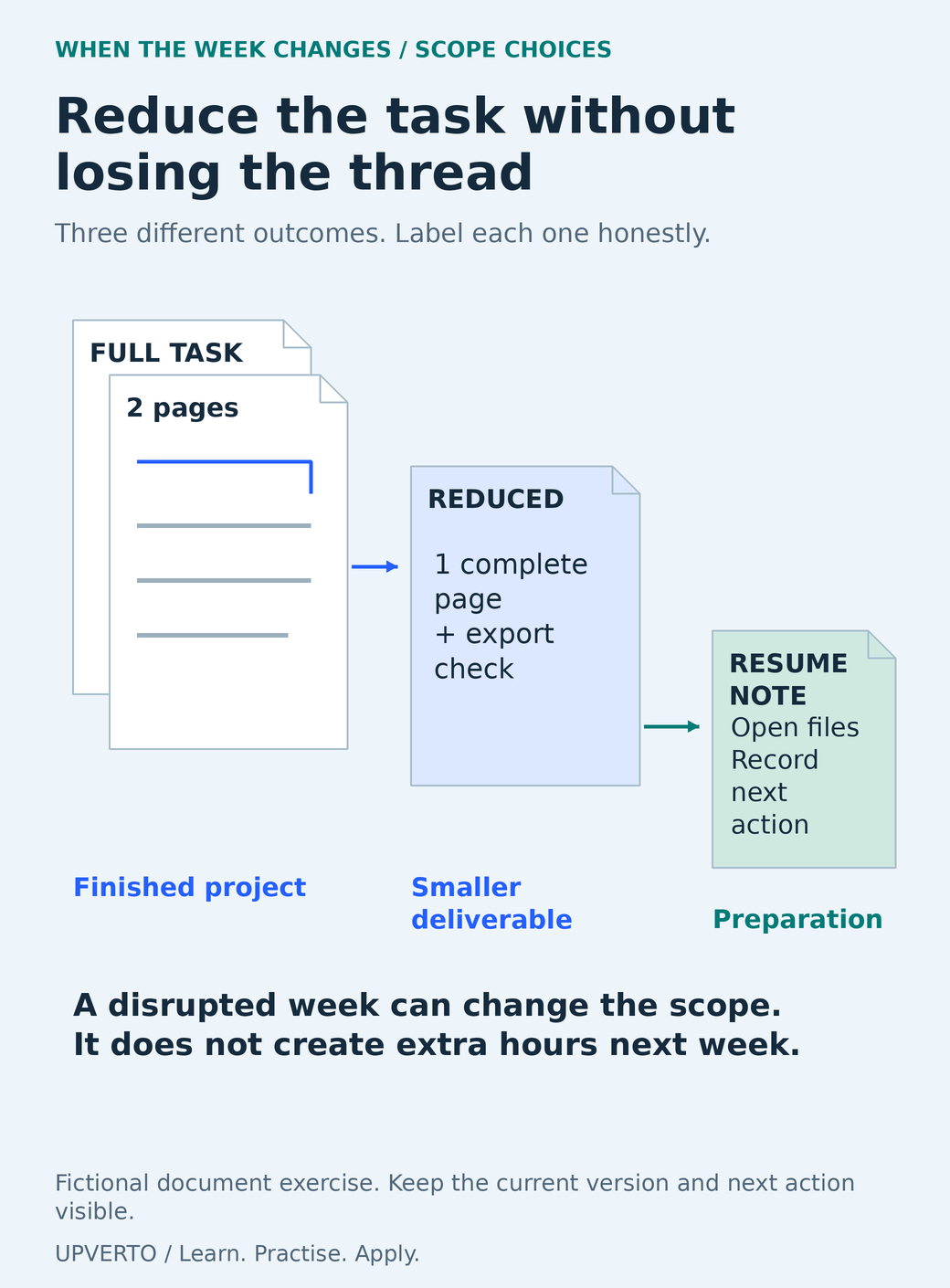
    Descending document forms distinguish a full two-page project, a reduced one-page deliverable and a short resume note that preserves the next action.
    Choose a smaller finishable task — Descending document forms distinguish a full two-page project, a reduced one-page deliverable and a short resume note that preserves the next action. Use the enlarged view, then swipe or use arrow keys to inspect details. View full-size infographic.
    Read the text version: Choose a smaller finishable task

    The fictional full task is a two-page information sheet with export checks. If capacity shrinks, a reduced task is one complete page with an export check. A much shorter maintenance session can reopen the files and record the next action; that is preparation, not a completed deliverable. Keep the current version and next action visible. A disrupted week does not create extra hours in the following week, so adjust scope rather than automatically accumulating catch-up obligations.

    Shrink the task when the week changes

    Plan a smaller version before you need it. Sam’s full task is two pages with a checked PDF. The reduced version is one page with a complete heading and export check. A short maintenance session can reopen the files, note the next action and verify the backup. These are different scopes; label them honestly rather than calling every activity a completed project.

    If interruptions repeat, change the plan itself. Reduce the number of outputs, choose a better access window or pause one learning goal. A schedule that depends on sacrificing essential responsibilities every week is not a reliable estimate of capacity. If you are working with a deadline imposed by someone else, discuss the constraint before accepting more work.

    Keep learning and client delivery separate in your calendar. A new technique may take unpredictable time to understand. Do not promise a client’s final deadline based on the pace of a guided tutorial. The weekly digital skill learning plan helps organise the learning sequence once the capacity boundary is clear.

    Copy the capacity planner and review the evidence

    FieldWrite your answer
    Fixed commitmentsWork, studies, care, travel and essential rest
    Usable practice windowsDay, realistic length, device and location
    One projectAudience, required output and a checkable finish
    Session resultsOne observable output or decision per session
    Reserve and reduced scopeWhat can move, shrink or wait?
    Actual recordTime used, work completed, blocker and next action
    Next-week adjustmentOne change based on the record

    At the review, compare planned and actual work without converting the exercise into a judgement of your worth. Did you underestimate setup? Was the lesson too advanced? Did the project depend on a file you did not have? These are planning inputs. Change one thing that addresses the observed obstacle.

    Keep a small archive of finished versions and explanations. It lets you see whether your work improves and gives a tutor or peer something specific to review. Course completion counts can be useful administration, but the more relevant evidence is what you can make, check and explain.

    Choose your next practice step with how to learn a digital skill. Keep the plan small enough to repeat, and enlarge it only when your records show that the additional work fits.

    Frequently asked questions

    How many hours a week do I need?

    There is no universal number that guarantees progress or paid readiness. Begin with realistic access and responsibilities, then choose a task that fits. Track actual work and adjust the scope. A small repeatable plan can be more useful than a large allocation you cannot maintain.

    What should I do in a fifteen-minute gap?

    Choose a task that can stop cleanly: restate the brief, recall a concept, organise source files or write the next test. Avoid beginning a complex export or live change if you cannot supervise it. Record that this was preparation rather than a finished deliverable.

    Should I study every day?

    Daily work is one possible arrangement, not a requirement. Device access, energy and responsibilities may make fewer longer sessions more practical. Include repeated opportunities to attempt and review the work, and avoid turning a missed day into an obligation to double the next session.

    How do I recover after missing a week?

    Reopen the latest complete version and read the last next-action note. Check what still applies, choose a reduced task and rebuild the schedule from current capacity. Do not carry every missed lesson forward as if your future time had increased.

    Can I learn two skills alongside a full-time job?

    You can, but first account for the switching cost and what each skill is meant to support. If neither produces inspectable work, narrow the plan. A complementary skill tied to one project may be more manageable than two unrelated full roadmaps.

    When should I add client work to the schedule?

    After you can perform and check the defined task, estimate its effort and communicate constraints. Client deadlines, revisions and administration need their own capacity. Do not treat learning hours as automatically available delivery hours or accept work that depends on mastering an unfamiliar technique immediately.

    Sources and review notes

    Primary sources checked on 27 October 2026 (UTC). Check the current provider pages before relying on a changing feature, policy or price. Worked examples and worksheets are original teaching material; fictional examples are not evidence of client results.

  • How to Check Demand for a Digital Skill Before You Commit

    How to Check Demand for a Digital Skill Before You Commit

    Checking demand means investigating who needs a piece of work, what they expect and which conditions you would need to meet. A list of popular skills cannot answer all three questions. Use a repeatable sample of actual buyer or employer needs, record how you found it and keep the limits of the evidence visible.

    In this guide

    The guide to make money online with digital skills gives the broader route from learning to useful work. This article focuses on the research decision before a large commitment. It contains a small, dated example from real public listings, followed by a worksheet you can use for your own skill and market.

    Define the demand question narrowly

    “Is web development in demand?” combines many different tasks, buyers and experience levels. A more useful starting question is: “What work do organisations ask a WordPress developer to do, and which requirements would matter to a beginner in my location?” That question can guide a search and reveal gaps without pretending to predict your income.

    Specify the skill, deliverable, buyer type, geography, work route and observation date. Decide whether you are examining employment, project work or product purchases. Keep those categories distinct because the responsibilities and evidence differ. The SBA’s market-research guidance supports investigating customers and alternatives rather than relying on assumptions.

    Choose a sample you can explain

    Use a defined source and method. For example, inspect relevant current listings on one specialist job board, then compare with another source or direct buyer research. Record the search phrase, filters, pages reviewed and exclusions. Do not select only the posts that confirm your preferred conclusion.

    A convenience sample is useful for learning the language of the work, but it is not a market census. A board may overrepresent particular platforms, locations, employers or seniority levels. Counts can change, listings can expire, and repeated advertisements may describe the same need. Preserve a dated note and recheck before making a consequential decision.

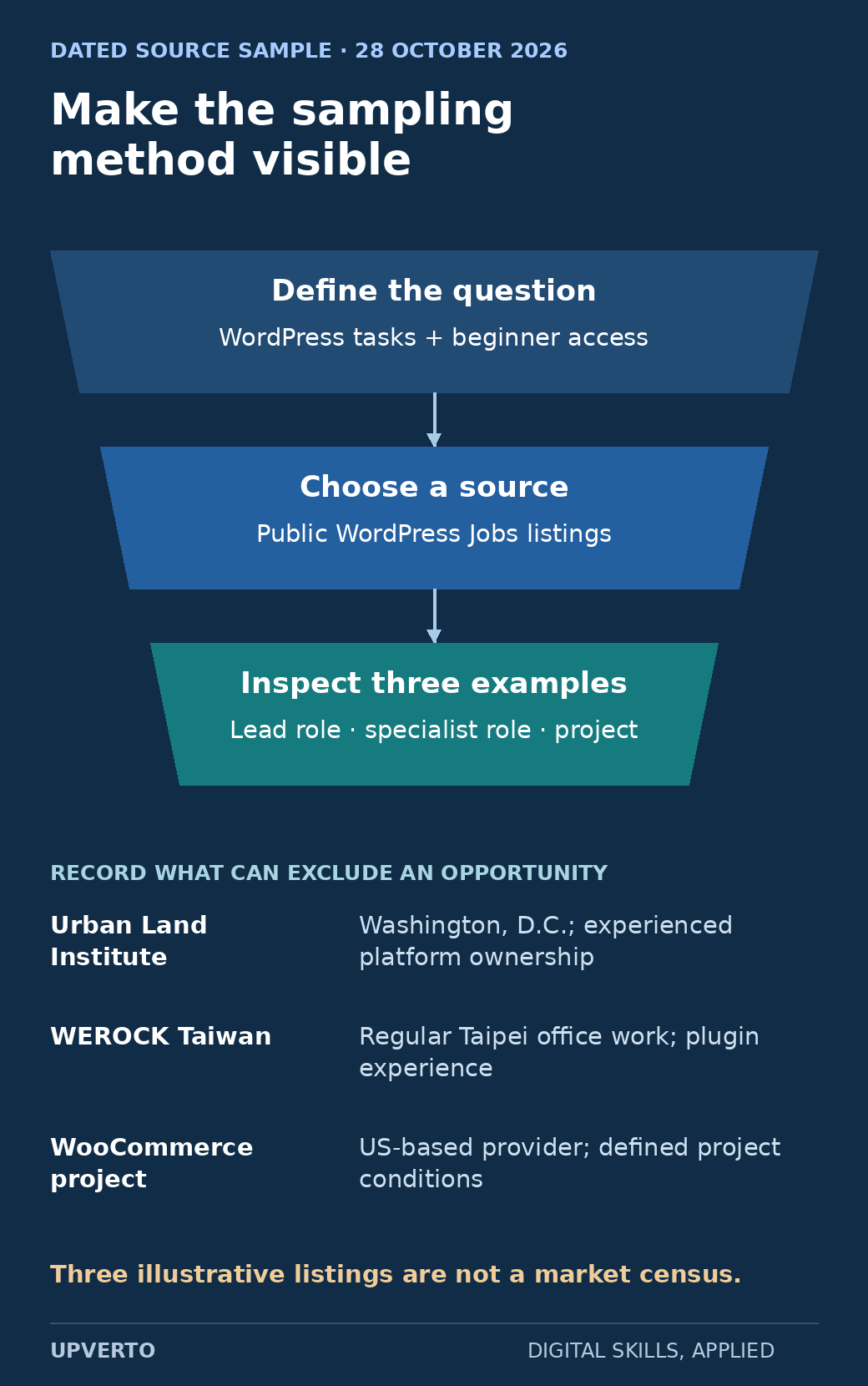
    A narrowing sampling funnel defines a WordPress task question, selects public WordPress Jobs listings and inspects three examples, then records each example’s location or experience boundary.
    Record a transparent demand sample — The observed sample is dated and deliberately small; it teaches the research method rather than measuring the whole market. Use the enlarged view, then swipe or use arrow keys to inspect details. View full-size infographic.
    Read the text version: Record a transparent demand sample

    Observed 28 October 2026: define a question about WordPress tasks and beginner access; use public WordPress Jobs listings; inspect three illustrative examples. Urban Land Institute: Washington, D.C. and experienced platform ownership. WEROCK Taiwan: regular Taipei office work and plugin experience. WooCommerce project: US-based provider and defined project conditions. This is not a random sample or market census. Source links and posting dates are in the article.

    Worked example: three public WordPress listings

    This teaching sample uses three listings reviewed on 28 October 2026, linked from WordPress Jobs. They were chosen to illustrate different responsibility and eligibility boundaries: a leadership role, a specialist employment role and a project. This is a deliberately small teaching sample, not a random sample or a count of all available work.

    Listing and posted dateObserved needConstraint to recordWhat it does not prove
    Urban Land Institute: Lead Web Developer — 19 October 2026Consolidating web properties, integrations, accessibility and ongoing platform responsibilityWashington, D.C.; substantial production and ownership expectationsThat a beginner can qualify after a short course
    WEROCK Technologies Taiwan: WordPress Developer — 11 October 2026Custom plugins, business integrations and maintainable website operationsExperience required; regular Taipei office work, with limited home-working by agreementThat every WordPress role is fully remote or globally accessible
    US WooCommerce developer: new store project — 11 October 2026A digital-download store with security, interface and handover requirementsUS-based provider requested; client prioritises work within an agreed allowanceThat the advertised project was awarded, paid or profitable

    The useful observation is that these listings request specific responsibilities beyond installing a website theme. They mention integration, operations, security, accessibility or ongoing maintenance. That suggests topics to investigate and practise for those kinds of work. It does not establish how common each requirement is across the wider market.

    The examples also show why geography and experience belong in the research log. A relevant technical task may still be inaccessible because of location, work authorisation, schedule or required evidence. Record that limitation rather than counting every matching keyword as a realistic opportunity.

    Separate three kinds of evidence

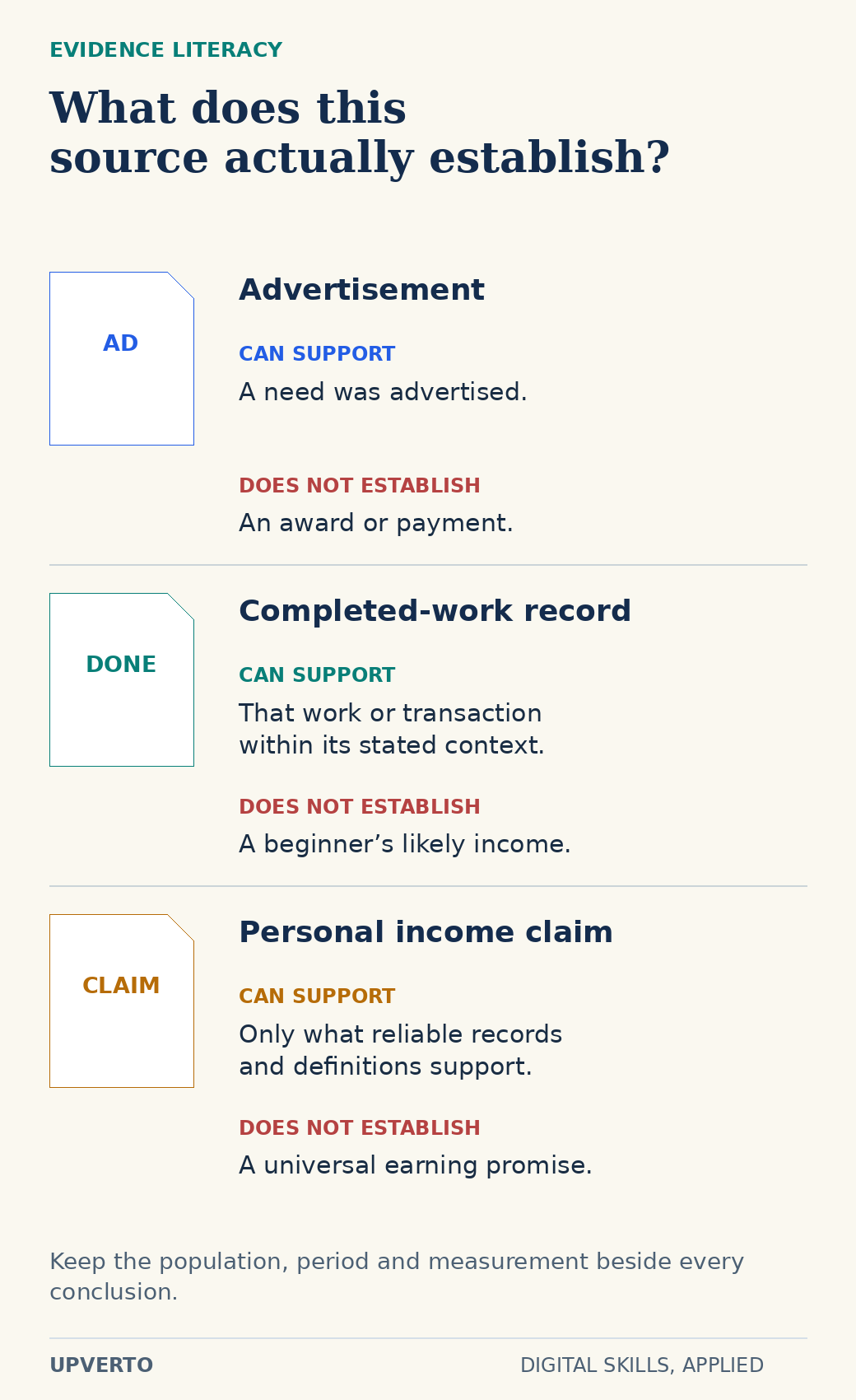
    Three distinct document specimens pair advertisements, completed-work records and personal income claims with the limited conclusions each can support.
    Separate advertised needs from completed work and income claims — An advertised budget is not an earned amount. Every evidence type needs its own context and limits. Use the enlarged view, then swipe or use arrow keys to inspect details. View full-size infographic.
    Read the text version: Separate advertised needs from completed work and income claims
    Advertisement
    Shows a need was advertised; does not establish an award or payment.
    Completed-work record
    May support a specific completed task or transaction in its stated context; does not establish a beginner’s likely income.
    Personal income claim
    Requires reliable records and definitions; does not establish a universal earning promise.

    Record population, period and measurement with each conclusion.

    A job advertisement is evidence of an advertised need at a particular time. It may include a budget or salary range, but that is not proof of a completed engagement or someone’s take-home income. A completed marketplace contract or verified transaction can support a different claim, though its context still matters. A personal earnings claim requires its own reliable evidence and cannot be generalised to beginners.

    Upwork’s 2026 skills report release describes a methodology based on completed jobs and freelancer earnings during 2025, with demand originating in the United States. That source can inform a question about activity within its defined platform sample. It cannot by itself describe all countries, every work route or a new learner’s likelihood of earning.

    Keep the source’s population, period and measurement beside any conclusion. If you cannot explain what a number counts, do not use it to rank a skill. Avoid turning a report headline into a universal claim that one direction is “best.”

    Use this demand-research log

    Create one row per distinct opportunity or evidence item. Include: source URL; observation date; posting date; query and filters; buyer or employer; task; deliverable; tools; experience; location; schedule; stated budget if relevant; evidence type; access constraint; and unanswered questions.

    Add two interpretation fields. First, “What can I reasonably infer?” For the WEROCK example, one inference is that this employer values plugin and integration competence. Second, “What cannot I infer?” You cannot infer that every employer wants the same stack or that the advertised role is available to someone outside its stated conditions.

    • Deduplicate repeated postings before counting a pattern.
    • Distinguish required qualifications from optional preferences.
    • Record the actual work verbs: migrate, reconcile, edit, test, maintain or explain.
    • Mark advertised budgets separately from completed payment evidence.
    • Include listings that reveal a mismatch with your current ability or constraints.
    • Keep missing information as unknown and identify a lawful, appropriate way to investigate it.

    Turn the research into a learning decision

    Look for recurring tasks within the sample, then ask what a small practice project could demonstrate. If several relevant briefs ask for clear handover documentation, include that in your next sample. If the work requires specialised permissions or high-risk operations, recognise the additional learning and supervision needed.

    Use which digital skill should I learn to compare the work itself with your interests and resources. Demand evidence is one input alongside your ability to learn, access to the market and willingness to do the task. A highly visible skill can still be the wrong immediate choice for your situation.

    Your next step is to validate a freelance service idea through a more focused buyer-and-problem test. Research can narrow uncertainty, but it does not guarantee a client. Keep your conclusion modest: “This sample gives me a reason to investigate this task further,” followed by the specific next evidence you need.

    Frequently asked questions

    How many listings do I need to inspect?

    Use enough to see whether your observations repeat across relevant sources, and record the method. There is no universal number that makes a convenience sample representative. The three listings here teach the process and are deliberately insufficient for a market-wide conclusion.

    Does an advertised budget show what freelancers earn?

    No. It describes a stated allowance or offer, not a completed payment, final scope, costs or take-home income. Keep advertised budgets in a separate field and do not convert them into an earnings promise.

    Can I use a platform report to choose a skill?

    Yes, as one source if you understand its population, period and method. Combine it with actual task requirements and your constraints. A platform-specific report does not automatically describe global demand or beginner access.

    Why include geography when the work is online?

    Online work can still have location, legal eligibility, time-zone or language conditions. The real sample includes regular office attendance and a US-based-provider requirement. Those conditions affect whether an opportunity is relevant to you.

    What if all the listings I find require experience?

    Record that result honestly. Investigate smaller responsibilities, adjacent roles or supervised opportunities, and build practice evidence for the relevant tasks. Do not reinterpret senior requirements as proof that a short course guarantees entry.

    When should I repeat the research?

    Recheck before committing substantial time or money, changing your service or applying to a particular opportunity. Keep dated notes so you can distinguish a changed market observation from your earlier assumptions.

  • What Does It Cost to Start Learning and Offering Digital Services?

    What Does It Cost to Start Learning and Offering Digital Services?

    The cost of starting digital services depends on the task, the equipment you can already use and the commitments you choose. A useful budget separates money you must pay now from optional purchases, recurring bills and costs that appear only when you deliver work.

    There is no honest universal startup figure. A learner who already has a suitable computer faces a different decision from someone who needs access, connectivity and assistive equipment. Build the budget around one defined output. The guide to make money online with digital skills explains the broader route; this worksheet helps you inspect its costs without assuming future earnings will cover them.

    In this guide
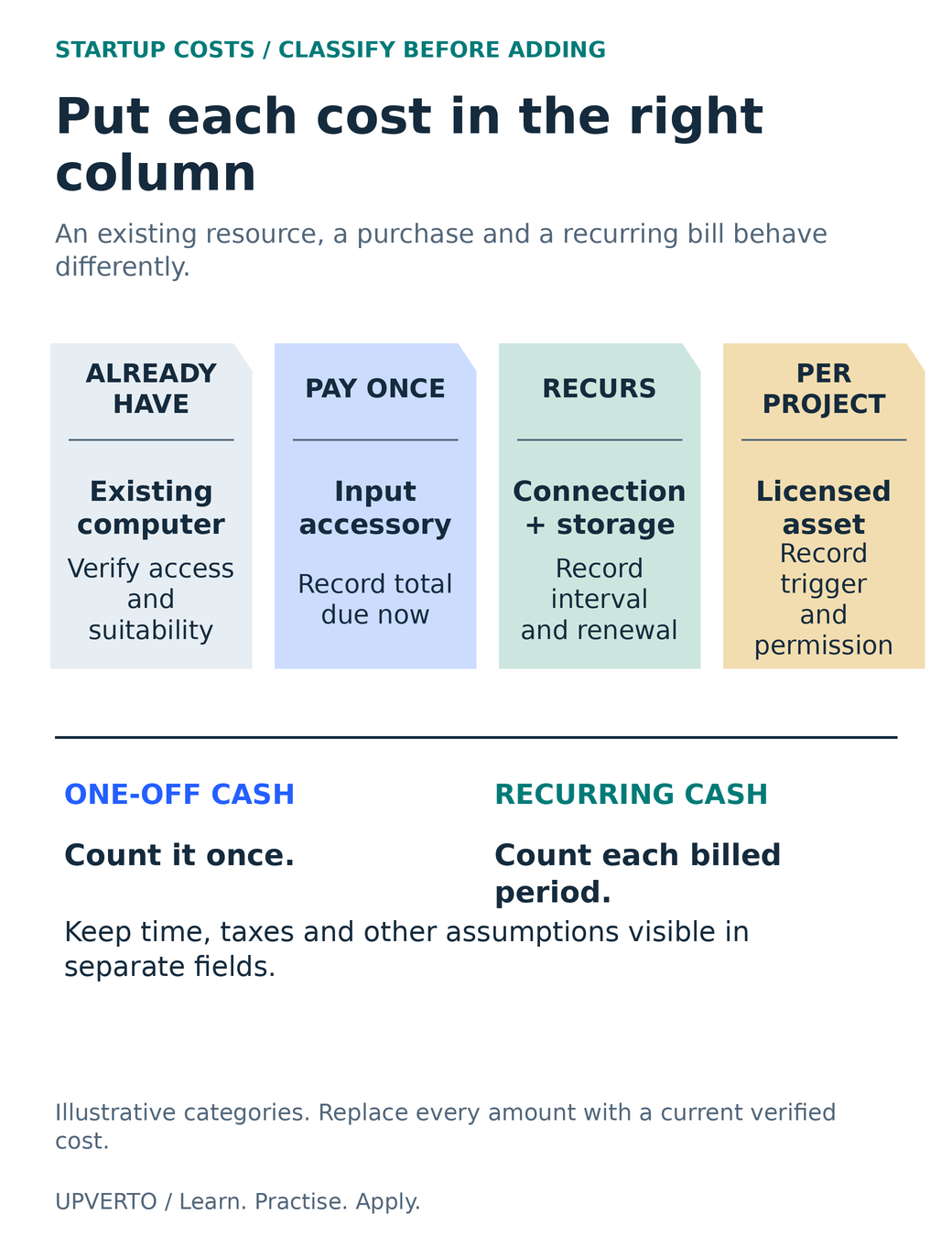
    Four receipt-shaped columns separate existing access, one-off purchases, recurring commitments and costs triggered by a project.
    Classify a cost before calculating it — Four receipt-shaped columns separate existing access, one-off purchases, recurring commitments and costs triggered by a project. Use the enlarged view, then swipe or use arrow keys to inspect details. View full-size infographic.
    Read the text version: Classify a cost before calculating it

    Classify costs before adding them. Existing access: verify that the computer or other resource is usable and permitted. Pay once: record the full amount due now for a necessary purchase. Recurring: record the billing interval and renewal for connection, storage or other commitments. Per project: record what triggers a charge, such as a licensed asset, and the needed permission. Count a one-off purchase once and recurring cash in every billed period. Keep time, taxes and other assumptions visible separately. The categories are illustrative and do not provide local prices.

    Choose the route and output before the shopping list

    A service, a remote job search and a digital product create different cost patterns. A small design service may need an editing tool and a reliable way to send files. A product may also need a storefront, ongoing hosting, customer support and updates. Compare freelancing vs remote jobs vs digital products before treating one person’s setup as your own budget.

    Write a testable output statement: “Create one accessible two-page information document from approved copy, export a readable PDF and provide an agreed editable source.” This tells you what to check: device access, suitable document software, fonts, export, review and storage. It does not automatically justify a premium website, multiple design subscriptions or paid advertising.

    If your intended output is still vague, use existing tools for a practice brief first. A failed export or unsupported source format gives you a concrete purchasing question. A subscription bought because professionals use it gives you a bill without establishing a requirement.

    Separate four kinds of cost

    CategoryExamples to investigateQuestion
    Existing accessDevice, connection, workspace and permitted shared equipmentCan I reliably use it for this task?
    One-off cashNecessary equipment, repair, adapter or initial setupWhat is due now, including delivery and applicable charges?
    Recurring commitmentSoftware, hosting, storage, connectivity or supportWhen does it renew and how do I cancel?
    Per-project or transaction costLicensed assets, specialist review, platform or payment chargesWhat event triggers the cost, and who agrees to it?

    Keep your time in a separate planning column. Unpaid practice, administration and client acquisition still consume capacity even when they do not appear as a cash charge. Do not label your cash total “profit” or assume every available hour can be billed.

    For a device decision, first use learn digital skills phone or computer. Hardware should match the application and the actual project. Add backup and replacement planning where relevant; a zero purchase price for an existing device does not make failure impossible.

    Check what free actually includes

    On the official pages checked on 27 October 2026, LibreOffice can be downloaded and used in business without a licence fee, and Blender is free software. That establishes a zero software-licence charge for those stated uses; it does not make hardware, training, third-party assets, storage or support free.

    A free plan, a free trial and open-source software are different arrangements. A trial can expire or begin billing. A hosted free plan may restrict export, collaboration, storage or commercial features. Open-source software has licence terms too, and assets distributed beside it can have separate permissions. Read the actual terms for the output you intend to deliver.

    When comparing paid tools, write the current currency, billing interval, taxes shown, renewal rate, cancellation terms and features you need. A monthly price advertised for an annual commitment is not necessarily a month-to-month arrangement. Leave a line marked “unverified” instead of inventing a local price from a search snippet.

    Worked example: a deliberately small practice budget

    Fictional planning example, in USD: Mina wants to practise formatting a two-page information sheet. She already has permitted access to a suitable computer and an internet connection. The figures below are invented arithmetic inputs, not market quotes, recommendations or a prediction of earning. Local taxes, exchange charges and circumstances must be checked separately.

    ItemDue oncePer monthAssumption
    Existing computer$0 additional now$0 additional nowNo new purchase for this exercise
    Necessary input accessory$18$0Invented cost after a device trial
    Additional connectivity allowance$0$12Invented incremental amount
    Backup/storage allowance$0$4Invented planning amount, no provider named
    LibreOffice licence$0$0Official no-licence-fee option; suitability still tested
    Optional premium subscription$0$0Deferred; no demonstrated requirement

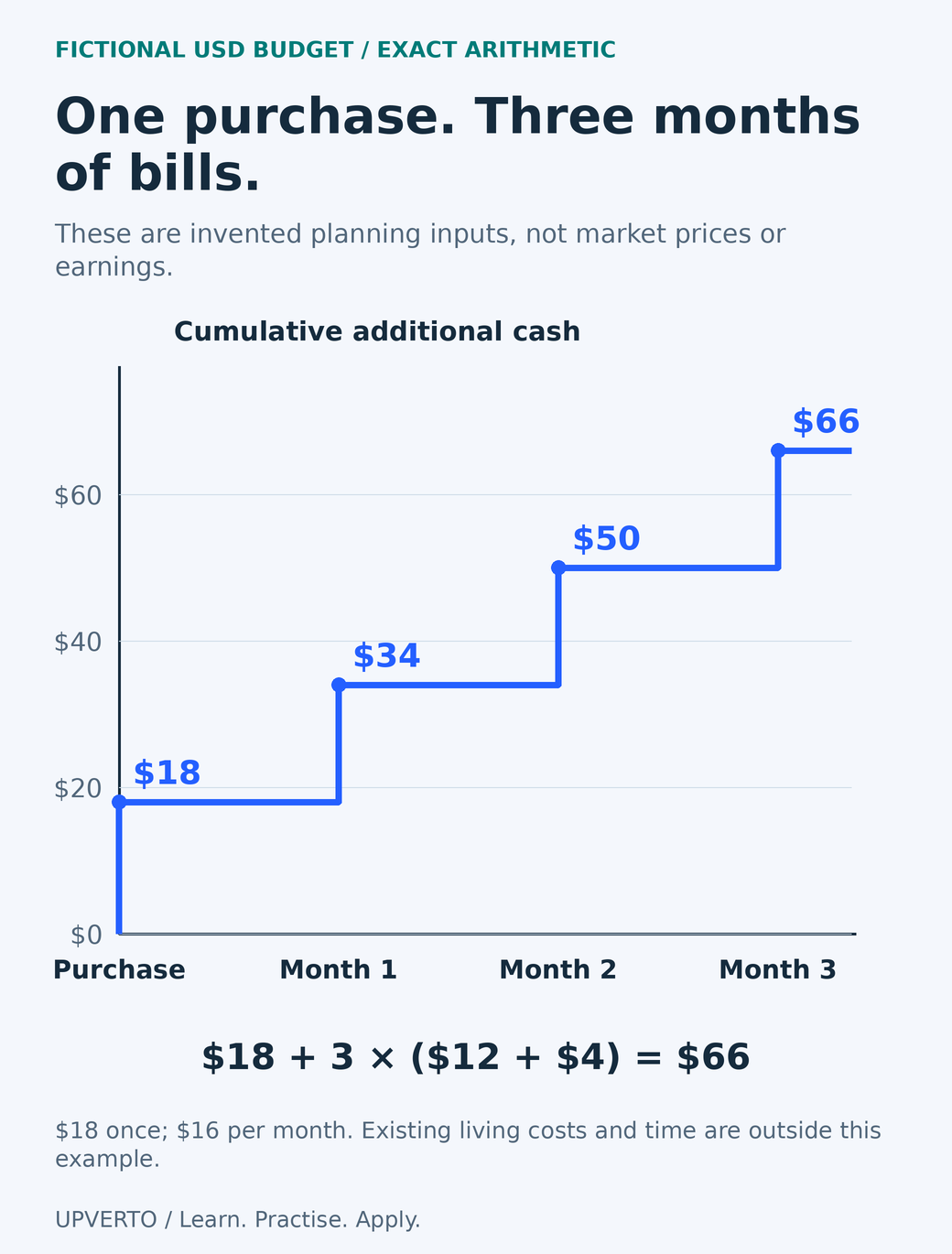
    The first-month additional cash is 18 + 12 + 4 = $34. Recurring additional cash is 12 + 4 = $16 per month. With the same assumptions over three months, 18 + (3 × 16) = $66. The $18 item is counted once, not again every month. Existing living costs and the learner’s time are outside this narrow calculation, so $66 is not her complete cost of living or a business profitability estimate.

    A labelled step chart shows an $18 fictional purchase followed by $16 monthly increments, reaching $34, $50 and $66.
    Check a three-month startup-cost calculation — A labelled step chart shows an $18 fictional purchase followed by $16 monthly increments, reaching $34, $50 and $66. Use the enlarged view, then swipe or use arrow keys to inspect details. View full-size infographic.
    Read the text version: Check a three-month startup-cost calculation

    All amounts are fictional USD arithmetic inputs, not quotes, recommendations or earnings. A necessary accessory costs $18 once. Additional connection and storage allowances are $12 plus $4, or $16 per month. Cumulative additional cash is $18 at purchase, $34 after month one, $50 after month two and $66 after month three. The three-month calculation is 18 + 3 × (12 + 4) = 66. Existing living costs and the learner’s time are outside this narrow example. Count the purchase once rather than adding it every month.

    Mina’s next decision is to test the document export and backup. If the free tool produces the required files, a paid subscription remains optional. If the real recipient later needs a different format, she investigates that requirement before quoting a delivery commitment.

    Copy this worksheet and make the assumptions visible

    FieldYour entry
    One task and required outputWrite quantity, format, recipient and checking method.
    Existing accessList what you may use and any access restrictions.
    Necessary one-off itemsRecord actual quote, currency, date and total due.
    Recurring itemsRecord charge, billing interval, renewal date and cancellation route.
    Per-project chargesRecord trigger, estimate and whether the client must approve it.
    Optional purchasesWrite the observed problem that would justify each purchase.
    Review pointSet a date to remove unused commitments and check assumptions.

    You can copy the table into a document or spreadsheet and add one row per item. Convert currencies only with a named rate and date, and keep any conversion or withdrawal charge separate. Where taxes, registrations or insurance may apply, obtain information for your jurisdiction rather than using a universal percentage.

    Set a spending limit you can afford without relying on an unconfirmed client. Revisit costs after a complete practice project and before starting a recurring service. When choosing learning material, compare free resources vs paid courses against the specific help you need, including the quality of practice, feedback and access.

    Frequently asked questions

    Can I start learning without buying software?

    Often you can use a free application or an existing permitted licence for a small practice task. Check whether it produces the needed format and whether its terms fit your use. Free software does not remove equipment, connection, asset or delivery responsibilities.

    Should I include the full cost of my existing computer?

    For a cash-startup worksheet, show what you must pay now and identify existing access separately. Replacement planning and business accounting are different calculations. If you need an accounting treatment or tax deduction, check local requirements with an appropriate professional.

    How do I compare monthly and annual subscriptions?

    Record the total commitment, billing schedule, renewal amount and cancellation terms. Divide an annual cost by twelve only to compare it; do not confuse that average with the cash due or assume you can cancel without further payment.

    Is the fictional $34 first month enough for me?

    It is only the total of the example inputs. It assumes existing device access and uses invented incremental costs. Replace every assumption with your own verified information. It is not a recommended budget or a statement about prices in your location.

    Should I pay for a portfolio website immediately?

    Only if it solves an access or presentation need you have identified. A suitable existing profile or document may let someone inspect your early work. Domain, hosting, maintenance and accessibility work should be considered together when deciding whether to build a site.

    When is a paid tool worth adding?

    When a verified requirement or repeated problem justifies the cost and you can sustain the commitment. Test the needed feature and export before subscribing. A tool purchase is not evidence that demand exists or that you are ready to promise the service.

    Sources and review notes

    Primary sources checked on 27 October 2026 (UTC). Check the current provider pages before relying on a changing feature, policy or price. Worked examples and worksheets are original teaching material; fictional examples are not evidence of client results.
  • How to Recognise Online Work Scams and Unrealistic Income Claims

    How to Recognise Online Work Scams and Unrealistic Income Claims

    A credible online-work opportunity should survive ordinary questions about who is involved, what work is required and how payment works. Pressure to pay first, reveal credentials or trust an impressive earnings screenshot is a reason to stop and verify.

    No checklist can establish that every offer is safe. Warning signs describe risk, and an unverified detail is not proof that a named person committed fraud. This guide gives you a way to preserve evidence, check claims independently and decline requests you cannot justify. It supports the broader path to make money online with digital skills without treating a promise of income as a substitute for real work.

    In this guide
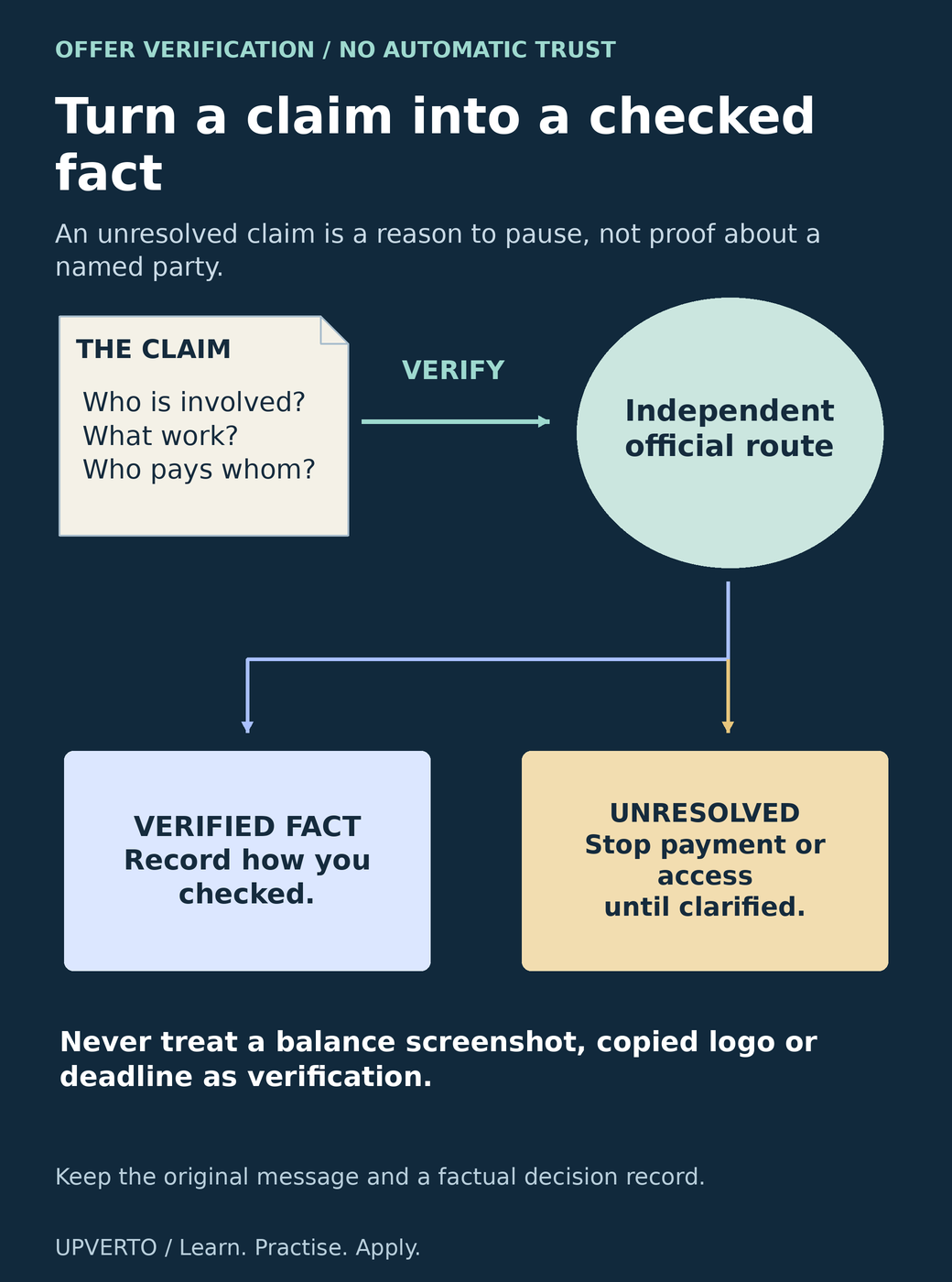
    An offer document leads through an independent official verification route and branches into a recorded fact or an unresolved claim requiring a pause.
    Separate a claim from verified evidence — An offer document leads through an independent official verification route and branches into a recorded fact or an unresolved claim requiring a pause. Use the enlarged view, then swipe or use arrow keys to inspect details. View full-size infographic.
    Read the text version: Separate a claim from verified evidence

    Inspect the claim: who is involved, what work is required and who pays whom? Verify through an independent official route, not only a link or number supplied in the message. If a fact is confirmed, record how you checked it. If the claim remains unresolved, pause payment or access until it is clarified. A balance screenshot, copied logo or urgent deadline is not independent verification. Preserve the original message and a factual decision record. An unresolved claim is not by itself proof of wrongdoing by a named person or organisation.

    Separate the work offer from the income story

    Ask what the buyer needs, what you would deliver and why they would pay for it. “Review ten product records against a supplied checklist” describes a task you can question. “Complete easy clicks and unlock your daily earnings” may describe a balance on a screen without explaining a legitimate buyer or a withdrawable payment.

    An earnings claim needs context: the period, gross revenue versus costs, whether money was received, whose activity it describes and whether the result is typical. A screenshot alone cannot establish those facts. Testimonials may be unverifiable, selectively chosen or unrelated to the work being sold. Do not convert an exceptional story into a personal forecast.

    The US Federal Trade Commission’s job-scam guidance describes false job offers, upfront payments and fake-check schemes. Its guidance is a primary source for these patterns, not a legal finding about every offer you encounter. If you are still establishing your first capability, start online work with no experience provides a practical preparation route that does not depend on a guaranteed job.

    Check identity, task, money flow and access

    AreaAsk or inspectReason to pause
    IdentityCan you verify the organisation and contact through a route you found independently?A display name, copied logo or supplied link is the only evidence.
    TaskAre the inputs, deliverables, review and decision-maker understandable?The task remains vague while urgency increases.
    Money flowWho pays whom, for what, through which agreed process?You must deposit money to unlock supposedly earned funds.
    AccessWhat information or permissions are genuinely necessary?Someone asks for a password, one-time code or unrelated remote access.
    ClaimsWhat evidence supports the promised income or result?A dramatic screenshot replaces an explanation of work and costs.

    Type an organisation’s known address yourself or find its official contact independently. Do not use the suspicious message’s phone number as the only way to verify that message. A genuine organisation can also be impersonated; the existence of the business does not authenticate the person contacting you.

    Keep identity checks proportionate. Do not request another person’s sensitive documents as an improvised verification system. If a platform requires your own verification, open its official account flow directly and follow the provider’s guidance rather than sending documents to someone in a chat.

    Understand the difference between a disclosed cost and paying to unlock work

    Some legitimate services have publicly documented charges, such as a software subscription or a marketplace’s proposal tokens. An unexpected recruiter directing you to a private payment account is a different situation. Check any claimed fee on the provider’s own official page and inside the account you opened independently.

    The FTC’s task-scam alert warns about requests to deposit money in order to receive supposed earnings. Do not send more money because a balance appears to grow or because a previous small payment arrived. That does not establish that a later withdrawal request is legitimate.

    Be equally cautious with an “overpayment” followed by an instruction to forward money elsewhere. A payment appearing in an account is not the same as an irreversible final settlement. Stop, contact the payment provider through its official channel and avoid becoming an intermediary for unexplained transfers.

    Assess the work separately from the sales pitch. Use check demand for digital skills to look for actual buyer tasks and requirements instead of treating the seller of a course or opportunity as the only evidence that demand exists.

    Worked example: an offer with an unexplained release fee

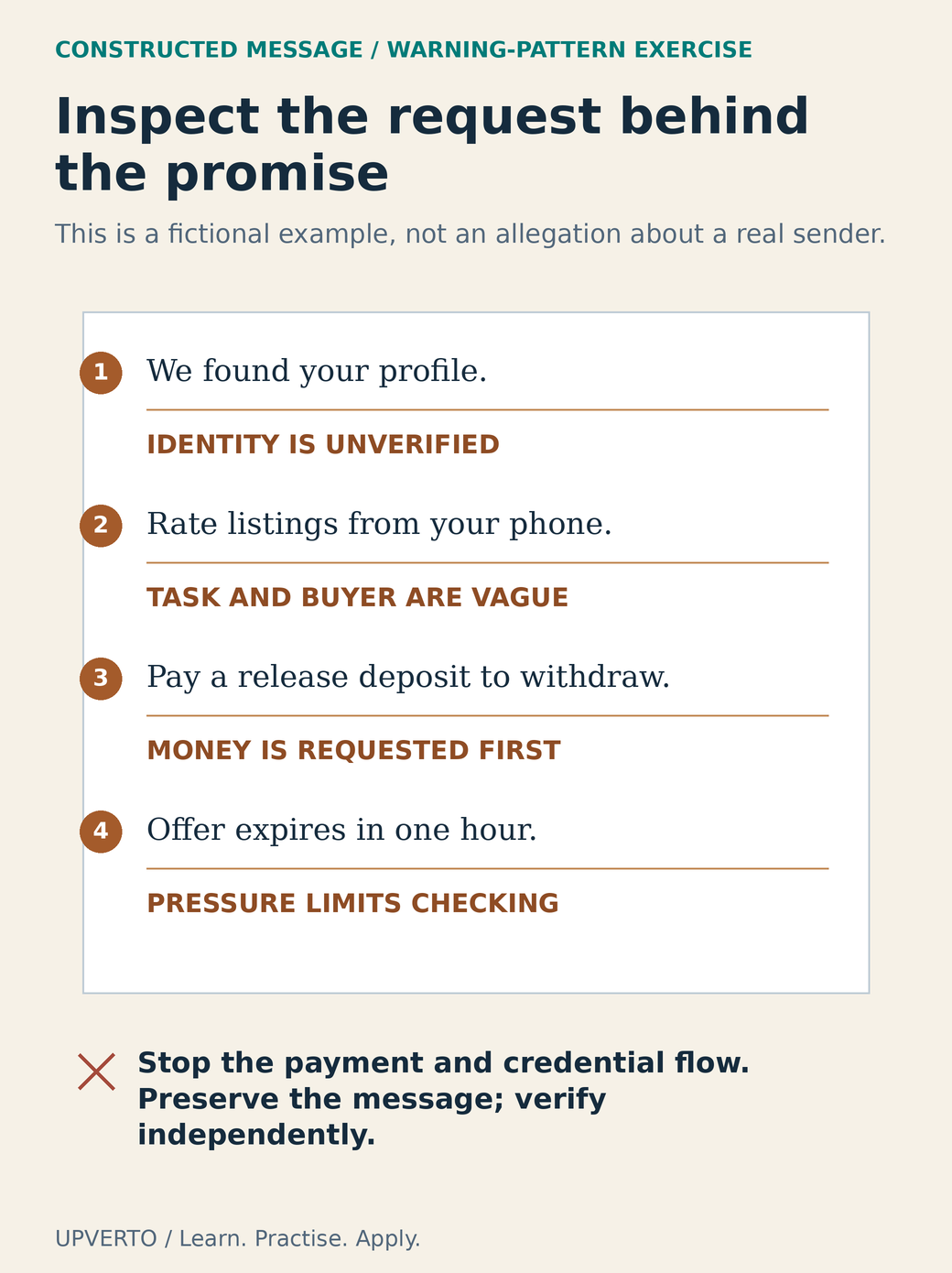
    Fictional message: “We found your profile. Rate listings from your phone today. Your account already shows a bonus. Send a refundable release deposit to withdraw it. Offer expires in one hour.” This is an invented teaching example; it does not identify a real organisation.

    Break it into claims. The message says the sender knows your profile, but gives no verifiable reason they selected you. It names a generic activity without explaining the real buyer or approved purpose. It displays a balance, but offers no reliable evidence of payment. It introduces a deposit and a deadline precisely when you ask to receive money.

    The decision is to stop the payment and credential flow, preserve the message and inspect the claimed provider independently. You do not need to prove criminal intent before declining an arrangement you cannot verify. Do not continue the conversation merely to catch the sender or test how far they will go.

    A fictional message is marked for unverified identity, a vague task, a deposit-to-withdraw request and an urgent deadline.
    Annotate a fictional release-deposit offer — A fictional message is marked for unverified identity, a vague task, a deposit-to-withdraw request and an urgent deadline. Use the enlarged view, then swipe or use arrow keys to inspect details. View full-size infographic.
    Read the text version: Annotate a fictional release-deposit offer

    Constructed teaching message: “We found your profile. Rate listings from your phone. Pay a release deposit to withdraw. Offer expires in one hour.” The annotations identify four issues: identity is unverified; the task and real buyer remain vague; money is requested before supposed earnings are released; urgency discourages checking. Stop the payment and credential flow, preserve the message and verify independently. The example does not identify a real sender and is not a legal finding. A warning pattern is sufficient to pause an arrangement you cannot justify.

    A contrasting fictional enquiry asks for two information-sheet layouts from supplied approved copy. It names the requester, provides a brief and proposes discussing scope through the original channel. That is more inspectable, but still requires identity checks, a suitable agreement, realistic payment arrangements and review of the supplied files. Clear wording is useful evidence, not a guarantee.

    Keep a verification record and act on what you know

    RecordEntry to make
    Original offerDate, channel, sender identifier and the exact requested action
    Independent checkOfficial address or contact route you found yourself
    Verified factsWhat you actually confirmed and how
    Unresolved claimsIdentity, task, fee or income claims still unsupported
    DecisionDecline, report, ask a limited question or continue due diligence

    If you already shared credentials, use the genuine service’s recovery process, change affected passwords and review account access. If you paid, contact the payment provider promptly through an official route and preserve transaction details. Reporting options depend on your location and the service involved; use relevant consumer-protection or law-enforcement channels. Be wary of a new stranger promising guaranteed recovery for another upfront fee.

    Keep reports factual. State what was requested and provide the evidence you hold, without adding accusations you cannot support. When you are ready to choose a legitimate acquisition route, compare freelance marketplaces vs direct clients and learn the rules of the channel you actually use.

    Frequently asked questions

    Does an unexpected work message automatically mean a scam?

    No. An unexpected message is a reason to check context and identity, especially when it includes urgency or a payment request. Verify the sender independently and inspect the actual task. Do not assume that a familiar logo or professional-looking account authenticates the person.

    Are all platform charges a warning sign?

    A documented charge inside an official platform flow is different from a private request to pay someone to release earnings or secure a job. Verify the charge on the provider’s own current documentation and account screen. Do not follow a stranger’s payment link as your only source.

    Can I trust an earnings screenshot?

    Treat it as an unverified claim unless the underlying facts can be established. It may omit costs, time, failed attempts or whether the funds were received. Even a genuine result for someone else does not establish what you will earn.

    What if the sender paid me a small amount first?

    A small initial payment does not validate later requests. Review each new action, especially deposits, refunds to another account or requests for credentials. You do not have to continue because you have already invested time or received a small transfer.

    How should I handle a request for identity documents?

    Use only the official verification process of a service you have independently identified and chosen to use. Check why the information is required and how it is handled. Do not send identity documents, passwords or one-time codes to an unverified recruiter in a message.

    Should I publicly name a suspicious sender?

    Preserve the evidence and use the relevant reporting route. Describe verified facts accurately. A warning sign or unresolved identity does not by itself prove wrongdoing by the person or organisation whose name appears in the message; impersonation is possible.

    Sources and review notes

    Primary sources checked on 27 October 2026 (UTC). Check the current provider pages before relying on a changing feature, policy or price. Worked examples and worksheets are original teaching material; fictional examples are not evidence of client results.

  • How to Make Money Online with Digital Skills: A Beginner’s Roadmap

    How to Make Money Online with Digital Skills: A Beginner’s Roadmap

    To make money online with a digital skill, learn to complete a useful piece of work, build evidence that you can do it, and connect with people who need that work. The internet helps you find opportunities and deliver results. The value comes from the problem you can solve.

    You might edit a creator’s videos, organise a business owner’s records, improve a website, or design clear marketing materials. Each path requires a different skill. All of them also require practice, communication, and reliable delivery. This guide explains the whole journey and helps you choose a practical starting point.

    In this guide
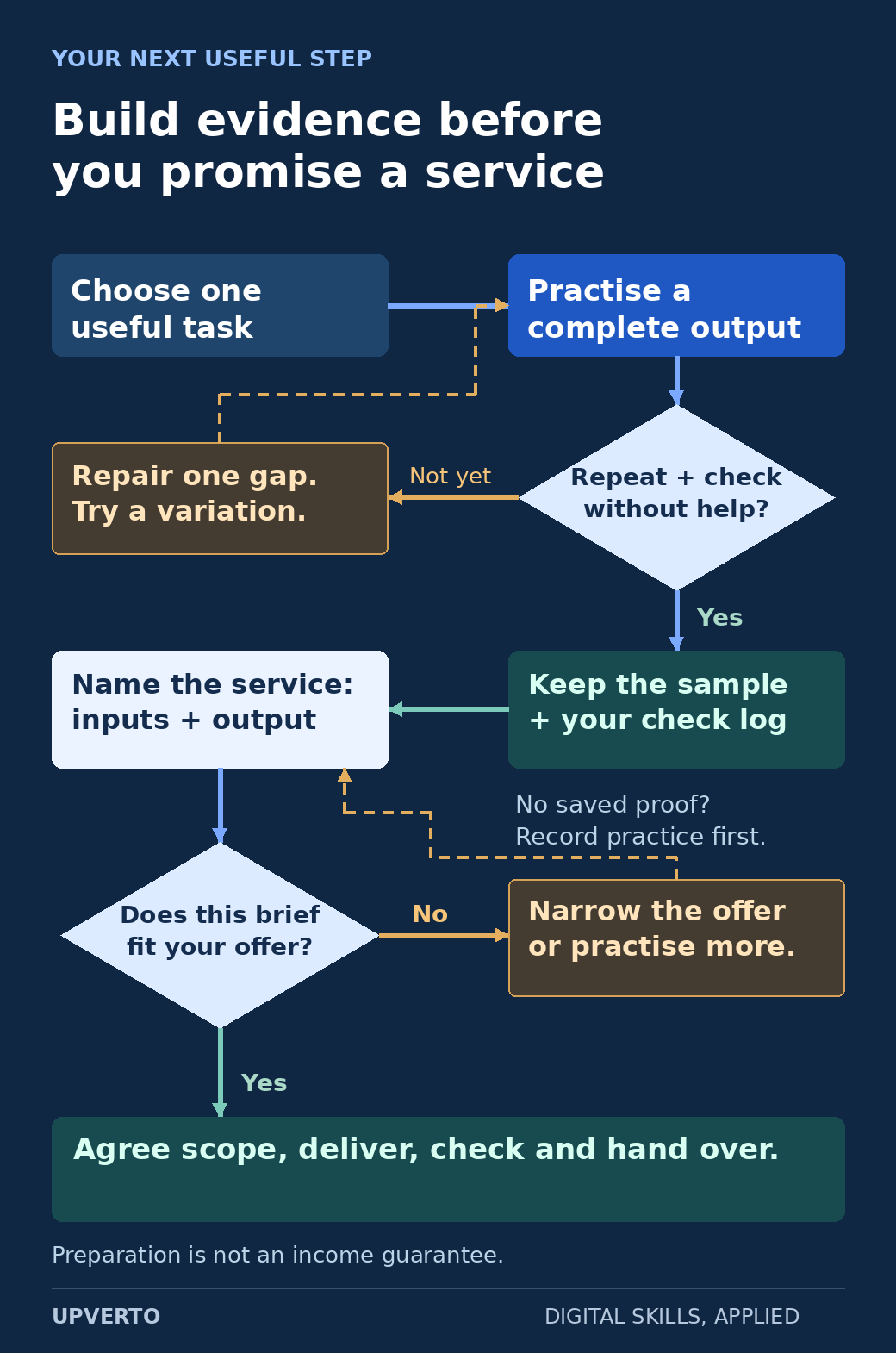
    A branching route connects a defined practice task to repeatable checks, a saved sample, a bounded service and a client brief; unfinished ability or a mismatched brief leads back to improvement.
    Find the next useful step — Use the decision points to identify what to improve before promising a particular piece of work. Use the enlarged view, then swipe or use arrow keys to inspect details. View full-size infographic.
    Read the text version: Find the next useful step
    1. Choose one useful task and practise a complete output.
    2. Ask whether you can repeat the task and check the result. If not, repair one specific gap and try a variation.
    3. Keep the practice sample and a record of your checks. If you have no saved evidence, document the practice before making claims.
    4. Define the service through its required inputs and finished output.
    5. Compare a potential client brief with that service. If it does not fit, narrow the offer or practise further rather than accepting unsupported responsibility.
    6. For work that fits your demonstrated ability, agree the scope, deliver it, check it and hand it over.

    The route describes preparation and delivery. It does not promise an income or a timetable for finding clients.

    Practical summary
    Your route from learning to useful work
    1. Choose: a skill and a type of problem you want to solve.
    2. Practise: complete a small task with clear requirements.
    3. Prove: show your work and explain your decisions.
    4. Offer: define what a client will receive.
    5. Connect: find relevant opportunities and discuss the brief.
    6. Deliver: check the work, hand it over, and learn from feedback.

    Understand the different ways digital skills can earn income

    Start by choosing a route to investigate. You do not need to pursue every option at once.

    RouteWhat you provideWhat you need to prepare
    Freelance servicesA defined piece of work for a client, such as an edited video or a website update.Relevant ability, work samples, a clear scope, and a way to manage client projects.
    Remote employmentOngoing work within an employer’s role and team.The skills and evidence required by the particular role, plus an application and interview process.
    Digital productsA reusable item, such as an original template or software product.A useful product, rights to its contents, a way to reach buyers, and arrangements for support.
    Content-led businessUseful content that develops an audience and supports a defined business model.Subject knowledge, consistent production, distribution, and the requirements of the chosen revenue method.

    These routes can overlap, but they are different businesses. Selling services does not require building a large public audience first. Selling a reusable product still requires finding customers. A remote job may have location, working-hours, or eligibility requirements even when the work happens online.

    This roadmap concentrates on skills and client services because that gives you a concrete sequence to practise. The same portfolio and communication work may also support an employment application, provided it matches the role.

    Choose a skill by examining the actual work

    Imagine a normal working session, including its less exciting parts. A video editor may spend time organising footage and correcting captions. A designer may revise spacing and prepare exports. A virtual assistant may check a spreadsheet for missing details. A website specialist may reproduce a problem before changing anything.

    Choose work you are willing to practise, check, and improve. Our digital-skill selection guide compares different families and includes small trial tasks. For a closer look, explore graphic design, video editing, SEO, virtual assistance, or WordPress services. These are examples of possible directions, not a ranking of guaranteed earners.

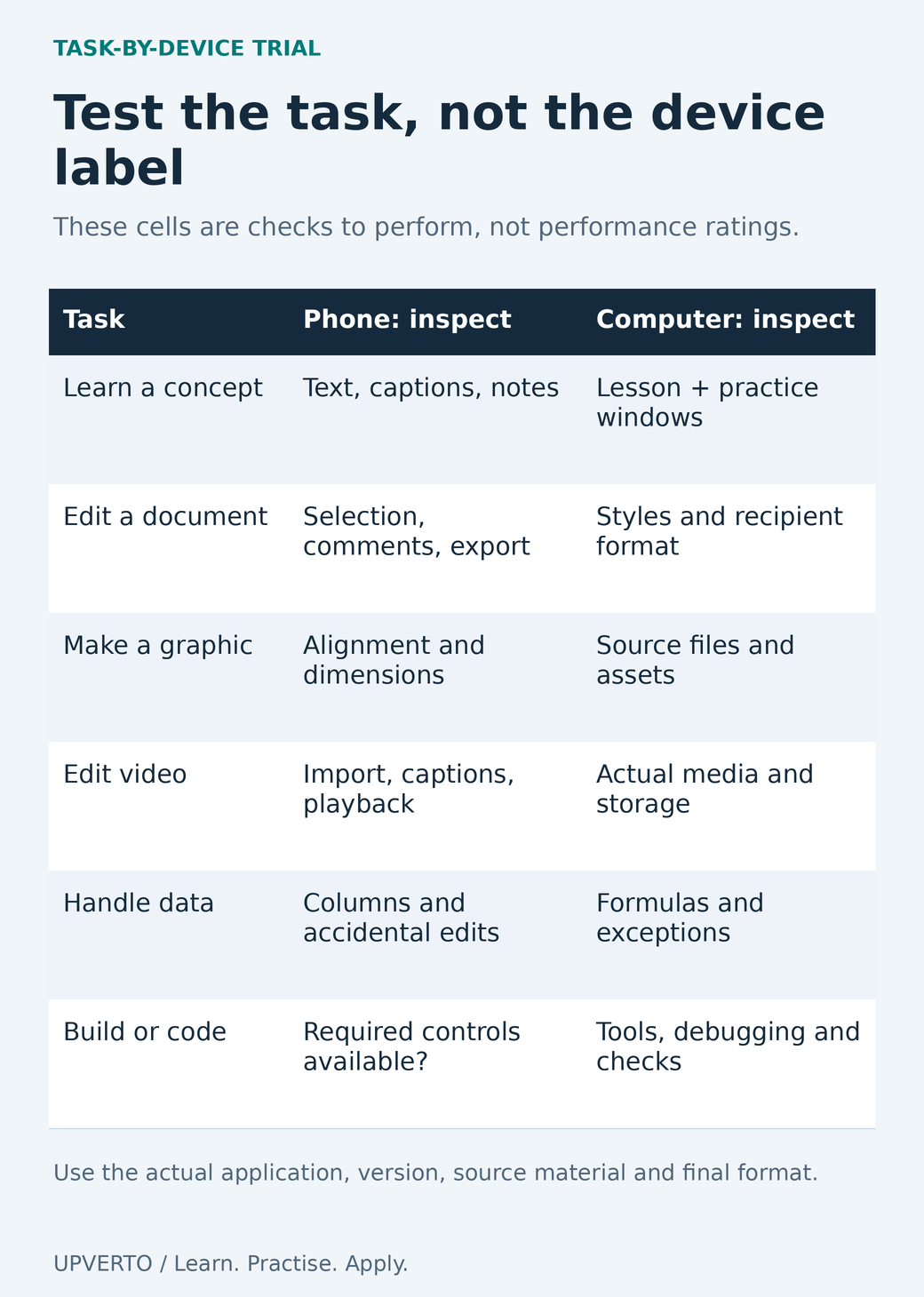
    Write down your current equipment, available study time, confidence with files and documents, and the kinds of tasks you enjoy. If you only have a phone, test whether your intended workflow can be completed on it before buying training or promising a service. Reading lessons on a phone and producing a complete client deliverable are separate questions.

    Learn the foundations and practise a defined task

    A useful first learning objective describes something you can produce. “Learn design” is broad. “Create a readable event announcement with a clear date, location, and booking instruction” gives you a task to complete and inspect.

    Identify the prerequisites: managing files, using the relevant application, understanding the brief, and recognising a correct result. Follow a worked example, explain what you did, then change the requirements and attempt the task again. Use the practical learning guide to build this sequence.

    Keep a small record of mistakes and fixes. If an exported video has missing audio, investigate the export settings and check the next export. If a layout becomes unreadable at a smaller size, revise it and compare the result. These records will help you see which tasks you can complete reliably.

    A course can organise the learning, but you still need to perform the work. Before enrolling anywhere, examine the prerequisites, practice tasks, actual course scope, and support that is explicitly included. Choose training that addresses your next learning gap.

    Build evidence before presenting yourself to clients

    You can create useful samples before anyone hires you. Write a fictional brief, use material you own or have permission to use, and complete the work against the brief. Label it as a practice or concept project wherever you show it.

    A convincing sample explains the problem, the intended audience, your decisions, the finished deliverable, and the checks you performed. A screenshot can show appearance. It cannot prove that a form works, a spreadsheet formula is correct, or a client earned more revenue.

    Use the portfolio guide for people without clients to organise your evidence. If you are unsure what to build, choose a portfolio project that matches the service you want to offer. Avoid copying another person’s project and presenting the result as independent work.

    Turn a skill into something a client can understand

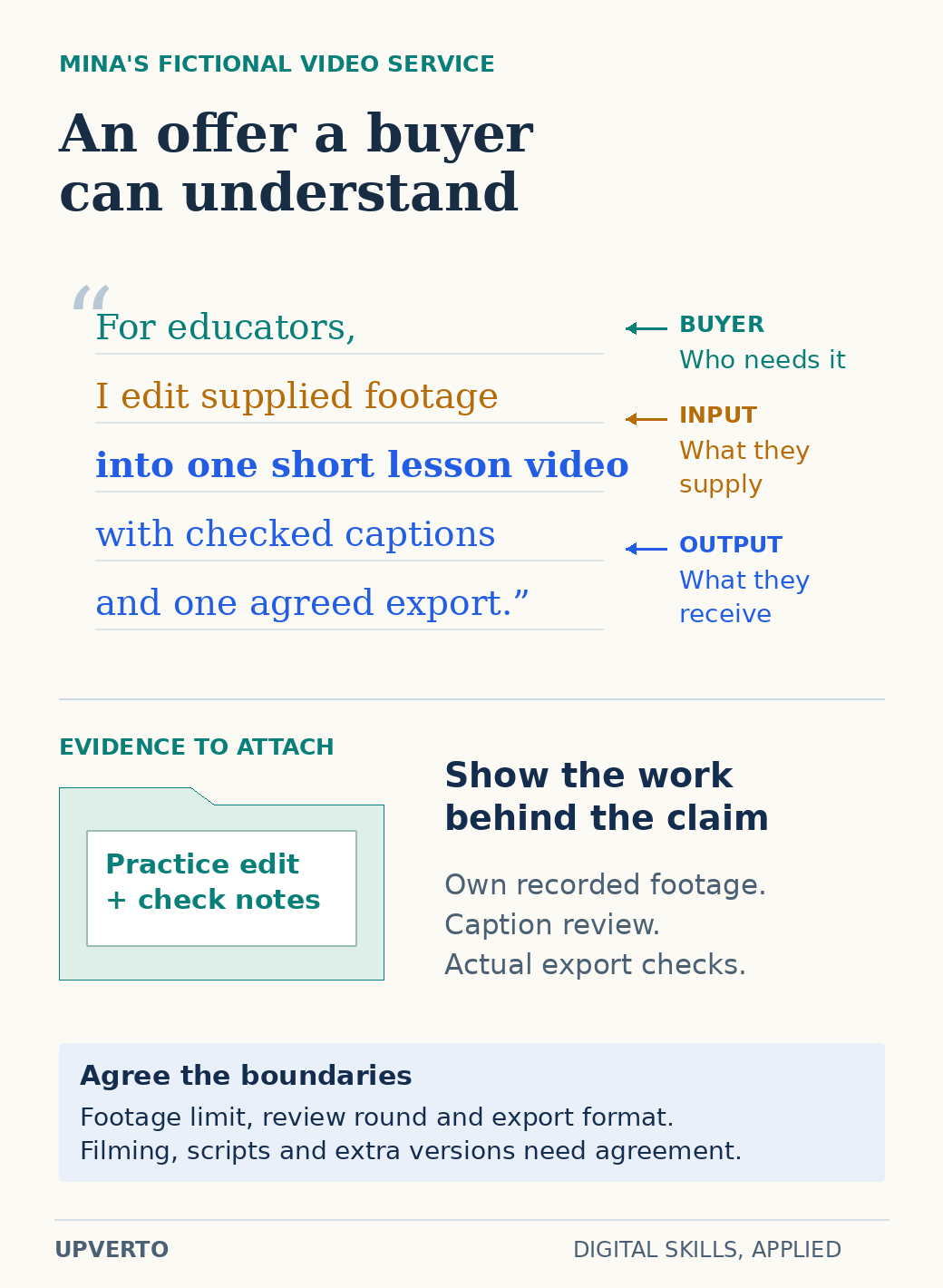
    A client needs to know what you can complete for them. “I use editing software” describes a tool. “I edit a supplied interview into one short video with checked captions and an agreed export format” describes a deliverable.

    Teaching example: Mina is a fictional beginner who wants to edit short educational videos. She first practises with footage she records herself. Her sample brief asks for a concise explanation, intelligible speech, accurate captions, and a clear ending. She keeps the original recording, the edit, and notes explaining what she changed.

    After she can repeat that task independently, she defines a small service: one agreed edit from a limited amount of client-supplied footage, one review round, and a named export. Filming, scriptwriting, new graphics, and extra versions are separate unless included. This is a planning example, not a report of earnings or a recommendation that every beginner sell the same package.

    Follow the guide to turning a digital skill into a service, then use the service-package worksheet to define inputs, outputs, boundaries, and acceptance checks.

    An annotated fictional video-editing offer identifies educators as the buyer, supplied footage as the input, a short captioned lesson video as the output, and a practice edit with check notes as evidence.
    Read the anatomy of a useful offer — Mina’s fictional example turns a broad editing skill into an offer with identifiable inputs, output, proof and boundaries. Use the enlarged view, then swipe or use arrow keys to inspect details. View full-size infographic.
    Read the text version: Read the anatomy of a useful offer

    Fictional offer: “For educators, I edit supplied footage into one short lesson video with checked captions and one agreed export.”

    • Buyer: educators who need a lesson video.
    • Input: footage the client supplies.
    • Deliverable: one short lesson video, checked captions and an agreed export.
    • Evidence: Mina’s own practice edit, caption-review notes and checks of the actual export. These support a claim about the task she completed, not earnings or client results.
    • Boundaries to agree: the footage limit, review round and export format. Filming, scriptwriting and extra versions are separate unless expressly included.

    Look for relevant opportunities

    Study real requests for the kind of work you can perform. Record the task, expected output, required experience, supplied materials, and questions you would need to ask. A request for an experienced specialist is useful market information even when you are not ready to apply.

    Possible channels include people you already know, professional communities, agencies that need support, direct business enquiries, and freelance marketplaces. Choose a manageable channel and learn its rules. A profile alone does not establish demand for your particular offer.

    When you contact a potential client, connect their actual problem to one relevant sample and a clear next question. Do not invent a problem you have not verified or claim results you cannot support. Our client-finding guide explains how to prepare, qualify opportunities, and keep track of conversations.

    Accept work you can deliver and manage it clearly

    Before agreeing to a project, confirm the deliverables, client inputs, permissions, review process, timing assumptions, and commercial arrangements. If the task involves sensitive data or a business-critical system, the responsibility may be greater than the visible editing task suggests.

    Use the readiness checklist to examine your ability to execute, check, troubleshoot, communicate, and hand over this specific task. You may be ready for a narrow service while still learning more advanced work.

    Once work begins, keep a clear brief and version history, raise missing information early, and review the finished output against agreed requirements. The project-management guide covers the route from brief to handover. Later, the sustainable-growth guide helps you review capacity, repeat work, and the improvements your business needs.

    Keep costs and opportunity claims in perspective

    Make a small starting budget for equipment you actually need, connectivity, software, learning, and any channel costs. Check current official prices and eligibility before committing. Avoid buying a collection of tools simply because someone includes them in a recommended setup.

    Income depends on factors such as your ability, the work available, how you reach buyers, and whether projects are completed and paid. This guide cannot predict when you will earn or how much. If you need immediate income, treat learning as a separate project with uncertain timing rather than relying on it to meet an imminent bill.

    The US Federal Trade Commission’s job-scam guidance describes fake jobs that request money or use fraudulent cheques. Verify an unfamiliar opportunity independently, especially if someone asks you to pay to release earnings or forward part of a payment to another person.

    Your starting-point worksheet

    DecisionWrite your answer
    My current stageExploring / learning / building evidence / preparing an offer / finding clients / delivering.
    One skill to investigateName the skill and a specific task you want to try.
    My constraintsAvailable equipment, realistic study sessions, budget, and access needs.
    My first practice outputDescribe a finished item and how you will check it.
    My evidenceKeep the brief, your work, checks, and explanation of decisions.
    My next actionChoose one small step that moves your present stage forward.

    Questions people ask before starting

    Do I have to learn coding?

    No. Design, editing, writing, marketing, and administrative services involve different kinds of ability. Some paths use code; others do not. Compare the actual tasks and prerequisites before choosing.

    Should I learn several skills at once?

    Begin with a defined task and the skills needed to complete it. Add a complementary skill when it solves a specific gap. Collecting unrelated introductory courses can leave you without a complete piece of work to show.

    Can I start without paying for a course?

    You can investigate a skill and begin practising with suitable free resources and tools. Availability depends on the skill and your equipment. Pay for structured learning when its actual contents address a gap you understand.

    How soon can I start earning from a digital skill?

    There is no reliable timetable that applies to everyone. First choose a specific task, practise it, check your results and create relevant evidence. You can then discuss suitable work with potential clients. A learning schedule helps you practise consistently, but it does not guarantee a paid project.

    Do I need a powerful computer to begin?

    Check the requirements of the task and the tools you plan to use. Writing, research and some administrative tasks have different needs from large video projects or development environments. Try a small complete workflow on your current equipment before committing to a course or buying hardware.

    How do I avoid suspicious online-work offers?

    Check who is offering the work, what the task involves and how payment is supposed to work. Be cautious about guaranteed earnings, requests to pay to obtain a job, or instructions to move money for someone else. Use the job-scam guidance linked in this article and verify an opportunity before sharing sensitive information.

    Choose the next step that fits you

    If you are still exploring, begin with choosing a digital skill. If you have already chosen, make a practical learning plan. If you can complete a useful task independently, build an honest portfolio and define a clear service. You do not need to complete every stage today; you need a useful next action and a way to check your progress.

  • Freelancing, Remote Jobs or Digital Products: Which Route Fits You?

    Freelancing, Remote Jobs or Digital Products: Which Route Fits You?

    Freelancing, remote jobs and digital products organise work differently. The better starting route depends on the work you can demonstrate, the responsibilities you want to carry and the opportunities you can realistically access. Choosing a route does not remove the need to learn a useful skill or create evidence of your ability.

    In this guide

    The broader guide to make money online with digital skills connects learning, practice and paid work. Here, compare the three routes as operating choices. There is no ranking of guaranteed income, and you can change direction as your experience and circumstances change.

    Compare what each route asks you to own

    In freelance services, you offer a defined piece of work to a client. You usually need to clarify the problem, agree scope, deliver, handle revisions and manage the business side of the engagement. A platform may help with some administration, but it does not make the client’s expectations or your costs disappear.

    In remote employment, you apply for a role in an organisation. The work may be performed away from its office, but the job can still have location, time-zone, work-authorisation, availability and experience requirements. Review the actual posting and employment terms rather than assuming “remote” means open to anyone anywhere.

    With a digital product, you create something multiple customers may use, such as a template or educational resource. You also need a way to reach appropriate buyers, explain the product, deliver access, answer questions and maintain it. Reusable does not mean effortless or permanently current.

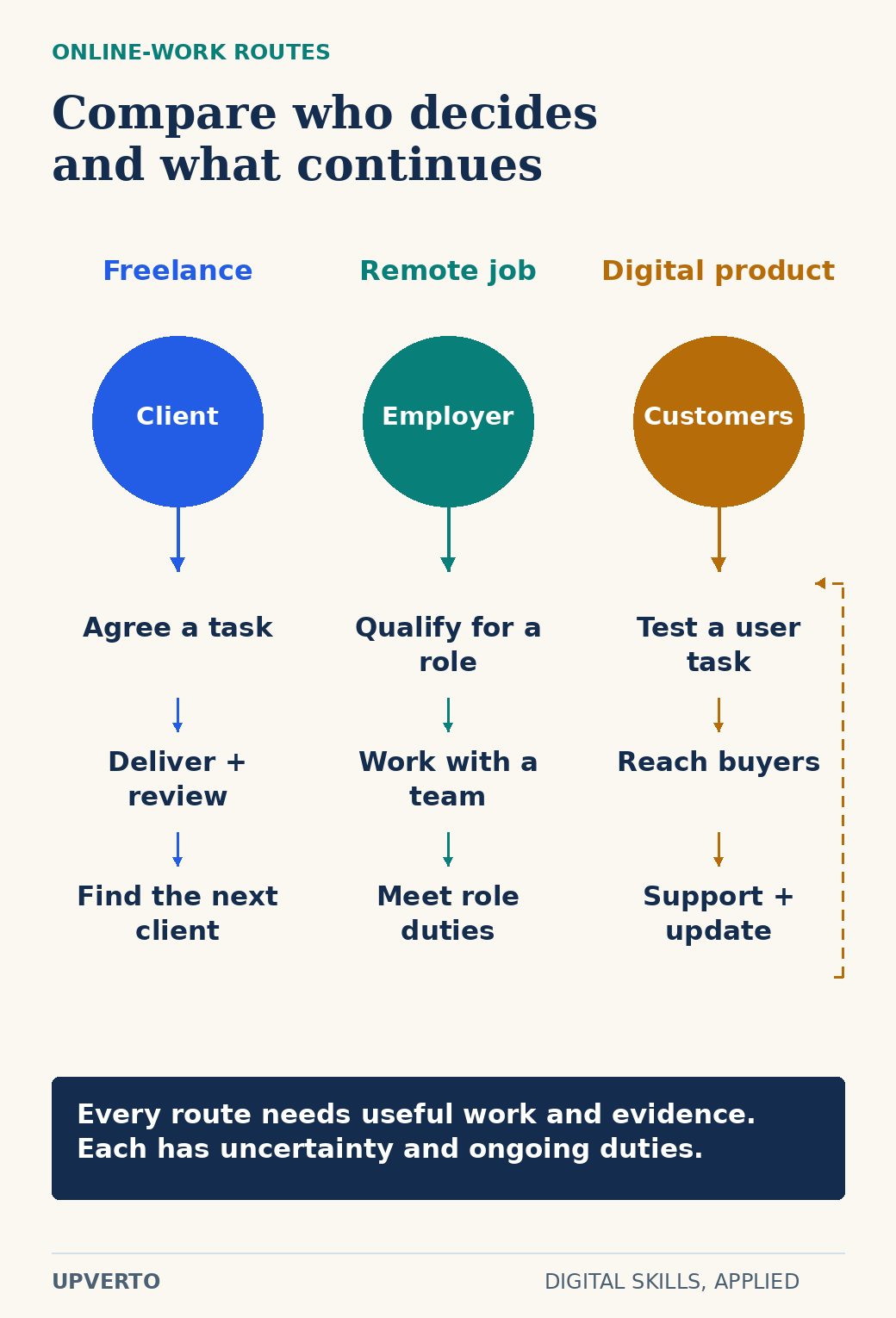
    Three relationship paths connect a freelance client, an employer and product customers to the continuing work each route requires, including a support-and-update return loop for products.
    Compare the operating responsibilities of three routes — Choose a route with its ongoing responsibilities in view, not just its initial entry point. Use the enlarged view, then swipe or use arrow keys to inspect details. View full-size infographic.
    Read the text version: Compare the operating responsibilities of three routes

    Freelance services: a client evaluates the specific task; agree, deliver, review and find further clients. Remote employment: qualify for a role, coordinate with a team and meet its duties. Digital products: test a user task, reach buyers, support users and update the product. Each route requires useful work and evidence and involves uncertainty.

    DecisionFreelance serviceRemote jobDigital product
    What someone evaluatesYour fit for a specific client problemYour fit for a role and teamWhether the product solves their task
    Useful preparationA bounded offer and relevant sampleRole-aligned evidence and applicationA tested sample and clear instructions
    Ongoing workFinding clients, delivery and administrationRole duties, coordination and developmentDistribution, support and updates
    Questions to resolveScope, access, payment and revisionsEligibility, expectations and working arrangementsAudience, rights, delivery and maintenance

    Start with your constraints rather than a slogan

    List the time you can reliably offer, equipment you can use, work you can already demonstrate and responsibilities you can take on. Distinguish a preference from a constraint. “I would like flexible hours” is a preference; “I can only be available after a fixed shift” may exclude particular roles or client schedules.

    Write down your financial boundary before buying tools or training. The SBA’s startup-cost guidance distinguishes one-time and recurring expenses; the distinction is useful even for a small experiment. For your own plan, include required software, connectivity, equipment access and any delivery costs, then verify current prices. The guide on the cost to start digital services can help you make that budget explicit.

    Do not assume a product route avoids customer contact. Support questions and updates may arrive after the sale. Do not assume freelancing means complete schedule control; client availability and deadlines still matter. Do not assume employment removes uncertainty; you still need to qualify for an actual role and understand its terms.

    Worked example: one skill, three possible routes

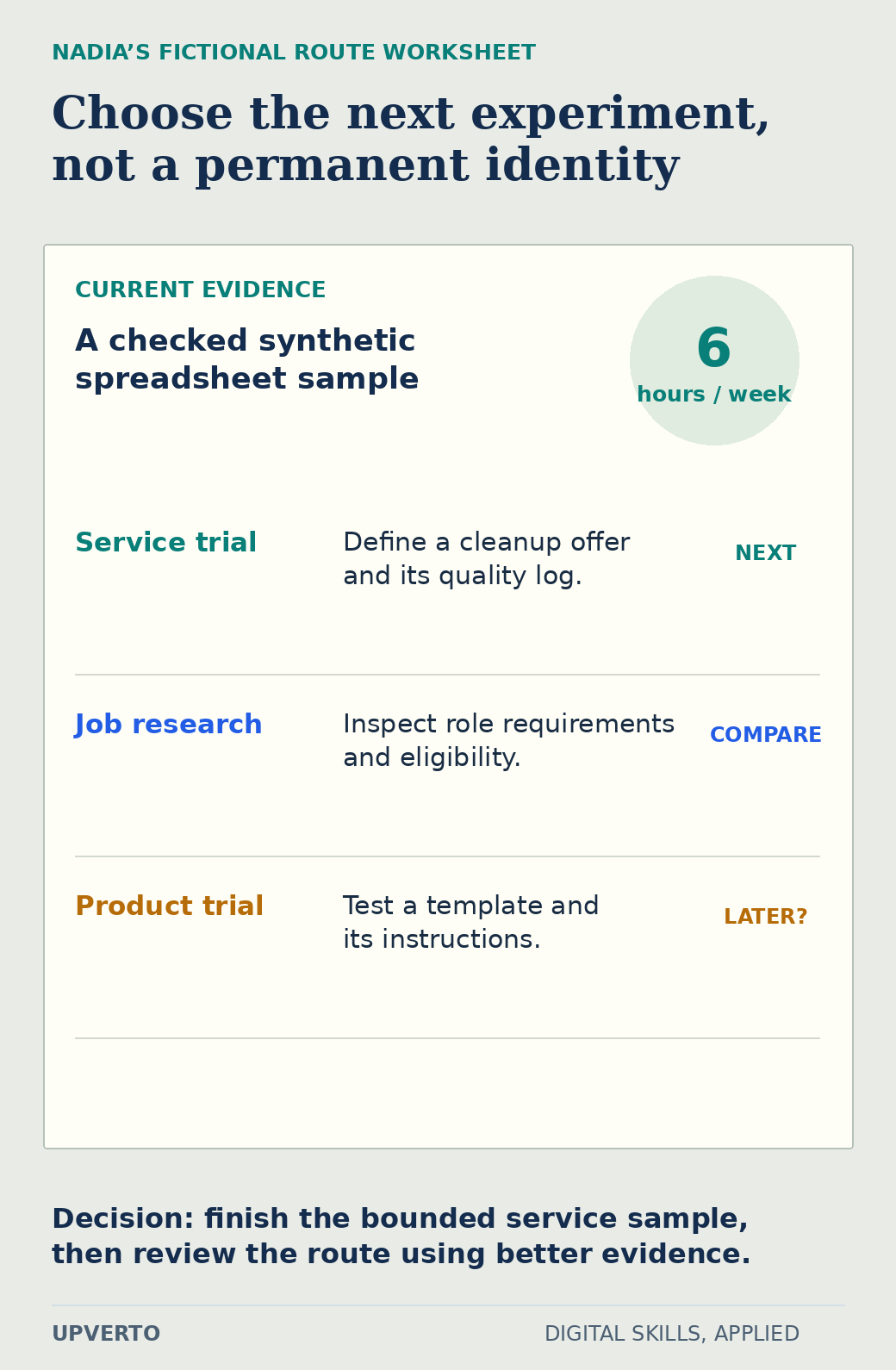
    Nadia is fictional. She can prepare a clear spreadsheet from a small synthetic dataset and has a documented sample. She has six predictable hours a week for further practice. She is comparing three experiments, not deciding how much she will earn.

    Her freelance experiment is to write a narrow offer for cleaning an agreed spreadsheet and delivering a quality log. Before approaching anyone, she needs to define the data limits and show a repeatable check. Her employment experiment is to examine relevant junior operations postings and record their actual responsibilities, eligibility and evidence requirements.

    Her product experiment is to build a simple inventory template with fictional data and ask an appropriate reviewer to follow its instructions. She needs to discover whether the template supports a real task and what maintenance or support it creates. Producing a file is only the first part of that experiment.

    Nadia’s fictional worksheet records a checked spreadsheet sample and six weekly hours, then compares a service trial, job research and a product trial, choosing the bounded service sample next.
    Use a route worksheet to select one experiment — The decision is conditional on Nadia’s current evidence and capacity; it does not establish demand or earnings. Use the enlarged view, then swipe or use arrow keys to inspect details. View full-size infographic.
    Read the text version: Use a route worksheet to select one experiment

    Nadia has a checked synthetic spreadsheet sample and six hours a week for further practice. Her service experiment is to define a cleanup offer and quality log. Her employment experiment is to inspect relevant role requirements and eligibility. Her product experiment is to test a template and instructions. She chooses the bounded service sample next, then reviews the route. This is a fictional learning decision, not proof of demand.

    Nadia chooses the spreadsheet-service sample as her next learning exercise because it is small enough to finish and inspect with her present resources. That choice does not prove there is a buyer or rule out employment later. She sets a review point after completing the sample and collecting more evidence about the routes she can access.

    Gather different evidence for different questions

    For freelancing, look for specific buyer problems and the inputs and outputs involved. For employment, read actual role requirements and distinguish essential criteria from preferences. For a product, investigate the user’s task, competing alternatives, distribution and support needs. The SBA’s market-research guidance provides a useful starting point for researching customers and alternatives.

    A public job advertisement shows that an organisation advertised a need; it does not show that you can obtain that role. A product listing shows an offer; it does not reveal its profit. A freelancer profile shows how someone presents services; it does not prove that every beginner can reproduce their results. Keep the evidence type beside your notes.

    Be alert to offers requiring payment to obtain a supposed job or to release wages. The FTC’s job-scam guidance explains common warning signs, including fake-check arrangements. Verify an opportunity independently before sharing sensitive information or moving money. Learning costs and an employer demanding a payment are different situations.

    Use the route-comparison worksheet

    Make one row per route and answer the following questions in plain language. Use “unknown” when evidence is missing rather than assigning an optimistic score.

    • What exact work or product would I offer, apply for or test?
    • Who evaluates it, and how would I reach that person or audience?
    • What sample, qualification or experience is actually required?
    • Which responsibilities remain after the initial delivery or application?
    • What time, equipment, costs or eligibility constraints apply?
    • What can I test this week without committing money I cannot afford?
    • What result would make me continue, adjust or pause this route?

    Compare the answers, not an invented numerical ranking. A route with attractive potential can still be unsuitable if a required condition is unavailable. A modest experiment can be useful if it gives you reliable information about the work you enjoy and the skill gap you need to close.

    Choose a reversible next step

    Write a one-sentence decision: “For the next practice period, I will test this route by producing this output, using these resources, then review these questions.” Keep the time boundary realistic and the output inspectable. Avoid switching routes every time you see a new success story.

    If you cannot yet name the work, use which digital skill should I learn to choose a small skill trial. A route becomes meaningful when connected to a task you can learn and check. You do not need to commit permanently; you need enough focused practice and honest evidence to make the next decision better informed.

    Frequently asked questions

    Which route is best for a complete beginner?

    There is no universal answer. Start with a useful task and compare your available time, equipment, eligibility and willingness to handle each route’s responsibilities. A small practice experiment can reveal more than an abstract ranking.

    Does remote employment mean I can work from any country?

    Not necessarily. A posting can restrict location, hours, work authorisation or other conditions. Read the actual requirements and clarify uncertainties before investing heavily in an application.

    Are digital products passive income?

    They can be reused, but creating, reaching buyers, supporting users and updating the product still require work. Do not assume that uploading a file creates demand or that a product will remain accurate indefinitely.

    Can I combine freelancing with a job?

    Possibly, depending on time, the employment terms, conflicts of interest and applicable rules. Check those conditions and your capacity. Avoid accepting work that you cannot deliver reliably alongside existing responsibilities.

    How can I compare routes without estimating earnings?

    Compare the work, responsibilities, required evidence, access to buyers or employers, costs and constraints. Choose a reversible test. You can improve the decision without inventing an income projection.

    When should I change my initial route choice?

    Review it after completing a defined experiment or discovering a material constraint. Use the completed work and evidence to explain the change. A difficult first session alone may indicate a learning gap rather than the wrong route.

  • How to Start Learning for Online Work When You Have No Experience

    How to Start Learning for Online Work When You Have No Experience

    If you have no experience, your first job is to create a small piece of work you can understand and check. You do not need to choose every future tool, build a public brand or offer a service immediately. Start with your current equipment, a manageable task and a place to keep the evidence of what you tried.

    In this guide

    The broader guide to make money online with digital skills explains how learning connects to a service or job. This page focuses on the first practical steps. A completed first-week exercise is a starting point for learning, not proof that you are ready to take a client’s project.

    Write down your actual starting point

    List the device you can reliably use, available internet access, software you already have and the time you can protect. Be specific: “three evening sessions of thirty minutes” is more useful than “I will study whenever possible.” Add any practical constraint, such as sharing a computer or using a small screen.

    Choose a task that fits those conditions. A phone can support reading, note-taking and some creation, but a particular project may require a desktop application, keyboard or larger display. Check the requirements for the task rather than assuming every digital skill is equally practical on every device. The guide on learn digital skills phone or computer develops that decision.

    Do not buy a large tool collection before testing the work. Identify the one capability needed for the first exercise. Use official documentation or a suitable free resource where it answers the immediate question. Keep a list of possible purchases for later review instead of treating them as prerequisites for beginning.

    Create a simple practice workspace

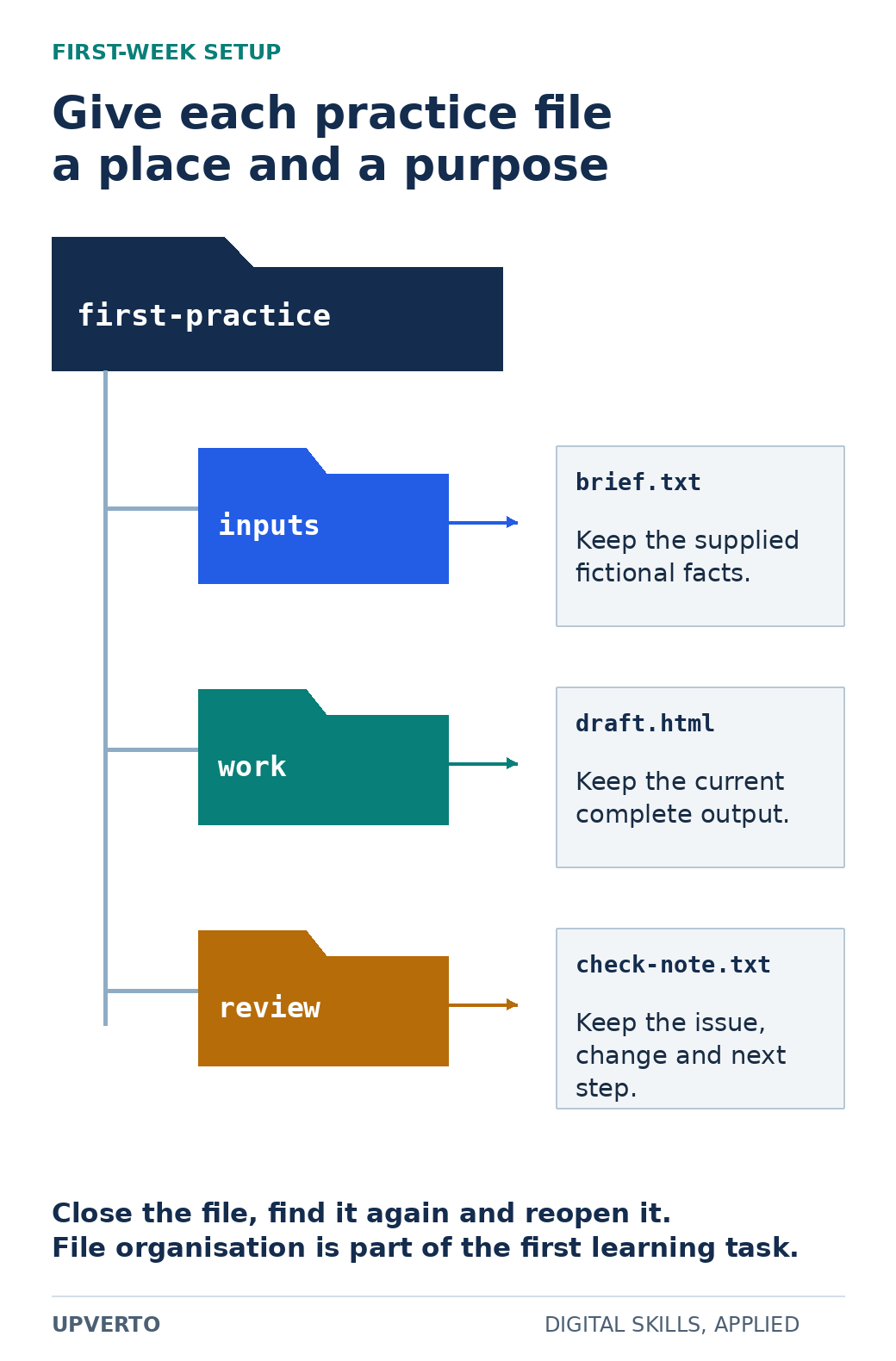
    Make a folder called first-practice. Inside it, keep an inputs folder, a work folder and a review folder. Save the brief as a plain text document. The names are a suggested organisation, not a required software system. The purpose is to know which file is the original input and which is your current work.

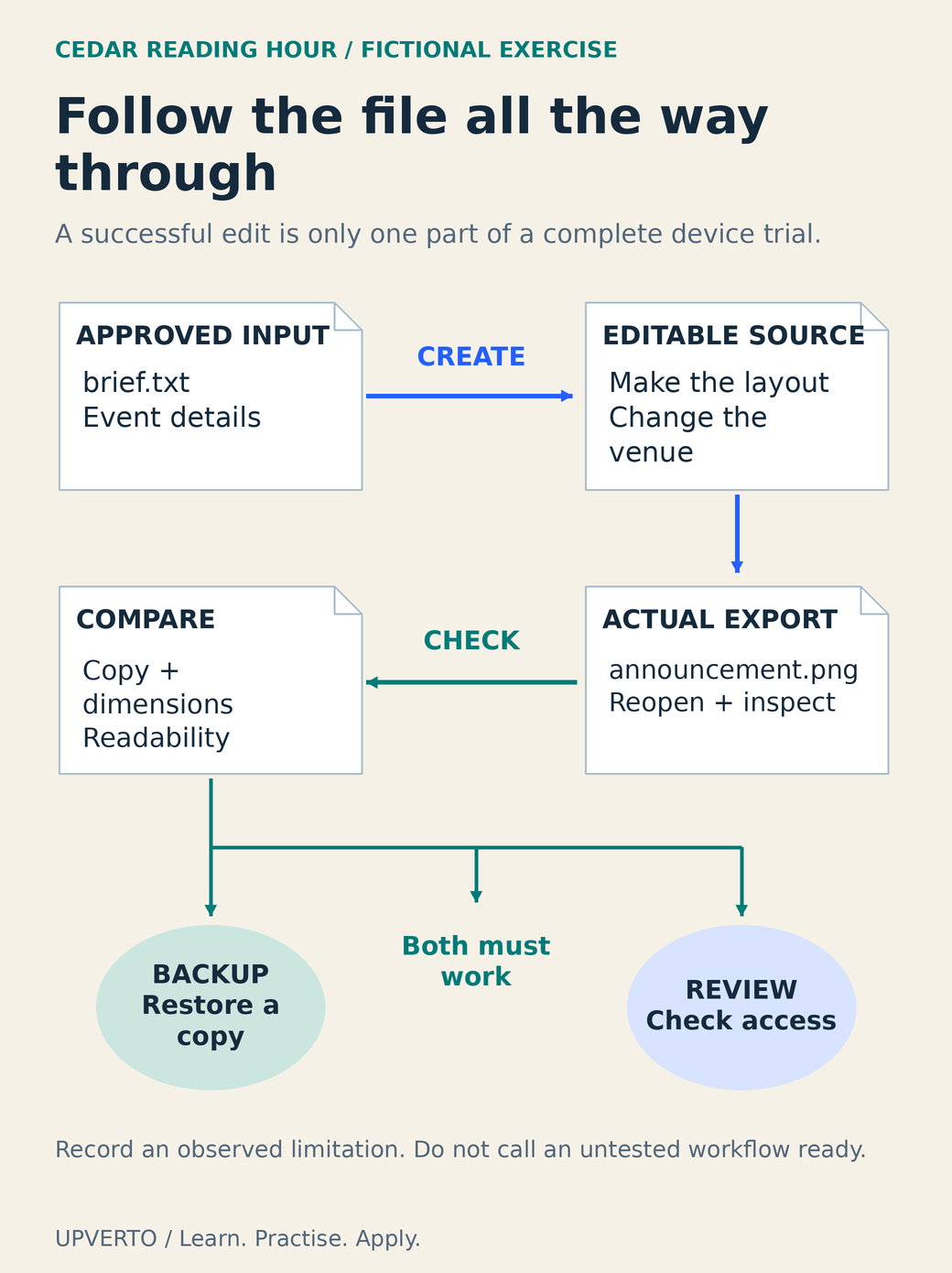
    Practise opening, renaming and saving a sample file, then find it again after closing the application. Understand where downloads go and how file extensions identify formats. Keep a backup appropriate to your device. If these tasks are unfamiliar, spend your first session on them rather than adding more tools.

    Ubuntu’s terminal tutorial illustrates the importance of knowing the current folder and reading file information for Linux learners. Other operating systems have their own official help. You do not need terminal commands for every beginner task; you do need to understand where your work is stored and how to recover it.

    Choose one small task with a visible finish

    A suitable first trial could be arranging a fictional event announcement, editing a short recording you own, organising invented meeting requests or making a simple information page. Choose one. Define the input and what a finished output should allow someone to understand or do.

    For a writing or layout trial, provide a fictional event title, date, location and request instruction. For a spreadsheet trial, use a few invented records. Avoid real client data, private messages or copied portfolio work. Synthetic inputs make it easier to practise freely and label the result honestly.

    A folder tree places a fictional brief in inputs, the current HTML draft in work and a check note in review, with an explanation beside each file.
    Organise a first practice folder — The folder names are suggestions; the learning goal is to recognise the original input, current output and review evidence. Use the enlarged view, then swipe or use arrow keys to inspect details. View full-size infographic.
    Read the text version: Organise a first practice folder
    • first-practice/inputs/brief.txt: supplied fictional facts.
    • first-practice/work/draft.html: current complete output.
    • first-practice/review/check-note.txt: issue, change and next step.

    Practise closing, locating and reopening the files. Use a backup appropriate to the device.

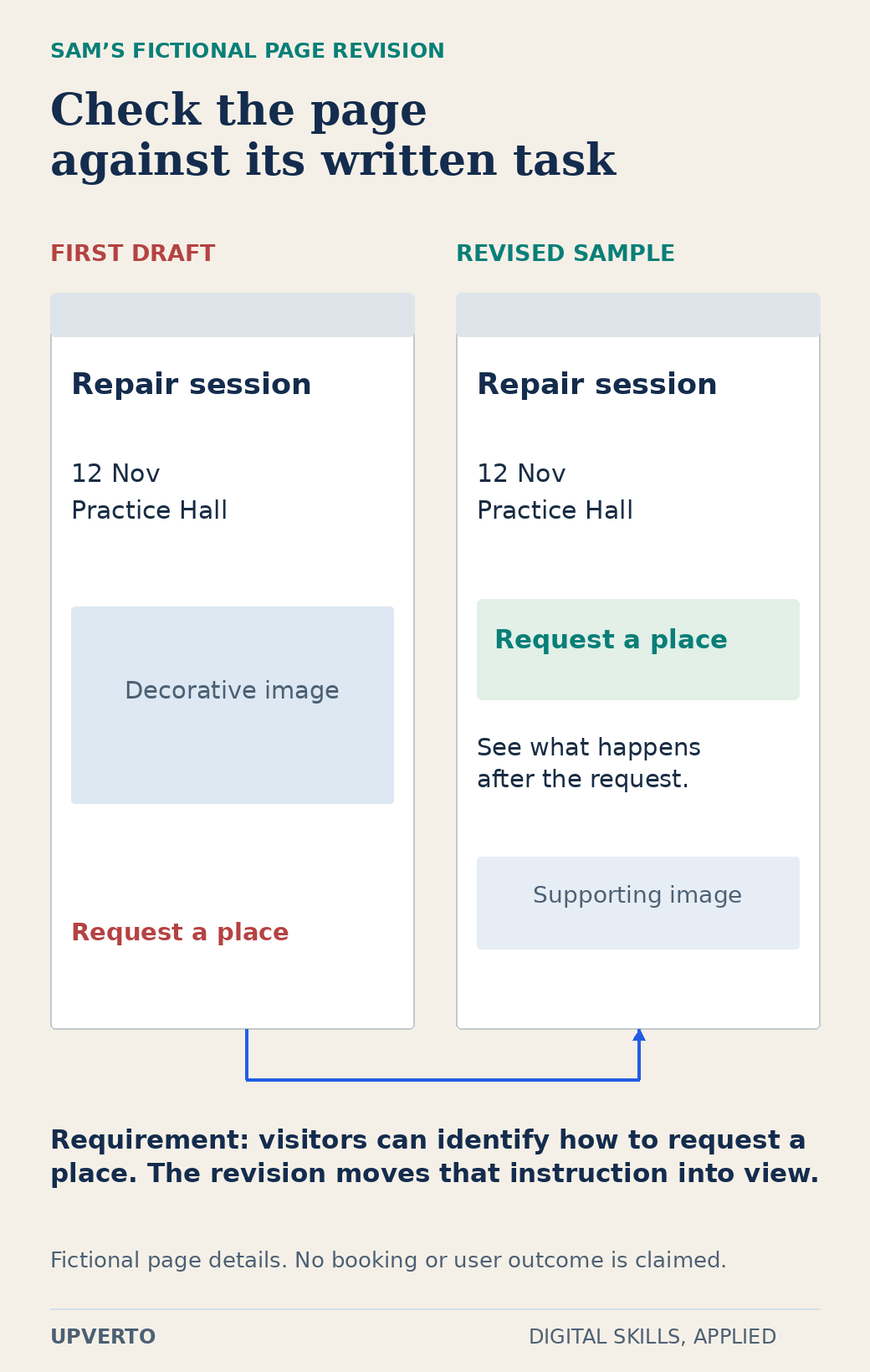
    The fictional learner Sam chooses an event information page. The task is to make the title, date, location and request instruction easy to find. Sam will save one HTML file and a review note. There is no booking form, payment system or public launch. The narrow finish helps Sam recognise when the exercise is complete.

    Use a first-week sequence with room to adjust

    SessionActionEvidence to keep
    1. Set upCreate the folders and save the fictional briefA file you can close, locate and reopen
    2. Learn one conceptRead a short lesson on headings and paragraphsA note explaining the concept in your own words
    3. Make the outputArrange the supplied event informationA first complete draft
    4. Check and repairCompare the draft with the brief on the available screenOne identified issue and a revised version
    5. ReviewExplain what worked, what remains difficult and what comes nextA short learning log and next task

    These are sessions, not a compulsory daily schedule. Spread them over the time you actually have. If setup takes longer, that is useful information about the prerequisite you need. Do not hide the difficulty by declaring a finished skill after watching a lesson.

    Worked example: check Sam’s page

    Sam’s first draft has the event title and a decorative image, but the request instruction is buried at the bottom. The fictional brief says that a visitor should be able to identify how to request a place. Sam moves that instruction beside the date and checks that the wording explains what will happen next.

    For the HTML exercise, MDN’s guidance on semantic HTML is a primary source for using meaningful headings, labels and links. Sam uses a heading for the event title and a real link for a destination, rather than styling ordinary text to look interactive. If there is no real destination, the sample labels the request instruction as a prototype instead of pretending the link works.

    Two fictional event-page specimens show a request instruction buried below a decorative image in the first draft and moved near the key details in the revision.
    Compare an initial page with a task-led revision — The observed evidence is the changed sample and its relation to the brief, not an increase in bookings. Use the enlarged view, then swipe or use arrow keys to inspect details. View full-size infographic.
    Read the text version: Compare an initial page with a task-led revision

    The fictional requirement is that a visitor can identify how to request a place. In the first draft, the request instruction appears below a large decorative image. In the revised sample it sits near the date and location, with an explanation of what happens next. The event and details are invented. No real booking, user research or commercial outcome is claimed.

    The review note records the supplied requirement, the observed issue and the change. It does not say that the revision increased bookings or that real users preferred it. The actual evidence is a revised sample and the reasoning behind it. That is enough for the first learning exercise.

    Use the first-week setup and exploration checklist

    • I can name the task and identify its required input.
    • I can locate and reopen the files I create.
    • I know which information is fictional and which source explains the technique.
    • I have made one complete output, even if it is basic.
    • I have compared that output with a written requirement.
    • I have recorded a specific difficulty rather than calling the whole subject impossible.
    • I have chosen one next exercise that addresses that difficulty.

    Keep the checklist beside your work, not as a certificate. If an item is unfinished, use it to choose the next session. A folder with a brief, draft, revision and review note is more informative than a list of videos you watched without applying them.

    Avoid commitments that do not help the first task

    Be cautious of supposed jobs that demand payment before you can work or release your earnings. The FTC’s job-scam guidance describes these and other warning signs. Verify the organisation independently and do not send sensitive documents simply because an unsolicited message promises easy online work.

    Keep the learning goal separate from an urgent income promise. A beginner exercise can show whether you enjoy a task and which prerequisite is missing; it cannot establish demand or replace a reliable financial plan. If you need immediate employment, evaluate actual opportunities and requirements alongside your longer learning path.

    Your next step is the guide to computer basics for digital skills if files, browsers or basic software still cause friction. Otherwise, repeat the same type of task with slightly different inputs. The second attempt reveals whether you understood the method or depended on copying the first example.

    Frequently asked questions

    What should I learn first if I have no computer experience?

    Begin with creating, saving, locating and reopening files, using the browser and understanding the software needed for one small exercise. These skills make later practice less frustrating. You do not need to install every possible tool.

    Can I start with only a phone?

    You can begin some research, note-taking and creation tasks, but the practical limits depend on the project and application. Check the actual requirements and choose a suitable first trial. Do not assume a phone replaces every desktop workflow.

    Should I create a freelance profile during the first week?

    It is usually more useful to produce and check a small sample first. A profile needs an honest description of what you can deliver. The first-week exercise does not establish readiness to promise a client outcome.

    What if I cannot finish the five sessions in one week?

    Treat them as a sequence and adapt it to your available time. Record the blocker and choose a smaller next step. The schedule is a planning example, not a deadline for becoming competent.

    May I copy a tutorial project for my first attempt?

    Following an exercise can help you learn, but acknowledge the source and then try a variation you can explain. Do not present copied work as original client experience. Keep your own inputs and decisions visible.

    How do I know whether to continue with the skill?

    Review the completed task, what you enjoyed, which difficulty was a missing prerequisite and what another attempt would teach you. A fair second trial can give better evidence than either instant enthusiasm or one frustrating session.

  • Can You Learn and Work Online with a Phone, or Do You Need a Computer?

    Can You Learn and Work Online with a Phone, or Do You Need a Computer?

    You can begin learning many digital skills with a phone. Whether you can complete a particular paid task on that phone is a separate question. The answer depends on the required application, the source material, the output, your access needs and the way you must check and hand over the work.

    A phone that plays a lesson clearly might still be awkward for inspecting a dense spreadsheet. A computer that opens an editor might struggle with the actual footage. Start with a task you can describe, then test the complete workflow. The broader guide to make money online with digital skills explains how the work connects to a service; this guide helps you check the equipment behind it.

    In this guide
    A six-row matrix lists the phone and computer checks needed for learning, documents, graphics, video, data and technical work.
    Match the task to the device trial — A six-row matrix lists the phone and computer checks needed for learning, documents, graphics, video, data and technical work. Use the enlarged view, then swipe or use arrow keys to inspect details. View full-size infographic.
    Read the text version: Match the task to the device trial

    This is a task-by-device trial matrix, not a benchmark or rating. For learning, inspect text, captions and notes on a phone and lesson/practice windows on a computer. For documents, test selection, comments, export, styles and the recipient format. For graphics, inspect alignment, dimensions, source files and assets. For video, test import, captions, playback, actual media and storage. For data, inspect columns, accidental edits, formulas and exceptions. For technical work, establish whether the required tools, debugging and checks are available. Use the actual application and version, source material and final format.

    Separate watching, practising and delivering

    Watching teaches vocabulary and shows a process. Practice requires you to control the tool, save your own work, make a change and recover from a mistake. Delivery adds the recipient’s requirements: file type, dimensions, accuracy, permissions, review and reliable transfer. Treat these as three different tests rather than one statement that a skill “works on mobile.”

    For example, you can read an HTML lesson on a phone. That does not establish that you can comfortably inspect a multi-file website, test its keyboard navigation and package it for another developer. Conversely, a short piece of approved copy may be drafted and revised effectively on a phone if the document tools and review process meet the actual brief.

    If files, accounts or basic work habits are still unfamiliar, use start online work with no experience to define a manageable first task. Equipment decisions become clearer once you know the output you are trying to create.

    Compare tasks rather than entire professions

    TaskPhone trialComputer trial
    Read a lesson and explain a conceptCheck text size, captions, navigation and note-taking.Check whether multiple windows help connect the lesson and practice.
    Edit a short documentTest selection, comments, export and file naming.Test styles, longer review and the recipient’s format.
    Create an event graphicInspect precise alignment, text wrapping and exported dimensions.Inspect editable files, asset dependencies and output settings.
    Edit supplied videoTest import, full playback, caption corrections, sound and export.Test the actual codec, timeline, storage and required handover.
    Clean a spreadsheetCheck visible columns, formulas, validation and accidental edits.Check full data structure, calculations and repeatable operations.
    Develop a website or complex 3D sceneCheck whether the required tools and debugging controls exist.Verify software requirements and run a representative project.

    This matrix lists observations to make, not measured performance ratings. It does not claim that every phone, computer or mobile application has the same capabilities. Accessibility features, external input devices and your own comfortable working method can change which setup is practical.

    Check the exact application and version

    Read the provider’s requirements before installing or purchasing. For desktop editing, Adobe separates minimum and recommended Premiere specifications and lists operating system, processor, memory, graphics, storage and display conditions. Meeting the minimum is not a promise that your particular project will be pleasant to edit. Keep the application version and the page’s date in your notes.

    Likewise, consult Blender’s current requirements when planning a 3D workflow. A browser viewer, a mobile companion and a desktop production application can have different functions. Avoid assuming that an application with a similar name opens every file or preserves every feature.

    Also check export restrictions, offline access, project-file compatibility, font availability, watermark rules and asset permissions. These can block delivery even when editing itself feels smooth. Cloud processing may reduce local demands for some tasks, but it introduces account, connection, upload and confidentiality considerations.

    Run a small end-to-end device trial

    Fictional trial brief: make a square announcement for the imaginary Cedar Reading Hour. Use the supplied event name, Saturday 11:00, Cedar Community Room and [email protected]. Produce one PNG and keep the editable source. The square format is an exercise constraint, not a platform specification.

    1. Save the approved wording and one self-created simple illustration in a named project folder.
    2. Create the graphic in the application available on your device. Change the venue to a deliberately longer name and see whether you can fix the wrapping.
    3. Export the file, leave the editor and reopen the actual PNG. Check all wording, alignment, dimensions and legibility.
    4. Copy the project and export to your chosen backup location. Confirm which files are local and which require a connection.
    5. Share a view-only copy with an intended reviewer, check the permission and ask the reviewer to identify the date and booking instruction.
    6. Reopen the editable file and make one approved correction. Verify that the corrected export has an unambiguous new version name.

    Record what you actually observed. “Exported PNG opens; editable source depends on an account I cannot share” is useful evidence. “Phone is good for design” is too broad. This guide does not report a cross-device benchmark; the trial is for your own equipment and required output.

    Folded document icons trace approved text into an editable layout and actual PNG, then branch to backup recovery and recipient-access checks.
    Trace a complete device trial — Folded document icons trace approved text into an editable layout and actual PNG, then branch to backup recovery and recipient-access checks. Use the enlarged view, then swipe or use arrow keys to inspect details. View full-size infographic.
    Read the text version: Trace a complete device trial

    The fictional Cedar Reading Hour trial starts with approved event details in brief.txt. Create an editable source and test a venue-name change. Export announcement.png and reopen the actual file. Compare its copy, dimensions and readability with the approved brief. Then check both branches: restore a backup copy, and confirm the intended reviewer can access the shared result. A successful editing operation alone does not establish the full workflow. Record actual limitations rather than calling an untested route ready.

    Use the result to decide what to change

    CheckObserved resultDecision
    Source and export reopenRecord filenames, application and format.Keep, change format or test another tool.
    Required correction is possibleDescribe the difficult operation.Practise it or identify a real tool limit.
    Files are recoverableRecord the backup and a successful restore.Fix recovery before accepting delivery responsibility.
    Review and handover workRecord recipient access and missing dependencies.Adjust permissions or agree a supported handover.
    Work is sustainableNote discomfort, repeated errors or connection barriers.Change setup, task scope or equipment.

    Try inexpensive changes that address a demonstrated problem: a supported keyboard, clearer folder structure, a smaller practice file or access to an existing computer. Borrowed, school or shared devices need permission, suitable software and a way to protect accounts and client material. Signing out does not necessarily remove downloaded copies.

    Buy equipment when a real limitation justifies it and the full cost is manageable. The guide to cost to start digital services separates access costs from optional upgrades. Use the trial result when deciding which digital skill should I learn, and choose a first project your available setup can complete and check.

    Frequently asked questions

    Can I learn video editing entirely on a phone?

    You can learn many editing concepts and practise supported mobile workflows. Test your actual source files, caption correction, audio checks, export and handover. A client who needs a particular desktop project file or a more complex workflow may require equipment and software beyond your current setup.

    Does meeting minimum software requirements mean my computer is ready?

    It means the provider lists that configuration as a minimum for the specified version and conditions. It does not measure your project. Try representative media or data, inspect the result and leave room for the files and dependencies your task needs.

    Should I buy a laptop before choosing a skill?

    First identify the work and test what you already have access to. Buying before defining the task can leave you with equipment that is expensive or unsuitable. Use a current requirements page and a small complete project to guide the decision.

    Can I use a school or library computer for freelance work?

    Only if its rules and your permission allow it. Check installation rights, session limits, file deletion, confidentiality and account security. Do not assume a shared machine is appropriate for private client data or that it will remain available near a deadline.

    What if my internet connection is unreliable?

    Check which tasks and files remain available offline, and test reconnecting and transferring the finished output. Plan around the real transfer conditions. A cloud-only source or unsynchronised file can be unavailable even when its name appears in a folder.

    Is a larger screen always better for accessibility?

    No single setup suits everyone. Text resizing, keyboard navigation, screen readers, captions, input devices and application support all matter. Test the work using the tools you rely on and avoid treating a particular device category as a guarantee of accessibility.

    Sources and review notes

    Primary sources checked on 27 October 2026 (UTC). Check the current provider pages before relying on a changing feature, policy or price. Worked examples and worksheets are original teaching material; fictional examples are not evidence of client results.